

You get a Unique Entity ID (UEI) free of charge by signing in to SAM.gov, choosing “Get Started” in Entity Management, entering your legal business name and physical address, and requesting the ID. Validation is automatic when your details match. A UEI alone does not let you bid as a prime contractor, which requires a full SAM.gov registration.
TL;DR
- A UEI is a 12-character ID that SAM.gov issues to identify your business in federal systems. It replaced the DUNS number on April 4, 2022.
- You request it at SAM.gov. You do not need to pay a third party.
- To bid as a prime contractor, including for a GSA Schedule, you need an active full SAM.gov registration, not only a UEI.
- Mismatched names and addresses are the most common cause of delays. Match your IRS records exactly.
- Once your registration is active, you can move on to the GSA Schedule application itself.
Table of Contents
- What is a UEI and is it the same as an EIN?
- Do you need only a UEI, or a full SAM.gov registration?
- How do you get a UEI step by step?
- What information do you need before you start?
- How long does the UEI process take?
- What if SAM.gov cannot validate your business?
- Does the UEI cost anything, and should you pay someone to get it?
- What comes after your UEI?
- Our view: the UEI is the doorway, not the destination
- How can we help you move from UEI to a GSA Schedule?
- FAQ
- Sources
What is a UEI and is it the same as an EIN?
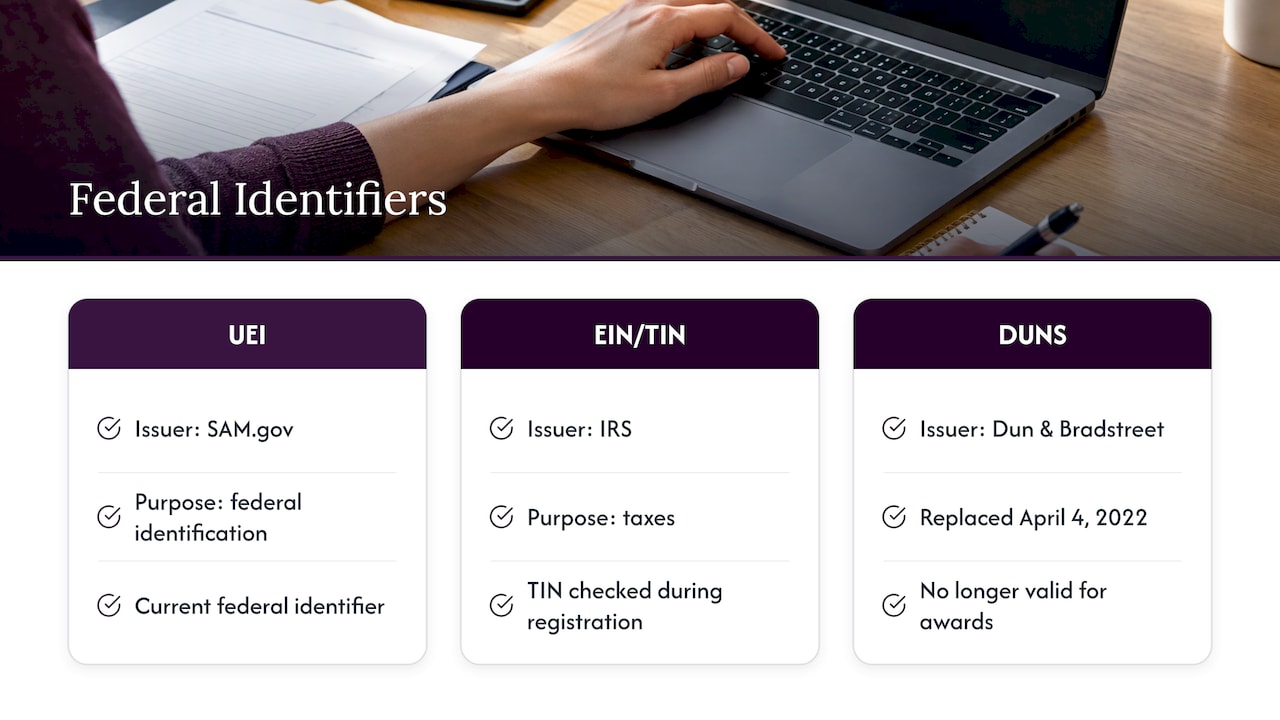
A UEI is a 12-character alphanumeric identifier created by SAM.gov to identify a unique entity in federal systems. The Small Business Administration (SBA) states that businesses dealing with the federal government must use this system-generated identifier, and that they no longer need a third-party website to get one.
It is not the same as an EIN or tax ID. Your EIN is issued by the IRS and used for taxes. Your UEI identifies your organization to federal buyers, grant offices and payment systems. The two meet during full registration, when SAM.gov asks for your taxpayer identification number (TIN) and checks it with the IRS.
The UEI also replaced the Dun & Bradstreet DUNS number. Per FEMA, the switch took effect April 4, 2022. Businesses already registered at that point were assigned a UEI automatically, and every new SAM.gov registration gets one as part of the process. If you still hold an old DUNS number, it no longer works for federal awards. For the full history, see our UEI vs. DUNS breakdown.
Do you need only a UEI, or a full SAM.gov registration?
This is the decision that matters most, and it depends on what you want to do.
GSA’s guidance separates the two. Getting a UEI validates your entity as a unique organization with its own physical address. Full registration adds your representations and certifications, tax information, and assertions such as business size and NAICS codes. GSA says entities participating as primary contractors or awardees should register, while subcontractors and sub-awardees may choose “Get a UEI” only.
GSA’s Register Your Business page is blunt on the point: a UEI alone does not let an entity bid as a prime contractor or seek federal assistance as a prime awardee. In most cases you need an active SAM registration when you submit an offer, at the time of award, and throughout the life of the contract.
| Your goal | What you need |
|---|---|
| Work only as a subcontractor | A UEI may be enough |
| Report as a sub-awardee on a grant | A UEI may be enough |
| Bid as a prime on federal contracts | Full, active SAM.gov registration |
| Hold a GSA Schedule | Full, active SAM.gov registration |
The federal acquisition rules back this up. FAR 4.1102 requires offerors to be registered in SAM when submitting an offer or quotation, with narrow exceptions such as classified contracts, certain emergency operations and some micro-purchases made with a government purchase card.
If your plan is to sell to federal agencies directly, treat the UEI as step one of a longer registration. Our guide to registering for government contracts shows how the pieces fit together.
How do you get a UEI step by step?
The process is the same whether you want the UEI alone or plan to register fully afterward.
- Create a SAM.gov account. You need a login before you can touch Entity Management. Use an email address you will check regularly, because validation messages arrive there.
- Start the request. Sign in, then select “Get Started” on the Entity Management widget. A quick start guide published by a federal agency walks through the same screens.
- Enter your entity information. SAM.gov’s checklist asks for the legal business name, physical address, date of incorporation and state of incorporation. The address cannot be a P.O. box.
- Certify your authority. You confirm that you are authorized to act for the entity.
- Select “Request Unique Entity ID.” If the details validate, the UEI is displayed.
If your business already had an active or inactive SAM.gov registration, you already have a UEI. It is visible on your entity registration record. The SBA notes that registered entities can view their UEI within SAM rather than requesting a new one.
A UEI does not expire. GSA’s bulletin explains that if you later register your entity, you keep the same UEI. Never request a second UEI for the same business, because duplicates cause validation problems later.
What information do you need before you start?
For the UEI alone, the four items above are enough. For the full registration that a GSA Schedule requires, gather more before you begin. SAM.gov’s All Awards checklist lists core data including:
- Organization start date and your MPIN
- Physical and mailing addresses
- TIN and IRS consent form for U.S. entities
- A CAGE code, or you select “No” and one is assigned
- Ownership details
- NAICS codes, points of contact, and representations and certifications
GSA adds practical advice. Prepare a Tax ID or EIN, banking information and corporate documents. Keep your registration, UEI and CAGE code active through final payment. Above all, match your business name, address and ownership details exactly across your IRS, SAM.gov and SBA records.
FAR 52.204-7 also requires you to provide your TIN with consent for validation, and to list CAGE codes for your immediate owner, highest-level owner and any predecessor that held a federal contract or grant in the last three years. U.S. entities without a CAGE code have one assigned by the DLA CAGE Branch during registration. If you want to understand how the two identifiers differ, read CAGE code vs. UEI.
A practical example: a two-person consulting firm operates as “Harbor Analytics, LLC” with the IRS, but its website and bank account say “Harbor Analytics.” Enter the exact IRS name in SAM.gov. Small differences in punctuation, suffixes or abbreviations are a classic reason for a validation hold.
How long does the UEI process take?
There are two clocks, and they are easy to confuse.
The UEI request. When your details match, the UEI appears at the end of the request. When they do not, SAM.gov routes you to a validation ticket. GSA’s entity validation FAQ puts the typical time for resolving a new validation incident, with correct documentation, at 14 business days.
The full registration. External checks with the IRS (TIN) and DLA (CAGE) can take 10 to 15 business days after submission, longer if flagged for manual review. It can take another 24 to 48 hours after activation for your information to appear in other government systems. GSA’s own advice is to start early because registration can take up to several days to complete and validate, and real-world timelines vary with how clean your records are.
SAM.gov shows where you stand through entity statuses:
| Status | What it means |
|---|---|
| Pending ID Assignment | Your entity is being validated to receive a UEI |
| ID Assigned | Validated; you have a UEI only, with no registration |
| Work in Progress | Your registration is started but not submitted |
| Submitted | Pending TIN and CAGE validation |
| Active | Registration complete and usable |
| Inactive | Registration has lapsed; the UEI stays attached |
Those statuses come from GSA’s validation FAQ. To read your own status and confirm what agencies will see, follow our guide to verifying your SAM.gov registration.
What if SAM.gov cannot validate your business?
If the system cannot confirm your entity, SAM.gov tells you to create a help ticket with the Federal Service Desk from the page itself. You then go through an Entity Validation Service (EVS) documentation review.
Per GSA’s FAQ, you submit documents proving your legal name, address and existence. An agent reviews them, and after acceptance you re-enter SAM.gov to complete validation. Emails come from fsdsupport@gsa.gov, and your incident is tracked at FSD.gov. Two rules save time:
- Answer within five business days. If you do not respond to a validation message in that window, the ticket closes and you start over.
- Watch your inbox and spam folder. SAM.gov is not directly involved in IRS or DLA manual reviews, so the Government Business point of contact should expect an email when a review finishes or when the registration is rejected for corrections.
Common documents include articles of incorporation or organization, a business license, or an IRS letter showing your legal name and address. Send documents whose names and addresses agree with each other and with what you typed into SAM.gov.
Consistent records matter well beyond SAM.gov. The same discipline of knowing exactly what your business holds, and where, underlies a good IT security audit, which many federal buyers care about as you move into contracting.
Does the UEI cost anything, and should you pay someone to get it?
No fee applies. GSA states that entities needing only a UEI can get one at SAM.gov with minimal information, without paying a third party to complete registration. Sites that charge for a UEI are charging for something the government gives away.
Where professional help earns its fee is further down the road. The UEI is the easy part. The harder work is the full registration, the GSA Schedule offer, pricing, and the negotiation that follows. Many small firms that start on their own spend months in back-and-forth with reviewers over documents and price lists.
What comes after your UEI?
Once your UEI is assigned, the sequence for a typical small business looks like this:
- Finish the full SAM.gov registration so it shows Active.
- Confirm your NAICS codes match what you actually sell.
- Decide which federal sales route fits: individual bids on SAM.gov or a GSA Schedule contract that agencies can buy from directly.
- Renew your registration every year. Letting it lapse blocks offers and payment. Our SAM registration renewal action plan covers the yearly routine.
FAEM notes that an applicant’s registration must stay active through the application, review, award and the full award management phase. Federal contract buyers apply the same logic. For ongoing upkeep, see maintaining SAM registration. If you want the broader view of why registration matters, read the role of SAM registration in federal contracting.
Our view: the UEI is the doorway, not the destination
Most owners who call us got their UEI in an afternoon and then stalled. The identifier proves your business exists. It does not prove you are ready to sell to an agency.
The real work starts when you ask what a government buyer needs to see: a registration that is active and consistent, NAICS codes that match your offering, a price list that stands up to review, and a narrative of past performance. That is where small businesses lose months, and where going alone often stretches past two years.
Our approach is built to take that load off you. Our clients typically spend about 3 hours of their own time, we aim for awards in roughly 90 days for many of them, and we work on a no award, no fee basis with a money-back guarantee. We claim a 98% first-application approval rate. We handle the paperwork, the compliance questions and the negotiation so you can keep running the business.
If your UEI is in hand and you are asking what is next, that is the right moment to talk to us.
Josh
How can we help you move from UEI to a GSA Schedule?
If your business already qualifies and you want a GSA Schedule rather than a pile of one-off bids, our full-service GSA Schedule options cover eligibility assessment, documentation, price list development, NAICS and SIN code mapping, and negotiation support. If you prefer to work through it yourself with structure, the GSA DIY Quick Start is available. Once you hold a contract, our maintenance plans start at $99 per month for one modification a year.
The simplest first step is a free eligibility check at gsascheduleservices.com. It tells you whether your business is ready for a GSA Schedule and what the path looks like.
FAQ
How do I get my UEI if I have never registered on SAM.gov?
Create a SAM.gov account, select “Get Started” under Entity Management, and enter your legal business name and physical address. Certify that you are authorized to act for the entity, then select “Request Unique Entity ID.” If SAM.gov validates your details, the UEI is displayed.
Are a UEI and a tax ID the same thing?
No. Your EIN or other tax ID comes from the IRS and is used for taxes. Your UEI comes from SAM.gov and identifies your entity in federal systems. Full SAM.gov registration asks for your TIN and validates it with the IRS, so the two must match your records.
Does a UEI expire?
No. A UEI does not expire, and it stays with an inactive registration. If you later register fully, you keep the same number. The registration itself must be renewed to stay active.
Can I bid on federal contracts with only a UEI?
No. A UEI alone does not let you bid as a prime contractor. Most offers require an active SAM.gov registration at submission, at award and throughout the contract. A UEI alone can suit subcontractors and sub-awardees.
What should I do if my UEI request is rejected?
Open a help ticket with the Federal Service Desk from SAM.gov and submit documents proving your legal name, address and existence. Respond to every message within five business days or the ticket closes.
Sources
- Get started with contracting, U.S. Small Business Administration
- Register your business, GSA
- What is the Unique Entity Identifier (UEI), FEMA
- Registration in SAM.gov is Different from Only Getting a UEI, GSA bulletin
- Quick Start Guide for Getting a Unique Entity ID
- Entity Registration Checklist, SAM.gov
- SAM.gov Entity Validation FAQ, GSA
- Step-by-Step Instructions to Obtain a UEI in SAM.gov
- FAR 4.1102 Policy, Acquisition.gov
- FAR 52.204-7 System for Award Management
- IT security audit guide
Recommended
- Verify SAM.gov Registration: Step-by-Step Guide
- UEI vs. DUNS: What Changed and What to Do Next
- CAGE Code vs. UEI Number: What Each One Does and How to Get Both
- SAM.gov Registration & Contract Search: The Complete Guide