

To look up a Product Service Code, open the official PSC Selection Tool and search by keyword or four-character code. Read the code’s description and its inclusion and exclusion notes. Then confirm it against the PSC Manual on Acquisition.gov. Pick the code that describes what the government would buy from you, not what your company is.
TL;DR
- Use the official PSC Selection Tool to search by keyword, by four-character code, or by spend category.
- A PSC records what the government bought on a contract action, so choose the code for your predominant product or service.
- Check the description and notes against the current PSC Manual on Acquisition.gov before you rely on a code.
- Pair your PSC with the NAICS code that matches your business so your SAM.gov searches and registration line up.
- If you want federal revenue without the guesswork, the right codes are one early step in a longer application.
Table of Contents
- What does a PSC actually tell you?
- How do you look up a PSC code with the official tools?
- How do you turn what you sell into a PSC, step by step?
- How do you confirm a PSC fits your product, service, or research work?
- What is the difference between a PSC and a NAICS code?
- Where do PSC codes show up in contract records?
- Which PSC mistakes cost small businesses the most?
- How do PSC codes connect to getting on a federal buying vehicle?
- Can you do this yourself, or do you need a consultant?
- What happens after you have your codes?
- How do you keep codes and catalogs current after award?
- Ready to turn your codes into a federal contract?
- FAQ
- Sources
What does a PSC actually tell you?
A Product Service Code describes the products, services, and research and development the federal government buys. It tells you what was purchased on each contract action, and those purchases are tracked in the Federal Procurement Data System, according to the Department of Defense PSC Quick Guide.
The code is a four-character value. In the federal record it sits in data element 8A, “Product or Service Code,” as the April 2025 PSC Manual explains. When one contract, task order, or purchase order covers more than one product or service, the contracting officer selects the predominant one.
That last point matters when you look up your own code. A PSC describes the purchase. It does not describe your company. A firm that installs security cameras and also sells monitoring might show up under several codes depending on what a given buyer purchased. Your job is to find the codes that match the work you want to win.
How do you look up a PSC code with the official tools?
Three official routes cover almost every lookup. Start with the first one.
Option 1: the PSC Selection Tool
The DPCAP Product Service Code Selection Tool is built for exactly this task. According to the PSC Quick Guide, it supports keyword searches, four-digit code searches, and navigation through federal spend categories. You can also browse by occupational category or by the Defense Department’s legacy Better Buying Portfolio groups.
The tool also shows a crosswalk to occupational categories and suggested NAICS codes for many PSCs. That second feature saves time when you are lining up your registration.
Option 2: the PIEE code lookup
The Product or Service Code Lookup in PIEE lets you filter by code using Equal To, Contains, Starts With, or Ends With. It also has a matching description search. This is useful when you already know part of a code and want to see its neighbors.
Option 3: the SAM.gov PSC API
If you or your developer prefer data over screens, the SAM.gov PSC Public API returns PSC records by group, parent PSC, or individual code. Group values include product, service, and R&D. You can filter for active, inactive, or all codes, narrow by level-one or level-two category, and filter by date. If you leave out the limit, it returns a default maximum of 100 records.
Most small business owners will never need the API. Use it if you want to build a spreadsheet of every service code in a category.
How do you turn what you sell into a PSC, step by step?
A keyword search is only the first move. Here is the process we walk clients through.
- Write what the government would buy, in plain words. “Monthly janitorial service for office buildings” works better than “facility solutions provider.” Describe the deliverable, not your brand.
- Search three or four keywords in the Selection Tool. Try the buyer’s words, your industry’s words, and a synonym. Federal descriptions often use older or narrower terms than your marketing copy.
- Shortlist two to five codes. Note each code, its title, and its parent group.
- Read the inclusion and exclusion notes. The PSC record includes notes on what a code covers and what belongs elsewhere. The SAM.gov API documentation lists these note fields along with status, effective dates, parent codes, and category fields.
- Check the status. A code can be inactive. Confirm it is current before you rely on it.
- Match to NAICS. Use the suggested NAICS codes in the tool as a starting point, then confirm them against your actual business activity.
- Test your shortlist in SAM.gov. Search opportunities with each PSC and see whether the work posted looks like work you do.
Step 7 is the reality check. If the first ten results are nothing like your business, the code is wrong or too broad.
How do you confirm a PSC fits your product, service, or research work?
The PSC Manual is the rulebook. The Acquisition.gov PSC Manual page hosts the archive in several formats along with supporting documentation, and it lists the April 2025 files as updated on April 8, 2025. Check that page for the current edition before you finalize anything, because codes and definitions can change from year to year.
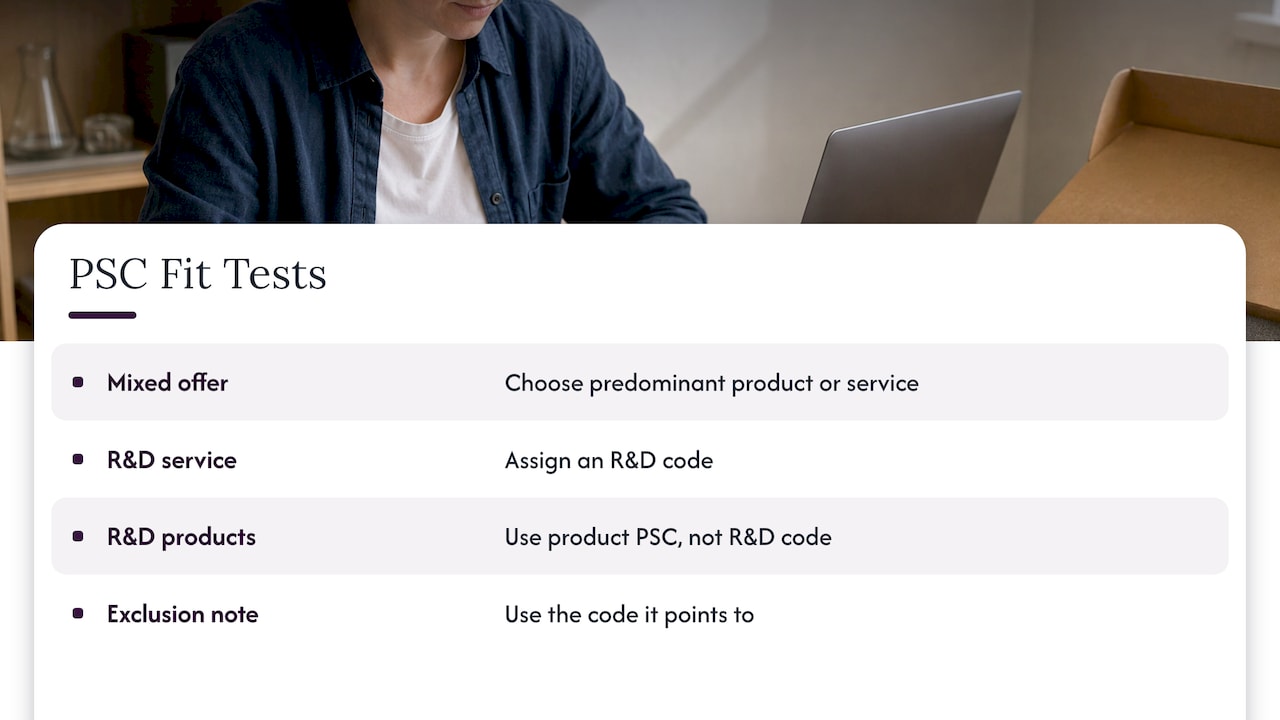
Three fit tests will keep you out of trouble.
Test 1: predominant purpose. If your offer mixes a product with a service, ask which part is the bigger share of what the buyer pays for. The manual tells contracting officers to choose the predominant product or service for a mixed action.
Test 2: R&D versus products. According to the April 2024 PSC Manual, R&D services receive an R&D code, while products bought in support of R&D receive the appropriate product PSC instead. An R&D code has two letters and two numbers: the first character is A, the second marks the major area, the third a sub-area, and the fourth the stage of R&D. If you sell lab equipment, you are a product seller, not an R&D vendor.
Test 3: the exclusion note. If the exclusion note points to a different code for your exact offer, take the hint. Contracting officers follow those notes when they classify a buy.
What is the difference between a PSC and a NAICS code?
A PSC describes what the government buys on a contract. A NAICS code describes the industry of the business selling it. You will usually need both: the PSC to find and understand solicitations, and NAICS for your registration and size standard.
The Selection Tool bridges the two by offering suggested NAICS codes for many PSCs. Treat those as suggestions, not answers. The size standard attached to a NAICS code decides whether your company counts as a small business for a given solicitation, so a casual match can cost you set-aside eligibility. Our guides on NAICS codes in GSA contracting and how NAICS codes affect eligibility go deeper on that side.
Where do PSC codes show up in contract records?
Every contract action reported to the Federal Procurement Data System carries a PSC. That makes the code a search handle for market research. Look up a PSC, then look at which agencies bought under it, how large the awards were, and who won them.
If you have never done that, start with our walkthrough on using FPDS for federal market research. For background on where the data lives, see understanding the Federal Procurement Data System and our SAM.gov guide to federal procurement databases.
A practical routine for a beginner looks like this:
- Pick two or three candidate PSCs.
- Search past awards under each one in FPDS.
- Note the top buying agencies and typical award sizes.
- Search current opportunities on SAM.gov with the same codes.
- Keep the codes that produce both past awards and live bids in your lane.
SAM.gov is where federal opportunities are posted today, so build the habit there. FedBizOpps has been retired and no longer exists as a source.
Which PSC mistakes cost small businesses the most?
Most errors are quiet. Nobody tells you the code is wrong. You just get no results, or the wrong ones.
- Choosing by company label. You are a “consulting firm,” so you pick a generic consulting code. The buyer purchased something more specific, under a different code.
- Using only one code. Most businesses sell in more than one category. One code is a thin net.
- Copying a competitor’s codes. Their offer may differ from yours, and their codes may reflect a contract type you cannot perform.
- Ignoring inactive status. A retired code produces stale results.
- Confusing PSC with other classification systems. Federal supply classes, NAICS codes, and special item numbers each answer a different question. Our guide to federal supply class categories and the government contract category converter explain how they relate.
For a longer treatment of how code choices can trigger reporting problems, read our piece on choosing PSC codes to avoid FPDS flags.
How do PSC codes connect to getting on a federal buying vehicle?
When a company applies for a GSA Multiple Award Schedule contract, its offer is organized by categories of products and services, and your codes need to tell a consistent story with your offer. The PSC and NAICS you identify during your lookup shape which categories you target, how you describe your offering, and how you build your price list.
So the lookup you do today is not busywork. It is the first draft of your federal market position. A company that arrives with a clear code map and a clear offer moves faster than one that figures it out mid-application.
Our perspective on PSC lookups
Most business owners treat a PSC lookup as a clerical step. We treat it as a strategy step. The code you choose decides which solicitations you see, which agencies you study, and how convincingly your offer reads to a contracting officer.
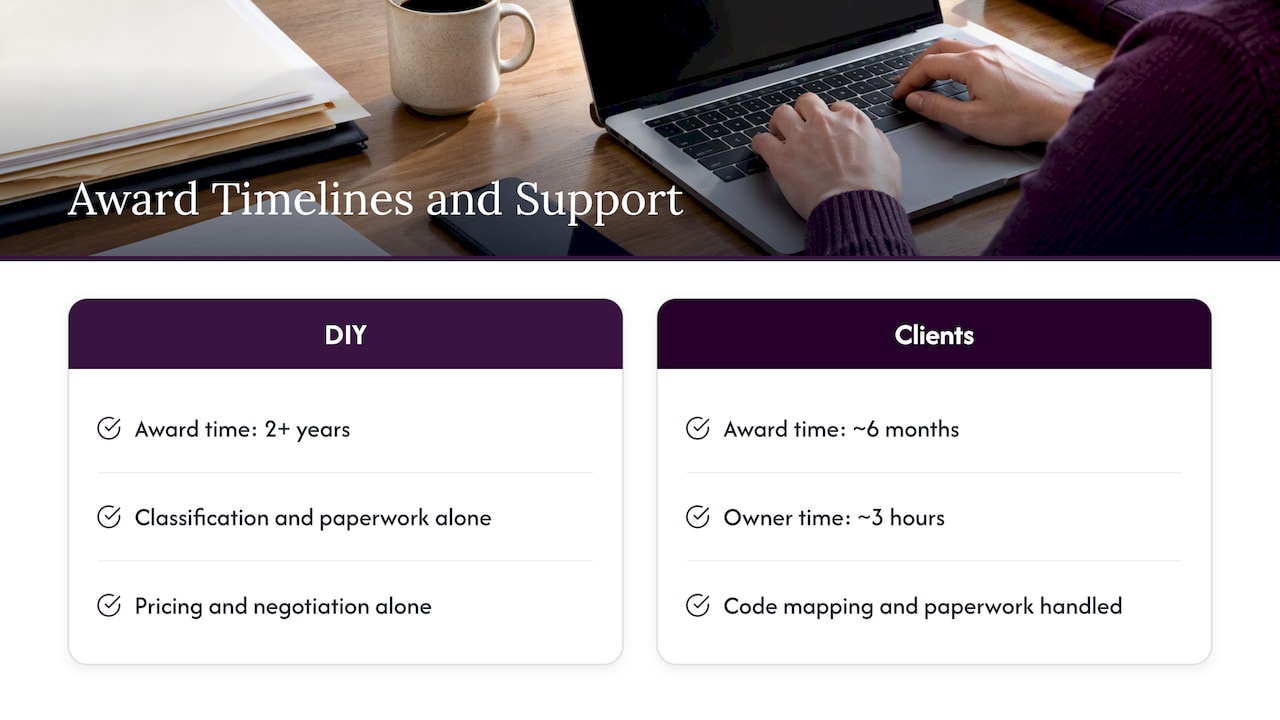
The pattern we see is simple. Companies that try to work through classification, documentation, pricing, and negotiation alone often spend two years or more getting to an award. Our clients are typically awarded in about six months, with roughly three hours of their own time. The difference is not magic. It is that someone who does this every week maps the codes, builds the paperwork, and handles the back-and-forth.
Our approach is built on that experience. We say our process is designed to be fast, hands-on, and low effort for the owner, and we stand behind it with a money-back guarantee and a “no award, no fee” structure. Look up your codes yourself first, because it will make you a better buyer of any service. Then let us carry the heavy part.
Josh
Can you do this yourself, or do you need a consultant?
You can absolutely do the PSC lookup yourself. It is free, the tools are public, and an afternoon is enough for a first pass. The harder part comes after: translating those codes into an accepted offer, a defensible price list, and a negotiation position.
Here is how the choice usually breaks down.
| Question | Do it yourself | Work with us |
|---|---|---|
| PSC and NAICS lookup | Free official tools | We map codes to your offer |
| Time from your team | Often long, on top of daily work | About 3 hours, by our estimate |
| Typical timeline | Two years or more for many first-time applicants, in our experience | About six months for our clients |
| Paperwork and price list | You build and revise | We prepare and manage |
| Risk | Your time and rework | Payment only after approval |
The figures in the right column are our own experience and claims about our service, not a government statistic. For a self-service route, our GSA DIY Quick Start gives you a guided path.
What happens after you have your codes?
Here is the sequence we recommend to businesses that already qualify and want results.
- Confirm eligibility. Your company’s track record, financials, and past performance all matter.
- Finalize code map. PSC, NAICS, and the categories your offer fits.
- Prepare the offer. Documentation, pricing, and commercial sales practices.
- Negotiate. Pricing and terms with the contracting officer.
- Launch and maintain. Once awarded, you will manage modifications, price list changes, and compliance on a recurring basis.
Pricing is part of step 3. For how product pricing appears to buyers once you are on the schedule, see how GSA Advantage pricing works. To size up the opportunity before you commit, try our 2026 GSA Sales Opportunity Estimator.
How do you keep codes and catalogs current after award?
A code lookup is not a one-time task. The PSC Manual is updated, businesses add offerings, and agencies change what they buy. Review your code map at least once a year and each time you add a new product line or service.
If you sell products, catalog accuracy matters too. Our guide to GSA product catalog update best practices covers the habits that keep listings clean. If you want someone to handle modifications, our maintenance plans start at $99 per month for one modification per year, and go to $159 per month for two, $219 for three, and $279 for four. Custom plans start from $339 per month.
Ready to turn your codes into a federal contract?
If you already qualify and want a consultant to carry the application, we handle eligibility, documentation, code mapping, pricing, and negotiation. You pay only after approval, and our service comes with a money-back guarantee. Look at our full-service options for startups, specialty firms, and streamlined applications.
Not sure whether you qualify yet? Start with a free eligibility check at gsascheduleservices.com, and we will tell you where you stand and which codes fit.
FAQ
Is a PSC code the same as a NAICS code?
No. A PSC describes what the government bought on a contract action, while a NAICS code classifies the industry of the seller. Most federal contractors use both. The PSC Selection Tool offers suggested NAICS codes for many PSCs, which gives you a place to start.
How many characters does a PSC have?
A PSC has four characters. R&D codes follow a set pattern of two letters and two numbers, beginning with A, according to the PSC Manual. Use the Selection Tool or the manual to see the exact code and title.
What if my business fits more than one PSC?
That is normal. List every code that matches work you can perform and want to win. The “predominant product or service” rule applies to how the government classifies a single contract, not to how many codes you can target in your market research.
Where can I find the current PSC list?
The Acquisition.gov PSC Manual page is the official place to check. It carries the manual archive in several formats along with supporting documentation. The SAM.gov PSC API also returns active and inactive codes with their status and dates.
Do I need a consultant just to find my PSC code?
No, the lookup is free and you can do it yourself. A consultant helps when you want to turn those codes into an approved offer faster. If you are unsure, our free eligibility check will show you whether you are ready.
Sources
- The Product Service Code Selection Tool: A Quick Guide (U.S. Department of Defense)
- DPCAP Product Service Code Selection Tool
- PIEE Product or Service Code Lookup
- SAM.gov PSC Public API (GSA Open Technology)
- Product and Service Code Manual, April 2025 (Acquisition.gov)
- Product and Service Code Manual, April 2024 (Acquisition.gov)
- Product and Service Code Manual page (Acquisition.gov)
Recommended
- Avoid FPDS Flags: Pick PSC Codes for US Contractors, April 2026
- How NAICS Codes Impact GSA Eligibility
- A Brief Guide to GSA PSS Contract
- GSA Schedule Lookup – A Step-by-Step Guide