

Labor category mapping means matching each role in your company to a labor category on your GSA Multiple Award Schedule (MAS) contract, with a duty description, minimum education and experience, and an hourly rate. Define your roles, set qualifications you can actually staff, tie rates to them, and submit the package through eMod.
TL;DR
- Mapping translates your internal job titles into standard, priced labor categories that government buyers can compare.
- Each category needs a position description, minimum experience and education, and an hourly rate you can defend.
- Qualifications you set become binding: staff on a task order must meet them, and the ordering contracting officer cannot waive them.
- Roles covered by the Service Contract Labor Standards need an equivalent title and a wage determination number.
- After award, you add categories through an Addition Modification in eMod, which the contracting officer approves only if prices are fair and reasonable.
Table of Contents
- What is labor category mapping on a GSA MAS contract?
- Why does mapping matter for pricing and compliance?
- How do you map your roles to GSA labor categories, step by step?
- What does a labor category description document include?
- How do wage determinations affect mapping?
- How do you add a labor category after award?
- What evidence will GSA ask for after the mapping is live?
- What mapping mistakes should you avoid?
- What does a well-mapped offer look like in practice?
- Our view: mapping is where offers are won or lost
- Want a specialist to build your labor categories?
- FAQ
- Sources
What is labor category mapping on a GSA MAS contract?
A labor category (often shortened to LCAT) is a standardized job description with a price attached. Instead of buying “Jordan, our senior developer,” a federal buyer orders hours of a “Software Engineer, Level III” at a stated hourly rate. Mapping is the work of lining up your own staffing structure with those categories.
Say your company calls someone a “Senior Code Wizard.” A buyer cannot evaluate that title. Mapped to a functional category such as Software Engineer III, with a degree requirement, years of experience and a rate, the role becomes something a contracting officer can compare against other vendors.
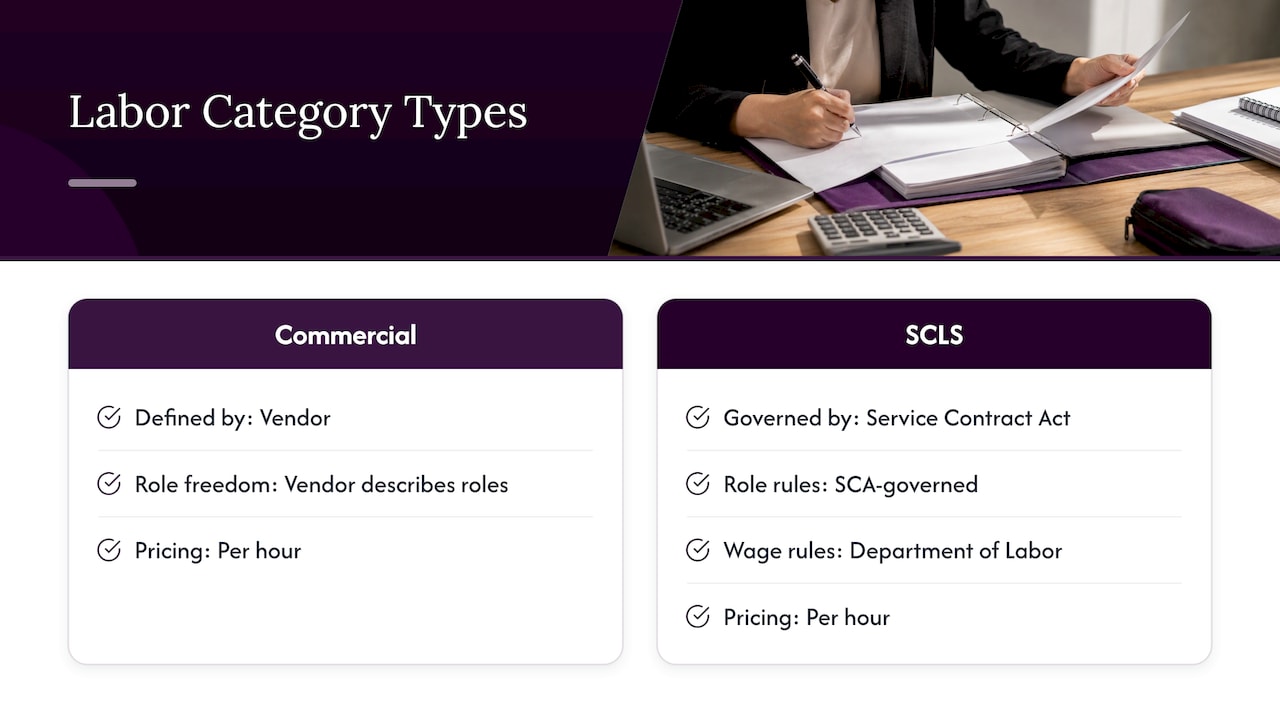
GSA’s own catalog distinguishes two kinds. Commercial Labor Categories are defined by the vendor, while SCLS labor categories are governed by Service Contract Act rules. Both are priced per hour. The first kind gives you freedom to describe your roles. The second kind ties you to Department of Labor wage rules, which we cover below.
This matters for professional services work: consulting, engineering, IT, program management, analytics and similar. If you sell only products, you can skip most of this. If you sell hours of expertise, your labor categories are your price list.
Why does mapping matter for pricing and compliance?
Three reasons.
Buyers compare you category by category. Your categories and rates sit in your authorized price list. A contracting officer reading a task order proposal looks at whether your labor mix and rates are reasonable for the work. Clean, standard-looking categories make that comparison easy. Vague ones invite questions and delay.
Your rates must be justified. GSA reviews proposed rates for fairness and reasonableness. A rate tied to a clear role, a clear qualification level and your commercial pricing is far easier to defend than a rate attached to an unusual title.
The qualifications you write become obligations. GSA’s Vendor Support Center says contractors must show that personnel on each task order meet the minimum qualifications in their contract. You set those qualifications before award or when you add categories, and the ordering contracting officer cannot waive them. Its example is a Network Engineer category requiring a bachelor’s degree and ten years of experience: staff it with someone who falls short and you are out of compliance.
That last point is where most mapping mistakes cost real money. Writing a requirement that sounds impressive but that your bench cannot meet creates a compliance problem you built yourself.
How do you map your roles to GSA labor categories, step by step?
Here is the routine, in the order we would work through it.
Step 1: List the roles you actually bill
Start with the people and positions that generate revenue today, from your commercial price list or recent invoices. Include the title, the typical duties, the education and years of experience of the people filling it, and the rate you charge. Do not start from what you think GSA wants to see. Start from what you can deliver.
The common failure here is listing aspirational roles. If you have never staffed a “Chief Data Scientist,” do not create one because competitors have it.
Step 2: Group roles into functional families
Group similar positions: project management, software development, cybersecurity, analysis, administrative support. Within each family, define a ladder of levels, typically junior, mid, senior and lead or principal. Three to five levels per family is usually enough. More levels create more pricing to defend and more qualifications to staff.
Step 3: Write a plain functional title
Replace internal branding with a title a buyer recognizes. A short illustration:
| Internal title | Mapped labor category | Typical attributes to define |
|---|---|---|
| Senior Code Wizard | Software Engineer, Level III | Bachelor’s degree, years of development experience, any certifications |
| Delivery Guru | Project Manager | Degree or equivalent experience, PMP or similar if you require it |
| Data Whisperer | Data Analyst, Level II | Degree, analytics tool experience |
These titles are examples to show the pattern, not a required GSA list. For commercial categories, GSA lets you define the category. Choose names that describe the function.
Step 4: Define duties and minimum qualifications you can staff
For each category, write the functional responsibilities and the minimums: years of experience, degree level, and any training or certification. Test each minimum against your real staff. Ask: who on our team meets this today, and how many of them would be available at the same time?
GSA’s guidance says each contractor’s categories are unique and the minimums are yours to set, which is both the opportunity and the risk. Set them at a level that fits your staff and your price. A higher bar supports a higher rate, but only if you can staff it.
Step 5: Decide on experience-for-education substitutions
If you want to staff a category with someone who has no degree but deep experience, say so up front. GSA expects you to explain any substitution method. Its modification guide gives the example of five years of experience equating to a bachelor’s degree. Put the rule in the offer so you do not need approval each time you staff a task order.
Step 6: Set the hourly rate for each category
Rates must reflect your commercial pricing. Start with the direct labor cost for the role, then build up overhead, general and administrative expense and profit into one fixed hourly rate. Your pricing also has to hold together across levels: a senior rate lower than a mid-level rate raises a flag.
Pricing interacts with your discount structure and your commercial sales practices, so check the rates against the rest of your offer before you submit. Our guide to multiple SIN pricing and why mods get rejected walks through where pricing inconsistencies show up.
Step 7: Match categories to the right SINs
Labor categories live under Special Item Numbers (SINs), the codes that organize what you sell. A category must fit the scope of the SIN it sits under. If you are still deciding which SINs apply, read our guide to GSA SIN selection first, because mapping to the wrong SIN means redoing the work.
What does a labor category description document include?
When you add professional services categories, GSA wants a labor category description document. Per the October 2026 MAS Modification Guide (Refresh 33), it contains:
- A detailed position description with functional responsibilities.
- Minimum years of experience.
- Minimum education or degree requirements.
- Applicable training or certification requirements.
- An explanation of any experience-for-education substitution method.
- A copy of your uncompensated overtime policy under FAR 52.237-10.
- An economic price adjustment method.
- Identification of any categories subject to the Service Contract Labor Standards, with the equivalent code and title and the wage determination number.
The guide’s predecessor, the October 2023 edition, also required a Professional Compensation Plan under FAR 52.222-46 when professional services were newly proposed, and said the employee handbook’s general compensation practices were generally enough if they set salary ranges and fringe benefits. Because requirements are refreshed periodically, check the current guide on gsa.gov before you submit. Our summary of recent MAS refresh changes helps you track what moved.
How do wage determinations affect mapping?
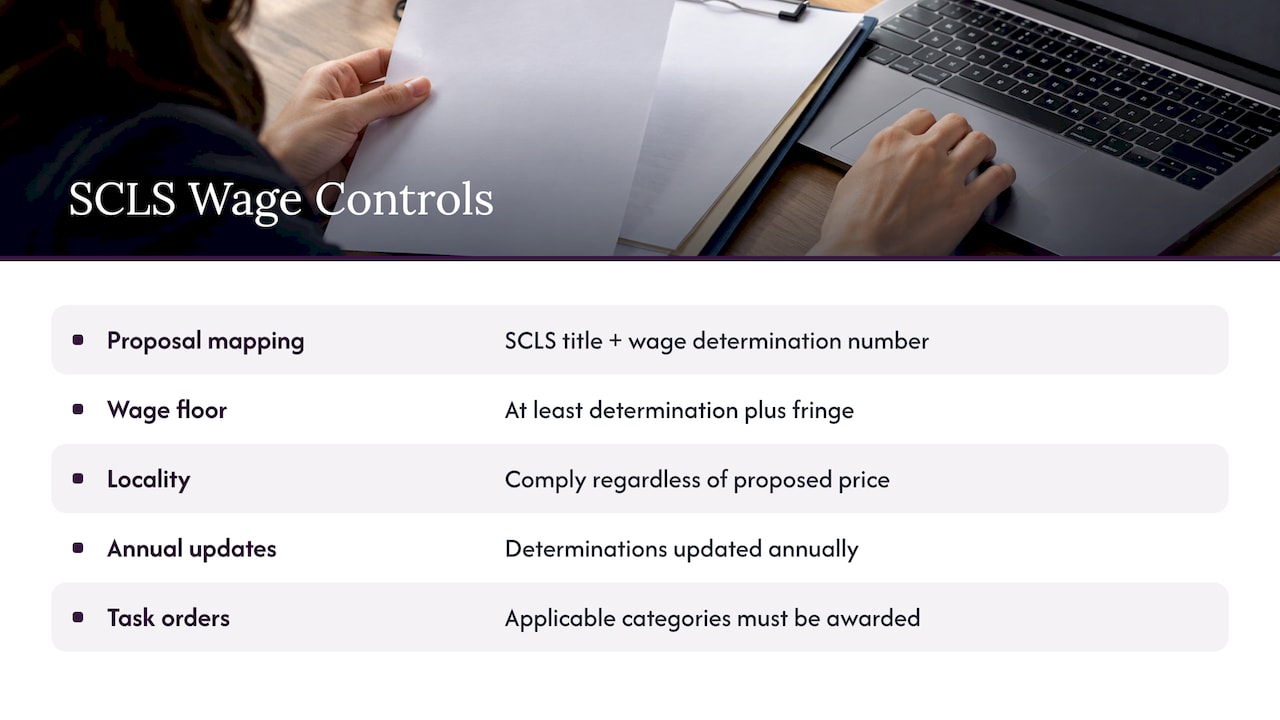
Some labor categories fall under the Service Contract Labor Standards (SCLS), which require wages and fringe benefits at least equal to Department of Labor wage determinations for certain service occupations. These tend to be roles such as clerical, technical support or maintenance rather than professional categories.
For these, you map your title to an SCLS-equivalent title and tie it to a wage determination number in your price proposal, which the modification guide requires. GSA’s SCLS page explains that wage determinations are incorporated at the contract level and updated annually. You must comply with the wage determination for each locality regardless of the price you proposed. The same page notes that your SCLS matrix, which lists the covered categories, is published in your authorized price list on eLibrary, and task orders cannot be issued unless the applicable categories were awarded under your contract.
Practically, that means two checks. First, never price an SCLS-covered role below the applicable wage determination plus fringe. Second, revisit your SCA matrix when updates arrive: GSA’s draft attachment for Refresh 16 advised offerors and contractors to update pricing and wage determination numbers in their matrix when the index was updated.
How do you add a labor category after award?
If you already hold a MAS contract and your business has grown into new roles, you add categories through a modification. The process:
- Decide the category and SIN. Confirm the category falls within the scope of a SIN already on your contract. You cannot sell under a SIN you have not been awarded, and you must meet the qualification standards for each SIN you add, as GSA’s MAS Q&A explains.
- Build the description document with the elements listed above.
- Submit an Addition Modification in eMod. The SCLS matrix is generated in eMod when relevant.
- Support the rate. The contracting officer adds the category only after determining that prices are fair and reasonable and within SIN scope.
- Wait for approval before billing. Until the category is on your contract, you cannot be issued task orders for it.
GSA’s Vendor Support Center says that to adjust qualifications or add categories, you contact your GSA contracting officer. Our overview of types of GSA contract modifications shows where an addition sits among the other mod types, and our article on adding a SIN to a GSA Schedule covers the related process when the category needs a new SIN.
What evidence will GSA ask for after the mapping is live?
Mapping is not finished at award. GSA’s Vendor Support Center says its compliance reviewers may request resumes, timesheets and other personnel documentation to confirm that task order staff meet the qualifications in your contract.
Build the habit early:
- Keep a resume for every person billed, annotated against the category minimums.
- Record the degree, years of experience and certifications that justify each placement.
- Document any experience-for-education substitution you rely on.
- Match timesheet category names exactly to the names on your price list.
A simple spreadsheet linking each employee to a category and its qualification evidence saves hours when a review arrives.
What mapping mistakes should you avoid?
- Copying another company’s categories. Their qualifications fit their staff, not yours.
- Setting minimums you cannot meet. Every unstaffed requirement is potential noncompliance.
- Creating too many levels. Each level needs its own description and rate logic.
- Ignoring SCLS roles. An SCLS-covered category priced below the wage determination is a compliance issue, whatever you proposed.
- Inconsistent rates. Level, SIN and commercial pricing should tell the same story.
- Leaving out the overtime policy or price adjustment method. Missing required documents slow the mod.
- Using internal job titles. Buyers cannot map them back, so they cannot price them.
Terms mistakes can sink a mod just as readily as pricing ones, so see our list of top GSA terms update mistakes as well. For a wider view of the topic, our GSA labor categories compliance guide goes deeper.
What does a well-mapped offer look like in practice?
Imagine a 25-person cybersecurity firm. Its commercial price list has eleven titles, including “Cyber Ninja I” through “Cyber Ninja IV.” A mapped offer might compress that into four functional categories: Cybersecurity Analyst, Senior Cybersecurity Analyst, Cybersecurity Engineer and Cybersecurity Program Manager. Each gets a one-paragraph duty description, minimum degree and years of experience, a certification requirement where the firm requires one, and a fixed hourly rate.
Before submitting, the firm checks that at least two current employees meet each category’s minimums, that rates rise with level, and that no category is covered by an SCLS wage determination. If one were, it would add the equivalent title and wage determination number. This is an illustration, not a client case, but it shows the discipline: fewer, clearer categories that the staff can really fill.
Our view: mapping is where offers are won or lost
We see labor category mapping as the part of a GSA offer where small companies most often create problems for themselves. The paperwork looks like a formality, yet every line you write about experience and education is a promise you must keep on a task order.
Our approach is to treat mapping as a staffing decision first and a paperwork task second. We start from the people you actually have and the rates you actually charge, then build categories that a contracting officer can read in a minute. That is why our service covers price list development and SIN mapping alongside documentation, compliance guidance and negotiation support, rather than handing you a template.
We designed our process to take roughly three hours of your time, and our clients are typically awarded in about six months. Going alone, many companies spend two years or more, much of it correcting offers that were rejected for exactly the mapping and pricing issues above. We back the work with a no-award-no-fee structure, so you pay only after approval.
Josh
Want a specialist to build your labor categories?
If you have not yet applied, our full-service GSA Startups, Specialty and Streamline offers cover eligibility assessment, documentation, price list development, SIN mapping and negotiation support. If you hold a contract and need categories added, our maintenance plans start at $99 per month for one modification a year, and price list changes are handled through our maintenance proposal page.
Not sure whether your company qualifies or which categories fit? Start with a free eligibility check and we will tell you where you stand.
FAQ
What is the difference between a labor category and a job title?
A job title is whatever your company calls a position. A labor category is a standardized, priced description on your contract with duties, minimum education and experience, and an hourly rate. Mapping connects the two so buyers can compare you with other vendors.
Can I add a labor category after I get my GSA award?
Yes. You submit an Addition Modification through eMod with a labor category description document. The contracting officer approves it only if the price is fair and reasonable and the category is within the scope of a SIN on your contract.
Do I need a wage determination number for every category?
No. Only categories subject to the Service Contract Labor Standards need an SCLS-equivalent title and a wage determination number. Many professional categories are vendor-defined commercial categories without that requirement, though you should confirm each role against the current modification guide.
Can the customer waive my minimum qualifications on a task order?
No. GSA’s Vendor Support Center states that the ordering contracting officer cannot waive the minimums in your contract. Staff each task order with people who meet them, or change the qualifications through a modification first.
How long does it take to map labor categories for a new offer?
For a company with a clean commercial price list and well-documented staff, drafting categories can take days. The longer part is aligning rates, qualifications and SINs, then negotiating with the contracting officer. Starting with your real staffing and pricing keeps that phase shorter.
Sources
- Multiple Award Schedule (MAS) Modification Guide, Refresh 33, October 2026
- MAS Modification Guide, October 2023
- Labor Qualification Compliance, GSA Vendor Support Center
- Service Contract Labor Standards under MAS, GSA
- MAS Services Catalog Update, GSA Interact
- Draft Significant Changes Attachment for MAS Refresh 16, GSA
- #AskMASAnything Q&A, GSA
Recommended
- GSA Labor Categories: A Compliance Guide for Contractors
- Ultimate Guide to GSA Labor Rate Development
- Defensible GSA Labor Rates for Contractors Using CALC+ and eMod