

Many GSA Schedule holders assume sales reporting means submitting a single monthly dollar total and calling it done. That assumption is dangerously outdated. The General Services Administration has fundamentally changed how contractors must report their government sales, shifting from simple aggregate numbers to detailed, transaction-level data submitted through a centralized portal. If you hold a Multiple Award Schedule (MAS) contract, understanding this shift is not optional. It is the difference between staying compliant and facing contract violations that can cost you your Schedule entirely.
Table of Contents
- What is GSA sales reporting and why is it changing?
- How GSA transactional data reporting works
- GSA sales compliance pitfalls and practical solutions
- Industrial Funding Fee (IFF): Reporting, remittance, and integration
- The real impact of TDR: What most guides miss
- Get hands-on help with GSA sales reporting
- Frequently asked questions
Key Takeaways
| Point | Details |
|---|---|
| Transactional data is mandatory | GSA requires detailed monthly transaction-level sales data, not just aggregate totals. |
| Deadlines matter | Sales reports must be submitted within 30 days after each month ends to stay compliant. |
| Data validation is critical | Incomplete or incorrect order mapping can trigger compliance errors, so thorough validation is essential. |
| IFF reporting integrated | Industrial Funding Fee must be included in sales data and paid quarterly, with optional monthly submission. |
| TDR alters compliance obligations | Covered contracts face reduced CSP/PRC requirements but increased monthly reporting detail. |
What is GSA sales reporting and why is it changing?
For years, GSA Schedule contractors reported sales in aggregate, meaning they added up their total government sales for the quarter and submitted one number. That system was simple but created serious blind spots. The government could not see what agencies were actually buying, at what prices, or under what discount terms. Fraud and pricing inconsistencies were difficult to detect.
That approach is now largely gone. GSA’s Transactional Data Reporting (TDR) is mandatory for all Multiple Award Schedule SINs (Special Item Numbers) and uses the FAS Sales Reporting Portal to collect transactional data from orders placed against MAS and other governmentwide acquisition contracts. This became effective with Refresh 31, which means virtually every active MAS contractor is affected.
The policy rationale is straightforward. By collecting granular, line-item data, GSA can analyze pricing trends across agencies, identify pricing discrepancies, and simplify compliance in ways that aggregate reporting never allowed. The trade-off is clear: less burden in some legacy compliance areas, but a much heavier lift in data collection and accuracy. You can read more about GSA sales process changes to understand the full picture of what this evolution means for your contract.
The TDR program expansion represents a fundamental restructuring of GSA’s commercial pricing oversight approach.
Here is a direct comparison of the two systems:
| Feature | Legacy aggregate reporting | TDR (current requirement) |
|---|---|---|
| Data granularity | Total sales per period | Line-item transaction data |
| Reporting frequency | Quarterly | Monthly |
| Fields required | Minimal | Up to 19 per transaction |
| CSP/PRC obligations | Required | Eliminated for covered SINs |
| Portal used | FAS Sales Reporting Portal | FAS Sales Reporting Portal |
| IFF reporting | Included in aggregate | Included in transaction data |
Key changes you must absorb:
- TDR applies to all MAS SINs (with limited exclusions noted for the OS4 SIN)
- Monthly reporting replaces quarterly aggregate submissions
- Line-item data replaces single total figures
- CSP and PRC obligations are eliminated for TDR-covered SINs, but transaction obligations increase
- IFF must be embedded in reported sales, not calculated separately afterward
This is not a minor administrative update. It is a structural overhaul of how the government tracks what you sell and at what price.
How GSA transactional data reporting works
Understanding the mechanics of TDR is essential before you touch the FAS Sales Reporting Portal. Getting this right from your first submission prevents the kind of cascading errors that can trigger compliance reviews.

Contractors must report transactional line-item data on up to 19 elements each month for TDR offers, with exclusions for the OS4 SIN only. Those 19 elements include information such as contract number, order number, agency, SIN, product or service description, unit price, quantity, and total price. Each field matters. Missing even one required element can flag your submission as incomplete.
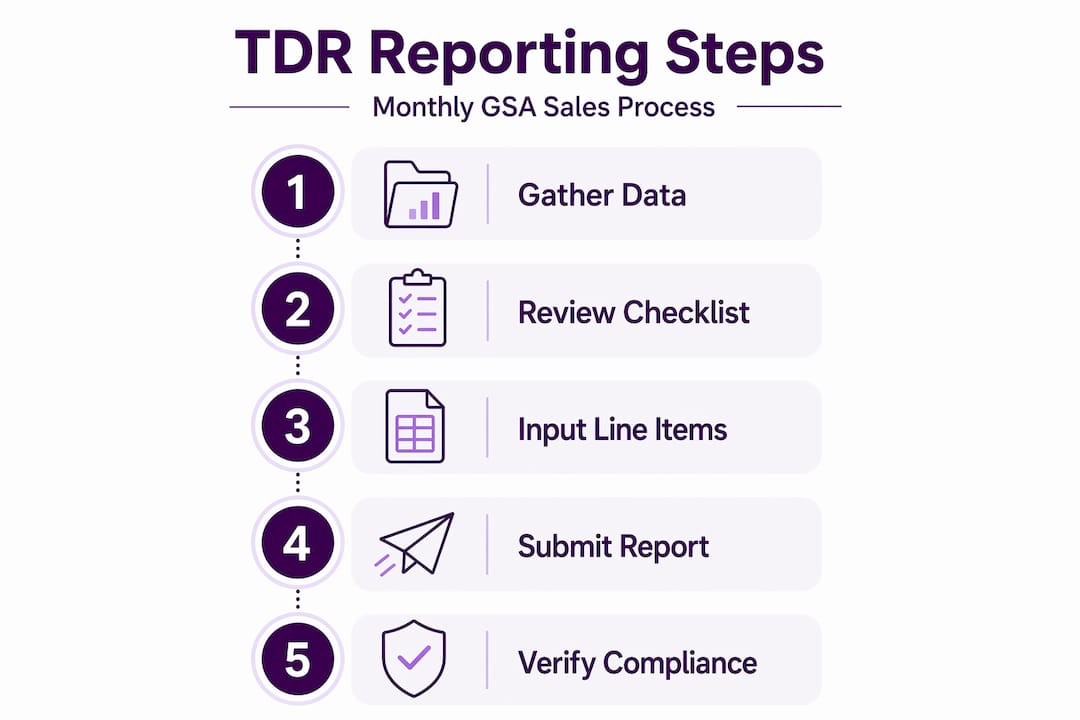
Here is what the required data structure looks like at a high level:
| Data element | Example | Notes |
|---|---|---|
| Contract number | GS-00F-000XX | Your MAS contract identifier |
| Order number | 47QRAA21D000X | Unique order reference |
| Ordering agency | Department of Veterans Affairs | Full agency name |
| SIN | 511210 | Service/product category code |
| Unit price | $125.00 | Price per unit sold |
| Quantity | 10 | Units delivered |
| Total price (with IFF) | $1,262.50 | IFF embedded in total |
| Delivery date | 03/15/2026 | Date delivered to agency |
TDR reporting is due within 30 days after the end of each month, and reported sales must be inclusive of the Industrial Funding Fee (IFF). So if your reporting month ends March 31, you have until April 30 to submit. Missing that window is a compliance violation, even if your sales volume was small.
Here is how to submit correctly through the FAS Sales Reporting Portal:
- Log in to the FAS Sales Reporting Portal at the GSA website using your credentials. New contractors should set up portal access immediately after contract award, not when the first deadline approaches.
- Gather all transaction records for the reporting month. This means pulling invoices, order confirmations, and delivery records for every GSA order line.
- Map each transaction to the required 19 fields. Do not estimate. Every data element must match your actual order documentation.
- Embed IFF in total sale figures before entry. IFF is currently 0.75% and must be calculated into reported sales, not added separately.
- Review your submission for completeness using the portal’s built-in validation tools before finalizing.
- Submit before the 30-day deadline and save your confirmation receipt as a compliance record.
Pro Tip: Create a monthly close checklist that triggers immediately after each month ends. Assign one person to gather all GSA order data within the first five business days of the new month, giving your team time to validate and correct errors before the deadline arrives.
For a full breakdown of useful resources, check out helpful GSA contract links to find official portals, guidance documents, and supporting tools in one place.
GSA sales compliance pitfalls and practical solutions
Here is where small and midsize businesses most often stumble. The mechanics of TDR look manageable on paper. In practice, transaction-level reporting exposes gaps in how most SMBs track their orders day to day.
Because TDR is transaction-level and requires many specific elements, gaps in order and invoice mapping or missing required fields can create reportable compliance errors even when total sales value is small. This is a critical insight most contractors overlook. You can have a month with only $5,000 in GSA sales and still generate multiple compliance errors if your data capture is weak.
“Strong data capture and validation around each GSA order line is your best defense against compliance infractions, regardless of your total sales volume.”
The most common compliance mistakes we see:
- Missing required fields. Contractors pull summary invoices instead of line-item data and submit incomplete records.
- Late submissions. Teams forget the 30-day window because no formal process triggers the reporting cycle.
- Incorrect IFF calculations. Contractors forget to embed IFF in the total reported price, or calculate it incorrectly for modified orders.
- Wrong SIN assignments. Products or services get reported under the wrong SIN, creating pricing inconsistencies that trigger reviews.
- Duplicate entries. Orders entered twice, especially for multi-delivery contracts, inflate reported sales and raise red flags.
- Missing zero-sales reports. If you have no GSA sales in a given month, you still must submit a report showing zero activity. Skipping this is a violation.
Practical solutions to protect yourself:
- Build a dedicated GSA order log in your CRM or accounting software, separate from commercial sales. Every GSA order line gets its own entry with all 19 data fields captured at the time of order, not reconstructed later.
- Conduct a mid-month data review so errors surface with two weeks to spare before the deadline.
- Cross-reference every submission against your actual invoices and agency purchase orders before hitting submit.
- Train anyone who touches GSA orders on what data to collect and why each field matters.
Understanding GSA compliance risks before an audit finds them is far less painful than correcting violations after the fact. Connecting TAA compliance assurance practices with your TDR workflow also protects you from country-of-origin issues that can compound reporting errors. For a broader view of what active compliance management looks like day to day, navigating GSA compliance covers the landscape in practical terms.
Pro Tip: Set up a calendar alert at the end of each month that automatically notifies your GSA reporting lead. Compliance failures happen most often not because contractors don’t know the rules, but because no system enforces the deadline reminder.
Industrial Funding Fee (IFF): Reporting, remittance, and integration
The Industrial Funding Fee is one of the most misunderstood elements of GSA reporting. Many contractors treat it as a separate accounting task rather than something woven directly into their monthly reporting.
IFF remittance timing and reporting integration is part of the sales reporting requirements, including quarterly IFF payment rules and options for monthly submission. Here is what that means in practice.
Follow these steps to handle IFF correctly:
- Calculate IFF on every transaction at the time of sale. The current IFF rate is 0.75% of reported sales. Multiply each transaction total by 0.0075 to find the IFF amount.
- Embed IFF in your monthly reported sales figures. When you enter transaction data into the FAS portal, the totals must already include IFF. Do not strip it out and add it later.
- Track IFF owed cumulatively each quarter. Even though you report sales monthly, IFF payment is typically remitted quarterly. Keep a running total so you are not surprised by the quarterly balance.
- Submit IFF payment within 30 days after each quarter ends. For example, Q1 (January through March) IFF is due by April 30. Late payment triggers interest and potential contract action.
- Choose monthly IFF remittance if it simplifies your accounting. GSA allows monthly payment as an option, which can smooth cash flow for businesses with consistent sales volumes.
- Reconcile IFF payments against your submitted sales data each quarter to catch any discrepancies between what you reported and what you remitted.
Staying on top of IFF is one of the easier ways to avoid compliance mistakes that create unnecessary risk. The math is simple. The risk of ignoring it is not.
The real impact of TDR: What most guides miss
Here is an honest perspective that most compliance checklists skip entirely. TDR is not a reporting change. It is a business process change disguised as a reporting change.
When GSA introduced TDR, the public framing focused on reducing burdens for contractors. And yes, TDR does eliminate CSP disclosure and Price Reductions Clause requirements for covered SINs. But legal and commercial commentary highlights that TDR is intended to reduce certain CSP/PRC burdens while simultaneously shifting burden toward detailed monthly discount and transaction reporting. Contractors should budget for both process change in data systems and compliance change in which clauses no longer apply. In other words, you traded one headache for another, and the new headache requires infrastructure you may not have.
We see this pattern repeatedly with SMBs who underestimate what TDR actually demands. The contractors who struggle are not the ones who fail to understand the rules. They are the ones who understand the rules intellectually but never invest in the systems and training needed to execute them consistently. A verbal understanding of “report 19 fields monthly” does not help you when your ERP system captures six of those fields and ignores the rest.
The businesses that thrive under TDR treat it as a strategic investment. They build data capture into their quoting and ordering workflows from day one. They train operations staff, not just finance staff, on GSA data requirements. And they budget quarterly to review whether their reporting processes are still working correctly. Explore deeper compliance strategies to build this kind of proactive posture.
The uncomfortable truth is that TDR rewards businesses with operational discipline and punishes those who treat GSA compliance as a back-office afterthought.
Get hands-on help with GSA sales reporting
GSA sales reporting under TDR demands attention to detail that most small and midsize businesses are not set up to handle alone. Missing a field, submitting late, or miscalculating IFF can create compliance problems that threaten the contract you worked hard to secure. Professional support from a team that understands the full GSA reporting landscape can prevent those errors before they happen, not after an auditor flags them. If you want to simplify your reporting process, protect your contract, and stay ahead of evolving GSA requirements, discover GSA reporting solutions tailored specifically for SMBs like yours.
Frequently asked questions
What is the deadline for submitting GSA sales reports under TDR?
Sales reports must be submitted within 30 days after month-end through the FAS Sales Reporting Portal. Missing this window is a compliance violation regardless of how small your sales volume was that month.
What data is required in GSA sales reports?
Contractors must report transactional line-item data on up to 19 elements each month for TDR offers, including order numbers, agency names, SINs, unit prices, quantities, and delivery dates, depending on the SIN assigned.
How is the Industrial Funding Fee (IFF) handled in GSA sales reporting?
IFF must be embedded in reported sales totals each month and then remitted quarterly, with an option for monthly submission if that better fits your cash flow and accounting practices.
Does TDR eliminate the need for CSP and PRC compliance?
For covered SINs, TDR eliminates CSP disclosure and Price Reductions Clause requirements, but it replaces them with significantly more detailed monthly transaction reporting obligations.
Recommended
- GSA Sales
- GSA Compliance: Don’t Get Lost | GSA Focus
- Important Links for your GSA Contract
- Avoid Rough Seas with your GSA Contract
