

GSA eLibrary is the official, nightly-updated directory of GSA and VA contract awards. The fastest way to put it to work is to open the site and run a contractor or SIN search, then download the results if you need to analyze them offline.
GSA eLibrary centralizes award data for Multiple Award Schedules (MAS), Governmentwide Acquisition Contracts (GWACs), VA Federal Supply Schedules, and strategic sourcing BPAs, and it refreshes nightly so the listings reflect current contract status, as described by Catalog. Whether you are scoping out competitors, vetting a potential teaming partner, or checking your own listing before a modification, nearly every question starts with the same basic search.
TL;DR:
- Search by contractor, keyword, NAICS code, or SIN; use Total Solution Search when a partner must cover several SINs or schedules.
- Apply socioeconomic filters before exporting XLS or CSV results, which can include schedule, SIN, contract, and contact fields; verify contractors’ active registration through SAM.gov.
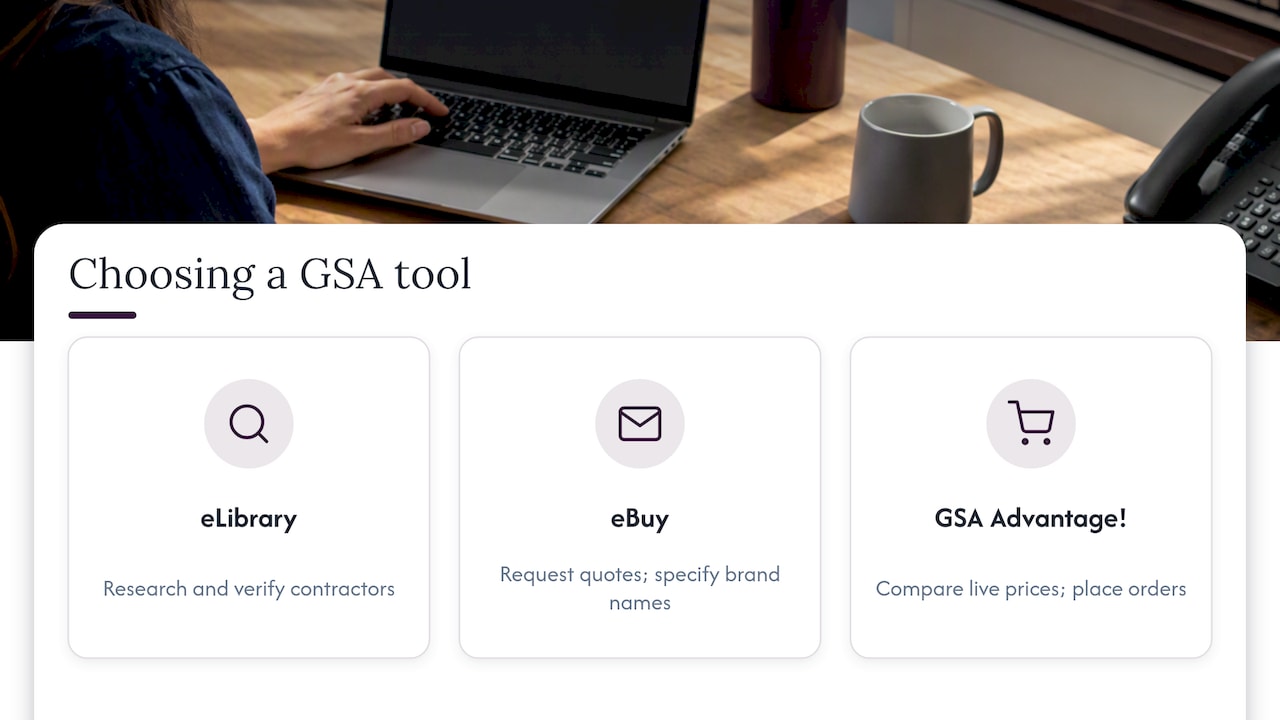
- Use eBuy to solicit quotations and GSA Advantage! to compare live catalog prices or place orders; eLibrary does not handle transactions or show live pricing.
- Repeat competitor and SIN searches quarterly, recording contractor counts so spreadsheet comparisons reveal new entrants and changes in coverage over time.
- Check your own listing monthly and after every contract modification, confirming SIN coverage, contact details, catalog links, and pricelists match current records.
Table of Contents
- How do you run a basic search for contractors or schedules?
- What are the main eLibrary features and what is each one for?
- How do you filter and export eLibrary results?
- Can you use eLibrary to research competitors and find teaming partners?
- When should you switch from eLibrary to eBuy or GSA Advantage!?
- How do contractors keep their eLibrary listing accurate?
- A consultant’s view on what eLibrary audits reveal
- What does this tutorial actually change about how you use eLibrary?
- Get help turning eLibrary research into a GSA Schedule
- FAQ
- Sources
How do you run a basic search for contractors or schedules?
Opening GSA eLibrary requires no account or login. The homepage itself describes the platform as the single source for GSA contract award information, built around tools like the Contractor Directory and Total Solution Search.
- Go to the eLibrary homepage and pick a search field: contractor name, keyword, NAICS code, or SIN, depending on what you already know.
- Enter your term and run the search; results populate as a list of awarded contractors matching that field.
- Use Total Solution Search instead of a basic search when you need contractors who hold coverage across several SINs or schedules at once, which matters for teaming or full-solution sourcing.
- Scan each result for schedule number, SIN coverage, contract number, and point-of-contact details, then click through to the contractor’s page for the full profile.
- Open “View catalog” from a contractor’s page to see their awarded items and pricelist structure.
- Download the result set as an XLS or CSV file when you want to sort, filter, or report on the data outside the browser.
This sequence works the same whether you are a new business researching the landscape or an existing contract holder checking a competitor’s SIN coverage.
What are the main eLibrary features and what is each one for?
eLibrary bundles a handful of distinct tools under one interface, and knowing which one answers your question saves time.
- Total Solution Search finds contractors covering multiple selected SINs or schedules at once, which is the right tool for teaming checks or confirming full-solution coverage.
- Contractor directory gives you an alphabetical listing for quick lookups when you already know a company name.
- Schedule summary and SIN detail pages show how a Multiple Award Schedule is organized into categories and subcategories, and they let you download contractor lists tied to a specific SIN.
- “View catalog” shows the items and pricing a contractor has on file in eLibrary, but it does not reflect live Advantage pricing or real-time inventory, a distinction confirmed on GSA eLibrary’s own site.
Knowing this split keeps you from treating eLibrary as a live ordering tool when it is really a research directory.
How do you filter and export eLibrary results?
Narrowing a search before you export saves hours of manual sorting later.
- Apply socio-economic filters, such as 8(a), HUBZone, or Veteran-Owned status, from the search form before running your query to limit results to a specific vendor category.
- Download the filtered list as XLS or CSV, which typically includes contractor name, schedule number, SIN, contract number, and point-of-contact fields, as detailed in the GSA eLibrary Help Guide.
- Run quick offline checks once exported: count contractors per SIN to gauge competition, flag listings missing contact details, and cross-reference company names against Sam to confirm active registration.
Pro Tip: Keep a running spreadsheet of SIN-level contractor counts over time so you can spot when new competitors enter your space.
Can you use eLibrary to research competitors and find teaming partners?
Mapping the competitive field in eLibrary takes a handful of repeatable steps rather than guesswork.
- Search by contractor name or by your core SINs to pull a list of direct competitors and note which SINs each one holds.
- Run a Total Solution Search across complementary SINs to surface firms that could fill gaps in your own offering, a method suited to finding teaming partners.
- Export each candidate’s catalog and compare pricelist breadth and the completeness of their listed contact information.
- Cross-check promising names against SAM.gov to confirm their registration is current before reaching out.
- Re-run the same SIN searches every quarter to catch new entrants or modifications among your competitors.
This routine turns a static directory into an ongoing market-intelligence habit, and our competitor research guide walks through the same approach in more depth.
When should you switch from eLibrary to eBuy or GSA Advantage!?
eLibrary is a research and verification tool. It does not post RFQs, collect quotes, or show live pricing, which means it cannot complete an actual order on its own.
FAR Subpart 8.4 lays out the ordering procedures for Federal Supply Schedules and identifies eBuy and GSA Advantage! as the tools agencies use to solicit quotes and place orders, according to Acquisition. Post to eBuy when you need to solicit quotations or specify brand-name requirements; use GSA Advantage! when you need to compare live catalog pricing or place an actual order. Treat eLibrary as the step before either of those tools, not a replacement for them, and see our eBuy guide for the next steps once you’ve identified the right contractors.
How do contractors keep their eLibrary listing accurate?
A listing that is out of date costs you visibility with contracting officers searching by SIN or socio-economic status.
- Verify your schedule and SIN coverage match your current contract, and confirm your point-of-contact and “View catalog” link both work.
- Update socio-economic representations and contact fields whenever your business status changes, and make sure downloaded pricelists reflect your latest modification.
- Run this check monthly, and always after any contract modification, contacting your contracting officer for corrections that fall outside your control.
Pro Tip: Set a recurring monthly calendar reminder to pull your own eLibrary listing and compare it against your current pricelist. Our eLibrary optimization guide covers the full maintenance checklist in more detail.
A consultant’s view on what eLibrary audits reveal
A short eLibrary audit, pulling your own SIN coverage and comparing it against competitors, is often the fastest way to see where a schedule application or modification needs attention before you submit anything. When SIN mapping and pricelist alignment get complicated, that is usually the point where a consultant’s review speeds both the award and the accuracy of the final listing.
What does this tutorial actually change about how you use eLibrary?
Most guidance on eLibrary treats it as a static lookup tool: search, read, move on. That undersells it. The real value shows up when you treat it as a recurring habit, re-running SIN and competitor searches quarterly, rather than a one-time lookup you do before writing a proposal.
The other gap in conventional advice is drawing a hard line between eLibrary, eBuy, and Advantage. Readers often assume eLibrary should show pricing or let them place an order, then get frustrated when it does not. It is a directory, not a storefront, and the sooner you internalize that, the less time you waste looking for features that live elsewhere.
If you take one thing from this tutorial, prioritize the export-and-compare habit over the single search. A one-time lookup tells you who is out there today. A tracked spreadsheet tells you how the field is shifting, which is the information that actually shapes a teaming decision or a pricing strategy.
— Josh
Get help turning eLibrary research into a GSA Schedule
Reading eLibrary data is useful, but applying what you find, correct SIN mapping, accurate catalog entries, a pricelist that holds up to review, is where most applications stall. We handle the full application process, from eligibility assessment through SIN mapping and catalog alignment, and we also maintain existing schedules through price list modifications and ongoing retainer support.
Clients working with us are typically awarded in around six months while spending about three hours of their own time; going it alone commonly takes two years or more. If you want to know where you stand before committing to either path, start with a free eligibility check.
FAQ
How hard is it to get a GSA schedule?
Preparing a GSA Schedule application on your own typically takes two years or more because of the documentation, pricing justification, and compliance review involved. Working with a consultant can shorten that timeline to around six months while requiring only a few hours of your own time.
What does GSA mean in a background check?
In a background check context, GSA usually refers to the General Services Administration, the federal agency that manages government contracting and procurement, not a specific screening requirement. It has no connection to the eLibrary search tool described in this article.
How do I look up GSA contracts?
Search GSA eLibrary by contractor name, keyword, NAICS code, or SIN to find awarded contracts and schedule coverage. For live pricing or to place an order against a contract, use GSA Advantage! or eBuy instead.
How long does a GSA contract last?
GSA Multiple Award Schedule contracts run on a base period followed by option periods, with the ability to extend through contract modifications over time. Exact terms depend on the specific schedule and solicitation, so check your contract documents or your contracting officer for your award’s specific dates.
Sources
Recommended
- 5 Steps To Use GSA eLibrary Vendor Search
- GSA eBuy Explained: 2026 Guide to Winning Federal Contracts
- Ultimate Guide To GSA eLibrary Optimization
- How To Use GSA eLibrary for Competitor Research