
If you’re a GSA MAS contractor, filing accurate and timely quarterly sales reports is non-negotiable. These reports, submitted via the FAS Sales Reporting Portal (FAS SRP), are due within 30 days after each quarter ends. They ensure compliance, calculate the 0.75% Industrial Funding Fee (IFF), and help maintain your contract’s good standing. Missing deadlines or errors can lead to audits or even suspension.
Here’s what you need to know:
- Reporting Models: Choose between the Non-TDR model (quarterly aggregate sales by SIN) or the TDR model (detailed monthly line-item data). By FY 2026, TDR will be mandatory for all contracts.
- Deadlines: Quarterly reports for Non-TDR contractors are due January 30, April 30, July 30, and October 30. TDR contractors report monthly.
- IFF Payments: Calculate IFF as Total MAS Sales × 0.0075. Payments align with reporting deadlines.
- Preparation: Separate GSA sales from other revenues, track data by SIN, and reconcile records for accuracy.
To file, log into the FAS SRP, submit the required data, and ensure IFF payment is completed. Keeping organized records and setting up internal controls can prevent common mistakes like misclassifying sales or missing deadlines. For new contractors or those transitioning to TDR, expert guidance may simplify the process.
Filing your GSA reports correctly not only ensures compliance but also supports your contract’s long-term success. If you’re overwhelmed, consider seeking professional support to streamline reporting.
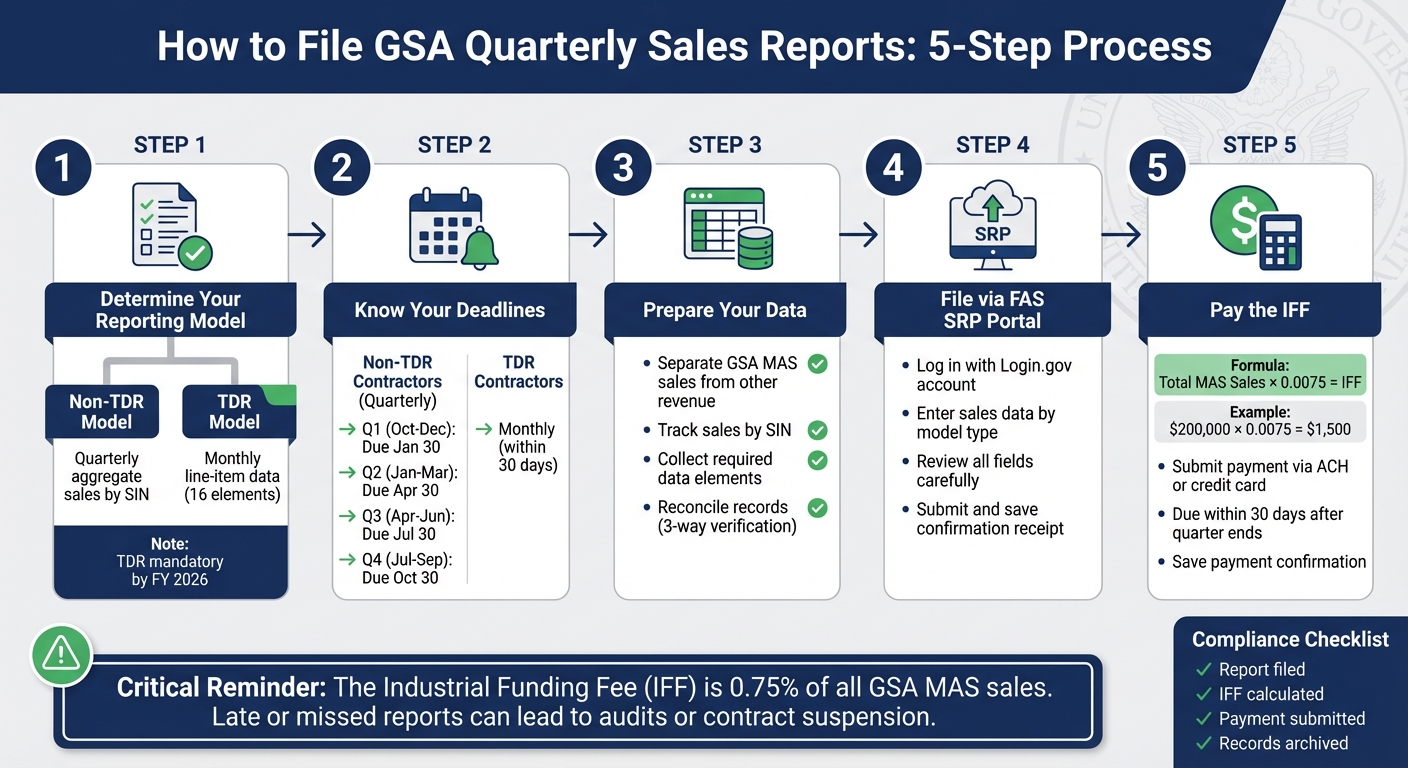
GSA Quarterly Sales Reporting Process: 5 Steps to Compliance
2GIT FAS Sales Reporting Portal (SRP) Training for Quarterly Reporting – 5/27/2021
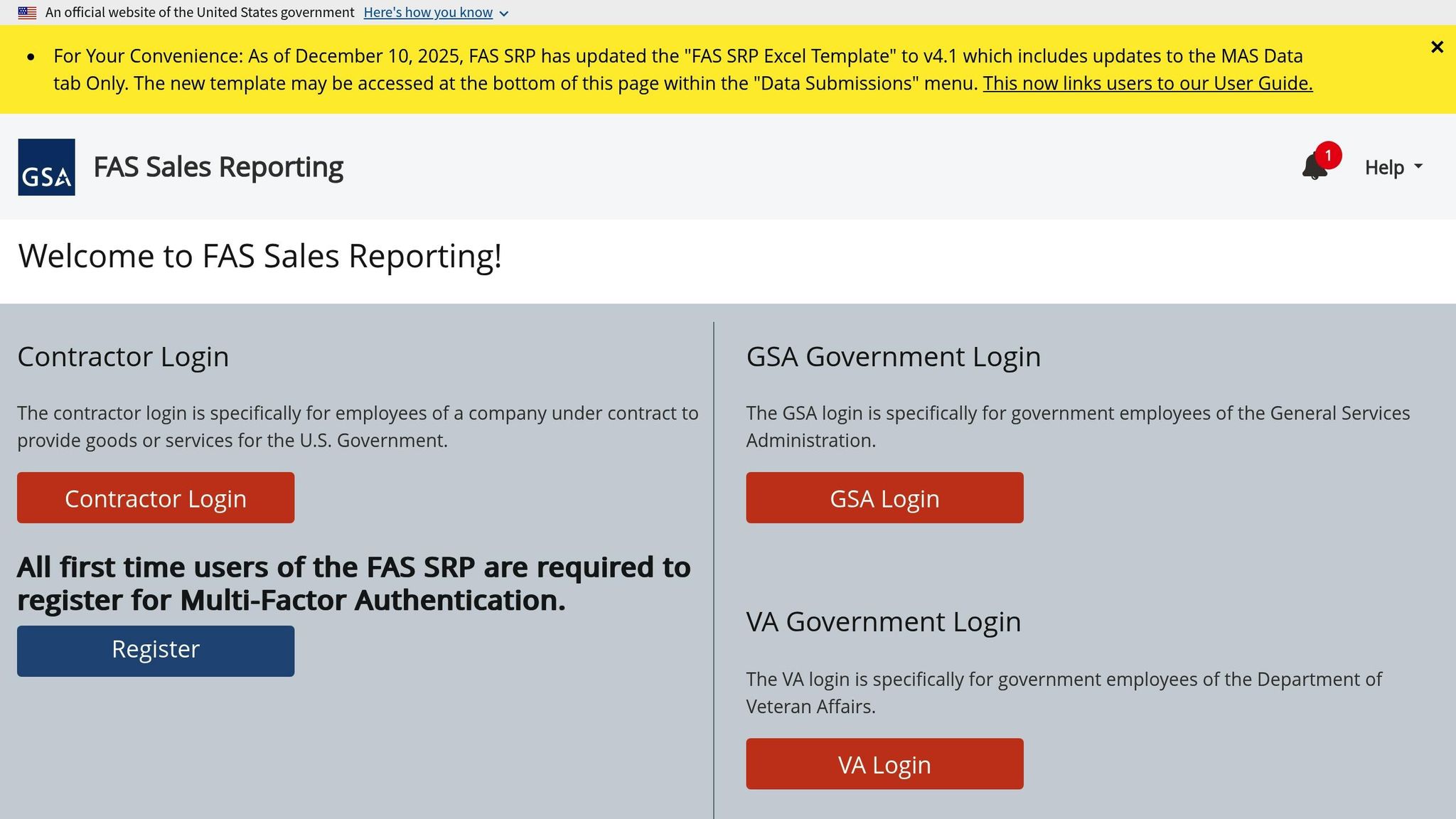
GSA Reporting Requirements Explained
If you’re an active GSA Multiple Award Schedule (MAS) contractor, you’re required to report all Schedule sales – yes, even if they amount to $0 – through the FAS Sales Reporting Portal (FAS SRP). This reporting continues throughout the life of your contract and plays a critical role in ensuring compliance with GSA’s minimum sales thresholds and Industrial Funding Fee (IFF) payments. Essentially, this process lays the groundwork for maintaining detailed sales records and calculating fees accurately.
Determine Your Reporting Model
As a GSA MAS contractor, you’ll follow one of two reporting models.
- Non-TDR Model: Report total contract sales by Special Item Number (SIN) on a quarterly basis as aggregate amounts.
- TDR Model: Submit detailed monthly line-item data for 16 elements, such as SIN, item description, manufacturer, quantity, unit price, total price, and ordering customer, via the FAS SRP.
By fiscal year 2026, the TDR model will become mandatory for all MAS contracts. A 2025 MAS Solicitation Refresh added 62 new product and cloud services SINs to the TDR requirement, bringing the total to 177 SINs. Contractors currently using the quarterly aggregate model will transition to the TDR model, so it’s essential to ensure your accounting and sales systems can consistently capture detailed line-item data.
Reporting Periods and Deadlines
You must report MAS sales to the FAS within 30 calendar days after the end of each reporting period. Here’s how it breaks down:
- Non-TDR Contractors: Follow the federal fiscal quarters. For example:
- Q1 (Oct 1 – Dec 31) reports are due by January 30.
- Q2 (Jan 1 – Mar 31) reports are due by April 30.
- Q3 (Apr 1 – Jun 30) reports are due by July 30.
- Q4 (Jul 1 – Sep 30) reports are due by October 30.
- TDR Contractors: Report data monthly, with submissions due within 30 days after the end of each calendar month.
Missing these deadlines can lead to compliance issues, which are often flagged during IOA assessments or audits.
What Is the Industrial Funding Fee (IFF)?
The Industrial Funding Fee (IFF) is a 0.75% fee applied to all reported GSA MAS sales. This fee supports the administration of the MAS program. To calculate your IFF, use the formula:
Total MAS Sales × 0.0075
For instance, if your quarterly MAS sales total $200,000.00, your IFF owed would be $1,500.00. Payments are due on the same schedule as sales reports – within 30 days after the reporting period ends. For non-TDR contractors, this aligns with quarterly reporting, while TDR contractors follow a monthly schedule.
How to Prepare Your Data for Reporting
Before diving into the FAS Sales Reporting Portal, it’s crucial to have your GSA MAS sales data in order. Proper preparation ensures compliance and avoids potential headaches. Start by clearly separating GSA MAS contract sales from all other revenue in your internal records. Every transaction you report should have supporting documents that confirm it belongs on your Schedule. To streamline this, implement systems that accurately sort and capture this data.
Track GSA Sales Separately
Your accounting or ERP system should be set up to clearly differentiate GSA MAS sales from other types of transactions, such as commercial sales, state and local contracts, or federal orders outside your MAS contract. Each GSA MAS order must have a unique identifier. For example, you might assign a specific customer code or contract code to these sales or create a separate revenue account to track only Schedule transactions. Additionally, configure your order entry system to require a "GSA MAS" selection, including the contract number and SIN, whenever staff quote or invoice using Schedule pricing. This step simplifies quarterly reporting and ensures you don’t mistakenly report – and pay IFF on – sales that fall outside your MAS contract.
Collect Required Data Elements
The data you need to report depends on whether you’re a Non-TDR contractor or a TDR contractor.
- Non-TDR contractors report aggregate sales by SIN each quarter. This includes your MAS contract number, active SINs, and the total sales dollar amount for each SIN.
- TDR contractors, on the other hand, must track 16 specific data points per line item monthly. These include details like the contract or BPA number, order identifier, SIN, item description, manufacturer name and part number (if applicable), unit of measure, UPC (if applicable), quantity, unit price, total price, and federal customer and order information.
For Non-TDR reporting, organize your data in a summary worksheet that maps each transaction to its SIN. Use tools like filters or pivot tables to subtotal sales by SIN. For TDR reporting, export invoice lines with consistent fields, such as contract number, SIN, customer, and pricing details, to ensure accuracy. Once your sales are properly flagged, gather all the required data elements based on your reporting model.
Verify Your Internal Records
Before submitting anything, perform a three-way reconciliation to ensure everything checks out. Here’s how:
- Generate a transaction report.
- Reconcile it with source documents like quotes, purchase orders, invoices, and delivery confirmations.
- Match SIN-level totals to your summary worksheet.
Some contractors go a step further by comparing these totals to their general ledger MAS revenue accounts to catch any overlooked or misclassified invoices. Keep all reconciliation workpapers organized by reporting quarter (or month for TDR) to support compliance reviews. This documentation will be invaluable during GSA’s Contractor Assessments or audits.
This verification process can help you catch common mistakes, such as misclassifying commercial sales as GSA MAS, omitting GSA Advantage! orders, assigning sales to the wrong SIN, or using gross sales figures instead of net amounts after cancellations and returns.
How to File GSA Quarterly Sales Reports in FAS SRP
Once you’ve organized and double-checked your sales data, it’s time to file your report through the FAS Sales Reporting Portal (FAS SRP). This online tool is specifically designed for GSA MAS contractors to submit their quarterly sales reports. The portal also offers step-by-step guidance to make the process smoother. Here’s how to get started.
Log Into the FAS Sales Reporting Portal
To access the FAS SRP, you’ll need a Login.gov account. If you don’t have one yet, you’ll need to create it first. After logging in, confirm that you’re reporting under the correct GSA MAS contract identifier to avoid any mix-ups.
Completing Your Sales Report
The portal will guide you through entering your sales data. Depending on your reporting model, you’ll either input aggregated sales totals or detailed transaction data. Take your time to carefully review each section and ensure all fields are filled in correctly. Accuracy is key to avoiding errors or delays.
Submitting Your Report
Once all the required data has been entered and reviewed, go ahead and submit your report. After submission, you’ll receive a confirmation receipt that includes a unique submission identifier and timestamp. Be sure to save or print this confirmation for your records – it’s your proof of filing.
How to Pay the Industrial Funding Fee (IFF)
Once you’ve filed your quarterly report, the next step is calculating and paying the Industrial Funding Fee (IFF). This fee, set at 0.75%, applies to all reportable GSA Multiple Award Schedule (MAS) sales under GSAM clause 552.238-80. Keep in mind, only sales made through your Schedule contract are subject to this fee.
Verify Sales Totals for IFF Calculation
Before calculating the IFF, take a moment to ensure your reported sales align with your internal records. Compare the totals from the FAS Sales Reporting Portal (FAS SRP) line-by-line with your accounting data, specifically filtering for GSA MAS transactions. For example, if $40,000.00 of $310,000.00 in total sales comes from an IDIQ contract, only the remaining $270,000.00 should be used for your IFF calculation. Document this reconciliation in a spreadsheet to maintain a clear audit trail.
To determine the IFF, multiply your verified quarterly sales by 0.0075. For instance:
- $250,000.00 in MAS sales: $250,000.00 × 0.0075 = $1,875.00
- $40,000.00 in MAS sales: $40,000.00 × 0.0075 = $300.00
Always round to two decimal places, and keep your calculation worksheet with your quarterly records for reference. Once everything checks out, you’re ready to submit your payment via FAS SRP.
Submit Payment via FAS SRP
Payments must be made electronically through the FAS SRP, using either ACH or a credit card. The deadline is 30 days after the quarter ends – for example, payments for Q2 sales are due by April 30.
Here’s how to make the payment:
- Log into the FAS SRP and navigate to the payment or IFF remittance section.
- Select the reporting period you’re paying for. The system may auto-fill the IFF amount based on your submitted sales – double-check that it matches your calculation.
- Choose your payment method, then enter your banking or credit card details.
- Submit the payment and save or print the confirmation, including the receipt number, for your records.
Keep Payment and Report Records
It’s crucial to retain all related documents for the life of your contract plus three years. This includes:
- Quarterly sales details
- Reconciliation spreadsheets
- FAS SRP reports
- Payment confirmations
- IFF calculation worksheets
Organize these records by fiscal year and quarter in well-labeled folders. This level of organization helps you quickly address any Industrial Operations Analyst (IOA) assessments or audits. Remember, late or insufficient IFF payments can lead to compliance issues, corrective actions, or even contract suspension. Staying on top of your records is key to avoiding these risks.
How to Maintain Compliance and Avoid Common Errors
Staying compliant with FAS SRP reporting isn’t just about submitting data – it’s about ensuring accuracy and avoiding common pitfalls. Missteps like misclassifying commercial sales as GSA MAS sales (or the other way around), failing to track sales by SIN, forgetting to include BPAs or task orders in totals, or missing the 30-day quarterly deadline for submitting reports and paying the Industrial Funding Fee (IFF) can lead to audits and compliance headaches. Underreporting sales or IFF payments is a red flag for auditors and can result in significant issues.
Common Reporting Mistakes to Avoid
One frequent error is reporting non-MAS sales. Be sure to include only the items and services listed under your MAS contract and their assigned SINs. Sales from open market transactions or other contracts must stay out of your reports. Reporting products or services outside your approved SINs can lead to serious audit findings.
For contractors using TDR, it’s critical to provide complete and accurate transaction details. Errors like missing or incorrect fields can cause data quality issues that GSA systems will flag. With TDR becoming mandatory for all MAS contracts by FY 2026, ensuring your data is both accurate and comprehensive is more important than ever. Robust internal controls are your best defense against these issues.
Set Up Internal Controls
Develop a system that flags GSA MAS orders using unique codes for SINs and IFF applicability, while assigning different codes for sales from open market or other contracts. Internally, run monthly GSA-only sales reports and cross-check them with orders in the FAS SRP system to catch any misclassifications before submitting your quarterly reports.
Create written standard operating procedures (SOPs) that clearly outline how to identify MAS orders, assign the correct SIN, apply contract pricing, code transactions, and prepare FAS SRP reports. A checklist, or even screenshots, can make the process easier for your team to follow. Regular training for your sales, contracts, and accounting teams is essential – especially after major changes like the expansion of TDR requirements. For new contractors, quarterly internal audits are a good practice, while more established contractors should audit at least annually. These audits help confirm that every MAS sale is properly reported, all orders are included in your FAS SRP submission, and the IFF calculations are accurate.
When to Get Expert Help
Sometimes internal controls aren’t enough to address persistent issues. If you’re a small business with limited staff, managing SOPs and reconciliations can quickly become overwhelming. Expert support is especially useful when you’re new to MAS contracts and still navigating FAS SRP, IFF, and TDR requirements – or when transitioning to mandatory TDR and needing to update your systems to capture the required data.
If you’re dealing with audit findings, IOA observations, or missed reporting deadlines, an expert can step in to review historical data, pinpoint gaps, and recommend corrective actions. Specialists can also help design compliant tracking systems, set up sales reporting calendars, conduct mock audits, and assist with negotiations or clarifications with GSA. By bringing in outside expertise, you reduce the risk of costly mistakes and free up your internal team to focus on what they do best – driving sales and delivering results.
Conclusion
Submitting GSA quarterly sales reports doesn’t have to be complicated if you stick to a consistent routine. Keep your GSA MAS records separate, double-check your reporting model, reconcile your data, and ensure your report is submitted through the portal within 30 days of the quarter’s end. Don’t forget to pay the 0.75% Industrial Funding Fee (IFF). By following a clear review-submit-archive process and meeting deadlines, you can maintain compliance and stay prepared for audits.
But there’s more to timely reporting than just meeting requirements. It’s also a strategic tool. Regular, accurate reporting helps you track progress toward GSA’s minimum sales thresholds – $100,000 in the first five years and $125,000 in each following five-year period. This visibility lets you spot revenue trends and address potential issues before they become major problems. With GSA planning to extend mandatory Transactional Data Reporting (TDR) to all MAS contracts by FY 2026, having reliable systems and accurate data is becoming even more critical.
For small businesses, juggling these reporting tasks alongside daily operations can feel overwhelming. That’s where expert help can step in. GSA Focus offers tailored support, helping businesses design compliant tracking systems, review quarterly data, configure systems for the 16 required TDR data elements, and even handle reporting as a done-for-you service. This lets your team concentrate on what they do best while staying compliant.
To get started, review your MAS contract reporting model and mark all FAS SRP deadlines on your calendar. If you’re finding gaps in your process, scrambling last minute, or struggling with sales classification or IFF calculations, it may be time to bring in a GSA-focused advisor like GSA Focus. They can help refine your systems, provide training, or take over reporting entirely. Investing in strong systems and expert guidance now can save you from compliance headaches down the road.
FAQs
What is the difference between Non-TDR and TDR reporting models?
The main distinction is in the way sales data is shared with the GSA.
Non-TDR (Non-Transaction Data Reporting) involves providing detailed information for every single sale. This means reporting specific data for each transaction, which can be a more labor-intensive and intricate process.
TDR (Transaction Data Reporting), on the other hand, streamlines the process. Instead of reporting individual transactions, you submit aggregated sales data. This approach is less detailed and significantly faster.
How can I accurately track GSA MAS sales to stay compliant?
To keep your GSA MAS sales on track and meet compliance standards, it’s crucial to regularly compare your sales data with reports from GSA eBuy and GSA Advantage. Make sure to maintain thorough records of every transaction and use an accounting system that aligns with GSA contract requirements.
Staying organized and keeping your records up-to-date can help you minimize mistakes and steer clear of compliance problems. Consistent oversight and solid documentation are the foundation for adhering to GSA guidelines effectively.
What should I do if I miss a GSA sales report deadline or find an error in my submission?
If you realize you’ve missed a deadline or spot an error in your GSA sales report, don’t wait – address it immediately. Contact the GSA right away to inform them of the issue and follow their guidance on how to correct or resubmit the report.
Acting quickly not only helps maintain compliance but also reduces the chances of penalties or interruptions to your contract. Moving forward, make it a habit to thoroughly review your reports to prevent similar errors.
Related Blog Posts
- How to Track Federal Sales with GSA Tools
- Ultimate Guide to GSA Sales Reporting
- How to Get a GSA Contract in 6 Steps
- GSA Reporting Requirements Explained