

Only about 4% of small businesses hold a GSA Schedule contract, yet the average small business with one earns roughly $927K per contract annually from a federal marketplace that processed $51.9 billion in FY2024 alone. That gap is not about eligibility. It is about preparation, process discipline, and knowing exactly where to start. This guide walks you through every stage of the GSA eOffer portal, from the prerequisites you need before logging in to what happens after you hit submit, so you can approach the process with confidence and a real shot at approval.
Table of Contents
- Understanding GSA eOffer: What it is and why it matters
- GSA eOffer prerequisites: Essential prep before you start
- Step-by-step walkthrough of the GSA eOffer process
- Post-submission: What to expect and how to handle requests
- Common pitfalls and how to avoid GSA eOffer rejection
- A fresh perspective: Why most small businesses struggle with GSA eOffer (and how to beat the odds)
- Ready for GSA success? Your next steps
- Frequently asked questions
Key Takeaways
| Point | Details |
|---|---|
| GSA eOffer is critical | The eOffer portal is the official gateway to GSA Schedule contracts, providing direct access to government buyers. |
| Preparation prevents delays | SAM.gov registration, digital certificates, and training are essential prerequisites to avoid rejection and speed up approval. |
| Follow each submission step | Accurately completing and uploading every required document is vital, as incomplete submissions cause most delays. |
| Beware common pitfalls | Top reasons for rejection include file formatting problems, wrong SINs, and SAM discrepancies. |
| Leverage expert support | GSA resources, training, and consultants can greatly improve acceptance odds, especially for small businesses new to the process. |
Understanding GSA eOffer: What it is and why it matters
The GSA eOffer portal is the official online platform for submitting new offers and modifications for Multiple Award Schedule (MAS) contracts. Think of it as the front door to the federal marketplace. Every business that wants a GSA Schedule contract must walk through it.
The MAS program is the federal government’s primary vehicle for buying commercial products and services. When an agency needs IT support, consulting, furniture, or professional services, they shop through this program. Understanding Multiple Award Schedule basics is the first step to seeing why getting on schedule is so valuable for a small business.
Here is why eOffer matters compared to older paper-based methods:
- Speed: Digital submissions eliminate postal delays and allow real-time status tracking.
- Transparency: You can monitor your offer’s progress at every review stage.
- Audit trail: Every upload, signature, and interaction is timestamped, protecting you in disputes.
- Direct access: Approved vendors appear on GSA Advantage and can be found by thousands of contracting officers.
| Feature | Traditional submission | GSA eOffer |
|---|---|---|
| Submission method | Paper or email | Fully digital portal |
| Status tracking | Phone or email inquiry | Real-time dashboard |
| Document revision | Mail or resend | Upload directly in portal |
| Signature process | Wet ink signature | Digital certificate |
| Average processing speed | Slower, no set timeline | Structured review phases |
The numbers make the opportunity clear. Small businesses hold GSA contracts at a fraction of their potential, yet those that do hold them average nearly $1 million in annual government revenue. The barrier is not the market. It is the process.
“Getting on the GSA Schedule is not just a contract. It is a long-term revenue channel that keeps paying as long as you maintain compliance and actively market to agencies.”
GSA eOffer prerequisites: Essential prep before you start
Once you understand why eOffer matters, it is critical to address what you need before logging in. Skipping this phase is the single biggest reason small businesses waste weeks on a submission that gets rejected before a contracting officer even reads it.
The MAS Roadmap outlines four core prerequisites you must complete before submitting:
- SAM.gov registration takes up to 10 business days to activate. Your registration must be active and current before you can submit. An expired SAM registration is an automatic rejection trigger.
- Digital certificate from an approved provider such as IdenTrust or DigiCert. This certificate is what allows you to legally sign your offer electronically. It has an expiration date, so check it before starting.
- Pathways to Success training is a mandatory online course that takes roughly 3 to 4 hours to complete. GSA requires proof of completion before your offer can move forward.
- Readiness assessment to confirm your business meets the minimum requirements for the schedule you are targeting, including two years of financial data and relevant past performance.
Understanding the full GSA Schedule Number steps before you begin helps you see how these prerequisites feed into the larger process. Similarly, reviewing an offer preparation checklist early prevents scrambling for documents at the last minute.
Here is a quick checklist of what to gather before you open eOffer:
- Active SAM.gov registration with current CAGE code
- Valid digital certificate installed and tested on your browser
- Pathways to Success completion certificate
- Two years of audited or reviewed financial statements
- Relevant past performance references (typically three)
- Commercial price list or rate card
- Completed solicitation provisions and attachments
Pro Tip: Create a shared calendar with hard deadlines for every credential and document expiration date. SAM.gov registrations expire annually, and a lapsed registration can freeze your submission mid-review.
“Many businesses invest weeks building their offer only to discover their SAM registration expired three days before submission. A simple calendar reminder prevents a months-long delay.”
Step-by-step walkthrough of the GSA eOffer process
With your prerequisites in place, you are ready to work through the actual submission steps. The eOffer Help Center outlines the core workflow: download and review the MAS solicitation, complete all required provisions, upload supporting documents, and digitally sign and submit your proposal.
Here is how each step breaks down in practice:
- Log in to eOffer using your digital certificate. Make sure you are using a compatible browser. Microsoft Edge in IE mode is the recommended option.
- Select the correct solicitation for your Special Item Number (SIN). Choosing the wrong SIN is one of the top rejection reasons, so take time to match your services to the right category.
- Download the solicitation package and read it fully before filling anything in. The package includes instructions, required templates, and clauses you must address.
- Complete all provisions offline. Do not type directly into the portal for long sections. Work in Word or Excel, then paste or upload. This prevents character limit errors and data loss.
- Upload supporting documents in the correct file format. GSA specifies acceptable formats for each document type. PDFs are generally preferred for narrative documents; Excel is required for pricing templates.
- Review your document upload checklist one final time before signing. A missing attachment is the most avoidable rejection.
- Digitally sign and submit your offer using your certificate. You will receive a confirmation number. Save it.
If you are applying for a professional service schedule, the document requirements differ slightly from product-based schedules, so confirm the specific attachments required for your SIN.

| Step | Action | Estimated time |
|---|---|---|
| 1 | Login and SIN selection | 30 minutes |
| 2 | Solicitation download and review | 2 to 4 hours |
| 3 | Provisions and templates completion | 8 to 20 hours |
| 4 | Document gathering and formatting | 4 to 8 hours |
| 5 | Upload and portal review | 2 to 3 hours |
| 6 | Digital signature and submission | 30 minutes |
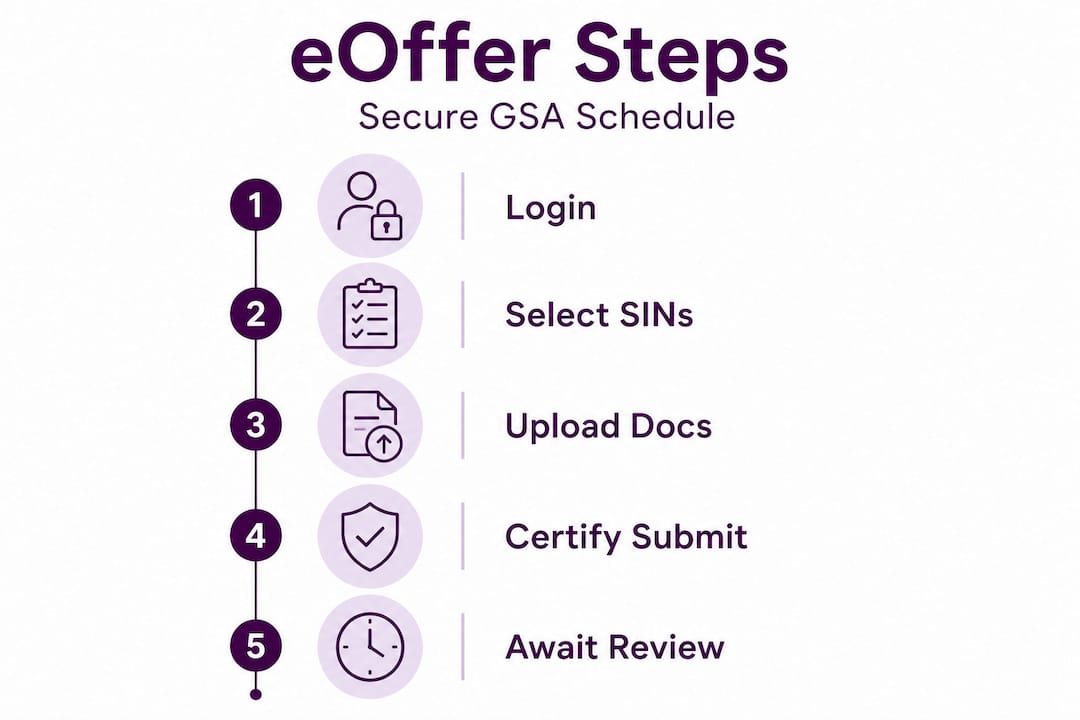
Important stat: 62% of rejections stem from incomplete or incorrectly formatted documents. That means most rejections are preventable with careful preparation.
Pro Tip: Always prepare and save your supporting documents offline before uploading. The eOffer portal has character limits and session timeouts that can erase unsaved work. Treat the portal as a final upload destination, not a drafting tool.
Post-submission: What to expect and how to handle requests
Now that your offer is in, here is what happens next and how to stay proactive. Many businesses submit and then go quiet, which is a mistake. The post-submission phase requires active attention.
The review process follows these phases:
- Completeness check (5 to 10 days): GSA reviews whether all required documents are present. Missing items trigger an immediate clarification request (CR).
- Technical evaluation (45 to 60 days): A contracting officer reviews your offer for compliance with solicitation requirements. This is where substance matters.
- Pricing review: GSA compares your proposed rates against commercial pricing and comparable market data. Be ready to justify every number.
- Negotiations: The contracting officer may request price reductions or clarifications before issuing a contract.
- Award: If everything is approved, you receive your contract number and can begin marketing to agencies.
The total timeline from submission to award runs 6 to 12 months for most businesses. Plan your cash flow accordingly.
Clarification requests are normal. They are not rejections. Respond within 5 to 10 business days, or you risk losing your place in the queue. Missing a CR deadline is one of the most common and most avoidable causes of delay.
For IT companies, the FASt Lane program offers accelerated review of under 45 days for new offers and under 48 hours for modifications, provided you meet eligibility requirements and respond to all inquiries within 24 hours. Losing FASt Lane eligibility by missing a single response window is a costly mistake.
Understanding how to use the federal GSA process within your business operations helps you stay organized through this long review window.
Pro Tip: Assign one specific team member to monitor both the eOffer portal and your business email every single day while your offer is under review. A missed CR notification can set your timeline back by months.
“The businesses that get awarded fastest are not always the ones with the best offers. They are the ones who respond to clarification requests the same day they arrive.”
Common pitfalls and how to avoid GSA eOffer rejection
Understanding the process is half the battle. Now, here is how to keep from falling into the most common traps.
The top rejection causes by frequency are:
- Wrong SIN selection (37%): Businesses apply under a category that does not match their actual services. Study the SIN descriptions carefully before selecting.
- Pricing mismatches (32%): Your proposed rates conflict with your commercial price list or with rates you have charged other customers. Consistency is critical.
- Incomplete SIN templates (28%): Required template sections are left blank or partially filled. Every field matters.
- Incorrect file formatting (19%): Documents submitted in unsupported formats or with incorrect naming conventions get flagged immediately.
- SAM discrepancies and expired certificates: Your SAM.gov data must match your offer exactly. A single address mismatch can trigger a rejection.
Stat callout: Wrong SIN selection alone accounts for more than one in three rejections. That is a problem that has nothing to do with your qualifications and everything to do with preparation.
Small businesses should prioritize SAM accuracy, use official checklists and the new offeror XLSX template, prepare all documents offline, and monitor eOffer and email consistently for clarification requests.
Additional tips to protect your submission:
- Use Microsoft Edge in IE mode for best portal compatibility
- Verify your digital certificate works before submission day, not on it
- Cross-reference your commercial price list with every rate in your pricing template
- Have someone outside your team review your SIN selection before submitting
Many of the myths about GSA contracts that discourage small businesses come from hearing about rejections without understanding their root causes. Most rejections are fixable and preventable. Knowing the GSA Marketplace overview also helps you understand what buyers actually look for once you are on contract.
Pro Tip: Before you submit, use the eOffer Help Center’s resources and a peer checklist to verify every document three times. One missed attachment undoes weeks of preparation.
A fresh perspective: Why most small businesses struggle with GSA eOffer (and how to beat the odds)
Here is something most guides will not tell you. The eOffer process is not actually that complicated. The instructions exist. The checklists are available. The training is free. And yet, rejection rates remain stubbornly high.
The real problem is process ownership. Most small businesses treat the GSA application like a one-person side project squeezed between client work and operations. Nobody owns it fully. Deadlines slip. Documents get assembled in a rush. The Pathways to Success training gets done the night before submission. That is not a complexity problem. It is a discipline problem.
The businesses that succeed treat the eOffer application like a product launch. They assign a project owner, build a timeline with milestones, and hold internal checkpoints. They do not start uploading until every document has been reviewed by at least two sets of eyes.
There is also a real question about when to go it alone versus when to bring in help. If your team has experience with government contracting, strong writing skills, and the bandwidth to dedicate 40 to 80 hours to the application, the DIY path is viable. If you are stretched thin, missing that expertise, or have already been rejected once, the cost of a qualified consultant often pays for itself in time saved and rejection avoided. Knowing what to look for when choosing a GSA consultant can help you make that call wisely.
One underused resource: GSA’s Office of Small and Disadvantaged Business Utilization (OSDBU), along with SBA and APEX Accelerators, offers free counseling for small businesses navigating the MAS process. Young companies should also look into the Startup Springboard option, which allows newer firms with less than two years of financial history to apply under modified requirements.
The businesses that beat the odds are not the ones with the biggest teams or the most resources. They are the ones that take the process seriously from day one.
Ready for GSA success? Your next steps
Navigating the GSA eOffer process takes preparation, patience, and the right guidance. The steps in this guide give you a solid foundation, but having experienced support in your corner can make the difference between a rejection and a contract award.
At GSA Schedule Services, we work with small and medium-sized businesses every day to simplify exactly what this guide covers: readiness assessments, document preparation, SIN selection, pricing strategy, and post-submission support. Our team knows where the process breaks down and how to keep your offer moving forward. Whether you are starting fresh or recovering from a rejection, explore our resources and services to see how we can help you reach contract award faster and with fewer headaches.
Frequently asked questions
How long does the GSA eOffer process take from start to finish?
The GSA eOffer process typically takes between 6 and 12 months to complete, from initial submission to contract award. Responding promptly to clarification requests can help keep your timeline on the shorter end.
What are the most common reasons GSA eOffer applications are rejected?
The most common rejection reasons are wrong SIN selection (37%), pricing mismatches (32%), incomplete SIN templates (28%), and incorrect file formatting (19%). Most of these are preventable with careful preparation and a thorough pre-submission review.
How do I get help if I have technical issues with eOffer?
The eOffer Help Center provides a user guide, phone support at 1-866-472-9114, and email support at eoffer@gsa.gov. Reaching out early when you spot a technical issue prevents delays from compounding.
Is there a fast-track option for IT companies submitting GSA eOffers?
Yes, the FASt Lane program provides accelerated review for eligible IT offers, reducing new offer review time to under 45 days. You must respond to all inquiries within 24 hours to maintain eligibility.
What role does a digital certificate play in the GSA eOffer process?
A digital certificate, obtained from an approved provider such as IdenTrust or DigiCert, is required to securely sign and submit your offer. It must be current and properly installed on your browser before you begin the submission process.
Recommended
- How to Obtain a GSA Schedule Number: Step-by-step
- Considering a GSA Schedule contract? Here’s What You Need to Know
- Interested in Getting a GSA Professional Service Schedule? Here’s How
- I Have My GSA Contract, Now What?
Article generated by BabyLoveGrowth
