
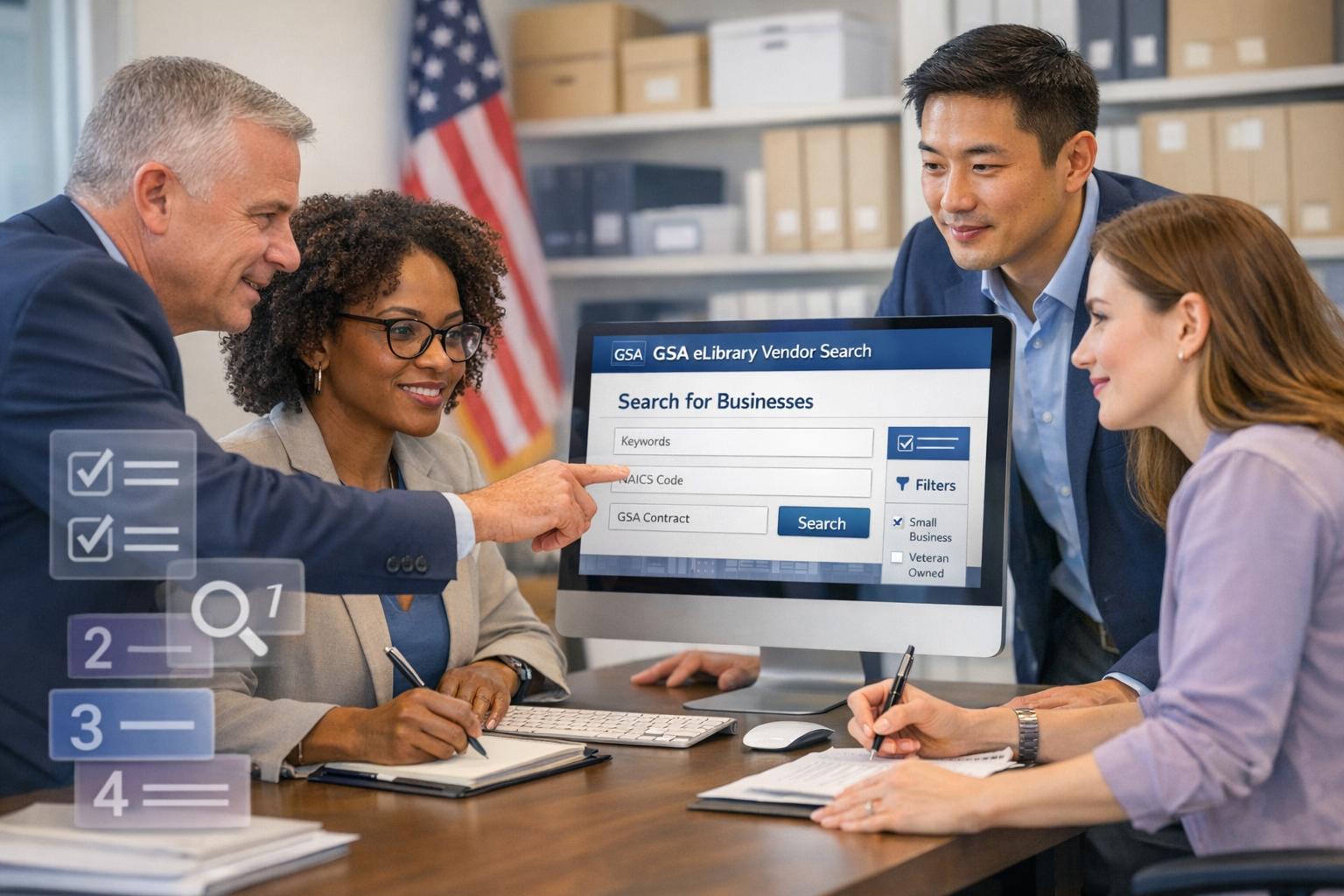
The GSA eLibrary is a 24/7 online resource for accessing GSA and VA contract award information, updated nightly. It helps small businesses find government contracting opportunities, research competitors, and connect with federal buyers. This guide walks you through five steps to use the Vendor Search Tool effectively, whether you’re identifying potential partners, analyzing contract details, or exploring agency buying patterns.
Key Takeaways:
- Step 1: Access the GSA eLibrary at gsaelibrary.gsa.gov and explore its search tools (Quick Search, Contractor Directory, Total Solution Search).
- Step 2: Use targeted keywords, NAICS codes, or SINs for precise vendor searches.
- Step 3: Review vendor listings for socio-economic indicators, certifications, and contract vehicles.
- Step 4: Analyze contract details, agency purchasing trends, and award history to identify opportunities.
- Step 5: Contact vendors using the provided details and use GSA Advantage for deeper insights.
By following these steps, you can streamline your federal contracting research and make informed decisions. Ready to dive in? Let’s break it down.
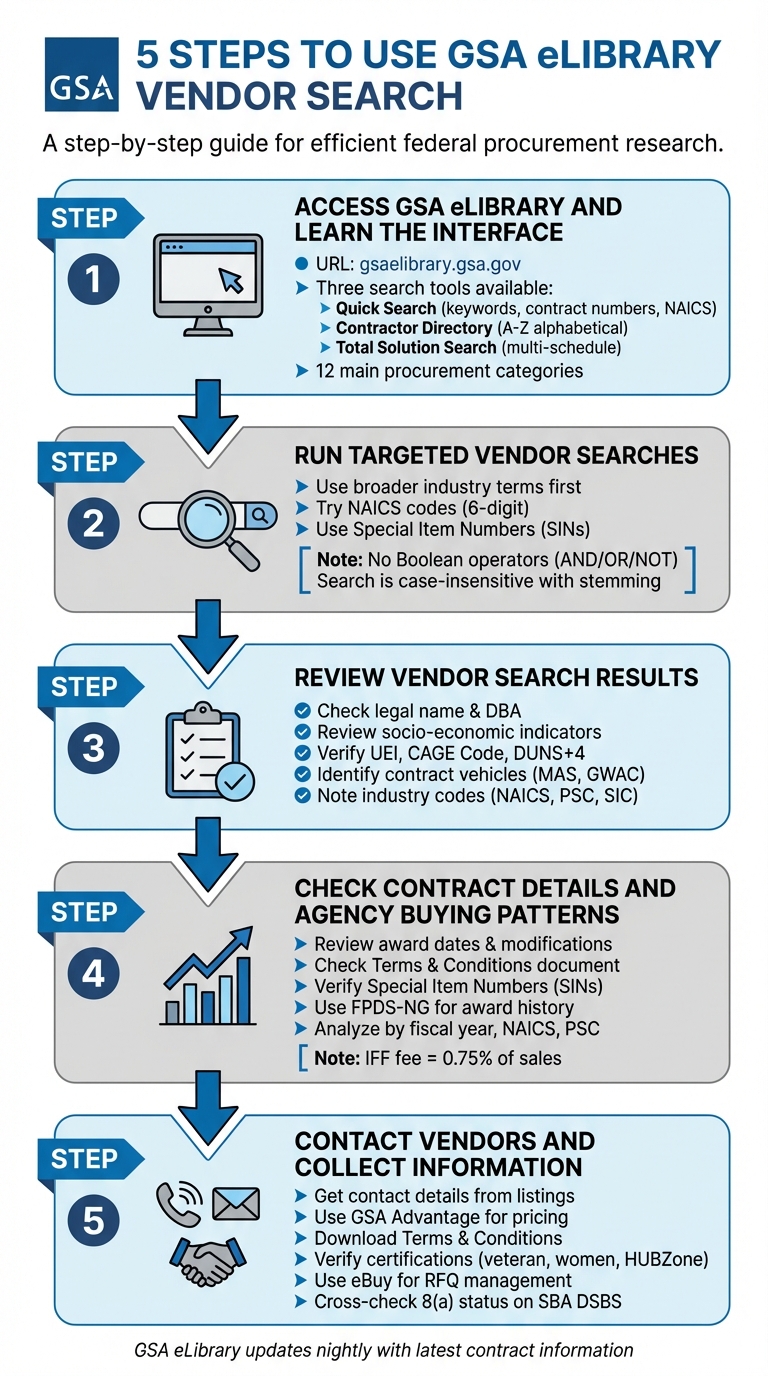
5-Step Process for Using GSA eLibrary Vendor Search Tool
GSA eLibrary – Your GovCon Goldmine for Researching Potential Teaming Partners and Price Comparisons
Step 1: Access GSA eLibrary and Learn the Interface
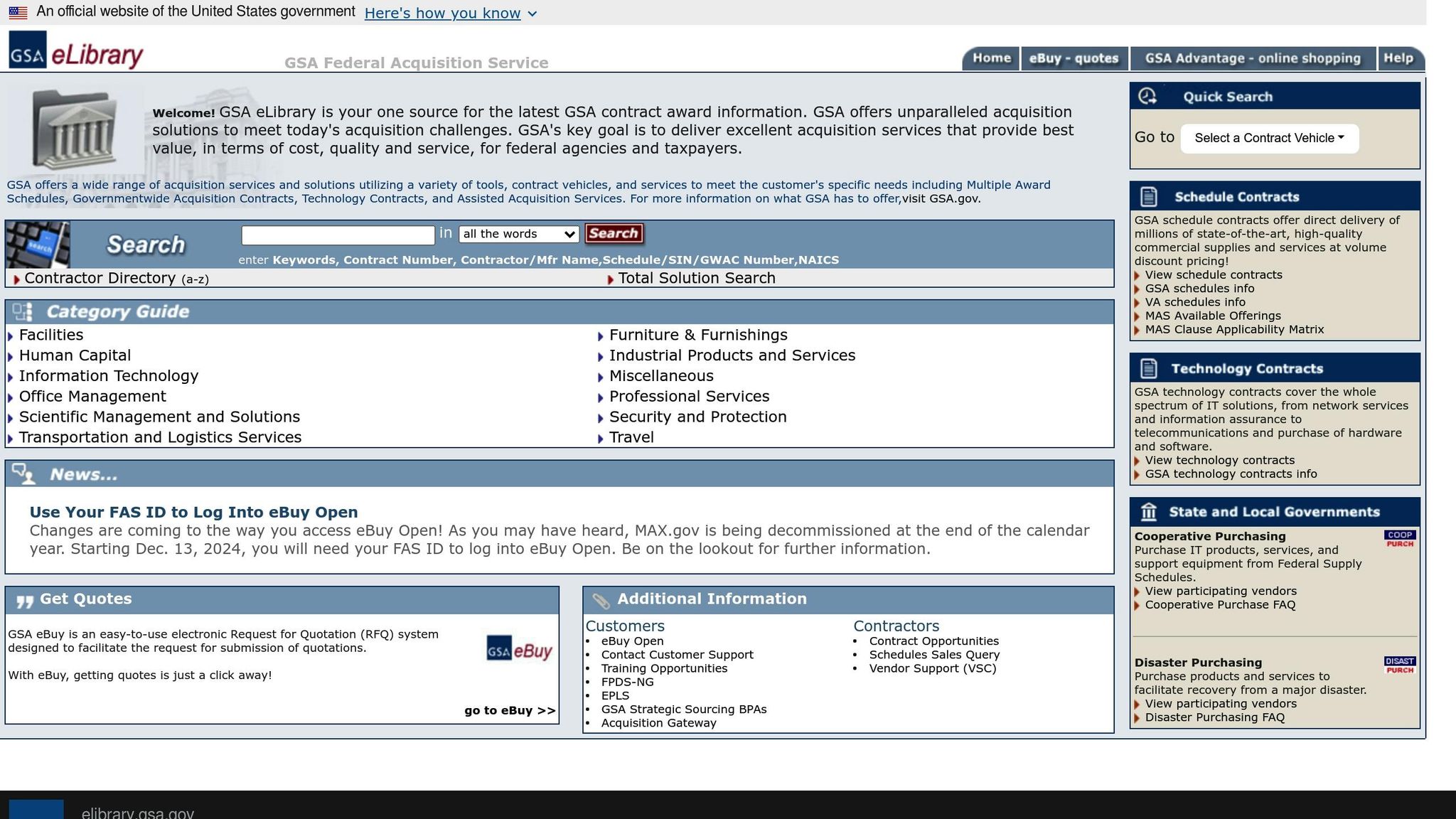
To get started, head over to the GSA eLibrary at https://www.gsaelibrary.gsa.gov (or elibrary.gsa.gov). Before entering any information, make sure the URL is secure by checking for a lock icon and the ".gov" domain. Once you’re on the site, you’ll find several tools to help you search and navigate effectively.
Find the Search Tool
Right at the top of the homepage, you’ll see the search bar. This is your primary tool for looking up information. You can enter a variety of details here, such as keywords, contract numbers, contractor or manufacturer names, Schedule/SIN/GWAC numbers, or NAICS codes. If you know the name of a company but lack specific contract details, the Contractor Directory (a-z) link allows you to browse vendors alphabetically. For more complex procurement needs involving multiple schedules, the Total Solution Search tool is available.
| Search Type | What You Can Enter |
|---|---|
| Quick Search | Keywords, Contract Number, Contractor/Manufacturer Name, Schedule/SIN/GWAC Number, NAICS |
| Contractor Directory | Alphabetical listing (A-Z) of all GSA contractors |
| Total Solution Search | Tool for handling complex, multi-schedule requirements |
Learn the Key Features
The homepage organizes government procurement options into 12 main categories, such as Information Technology, Professional Services, Facilities, Furniture & Furnishings, and Human Capital. These categories help streamline your search process. When you perform a search, the results are typically divided into three sections:
- Description Matches: Vendors whose descriptions include your search terms.
- Contractor Matches: Companies whose names align with your query.
- Keyword Matches: Listings tagged with relevant keywords.
Search results also provide essential vendor details, such as socio-economic indicators (e.g., "w" for Women-Owned Small Business or "dv" for Service-Disabled Veteran-Owned Small Business). You’ll also find SAM UEI numbers and government points of contact to assist with further inquiries.
Step 2: Run Targeted Vendor Searches
Fine-tune your search by using precise keywords and understanding how the system processes queries. By refining your approach and knowing the system’s limitations, you can improve the quality of your results.
Pick Effective Keywords
Begin with broader industry terms instead of overly specific phrases. For instance, if you’re searching for IT support services, start with terms like "information technology" or "IT services" rather than something as narrow as "cloud-based enterprise resource planning implementation." Being too specific might lead to zero results, forcing you to restart the search.
For more accurate results, try using NAICS codes instead of descriptive terms. These six-digit codes classify businesses by industry and can directly connect you with vendors approved for those categories. Similarly, Special Item Numbers (SINs) are useful for pinpointing vendors specializing in particular subcategories of products or services. Both approaches are often more reliable than relying on keywords alone.
Know the Search Rules and Limits
The search tool is case-insensitive and uses stemming rules, meaning it matches root words and their variations. For example, searching "consult" will also return results for "consulting", "consultant", and "consultants."
However, it’s important to note that Boolean operators like AND, OR, or NOT are not supported. You can’t combine terms using these commands to refine your results. Instead, stick to entering one clear keyword, NAICS code, or SIN at a time. If your initial search doesn’t work, switch to a different identifier rather than trying to create complex strings.
Also, be aware that socio-economic indicators in search results reflect a vendor’s status at the time of contract award. Updates made in the System for Award Management (SAM) don’t automatically sync with eLibrary, meaning a vendor’s current status might differ. If this information is critical for your procurement, verify it directly on SAM.gov. Additionally, the system has difficulty identifying 8(a) program participants. To confirm this designation, consult the SBA’s Dynamic Small Business Search (DSBS) or SAM.gov. Following these guidelines can help you conduct more precise and reliable searches.
Step 3: Review Vendor Search Results
Once you’ve narrowed down your search, it’s time to dive into the details. This step is all about verifying vendor credentials and understanding their contract vehicles to ensure they meet your needs.
After running your search, you’ll see a list of contractors along with key details. The legal company name is listed first, followed by any "Doing Business As" (DBA) name in parentheses. This helps identify companies operating under alternate public names, such as subsidiaries or brand aliases .
Next to each contractor’s name, you’ll notice socio-economic indicator codes. These codes reflect the vendor’s status at the time their contract was awarded, which can provide valuable insights into their qualifications .
Read Contractor Listings
Each contractor listing includes essential registration details like the UEI, CAGE Code, and DUNS+4 number, which you can use to verify their registrations. You’ll also find industry classification codes – such as NAICS, PSC (Product Service Code), and SIC – that help confirm whether the vendor’s expertise aligns with your specific requirements. Some listings even include geographic details, such as certified regions or preferred places of performance, which could influence your procurement decisions.
If a listing includes a Parent UEI or Parent DUNS number, it indicates the contractor is part of a larger corporation. This is worth noting, as it can provide insight into the vendor’s stability and resources. These details are critical for evaluating a vendor’s ability to meet your contractual needs.
Find Relevant Contract Vehicles
Another key aspect to review is the type of contract vehicle each contractor holds. These could include Multiple Award Schedules (MAS), Governmentwide Acquisition Contracts (GWAC), or specialized Technology Contracts. The contract vehicle determines how agencies can make purchases from that vendor, so understanding this is essential.
To make your review easier, results are grouped into broad service categories like Information Technology, Professional Services, Facilities, and Industrial Products. This organization helps you quickly identify contractors that align with your specific needs. Additionally, some vendors participate in specialized programs, such as Cooperative or Disaster Purchasing, which can simplify and expedite your vendor selection process.
Step 4: Check Contract Details and Agency Buying Patterns
Now that you’ve reviewed vendor listings, it’s time to dive deeper into contract details and agency purchasing habits. This step helps you identify real opportunities and understand the competitive environment better.
Review Contract Information
Start by examining key contract specifics like award dates, modifications, and the "Terms & Conditions / Price List" document. This document provides insight into the vendor’s order acceptance period and details about labor categories and rates. Pay attention to the difference between the "Current Option Period End Date" and the "Ultimate Contract End Date", as this highlights how long the vendor is authorized to accept orders.
Check the assigned Special Item Numbers (SINs) to verify whether the vendor is authorized to provide the products or services you’re looking for. Additionally, review their contract vehicles and performance periods to ensure they fit your procurement needs.
Once you’ve gathered these contract details, combine them with procurement data to uncover buying patterns and identify future opportunities.
Leverage Data for Insights
Use external data tools to analyze agency buying trends and vendor activity. For instance, GSA eLibrary links to resources like FPDS-NG (Federal Procurement Data System-Next Generation) for award history and Schedules Sales Query Plus for sales data. These tools allow you to track which agencies are purchasing from specific vendors and how much they’re spending.
Filter data by industry, fiscal year, NAICS code, and Product and Service Code (PSC) using FPDS-NG or USAspending.gov. Look at fields like "Type of Set Aside" and "Extent Competed" in award data to see if agencies are prioritizing small business categories or holding open competitions. This information can help you tailor your strategy.
Dig into contract modifications to understand the lifecycle of a contract and anticipate when re-compete opportunities might arise. Keep in mind the Industrial Funding Fee (IFF) for MAS contracts, which is currently set at 0.75% of reported sales. This fee impacts overall pricing and should be factored into your planning.
Step 5: Contact Vendors and Collect Information
Once you’ve reviewed contract details and agency purchasing patterns, the next step is reaching out to vendors for more information. This stage naturally follows your contract analysis and provides an opportunity to clarify details and gather insights. The GSA eLibrary is your go-to resource for vendor contact details, including phone numbers, emails, and physical addresses. Each vendor listing also includes a link to their official website and their SAM UEI for verification purposes.
Use GSA Advantage for Deeper Insights
By clicking the "View Catalog" link on a vendor’s listing, you’ll be directed to their GSA Advantage page. Here, you can explore detailed product pages, part numbers, and GSA-negotiated pricing. Products are displayed on catalog pages, while services are available as downloadable Excel files (Services Plus Files).
"GSA Advantage is an online shopping and ordering system that provides access to thousands of contractors and millions of supplies (products) and services." – GSA Vendor Support Center
To ensure you’re making informed decisions, download the Terms & Conditions file. This document outlines delivery times, warranties, and available discounts. If your agency prioritizes eco-friendly procurement, GSA Advantage offers filters to help you locate green products. Additionally, you can confirm business certifications – such as veteran-owned, women-owned, or HUBZone designations – directly through the platform.
After collecting these details, consolidate the vendor data to streamline your follow-up efforts.
Organize and Track Vendor Information
Establish a system to keep vendor information well-organized. Record key details such as the vendor’s name, DBA, contract number, NAICS code, and a direct link to their GSA Advantage page. Group vendors by their contract vehicles or Special Item Numbers (SINs) to ensure they align with your procurement requirements.
For more efficient vendor outreach, cross-check critical designations like 8(a) status using tools like the SBA’s DSBS or SAM.gov. Before submitting a formal Request for Quotation (RFQ), use the "go to eBuy" link to manage vendor interactions and verify details. Keep in mind that starting December 13, 2024, a FAS ID will be required to access eBuy Open for viewing historical quote data and handling vendor communications.
Conclusion
Mastering GSA eLibrary can give your business a strong advantage in federal contracting. By following a clear process – accessing the platform, conducting targeted searches, analyzing results, reviewing contract details, and connecting with vendors – you’ve established a reliable method for competitive analysis and market planning. With nightly updates, the platform ensures you’re always working with the latest data.
Use the insights you gather to identify competitors, dissect contract terms, and pinpoint gaps in the market. Take advantage of tools like the Total Solution Search to refine your research, and export contract data for offline analysis to spot emerging trends.
Consistency is key to staying competitive. Regularly conducting research helps you adapt to the evolving federal marketplace. Keep an eye on Best-in-Class contract designations to understand government-wide preferences, and track competitor sales using tools like the FAS Schedule Sales Query Plus. This ongoing effort allows you to align your offerings with government purchasing trends and identify the most profitable contract opportunities.
GSA eLibrary also opens doors to subcontracting opportunities. Use it to find prime contractors and form partnerships that add value to federal agencies. If your business qualifies for socio-economic programs like HUBZone, 8(a), or WOSB, the platform’s filters make it easier to locate set-aside contracts tailored to your qualifications. These partnerships can become a cornerstone of your broader strategy.
"GSA’s key goal is to deliver excellent acquisition services that provide best value, in terms of cost, quality and service, for federal agencies and taxpayers." – GSA Federal Acquisition Service
The vendor data you gather through GSA eLibrary can serve as the foundation for a robust strategic plan. Cross-check your findings with tools like the Federal Procurement Data System to analyze historical agency spending, and use Market Research as a Service for automated insights. Together, these resources transform GSA eLibrary into a powerful guide for success in federal contracting.
If you’re looking for expert support, consider partnering with GSA Focus to simplify the process and tap into the lucrative opportunities the federal marketplace offers.
FAQs
How can I get accurate results when using the GSA eLibrary vendor search?
When searching, focus on using specific keywords or exact phrases that directly relate to what you’re looking for – things like contract numbers, contractor names, Schedule/SIN, or NAICS codes. Be sure to double-check your spelling and use the correct search fields to get the most accurate results.
The GSA eLibrary database is refreshed every night, ensuring it always contains the latest information. Being precise with your search terms will save you time and help you locate exactly what you need.
Why is it better to use NAICS codes instead of keywords when searching?
When it comes to searching, NAICS codes can be a game changer. Unlike keywords, which can sometimes be too broad or ambiguous, NAICS codes offer a standardized way to classify industries. This means your search results are more precise and directly tied to specific business categories, cutting through the noise of overlapping or vague keywords.
These codes are particularly handy on platforms like GSA eLibrary. Since they align with federal contracting classifications, NAICS codes make it easier to zero in on vendors or opportunities that match your industry. The result? You save time and get more relevant results, making your search process far more efficient.
How do I check a vendor’s socio-economic status and certifications?
To determine a vendor’s socio-economic status, start by searching for the vendor in GSA eLibrary. Look at the Socio-Economic Indicators column, which shows designations like Small Business, Women-Owned, or 8(a) as they were recorded at the time the contract was awarded. For the latest certification details, check directly in SAM or reach out to the MAS Helpdesk for support.
Related Blog Posts
- 5 Tools for GSA Competitor Research
- 5 Steps to Meet GSA Prequalification Standards
- What Services Can You Sell Under a GSA Schedule?
- How To Use GSA eLibrary for Competitor Research
