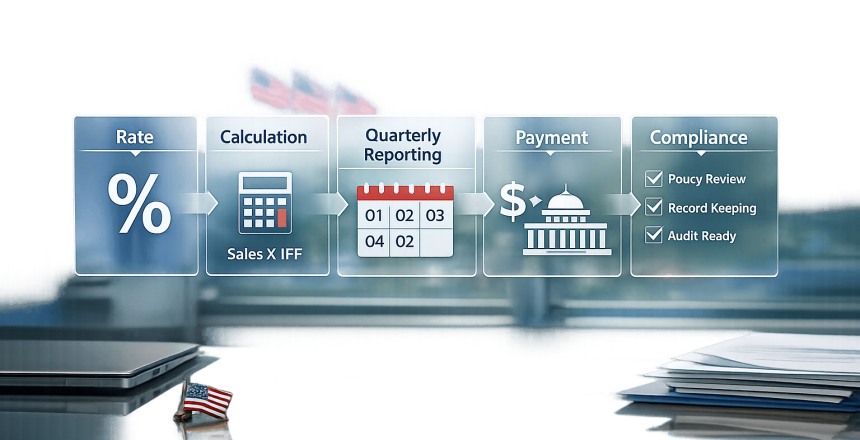
The Industrial Funding Fee (IFF) is a mandatory charge for GSA Schedule contract holders. It supports the costs of managing the Federal Supply Schedules Program, ensuring its smooth operation. Contractors are responsible for calculating, reporting, and remitting the fee quarterly through Pay.gov.
Key Points:
- What is it? A 0.75% fee (for GSA MAS contracts) built into pricing to cover administrative costs.
- Who pays? Federal agencies fund it through purchases, but contractors calculate and remit it.
- How to calculate? Divide your negotiated price by 0.9925 to include the 0.75% fee.
- Deadlines: Submit sales reports and payments within 30 days after each quarter ends.
- Reporting tool: Use the FAS Sales Reporting Portal for reporting and payments.
Accurate reporting and timely payments are critical to maintaining compliance and avoiding penalties. Missteps can lead to audits or delinquency notices. Contractors should also keep thorough records and use automation tools to simplify reporting.
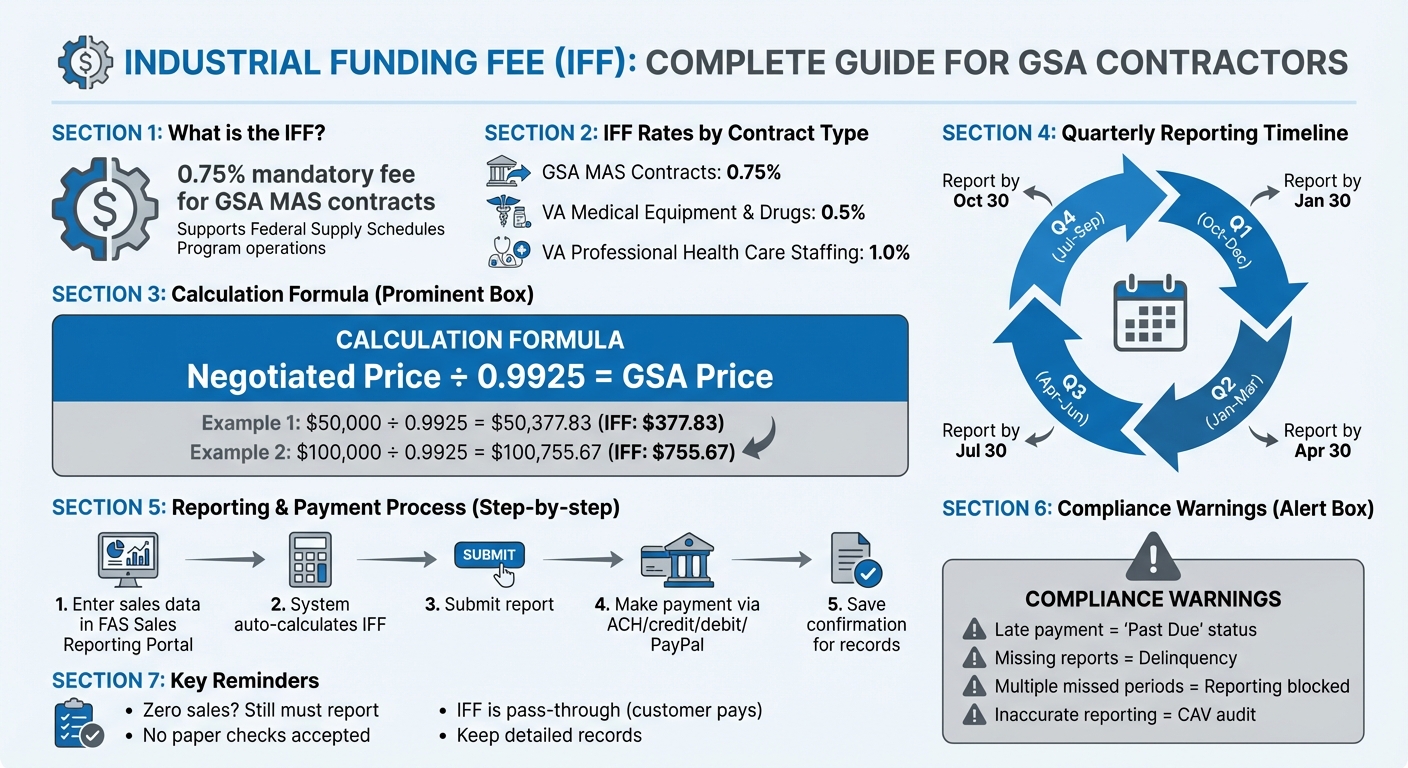
GSA Industrial Funding Fee Calculation and Reporting Process
How to Calculate the Industrial Funding Fee
Understanding the 0.75% IFF Rate
For GSA Multiple Award Schedule (MAS) contracts, the Industrial Funding Fee (IFF) rate is set at 0.75%. This means for every $100 in sales, you collect $0.75. The fee is used to support the GSA’s operational costs for managing the Federal Supply Schedules program.
However, the rate can vary for VA Federal Supply Schedules. For example, it’s 0.5% for medical equipment and drugs, but 1.0% for professional health care staffing. Always double-check your specific contract solicitation to ensure you’re using the correct rate when calculating the fee. This standard rate is the foundation of the pricing method explained below.
IFF Calculation Formula and Examples
Once you confirm the rate, you’ll need to incorporate the IFF directly into your pricing. Instead of adding the 0.75% fee after the fact, you build it into your pricing upfront. To do this, divide your negotiated discounted price by 0.9925 (which is 1 minus 0.0075). This ensures that after you remit the fee, you’ll still receive your full negotiated price.
Here’s a simple rule to follow:
"A simple rule to calculate your IFF-included GSA Schedule pricing is to take your discounted price and divide it by 0.9925 (which is 1 minus 0.0075)." – GSA Schedule Contract Services
Example 1: Suppose your negotiated price is $50,000. Divide $50,000 by 0.9925, which gives you a GSA price of $50,377.83. When the sale is made, you’ll remit $377.83 to the GSA (calculated as $50,377.83 × 0.0075), leaving you with your intended $50,000.
Example 2: For a negotiated price of $100,000, dividing by 0.9925 results in a GSA price of $100,755.67. From this, $755.67 is allocated as the IFF (calculated as $100,755.67 × 0.0075), ensuring you still net $100,000.
Reporting and Payment Requirements
Quarterly Reporting Deadlines
If you’re a GSA Schedule contractor, you’re required to report sales and pay the Industrial Funding Fee (IFF) within 30 days after the end of each calendar quarter. These deadlines are consistent every year:
- January 30: Covers Quarter 1 (October 1–December 31)
- April 30: Covers Quarter 2 (January 1–March 31)
- July 30: Covers Quarter 3 (April 1–June 30)
- October 30: Covers Quarter 4 (July 1–September 30)
Even if you have no sales to report, submitting a zero-sales report is mandatory to avoid being marked as delinquent. Staying on top of your Schedule sales and submitting reports on time is key to maintaining compliance.
Once you’re ready to report, the Federal Acquisition Service (FAS) Sales Reporting Portal is your go-to tool.
How to Submit Reports and Payments
The FAS Sales Reporting Portal (SRP) streamlines the process for both reporting and payment. Here’s how it works:
- Enter your sales data into the portal, organized by their corresponding Special Item Number (SIN).
- The system automatically calculates your Industrial Funding Fee based on the sales data provided.
- After submitting your report, head to the "Make Payments" section to view your balance and complete the payment. Accepted methods include ACH, credit card, debit card, or PayPal. Paper checks are not allowed.
- Always keep copies of your reports and payment confirmations for future audits.
It’s crucial to follow these steps closely. Skipping or mishandling any part of the process can lead to penalties.
Consequences of Late or Incorrect Reporting
Missing the 30-day reporting deadline results in delinquency. For payment delays, the system sends three notifications before escalating to a Claim Initiation Notification sent to your Contracting Officer. According to the GSA FAS Sales Reporting Portal:
"Payments not made on time will be revised to ‘Past Due’ status and might reflect on the Contractors performance record."
Failing to report for multiple periods has even more serious consequences. The system will block you from reporting current sales until all past periods, including zero-sales reports, are submitted. At that point, you’ll need to consolidate any outstanding fees into a single payment.
Inaccurate reporting can also trigger a Contractor Assessment Visit (CAV) audit to ensure compliance. If you spot an error in a previous report, use the portal’s "Adjust Sales" feature instead of attempting to submit negative values. Proper corrections are essential to avoid further complications.
Building the IFF into Your Pricing
How to Include the IFF in GSA Pricing
When working with GSA pricing, it’s essential to correctly incorporate the Industrial Funding Fee (IFF) into your calculations. The IFF is a pass-through cost, meaning the ordering agency covers it – not you. To avoid inadvertently cutting into your profit margins, don’t simply add 0.75% to your price. Instead, use the division method discussed earlier to ensure your negotiated price remains intact.
For VA Federal Supply Schedule contracts, the division factor varies based on the IFF rate. Use 0.995 for medical equipment and drugs (0.5% IFF rate) and 0.99 for professional health care staffing (1.0% rate). Always double-check the specific IFF rate in your solicitation to ensure accuracy.
If you’re part of a teaming arrangement, clarity is key. The IFF only applies to items listed under labor categories on your GSA Schedule. Services marked as "Open Market" from a partner generally aren’t subject to the fee. This distinction can help keep your overall bid price competitive. When in doubt, consult your Contracting Officer to confirm how the fee applies to partnering services.
By following these steps, you’ll not only ensure compliance but also protect your profit margins.
How the IFF Affects Revenue and Profit Margins
Once you’ve factored the IFF into your pricing, it’s important to understand its impact on your revenue and profit margins. When done correctly, the IFF has no effect on your net profit. The customer pays the fee, you collect it at the time of sale, and then remit it to the GSA quarterly. Essentially, you’re just holding the funds temporarily.
The problem arises when contractors skip the division method and simply add 0.75% to their discounted price. This approach can lead to you unintentionally covering part of the fee out of your profits. Over time, especially on high-volume contracts, this can significantly erode your bottom line.
To safeguard your margins, maintain a transparent pricing structure. As outlined in the GSA Solicitation Instructions:
"The IFF is to be shown after the total price is calculated as it is a separate collection mechanism, i.e., Base Rate + Overhead + G&A + Fee = Subtotal + IFF = Total Proposed Rate."
This method ensures the IFF is clearly separated from your cost structure, simplifying tracking and reporting during quarterly submissions.
Additionally, it’s worth considering tools like Economic Price Adjustments (EPA) to offset inflation and rising costs over the contract’s five-year base period. If eligible, opting into Transactional Data Reporting (TDR) can also eliminate the Price Reduction Clause, giving you more flexibility in pricing and reducing the burden of maintaining commercial price parity.
For more tailored guidance on pricing strategies and IFF compliance, reach out to the experts at GSA Focus. They specialize in helping small businesses navigate the complexities of GSA Schedule Contracts.
Staying Compliant with IFF Requirements
Record-Keeping Requirements
Keeping precise records isn’t just a good habit – it’s a must for staying compliant with IFF rules. You’ll need to track key details like contract or BPA numbers, task order numbers, SINs, quantities, and per-unit prices. This information should be updated monthly in the FAS Sales Reporting Portal (FAS SRP), ensuring that each sale reflects the 0.75% IFF fee.
For firm-fixed-price service orders over $1 million, upload the PWS, SOO, or SOW documents directly to the SRP. If you’re dealing with Highly Configurable Products (HCP) or Configurable Services (CS), make sure to upload invoices or Bills of Materials. Also, keep detailed records of your Pay.gov payments since paper checks aren’t accepted.
Contractor Assistance Visits (CAV) from the GSA are part of the process. These visits ensure your sales tracking system captures all reportable sales and that the correct IFF payments are made. To make life easier, consider automating data capture at the point of sale – this can simplify monthly reporting significantly.
Now, let’s look at tools that can help manage these requirements more efficiently.
Tools and Services for IFF Compliance
When it comes to managing IFF reporting, the FAS SRP has you covered with its integrated features and automation capabilities. This portal (https://srp.fas.gsa.gov) is your go-to tool for compliance, offering automatic fee calculations and payment tracking. To get started, you’ll need a FAS ID and multi-factor authentication for secure access.
For contractors handling large volumes of data, automation can be a game-changer. Options like EDI or API integration simplify the process, while Excel or .csv templates make bulk uploads easier. When it’s time to pay, the portal connects seamlessly with Pay.gov, allowing electronic payments via ACH, credit/debit cards, or PayPal.
If you’re feeling overwhelmed, professional support is available. Services like GSA Focus (https://gsascheduleservices.com) specialize in helping small businesses navigate the complexities of GSA Schedule Contracts. They assist with everything from using the SRP to organizing documentation and staying on top of IFF obligations.
Conclusion
Handling the Industrial Funding Fee (IFF) is a critical obligation for maintaining your GSA Schedule contract. This 0.75% fee supports the Federal Supply Schedules Program, and failing to manage it properly could put your contract at risk. Staying on top of this responsibility ensures your federal contract remains in good standing and continues to deliver benefits.
To comply, calculate 0.75% of your total GSA sales, report those sales, and submit your IFF payment within 30 days after the end of each quarter. Payments must be made electronically via Pay.gov through the FAS Sales Reporting Portal – paper checks are not accepted.
Beyond compliance, managing the IFF effectively provides valuable opportunities for growth. The transactional data you report is published as demand data every two months, offering insights into government purchasing trends. This information can help you refine your offerings to better meet market needs.
If you have a VA Federal Supply Schedule contract, double-check your specific fee rate, which could range from 0.5% for medical equipment to 1.0% for professional health care staffing. Miscalculations can create long-term issues, so accuracy is key. Keeping up with IFF obligations also minimizes complications during mandatory updates like MAS Refresh 31, helping you stay competitive and compliant.
Think of IFF reporting as more than just a requirement – it’s a strategic tool for ensuring success in federal contracting.
Need help navigating GSA compliance? GSA Focus offers full-service solutions to streamline your obligations, so you can focus on growing your business with confidence.
FAQs
Which sales count as IFF-reportable sales?
Sales conducted under a GSA Schedule contract, whether they involve products or services provided directly to federal agencies, must be reported under the Industrial Funding Fee (IFF) requirements. However, sales that fall outside the GSA framework – such as open market items – are not subject to this reporting obligation.
How do I correct a past IFF report without going delinquent?
To fix an error in a past IFF report, you’ll need to submit an amended report through the designated portal before the deadline. Remember, all sales reporting, including IFF payments, must be completed within 30 days after the quarter ends. If you spot a mistake, correct it as soon as possible to remain in compliance. Take the time to review past submissions and make any necessary updates before the next deadline to prevent penalties or being marked delinquent.
What records should I keep for a CAV audit?
To stay compliant during a Contractor Assistance Visit (CAV) audit, it’s crucial to keep detailed records of all contract sales. This includes:
- Dollar value of sales: Document the exact amounts for all transactions.
- Sales reporting documentation: Maintain thorough records, such as sales reports or summaries.
- Proof of Industrial Funding Fee (IFF) remittance: Ensure you have evidence of timely IFF payments.
Examples of acceptable records include invoices, shipment records, and payment confirmations. These documents not only demonstrate compliance but also help streamline the audit process.
Related Blog Posts
- What Is the Industrial Funding Fee (IFF)?
- How to Track GSA Contract Compliance
- Ultimate Guide to GSA Sales Reporting
- How to File GSA Quarterly Sales Reports