
GSA eLibrary is a critical resource for federal acquisition professionals, serving as a centralized database for GSA and VA contract award information. For businesses holding GSA Schedule Contracts, optimizing your eLibrary profile ensures visibility to federal buyers searching for products and services. Without proper optimization, your listing might be overlooked, costing you potential opportunities.
Key Takeaways:
- Why It Matters: Federal agencies use GSA eLibrary for market research before purchases or quote requests. Accurate, keyword-rich profiles are essential for appearing in search results.
- Optimization Basics:
- Use precise keywords, NAICS codes, and SINs.
- Ensure your SAM.gov profile matches your eLibrary listing.
- Regularly update your catalog, pricing, and certifications.
- Buyer Behavior: Agencies filter searches by socioeconomic status, SINs, and NAICS codes. Your profile must align with these criteria to appear in results.
- Compliance: Keep your SAM.gov registration active, update socio-economic indicators manually, and ensure pricing aligns with your GSA contract.
This guide breaks down the steps to optimize your GSA eLibrary profile, from selecting the right codes to maintaining compliance and improving visibility. Whether you’re new to federal contracting or looking to refine your strategy, these insights will help you stand out in the competitive eLibrary ecosystem.
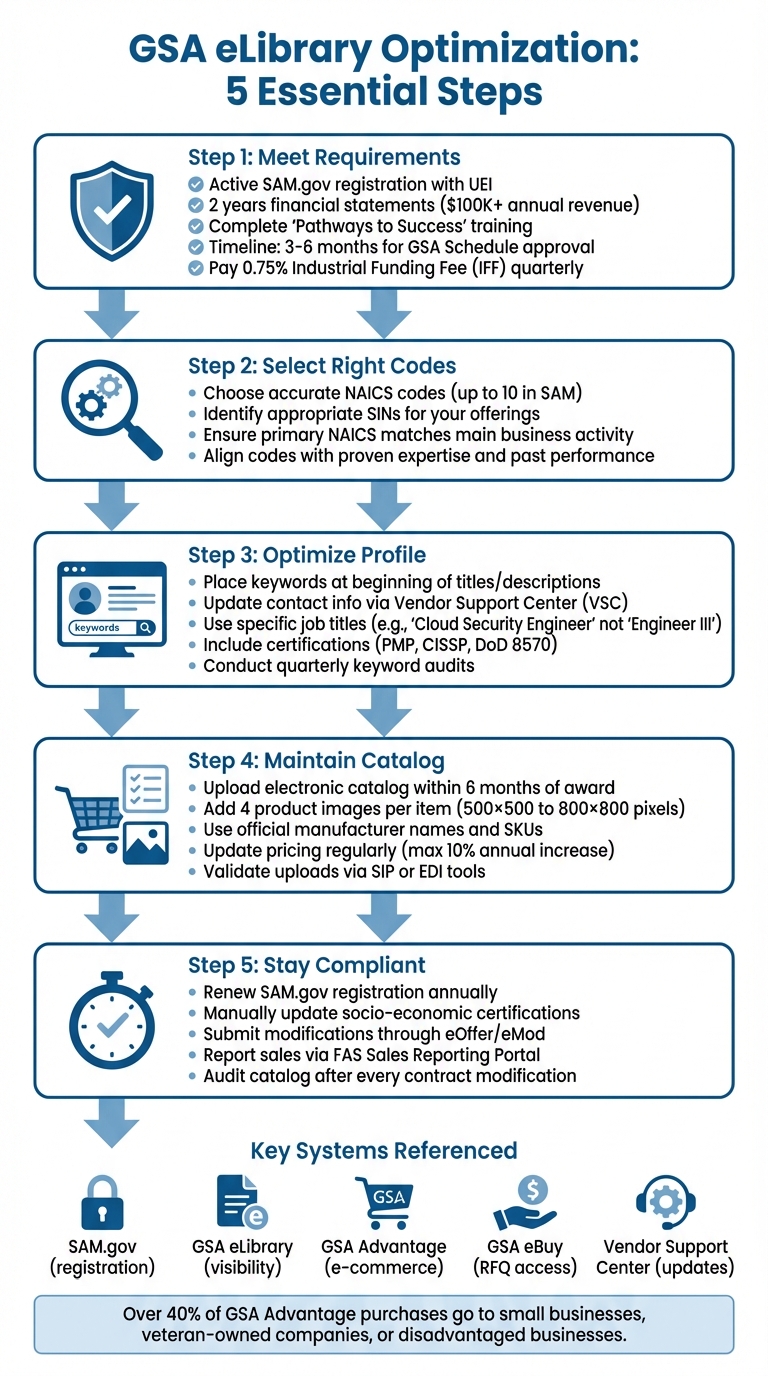
GSA eLibrary Optimization 5-Step Process for Federal Contractors
GSA eLibrary – Your GovCon Goldmine for Researching Potential Teaming Partners and Price Comparisons
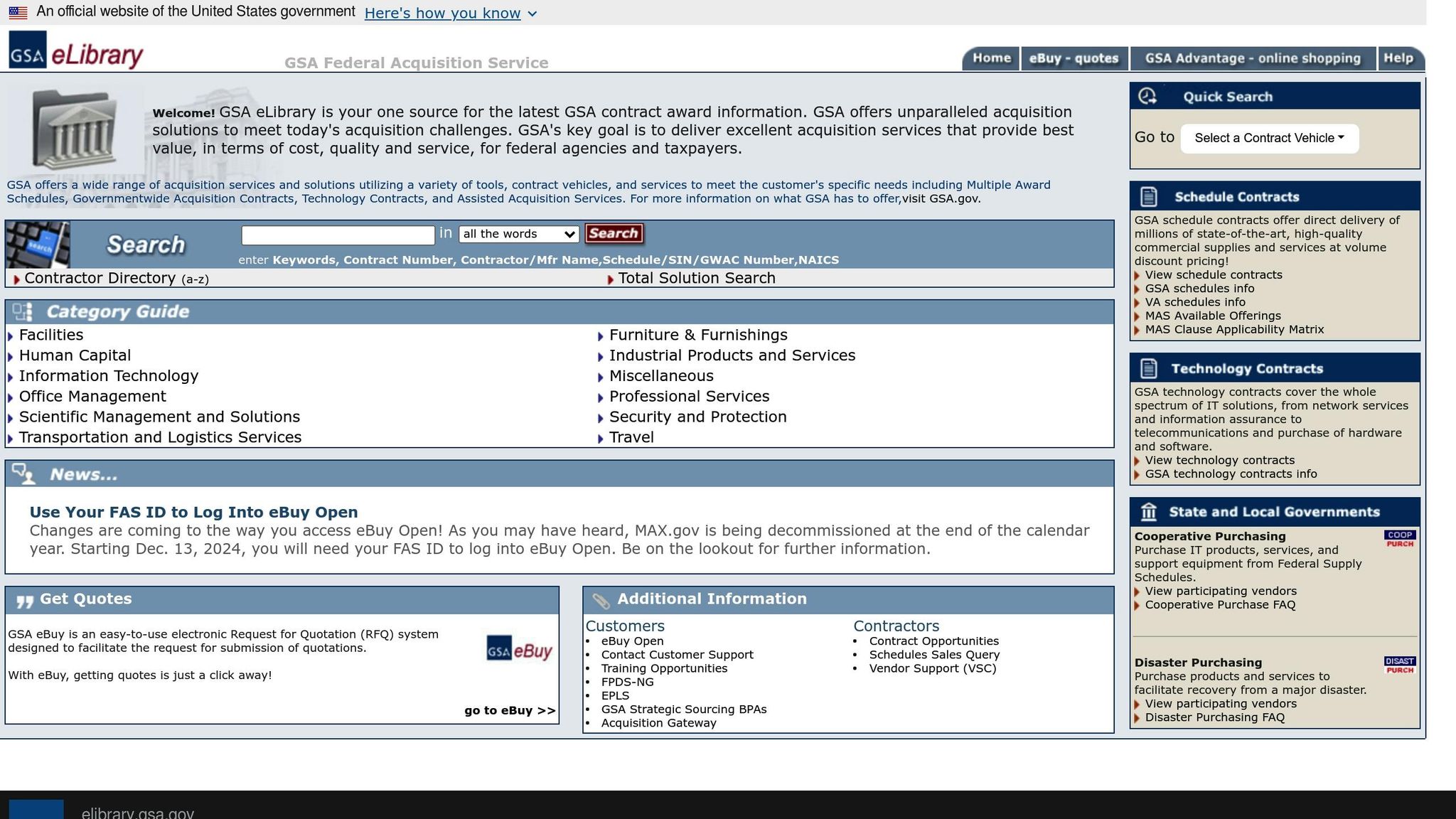
What GSA eLibrary Is and Why It Matters
GSA eLibrary serves as the official centralized database for all GSA and VA contract award information. It brings together data from Multiple Award Schedules (MAS), Governmentwide Acquisition Contracts (GWACs), Technology Contracts, and various IDIQ solutions into a single, searchable platform. Updated nightly, the system ensures federal buyers have access to the most current contractor details, pricing, and terms.
The platform is a massive resource, hosting millions of supplies and services. Federal agencies can search for contractors using keywords, contract numbers, contractor names, Special Item Numbers (SINs), or NAICS codes. Key tools like the Total Solution Search help buyers identify contractors with multiple SINs to meet complex needs. Additional features include an alphabetical Contractor Directory, links to contractor websites, email contacts, and detailed contract documents. With its real-time data, GSA eLibrary not only informs agency decisions but also influences how contractors are discovered.
How Federal Agencies Use GSA eLibrary
Acquisition professionals rely on GSA eLibrary as their starting point. Before purchasing through GSA Advantage or sending Requests for Quotations via GSA eBuy, they use eLibrary to research vendors and assess their capabilities. The platform’s search tools allow users to filter results by criteria like NAICS codes or SIN categories, making it easier to find the right match quickly.
The platform supports a wide range of authorized buyers, including federal agencies such as the Department of Defense (DoD), Department of Energy (DoE), Department of Commerce (DoC), Department of Transportation (DoT), and GSA itself. It also serves federally owned corporations like UNICOR and the Federal Financing Bank, independent establishments like the Smithsonian and USPS, and organizations such as the Red Cross. State and local governments, tribal governments, and territorial governments also use the system. Each of these buyers depends on accurate contractor listings to make informed purchasing decisions. For specific needs like disaster recovery or cooperative purchasing programs, dedicated search sections help agencies identify appropriately flagged contractors.
Recognizing how agencies use GSA eLibrary highlights why keeping your listing accurate and detailed is so important.
Benefits of Optimizing Your Listing
An optimized listing in GSA eLibrary can significantly improve your visibility in federal searches. The platform’s search engine scans titles, descriptions, and business names for keyword matches but doesn’t support Boolean operators like AND or NOT. This means your listing must include the exact terms buyers are searching for, with critical keywords placed strategically at the beginning to boost your ranking in search results.
Optimization also gives you a competitive edge by generating passive leads. When your SIN and NAICS codes are accurate, your business automatically appears in relevant searches without needing extra marketing efforts. For small businesses, this can open doors to more federal contracting opportunities. On the flip side, incorrect categorization can make your business invisible to agencies looking for your specific skills. Conducting quarterly audits of your keywords and catalog data ensures your listing stays aligned with evolving agency needs and trends. Additionally, since GSA eLibrary integrates with GSA eBuy, an optimized listing increases the likelihood of receiving invitations for Requests for Quotations that match your registered SINs.
Requirements for GSA eLibrary Listings
Before you can list on GSA eLibrary, there are a few must-haves to check off your list. First, ensure your business has an active SAM.gov registration, complete with a Unique Entity ID (UEI). This is your gateway to the eOffer system and a critical step before submitting your GSA Schedule application. Think of this as laying the groundwork for a smooth application process.
When it comes to finances, your business needs to show two years of financial statements, each reflecting at least $100,000 in annual revenue. Additionally, company officers are required to complete the "Pathways to Success" training. Since March 8, 2021, the FAS ID system has replaced the old digital certificate process, saving you the associated costs – this step is now free. Once your contract is awarded, you’ll need to pay an Industrial Funding Fee (IFF) of 0.75% on all reported sales under your contract. These payments are due within 30 days after the end of each quarter.
The timeline for securing a GSA Schedule typically ranges from 3 to 6 months, but the GSA Information Technology Category (ITC) FASt Lane program can speed things up for qualifying IT contractors, cutting the wait in half. During this process, GSA will review your technical capabilities, pricing, and compliance with federal regulations to ensure your offerings align with government standards.
Getting a GSA Schedule Contract
To start your GSA Schedule application, head to the eOffer portal. Once you log in with your FAS ID, you’ll need to provide detailed information about your business capabilities, pricing, and offerings. The system automatically pulls data from your SAM.gov profile, so it’s crucial that everything there is up-to-date. Mismatched information – like your business name, address, NAICS codes, or socio-economic certifications – can cause delays or errors. Double-check everything before you begin.
Another key requirement is compliance with the Trade Agreements Act (TAA). Every product you list must be manufactured or "substantially transformed" in the U.S. or a TAA-designated country. Be ready to provide documentation proving the country of origin for all items in your catalog. For services, the requirements are less stringent, but you’ll still need to validate your team’s qualifications and past performance. GSA also evaluates whether your pricing is fair compared to what you charge commercial customers, so be prepared to back up your rates with documentation.
Selecting the Right SINs and NAICS Codes
Your primary NAICS code should reflect your main business activity as listed in SAM.gov. This isn’t just a checkbox – it determines which agencies can find you when searching by industry classification. If your business operates across multiple industries, you can add secondary NAICS codes, but only if you can provide evidence of expertise in those areas, such as past performance records or technical descriptions.
Special Item Numbers (SINs) are equally important. These define exactly what you’re authorized to sell under your GSA Schedule. Both the GSA eLibrary and eOffer portal have searchable databases to help you find SINs that align with your offerings. During your application, you’ll need to identify your primary Large Category, subcategory, and the specific SIN that represents the majority of your contract’s expected value. Choose SINs that reflect your proven expertise – GSA requires evidence that you’ve successfully delivered similar solutions in the past. The SINs you select directly impact your visibility on eLibrary, so accuracy here is crucial. If you want to add new SINs after your contract is awarded, you’ll need to submit a formal modification request through the eMod system.
Once your contract is finalized, keeping your information accurate across all platforms is essential.
Staying Compliant and Accurate
Maintaining your GSA eLibrary listing requires constant attention. Your SAM.gov registration must remain active, as an expired registration will invalidate your GSA Schedule and remove your eLibrary listing from searches. To avoid this, set reminders well ahead of your annual SAM.gov renewal date.
Changes to your socio-economic status also require manual updates. The GSA Federal Acquisition Service emphasizes:
"Changes made on the System for Award Management (SAM) to socio-economic indicators do not automatically update GSA Advantage, Schedules e-Library, or e-Buy".
If you gain a new certification, such as Women-Owned Small Business or HUBZone status, update your SAM.gov profile first. Then, contact the MAS Helpdesk to ensure the changes are reflected in GSA systems. Pricing updates need similar care – GSA typically limits annual price increases to 10% per category item unless you provide strong justification. Staying on top of these details ensures your listing remains compliant and visible to potential buyers.
How to Optimize Your GSA eLibrary Profile
Once your contract goes live, keeping your GSA eLibrary profile up-to-date is essential. Think of it as a dynamic document that reflects the growth and evolution of your business. A stagnant profile won’t grab the attention of federal buyers. Regular updates show agencies that you’re an engaged vendor, not just another name in the database. This can make the difference between being contacted for opportunities or fading into the background.
Update Contact and Capability Information
Your contact details and capability descriptions are the first things agencies see when they view your profile. Begin by logging into the Vendor Support Center (VSC) to ensure your points of contact, business addresses, and market research data are accurate. For major updates, submit a formal modification through eOffer/eMod.
Make sure your listed capabilities align with your awarded SINs and NAICS codes. If your business classification is off, agencies won’t find you when they filter their searches.
For service-based contracts, precision is key. Instead of vague titles like "Engineer III", go with something specific like "Cloud Security Engineer" and include relevant certifications such as PMP or CISSP. Position your most important keywords at the beginning of titles and descriptions because the GSA Advantage search engine prioritizes early keywords. Avoid leaving any fields blank – use standardized naming conventions that match the terminology federal buyers use in RFQs. To stay competitive, schedule quarterly reviews to refresh keywords, audit your catalog after any contract modifications, and double-check your listings. These updates not only enhance your profile but also reinforce your status as an active, reliable vendor.
Once your contact details are squared away, shift your focus to keeping your electronic catalog and pricing current.
Refresh Your Electronic Catalog and Pricing
Uploading and maintaining an electronic catalog on GSA Advantage isn’t just a good idea – it’s mandatory. You’re required to submit your catalog within six months of your contract award. Plus, an updated catalog is a must for being included in GSA eBuy, where agencies post Requests for Quotations (RFQs).
Here’s a quick breakdown of key updates and the tools you’ll need:
| Update Type | Tool/System Used | Purpose |
|---|---|---|
| Contact/POC Updates | Vendor Support Center (VSC) | Update points of contact and market research data |
| Contract Modifications | eOffer/eMod | Request changes to contract terms or awarded items |
| Catalog/Pricing Updates | SIP or EDI | Upload electronic catalogs and price lists to GSA Advantage |
| Sales Reporting | FAS Sales Reporting Portal | Report transactional data and pay the Industrial Funding Fee (IFF) |
Including product photos can give your listing an edge. Buyers often filter search results to show only products with images, so high-quality visuals can boost your visibility. Submit up to four images per product (500×500 to 800×800 pixels, JPG or GIF, under 1 MB). Ensure the product takes up at least 80% of the image.
Keep in mind, GSA may "scrub" or hide listings with bad data or formatting issues, making your offerings invisible. Before uploading through the Schedule Input Program (SIP) or FAS Catalog Platform (FCP), double-check your CSV formatting and field limits. Use official manufacturer names and confirm SKUs match your internal systems for seamless reordering. Regular pricing updates not only keep you competitive but also build trust with contracting officers.
Beyond catalog maintenance, showcasing your contract history can further demonstrate your reliability.
Add Contract History and Modifications
Contract modifications are more than just paperwork – they’re proof of your performance. For example, if an agency increases your contract value from $500,000 to $3.2 million through modifications, it shows other buyers that you’re a trusted vendor. As USFCR puts it:
"Modifications tell you what agencies buy after the initial award. That’s where opportunities hide".
Agencies use eLibrary to differentiate active vendors from those with outdated contracts. Frequent modifications and repeat business signal that you’re actively securing work rather than sitting idle. Keep your profile updated with all contract changes – some federal agencies award contracts based solely on eLibrary research. To stay ahead, track the award frequency and modification history of the top three companies in your NAICS code every month. Additionally, look at modifications in related codes where your capabilities overlap to uncover new opportunities.
Advanced Tactics for Better Visibility
Once you’ve nailed the basics, it’s time to step up your game. Federal buyers don’t randomly stumble across your profile – they actively filter, compare, and cross-check listings before making decisions. Vendors who stand out are the ones who truly understand how agencies search and what matters most to them.
Leverage NAICS Codes to Gain an Edge
NAICS codes are one of the primary tools federal buyers use to filter searches on platforms like GSA eLibrary and GSA Advantage. While the Census Bureau assigns your primary NAICS code, you can self-assign up to 10 codes in SAM to cover all your revenue-generating services.
Start by doing some keyword research. Plug your primary NAICS code into the GSA Advantage search bar to see which competitors dominate the first page. Cross-check recent federal RFQs to identify the NAICS and SIN combinations buyers are using, and tweak your profile accordingly.
To sharpen your strategy, use NAICS association tools to identify the top companies in your sector by revenue. Study their GSA eLibrary profiles to see how they organize their capabilities and labor categories. For service contracts, avoid generic job titles – be specific. For example, instead of “Engineer III,” use something like “Cloud Security Engineer” to align with federal certification standards like DoD 8570. If a specific code doesn’t exist for your niche, consider using catch-all codes (those ending in "90" or "99") to capture more traffic.
These steps not only help you stay competitive but also allow you to monitor trends and fine-tune your approach over time.
Track Teaming Patterns and Pricing Trends
Staying competitive requires more than just a good profile – it’s all about intelligence. Analyze the top 5–10 listings for your target keywords on GSA Advantage. Pay attention to how they structure their titles, format descriptions, and incorporate technical specs or certifications. Tools like the Schedules Sales Query and FPDS-NG can help you uncover buyer trends and competitor data.
Make it a habit to conduct quarterly keyword updates, audit your catalogs after modifications, and manually search monthly to track how your rankings shift. As GSA Focus wisely advises:
"Think like a buyer, not a seller. You say ‘multifunctional ergonomic vertical workstation platform.’ The buyer says ‘standing desk.’ Use their language." – GSA Focus
Additionally, use GSA eLibrary and SAM.gov to analyze competitors’ set-aside designations, such as WOSB, SDVOSB, or 8(a). These insights can reveal market gaps or potential teaming opportunities. Notably, over 40% of GSA Advantage purchases go to small businesses, veteran-owned companies, or disadvantaged businesses.
This kind of data-driven approach ensures you’re well-positioned within the broader GSA ecosystem.
Maximize Visibility with GSA Advantage
Optimizing your internal profile is only part of the equation. Connecting your GSA eLibrary profile with GSA Advantage can take your visibility to the next level. Unlike eLibrary, which is static, GSA Advantage turns your contract listing into a dynamic e-commerce platform where buyers can compare features, pricing, and delivery options 24/7. Don’t forget – you’re required to upload your approved pricelist to GSA Advantage within six months of receiving your contract.
Uploading your catalog doesn’t just make your listing more dynamic; it also gives you direct access to bid opportunities and RFQs through the eBuy system. Buyers can filter results by SINs, business size, category, and delivery time, ensuring your profile reaches the right audience.
When structuring product titles, lead with the primary keyword, followed by key features and specifications (e.g., "Keyword + Feature + Size + Part Number"). Ensure part numbers in your catalog match your invoice system exactly. Buyers often search by manufacturer SKUs, so sticking to official manufacturer names instead of internal naming conventions is critical for appearing in brand-specific searches.
Finally, keep in mind that GSA is transitioning from the older Schedule Input Program (SIP) to the FAS Catalog Platform (FCP) for catalog submissions and updates. Make sure you’re using the correct platform to avoid delays or errors that could make your listings invisible.
Common Mistakes and Compliance Issues
While implementing optimization strategies is crucial, avoiding common mistakes is just as important to maintain visibility and stay compliant. These errors can undo all the hard work you’ve put into your GSA eLibrary profile. Federal buyers depend on accurate, up-to-date information to filter searches, compare vendors, and make purchases. Mistakes like outdated pricing, incorrect categorization, or formatting problems can not only reduce your visibility but also lead to compliance violations that might jeopardize your contract.
Prevent Mismatched or Outdated Information
One of the most common mistakes is having inconsistent data between SAM.gov and GSA eLibrary. If details like your Unique Entity ID, business address, or socio-economic designations don’t match across platforms, you could raise compliance flags and miss out on set-aside opportunities. Any updates made to SAM.gov should also be reflected in GSA eLibrary to avoid these issues.
Another frequent problem is stale pricing. If your GSA Advantage catalog doesn’t align with your approved contract pricing, you risk compliance violations and even losing your contract. To prevent this, conduct a catalog audit immediately after every contract modification to ensure everything matches.
Additionally, leaving part numbers blank or using internal SKUs instead of official manufacturer numbers can make it difficult for buyers to find your products during reorder searches. As GSA Focus points out:
"GSA scrubs listings with bad data. It might look uploaded – but it’s quietly invisible." – GSA Focus
Formatting errors can also render your listing invisible. Copying text directly from PDFs, for example, often introduces formatting issues that cause GSA to hide your listing. Even if it appears uploaded in your system, buyers may not see it. To avoid this, always validate your uploads using tools like the Schedule Input Program (SIP) or EDI, and double-check CSV formatting before submission.
Common Errors and How to Fix Them
Understanding the most frequent mistakes and their solutions can save you from costly setbacks. Below is a breakdown of common errors and how to address them:
| Error Type | Impact on Success | Recommended Fix |
|---|---|---|
| Pricing Errors | Can lead to compliance violations and potential contract loss. | Perform a catalog audit after every contract modification to ensure alignment. |
| SIN Selection Errors | Makes it harder for buyers to locate your offerings. | Verify that all listings match the SINs awarded in your GSA contract. |
| Data Formatting | May cause listings to appear uploaded but stay hidden. | Use SIP/EDI tools to validate uploads and manually retype text to fix formatting issues. |
| Vague Descriptions | Buyers may struggle to confirm compliance or technical specs. | Include bullet points for compliance details (e.g., TAA, Buy American) and technical specs. |
For service providers, using generic titles like "Engineer III" is another common misstep. Instead, opt for specific titles that reflect what federal agencies are searching for, such as "Cloud Security Engineer with DoD 8570 Certs". This not only improves visibility but also helps buyers quickly determine if you meet their technical needs.
Avoid keyword stuffing as well. Repeating terms excessively, like "Desk desk desk", can make your descriptions look unprofessional and harm search performance. Instead, use keywords naturally – about two to three times per paragraph – and focus on the language buyers are likely to use.
To stay ahead, set up a quarterly optimization schedule. Regularly refresh keywords, audit your catalog, and review competitor listings to ensure your profile remains competitive. Also, note that starting December 13, 2024, contractors must use a FAS ID to log into eBuy Open, as the MAX.gov login will be decommissioned.
How GSA Focus Can Help with GSA eLibrary Optimization
For small businesses, navigating the complexities of optimizing a GSA eLibrary profile can feel like a daunting task. Partnering with a seasoned consultant can make the process smoother, helping you sidestep common pitfalls that could lead to invisible listings or compliance headaches. Here’s how GSA Focus simplifies this journey for you.
Full-Service GSA Schedule Management
GSA Focus takes the stress out of managing your GSA Schedule by offering a comprehensive solution that covers everything from contract acquisition to ongoing optimization. They tackle common challenges like data errors and compliance issues, ensuring every detail is handled with precision. Their services include document preparation, compliance monitoring, and marketing strategies designed to enhance your visibility on both GSA eLibrary and GSA Advantage.
The team goes a step further by helping you select the right Special Item Numbers (SINs) and NAICS codes, ensuring your catalog uploads are error-free. Plus, they keep your profiles up-to-date after every contract modification, so you stay compliant and visible without the hassle.
"GSA Focus is the full-service GSA Contract solution for small businesses. Our comprehensive, full-service approach is paired with an affordable price to offer the very best option to get your GSA Schedule." – GSA Focus
Proven Results and Value
With a track record of serving over 600 clients and a 98% satisfaction rate, GSA Focus has built a reputation for delivering results. Their clients see an average return on investment (ROI) of 87×, which speaks volumes about the financial benefits of proper GSA Schedule management. To further ease your mind, GSA Focus offers a refund guarantee, minimizing any financial risk.
While the industry standard for a GSA Schedule application prepared by a consultant typically ranges from $5,000 to $25,000, GSA Focus provides a cost-effective alternative. They cut through the administrative red tape, making federal contracting more accessible for small businesses.
Take the Next Step with GSA Focus
Ready to elevate your GSA eLibrary presence? GSA Focus’s experienced team is here to help. They’ll evaluate your current profile, identify areas for improvement, and offer tailored advice to position you more competitively for federal contracts. Reach out today and take the first step toward optimizing your federal contracting strategy.
Conclusion
Your GSA eLibrary profile is more than just a basic listing – it’s a powerful sales tool that directly impacts whether federal buyers can find and choose your business. If your profile isn’t properly optimized, even competitive pricing and strong offerings might not be enough to make you visible. Since the platform updates nightly with the latest contract data, keeping your profile accurate and relevant requires consistent effort.
The essentials? Focus on precise SINs/NAICS codes, buyer-friendly keywords at the beginning of titles, and standardized part numbers. These details significantly affect your visibility when contracting officers search for solutions, leveling the playing field for small businesses competing with larger vendors.
Think of optimization as a form of competitive research. Regularly review your profile, study how top-ranking vendors structure their listings, and refine your strategy based on what agencies are actually purchasing. Use the language federal buyers include in RFQs, not internal company jargon, to make your catalog more appealing. This thoughtful approach strengthens your listing and makes buyer interactions smoother.
FAQs
How can I optimize my GSA eLibrary profile to improve visibility?
To make your GSA eLibrary profile stand out, focus on presenting accurate, relevant, and professional information. Federal buyers depend on this platform to identify contractors, so a well-optimized profile can significantly impact your visibility.
Start by ensuring all your contract details are complete and current. Include essentials like your GSA Schedule contract number, SINs, NAICS codes, and other identifiers. These details are the main filters buyers use when searching, so accuracy is key. Incorporate strategic keywords that align with government procurement language – terms like "TAA-compliant" or specific product descriptions can help your profile show up in targeted searches.
Don’t overlook compliance. Regularly update pricing, discounts, and certifications to keep your profile competitive and trustworthy. Adding professional visuals – such as high-quality images and polished capability statements – can further highlight your offerings and make a strong impression. Since the eLibrary refreshes nightly, it’s a good idea to monitor your profile to ensure updates are reflected quickly.
By keeping your profile current and professional, you’ll improve your chances of connecting with federal buyers and securing valuable contracts.
What happens if my GSA eLibrary listing has outdated or incorrect information?
Having inaccurate or outdated details in your GSA eLibrary listing can seriously impact how federal buyers perceive your business. It could result in your products or services being ignored, missed contract opportunities, or even potential compliance problems.
To stay competitive, make it a priority to keep your listing current, accurate, and in line with GSA guidelines. This not only strengthens trust with buyers but also boosts your chances of winning federal contracts.
How do NAICS and SIN codes impact my visibility on GSA eLibrary?
Using the correct NAICS (North American Industry Classification System) and SIN (Special Item Number) codes in your GSA eLibrary profile is essential for boosting your visibility. Think of these codes as the keywords and filters that government buyers use to locate businesses offering specific products or services.
Choosing the right codes ensures your business shows up in relevant searches, making it easier for potential buyers to find you. This simple step can improve your chances of landing federal contracts and establishing meaningful connections with government agencies.
Related Blog Posts
- How to Optimize GSA Advantage Listings
- GSA Advantage Website 101: A Small Business Guide
- What Services Can You Sell Under a GSA Schedule?
- Selling Services via GSA Schedule: A Complete Walkthrough