
Managing your GSA Schedule catalog is critical for staying compliant and visible in the federal marketplace. Without a live, accurate catalog on GSA Advantage!, you can’t respond to RFQs through eBuy or maintain your competitive edge. This guide simplifies the process, helping you meet deadlines, avoid compliance issues, and optimize your listings for success.
Key Takeaways:
- Submit your catalog within 30 days of contract award using FCP or SIP to comply with GSAR clause 552.238-88.
- Use clear product descriptions, accurate pricing, and quality images to improve visibility on GSA Advantage!.
- Leverage tools like the FAS Catalog Platform (FCP) for automated validation and real-time updates.
- Keep your catalog synchronized across eMod, GSA Advantage!, and eLibrary to avoid buyer confusion.
- Regularly update your listings to reflect new products, pricing, or discontinued items.
Maintaining an accurate catalog isn’t just about compliance – it’s about winning more federal contracts. Below, you’ll find actionable tips to streamline catalog management and maximize your opportunities in the $75 billion federal marketplace.
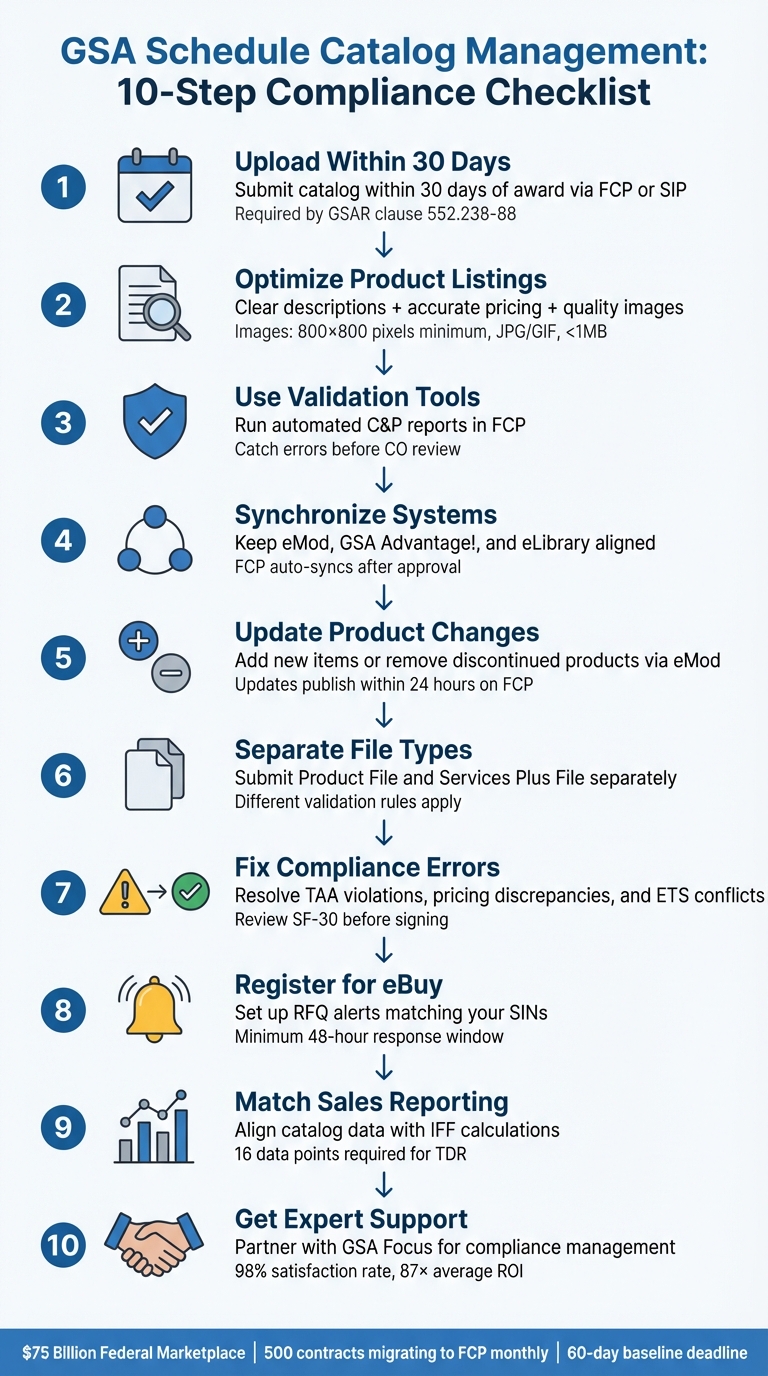
GSA Schedule Catalog Management: 10-Step Compliance Checklist
Getting Started in FCP – MAS Vendor Training
1. Upload Your Catalog Within 30 Days of Award Using FCP or SIP
Submitting your electronic catalog within 30 days of receiving your award is a must, as outlined in clause I-FSS-600. Missing this deadline could lead to a breach of contract and restrict your access to essential tools like GSA Advantage! and eBuy. Meeting this requirement on time is crucial for staying compliant and ensuring your products or services are visible in the marketplace.
To get started, you’ll need to choose between two submission systems: the FAS Catalog Platform (FCP) or the Schedules Input Program (SIP). The FCP is a modern, web-based platform that integrates seamlessly with eMod and publishes your catalog within 24 hours. GSA is steadily migrating contracts to FCP, with around 500 contracts transitioned each month. Meanwhile, SIP remains an option for those who have not yet moved to FCP.
Once you’ve chosen your submission method, register promptly with the GSA Vendor Support Center (VSC). This step is vital to avoid login issues and gain access to eBuy. For FCP users, make sure that anyone managing your catalog is listed as an Authorized Negotiator in eMod, as FCP relies on FAS ID authentication tied to this role.
If you’re using the FCP, the next step is to establish your catalog baseline. You’ll need to initiate this process within 60 days of gaining access to FCP. Keep in mind that during the baseline phase, you can only make deletions or corrections to existing data – price changes or new product additions must be handled separately. One of the key advantages of FCP is its automated Compliance & Pricing (C&P) reports, which flag errors like formatting issues, pricing discrepancies, and compliance gaps before you submit your catalog to your Contracting Officer. This real-time validation helps streamline the approval process.
Once your baseline is approved, you’ll need to upload a separate Terms & Conditions (T&C) file. Unlike SIP, FCP manages pricing through Product or Services Plus files, so your T&C file won’t include pricing tables. Keeping your catalog up to date across all systems is essential for maintaining visibility and staying competitive on GSA Advantage!
2. Write Clear Product Descriptions with Accurate Pricing and Quality Images
When selling on GSA Advantage!, it’s essential to craft product descriptions that are both detailed and engaging. Government buyers expect thorough product information, making it vital to approach your listings with the same attention to detail as top e-commerce platforms. Patrick Morgans, Manager at Winvale, likens GSA Advantage! to a government version of Amazon:
"We often call GSA Advantage! the government version of Amazon because it serves as a one-stop shop of product purchases for government customers".
Crafting Effective Product Descriptions
GSA Advantage! organizes search results by part number, product name, company name, and then description. To improve your product’s visibility, include specific keywords and technical details that align with buyer searches. For technical items, highlight key features like dimensions, lens types, processing speeds, and any included accessories. This level of detail ensures buyers know exactly what they’re purchasing.
If your products aren’t performing well, consider submitting a technical modification to refine descriptions with more effective keywords. This can make a significant difference in search relevance and buyer interest.
The Importance of Quality Images
Images play a critical role in attracting buyers. Government customers can filter their searches to display only products with photos, meaning listings without images are often ignored. The GSA Vendor Support Center underscores this point:
"Photos provide the best shopping experience for customers and give you an edge when it comes down to the customer’s final purchase decision".
You can upload up to four photos per product, showcasing different angles or accessories. To meet GSA requirements, follow these guidelines for your images:
- Resolution: At least 500×500 pixels (800×800 recommended).
- File Format: JPG or GIF, with a file size under 1MB.
- Content: The product should occupy at least 80% of the image area. Avoid logos or generic manufacturer images, as these will be rejected.
- Filenames: Limit filenames to 80 characters, using only letters, numbers, and underscores.
Using high-quality, actual product images can give your listing a competitive edge and help buyers make informed decisions.
Pricing That Matches Expectations
Accurate pricing is just as important as clear descriptions and quality images. Ensure your catalog reflects GSA-approved, competitive pricing by consulting the FCP’s C&P report before submitting any updates. Additionally, use the Vendor Support Center’s SIN-MOL-Photo-UPC lookup table to verify if your Special Item Number (SIN) requires photos or Universal Product Codes (UPC).
3. Use Automated Validation Tools and Follow GSA Formatting Standards
Once your catalog content and imagery are finalized, the next step is ensuring everything meets compliance and pricing standards. Automated tools can simplify this process and catch potential issues before submission. The FAS Catalog Platform (FCP) has replaced the Schedule Input Program (SIP) for most contractors, offering a web-based solution that helps identify errors before they reach your Contracting Officer. GSA is in the process of transitioning contracts from SIP to FCP.
A standout feature of FCP is the Compliance & Pricing (C&P) Report. This tool automatically conducts market research, flagging any pricing discrepancies or compliance concerns. Reviewing this report early in the modification process allows you to address flagged issues proactively, reducing the risk of delays and making negotiations smoother.
For contractors still using SIP or managing extensive catalogs, the Formatted Product Tool (FPT) is invaluable. It standardizes Manufacturer Part Numbers (MPNs) and UPC-A data while generating reports that highlight pricing outside market norms. Keep in mind that processing times vary – small catalogs can take 15–20 minutes, but larger catalogs with up to 100,000 line items may take several hours. Plan accordingly to avoid last-minute bottlenecks.
Common Formatting Mistakes to Avoid
GSA’s automated systems are unforgiving when it comes to formatting errors. Here are some frequent pitfalls and how to sidestep them:
- Manufacturer Part Numbers: Keep these under 40 characters; anything longer will be rejected immediately.
- Percentages: Always convert percentages to decimals. For example, use
0.05instead of5%. - Currency and Symbols: Avoid including
$or%symbols in numeric fields, as these trigger validation errors. - Discount Precision: For Services Plus Files, ensure discounts are limited to four decimal places.
If your contract is enrolled in Transactional Data Reporting (TDR), do not include Most Favored Customer (MFC) information, as this results in validation issues. Additionally, filenames for Terms and Conditions must adhere to the format ContractNumber_filename.xxx without spaces.
4. Keep Your Catalog Synchronized Across eMod, GSA Advantage!, and eLibrary

Keeping your GSA Schedule catalog aligned across eMod, GSA Advantage!, and GSA eLibrary is crucial. Inconsistent data – like mismatched pricing or outdated product details – can lead to compliance issues and erode buyer trust. Worse, it could cost you valuable sales opportunities if buyers encounter incorrect information.
The FAS Catalog Platform (FCP) has made this process much simpler. FCP ensures that once your modifications are approved, your updates are automatically reflected across GSA Advantage! and other systems. As the GSA Vendor Support Center explains:
"The Product File automatically updates GSA Advantage!, eliminating the need for vendors to complete a separate SIP file update. As a result, customers always see catalog details that reflect the most recently awarded contract".
This automation is a game-changer compared to the older SIP system. With SIP, vendors had to manually upload updates after eMod approval, leaving room for errors. Patrick Morgans, Manager at Winvale, highlights this challenge:
"With SIP, you are required to manually submit a SIP upload after the modification has been awarded".
To ensure your catalog remains accurate, verify that all pricing, product descriptions, and images are up-to-date immediately after any changes. Also, double-check that the list of authorized negotiators in eMod is current, as FCP relies on these roles for system access.
GSA is actively transitioning contracts from SIP to FCP, moving about 500 vendors each month. If your contract is eligible for this switch, transitioning to FCP will save you from the hassle of dual-entry updates and reduce the chances of outdated information reaching buyers.
5. Remove Discontinued Products and Add New Items Through eMod
Keeping your GSA Schedule catalog up to date is essential to reflect the products and services you actually offer. When items are discontinued or new ones are introduced, these changes must be submitted as formal modifications through eMod. The process for adding and removing items varies, and understanding these steps is key to avoiding rejected submissions. A current and compliant catalog ensures smooth operations and aligns with the goals mentioned earlier.
Adding new products requires specific documentation. You’ll need to submit a Products Price Proposal Template along with supporting materials like invoices, product literature, and an updated commercial price list. For services, include detailed labor category descriptions and technical specifications. To ensure your submission meets the requirements, consult the Multiple Award Schedule (MAS) Modification Guide, which outlines exactly what your Contracting Officer (CO) expects for each type of modification.
Removing discontinued items is a more straightforward process. Simply provide a list of the items you wish to remove. However, some updates, like changing a manufacturer name, part number, or Services Unique Catalog ID (UCID), require a "Delete and Add" approach. This means the old entry must be deleted and re-added with the corrected details to align with GSA’s data standards.
Once your modification is approved, the time it takes for updates to appear depends on your platform. If you’re using the FAS Catalog Platform (FCP), updates are published to GSA Advantage! almost immediately after approval, thanks to automation. Administrative modifications often process within 24 hours, though Stephanie Hagan, Training and Communications Manager at Winvale, notes that review backlogs with the Contracting Officer can sometimes delay this timeline. More complex modifications, especially those requiring pricing analysis, may take longer due to additional CO review.
Before submitting any modification, ensure your company information in SAM.gov is accurate, as eMod pulls entity data directly from that system. After approval, double-check your listings on GSA Advantage! to confirm everything is accurate. This final step helps catch any publishing errors before buyers encounter outdated or incorrect information.
6. Submit Products and Services in Separate Catalog Files
After syncing your catalog, it’s crucial to organize your products and services into separate files for a clear and compliant display on GSA Advantage! GSA mandates this division into two distinct file types within the FAS Catalog Platform (FCP): the Product File for orderable goods and the Services Plus File (SPF) for services and non-orderable items. This setup ensures your offerings align with how buyers make their purchases.
The Product File is for "click-to-buy" items that customers can order directly on GSA Advantage!, while the Services Plus File is used for labor categories, fixed-price services, training, and other items unsuitable for direct online ordering. Product Files are showcased as searchable product pages with images, whereas Services Plus Files are downloadable Excel price lists. This separation ensures buyers can quickly find and order what they need.
To determine which template applies to your Special Item Numbers (SINs), refer to the "SIN Type & Definitions Lookup Table" provided by GSA.
When submitting, you’ll need to complete two separate Catalog Baseline Modifications in eMod – one for the Product File and another for the Services Plus File. As GSA explains:
"For vendors requiring use of both the Product File and Services Plus File, this step must be completed twice to submit both files. These will be separate Catalog Baseline Modifications".
Each file type undergoes different automated validation checks in the FCP, so the formatting rules for each vary. Once your files are approved and published, remove the corresponding items and pricing from your Terms and Conditions (T&C) file. Items included in a Product or Services Plus File should not appear in the T&C file on GSA eLibrary.
Formatting Tips for Submission
Before submitting, make sure your files follow these common formatting rules:
- Use decimals for percentages (e.g., 0.05 for 5%).
- Avoid including currency symbols (like "$") in numeric fields.
- Limit discounts to four decimal places.
If you need to update Manufacturer Names, Part Numbers, or Services Unique Catalog IDs (UCIDs), delete the old entry and re-enter it with the corrected details.
7. Fix Compliance and Pricing Errors Before Submitting Modifications
Once you’ve ensured timely uploads and synchronized catalogs, the next critical step is addressing compliance and pricing errors. These issues can derail your catalog modifications if not resolved beforehand. The FAS Catalog Platform (FCP) provides a Compliance & Pricing (C&P) report, which mirrors the market research data your Contracting Officer will review. This report highlights pricing outliers and compliance issues, giving you the chance to fix them before they cause delays.
Some of the most frequent problems include Trade Agreements Act (TAA) violations – when products are sourced from non-compliant countries – and Ability One "essentially the same" (ETS) conflicts, where your commercial item overlaps with an Ability One product. Pricing discrepancies are another significant issue, particularly violations of the Price Reduction Clause. For instance, if you offer a Most Favored Customer (MFC) a lower price than your GSA rate without adjusting the government’s price, it could lead to compliance issues. Submitting an outdated Price Proposal Template is another common mistake that often results in rejection. Additionally, selecting the wrong modification type in eMod (e.g., "Add SIN" instead of "Add Product") can complicate the process by triggering different documentation and requirements. Patrick Morgans, Manager at Winvale, emphasizes the importance of accuracy:
"Not submitting current, accurate, and complete documentation is grounds for your Contracting Officer rejecting a modification".
To avoid these pitfalls, carefully review all documentation before submission.
Another crucial step is to review the Standard Form 30 (SF-30) thoroughly before signing. Contracting Officers may occasionally make errors when recording discounts or pricing details, and it’s your responsibility to catch these mistakes before the modification is finalized. If you’re dealing with formatting requirements for manufacturer part numbers or UPCs, refer to the validation standards outlined in Section 3.
Lastly, ensure that any pending Mass Modifications are accepted within their 90-day deadline before submitting new voluntary modifications. Failure to resolve pending modifications can result in your Contracting Officer declining to process your requests. By addressing these issues early, you can avoid delays and keep your catalog compliant and visible.
8. Register for eBuy and Track RFQs That Match Your SINs
After resolving compliance and pricing issues, the next step is to register with eBuy, the federal platform where agencies post Request for Quotation (RFQ) opportunities specifically for GSA Schedule holders. To get started, you’ll need to register your contract through the GSA Vendor Support Center (VSC). Skipping this step will cause login errors, making it impossible to access or respond to RFQs. Essentially, this registration is your gateway to participating in eBuy.
"In order to participate in GSA eBuy, you are required to register your contract(s) with the Vendor Support Center (VSC)." – GSA Vendor Support Center
Once you’re registered, head to the "Profile" tab to set up notifications for RFQs that match your Special Item Numbers (SINs). These notifications will ensure that the right team members receive email alerts every four hours when new opportunities are posted. But here’s the catch: not all RFQs will wait for the notification cycle. To avoid missing time-sensitive opportunities, it’s a good idea to manually check the eBuy dashboard regularly. For even faster updates, you can activate text message alerts – especially useful since RFQs are open for a minimum of 48 hours.
Another important point: you won’t be able to respond to RFQs until your catalog is live on GSA Advantage!. This is where consistent catalog data, as discussed in Section 4, becomes critical. If you’re a service provider using FCP, the system will automatically update and publish your price lists on eBuy, ensuring buyers always see your latest offerings. Lastly, make sure all relevant team members are listed as "Authorized Negotiators" in eMod, allowing them to access eBuy through their FAS ID. This setup ensures your team is ready to respond promptly to opportunities.
9. Match Your Catalog Data with Sales Reporting Requirements
Your catalog plays a key role in ensuring accurate sales reporting and proper IFF (Industrial Funding Fee) calculations. Start by verifying that each product in your catalog includes a manufacturer name and a manufacturer part number (limited to 40 characters). These identifiers must align with your sales tracking and accounting records. If they don’t match, you could run into issues during quarterly reconciliations or even face penalties during audits.
To get started, establish a baseline for your catalog using the FAS Catalog Platform (FCP). This electronic record integrates seamlessly with eMod, ensuring your catalog reflects the latest contract pricing. Keeping this alignment is critical for meeting the data accuracy requirements under Transactional Data Reporting (TDR). When GSA Industrial Operations Analysts (IOAs) perform assessments, they’ll check to see if the price and discount relationships in your catalog match your reported sales and invoices. Any inconsistencies could lead to audits or financial penalties.
If you’re operating under TDR, your internal systems must be set up to capture 16 specific data points for each line item. These include details like the UPC, unit measure, and price paid per unit. Additionally, every invoice must clearly display the GSA Contract Number, SIN, and Part Number exactly as they appear on GSA Advantage.
To maintain data accuracy, use an accounting system that can distinguish between GSA Schedule sales and other types of sales, such as commercial or open-market transactions. For any non-contract items on GSA orders, mark them as "Open Market" to avoid mistakenly applying the 0.75% IFF to items not covered by your contract. Make it a habit to regularly review your sales reports and samples to catch and correct classification errors before submitting them.
10. Work with GSA Focus for Compliance Support and Catalog Management

Managing a GSA Schedule catalog can feel like navigating a maze of technical requirements and constant updates. That’s where GSA Focus steps in, offering a full-service solution specifically designed for small businesses. From the initial catalog upload to ongoing compliance management, their team ensures your products and services are properly listed and maintained on GSA Advantage!, keeping them visible to government buyers. This hands-on approach is especially critical during system transitions.
One such transition is the move from the legacy Schedule Input Program (SIP) to the new FAS Catalog Platform (FCP). Contractors must act quickly, as they have only 60 days from system access to establish their catalog baseline. GSA Focus simplifies this process by guiding contractors through the essential "First Steps" registration and the critical "Baseline" setup unique to the FCP.
Beyond the initial setup, GSA Focus provides ongoing compliance support to help contractors stay on track. Their team assists in resolving compliance flags flagged in the FCP’s Compliance & Pricing (C&P) reports before submission to a Contracting Officer. This step is crucial for maintaining visibility on GSA Advantage! and can streamline negotiations. Missing this step can have serious consequences – failure to maintain a compliant electronic catalog could lead to removal from GSA eLibrary, making you ineligible for GSA eBuy notifications.
With a proven track record of serving over 600 clients, GSA Focus boasts a 98% satisfaction rate and delivers an average return on investment of 87×. This is no small feat, especially considering that about 60% of GSA Schedule holders fail to meet minimum sales requirements. Their results speak volumes about their ability to simplify complex government contracting requirements, offering small businesses a reliable partner in managing their GSA catalogs.
"GSA Focus is the full-service GSA Contract solution for small businesses. Our comprehensive, full-service approach is paired with an affordable price."
Conclusion
Keeping your GSA Schedule catalog up to date is a critical part of staying compliant and visible to government buyers. If you’ve recently received a new award, make sure to upload your approved pricelist within six months. For modifications, updates must be reflected within 30 days. Missing these deadlines can lead to compliance violations, which no one wants to deal with.
Effective catalog management doesn’t just help you avoid penalties – it also improves your ranking on GSA Advantage!. High-quality product photos (at least 800×800 pixels) and keyword-rich descriptions make it easier for federal, state, and local buyers to discover your offerings.
The Federal Catalog Platform (FCP) has modernized this process, making updates simpler and compliance easier to maintain. Automated tools like FCP’s Catalog & Price (C&P) reports help catch errors early, so you can address them quickly. By keeping your catalog accurate and compliant, the FCP ensures that your business remains competitive in the federal marketplace.
For small businesses, managing the complexities of a 20-year GSA Schedule can feel daunting. That’s where expert support from GSA Focus comes in. Whether you’re transitioning to the FCP, optimizing your product listings to improve visibility, or preparing for a Contractor Assessment Visit, having experienced guidance can make all the difference. GSA Focus helps you navigate these challenges, ensuring compliance while maximizing your opportunities in the federal marketplace.
FAQs
How can I keep my GSA Schedule catalog compliant and up-to-date?
To keep your GSA Schedule catalog compliant, it’s essential to follow the established GSA regulations. Start by submitting your electronic catalog within 30 days of award (or 6 months for legacy contracts) through the Federal Acquisition Service (FAS) Catalog Platform (FCP). Make sure all authorized negotiators are registered with the GSA Vendor Support Center and have an active FAS ID to access the platform.
When uploading your catalog, accuracy is key. Include pricing that matches your GSA-approved discounts, ensure all items comply with Trade Agreements Act (TAA) requirements, and stick to GSA content standards. This means using clear product titles, detailed specifications, and high-quality images (minimum 800 × 800 px with a white background). To keep your catalog relevant, regularly update details like pricing, product availability, and certifications.
Catalog maintenance isn’t a one-time task – it’s an ongoing responsibility. Regularly check FCP compliance reports, watch for restricted products, and update your seller profile whenever necessary. By staying on top of these tasks and following GSA guidelines, you’ll not only remain compliant but also boost your visibility for federal contracting opportunities.
What steps can I take to make my products stand out on GSA Advantage!?
To get your products noticed on GSA Advantage!, it’s all about fine-tuning your product listings. Start with clear and descriptive titles and pair them with keyword-rich descriptions that match what buyers are likely searching for. Competitive pricing is another key factor – just make sure it aligns with GSA-approved guidelines. And don’t underestimate the power of high-quality images; they can make your listings stand out.
Keeping your catalog up to date is just as important. Regular updates ensure accurate product availability and help you stay compliant with GSA requirements. By staying on top of your listings and keeping them fresh, you not only improve their visibility but also provide buyers with the latest details about your products.
What mistakes should I avoid when modifying my GSA Schedule catalog?
Submitting a GSA Schedule catalog modification demands precision, as even minor mistakes can lead to delays or outright rejections. To help you navigate this process smoothly, here’s what to watch out for:
- Using outdated templates or skipping details: Always rely on the most recent MAS Modification Guide to ensure your submission meets current standards. Missing essential information, like pricing tables or certifications, or using outdated forms can result in an automatic rejection.
- Errors in content or non-compliance issues: Carefully review product descriptions, pricing, and keywords to ensure they align with your contract terms. Mistakes such as mismatched SKUs or missing Trade Agreements Act (TAA) documentation can create compliance headaches and hurt your visibility.
- Missing required documents: Double-check that all necessary paperwork is included. This might involve authorization letters for changes, market data to justify pricing updates, or subcontracting plans. Missing any of these can trigger time-consuming back-and-forth with your Contracting Officer.
By staying organized, keeping your resources current, and thoroughly reviewing your submission for accuracy, you can simplify the modification process and maintain a compliant, visible catalog on GSA Advantage.
Related Blog Posts
- How to Remove Products from GSA Schedule
- Common GSA Compliance Mistakes And Fixes
- How to Update GSA Schedule Prices
- GSA Advantage Website 101: A Small Business Guide