
Updating your GSA Schedule prices is essential to stay aligned with market changes and ensure compliance. Whether dealing with inflation, shifts in commercial pricing, or rising material costs, price modifications allow you to adjust your contract terms effectively. Here’s a quick summary of the process:
- Price Modification Types:
- Economic Price Adjustments (EPA): For inflation or market-driven price increases.
- Price Reductions: To lower prices due to competitive pressures or compliance needs.
- Timing Rules:
- EPAs can only be requested 12 months after the initial contract award and annually thereafter.
- Price reductions can be submitted anytime.
- Required Documents:
- Price Proposal Template (PPT)
- Cover Letter (specific template required)
- Supporting market data (e.g., supplier cost increases, wage index data)
- Letter of Supply (if applicable).
- Submission Steps:
- Log in to eMod with your FAS ID.
- Select the correct modification type.
- Upload all required documents.
- Submit and track your request.
- Post-Approval Actions:
- Update your GSA Advantage! catalog and price lists within 30 days.
- Review and file the SF-30 form for your records.
Avoid common mistakes like using outdated templates, selecting the wrong modification type, or missing required documents. Proper preparation ensures a smoother approval process and keeps your contract compliant. For detailed steps, tips, and troubleshooting, read on.
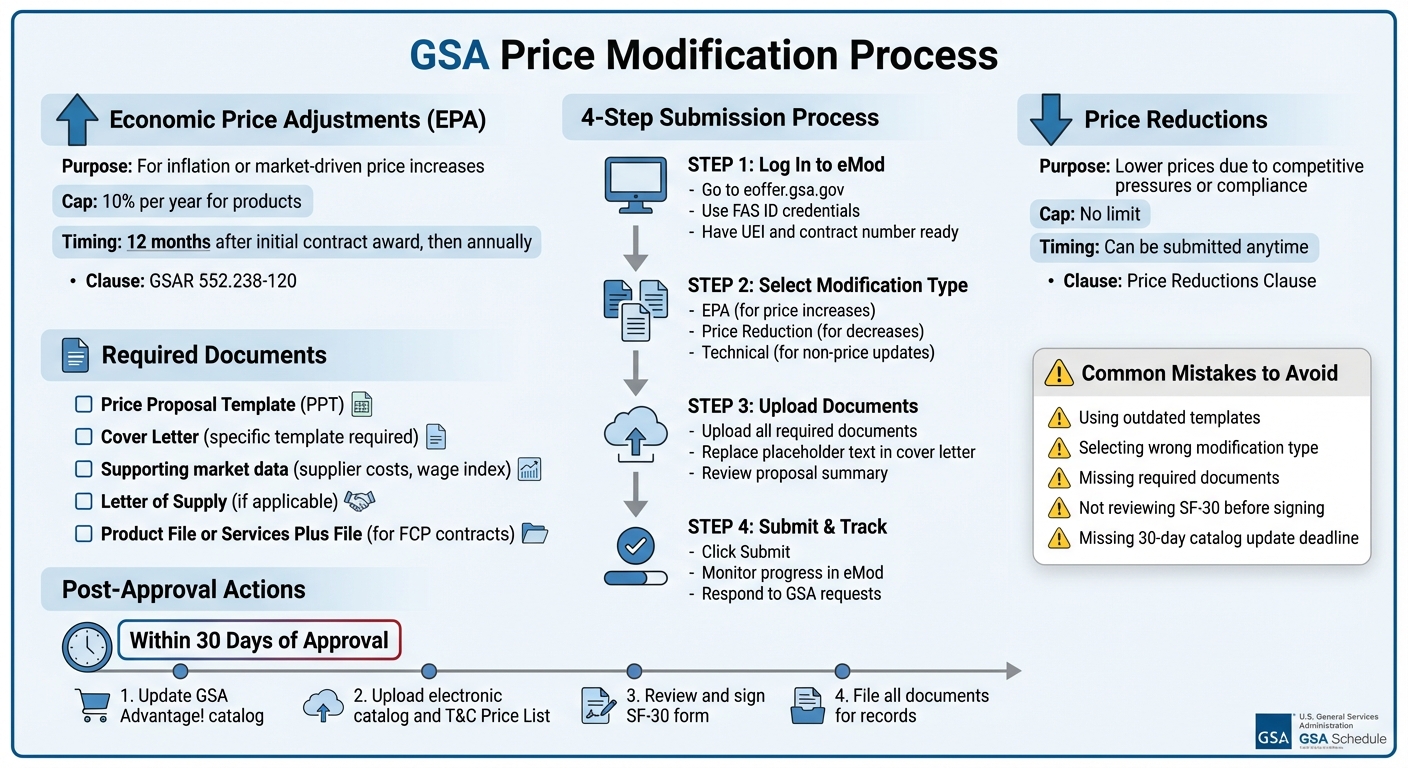
GSA Price Modification Process: 4-Step Guide with Requirements and Timeline
The 3 GSA Modification Changes You Must Know For 2024
What Are GSA Price Modifications?
A GSA price modification is an official way to adjust the pricing terms in your existing GSA contract. These updates ensure your contract reflects current market conditions, inflation, or changes in your commercial pricing. Unlike modifications that add new products or services, price modifications specifically focus on adjusting the dollar amounts you charge government buyers.
Costs for materials, labor, and other factors can shift over time. Price modifications help you adapt to these changes while staying compliant with your negotiated terms.
Types of Price Modifications
There are two main types of GSA price modifications: Economic Price Adjustments (EPA) and Price Reductions. Each addresses specific market scenarios and determines how and when you can adjust your pricing.
- Economic Price Adjustments (EPA): These allow you to raise prices to account for inflation or other market shifts. Under GSAR 552.238-120, the EPA clause outlines the rules for timing, frequency, and limits on increases. A common approach is a fixed annual escalation, such as a 3% increase. For product-based pricing, EPAs generally cap increases at 10% per year. Labor rate adjustments may follow the Department of Labor (DOL) wage index instead of a set percentage.
- Price Reductions: These let you lower your prices in response to market changes or competitive pressures. Price reductions can also help you comply with the Price Reductions Clause when your commercial pricing drops.
When to Modify Prices
You’ll need to submit a price modification when your pricing no longer aligns with commercial changes or when inflation and rising costs impact your profit margins. For example, material costs for items like gas, steel, or copper can increase significantly, making timely adjustments essential.
EPA timing restrictions are important to keep in mind. Typically, you can request an EPA 12 months after your initial contract award and then every 12 months after that. This means you can’t submit multiple price increases back-to-back, so it’s crucial to plan and time your requests carefully. Price reductions, however, don’t have these timing restrictions and can be made at any time.
Next, we’ll look at the eligibility requirements and the documents you’ll need to prepare for your submission.
Getting Ready to Submit Your Price Modification
Before diving into the price modification process, make sure you’ve double-checked your eligibility and gathered all necessary documents. Missing or outdated paperwork can hold up your approval, so it’s worth getting everything in order upfront.
Eligibility and Timing Requirements
To request a price increase, your contract must meet specific timing rules. For instance, you can only apply for an Economic Price Adjustment (EPA) after 12 months from the date your contract was awarded. After that, you can submit another request every 12 months.
Also, confirm that your contract includes the EPA clause (GSAR 552.238-120). This is particularly important if you’re working under MAS Refresh 29, which introduced a new EPA method that requires a specific cover letter template. Additionally, ensure your authorized negotiators and points of contact in the eMod system are up to date. Only these individuals can submit modification requests.
Once you’ve confirmed eligibility, the next step is to gather all the required documentation.
Documents You’ll Need
Before logging into eMod, make sure you have the following documents ready:
- Price Proposal Template (PPT): Depending on your offering, download the appropriate version – either "Products" or "Services and Training" – from the GSA Vendor Support Center.
- Product File or Services Plus File: If your catalog transitioned to the FAS Catalog Platform (FCP) in 2024, you’ll need to use these files instead of the legacy PPT.
- Cover Letter: Use GSA’s specific templates, which vary for general modifications, FCP baseline requests, and the new EPA method.
- Letter of Supply: This is necessary if you’re adding a new manufacturer or reselling commercial off-the-shelf (COTS) products.
- Supporting Documentation: Provide market data to justify the price change. Examples include supplier cost increases or Department of Labor wage index data for labor categories.
Having these documents ready will streamline the modification process and minimize delays.
How to Modify Your GSA Prices
Once your documents are ready, follow these steps to complete your price modification using eMod.
Step 1: Log In to eMod
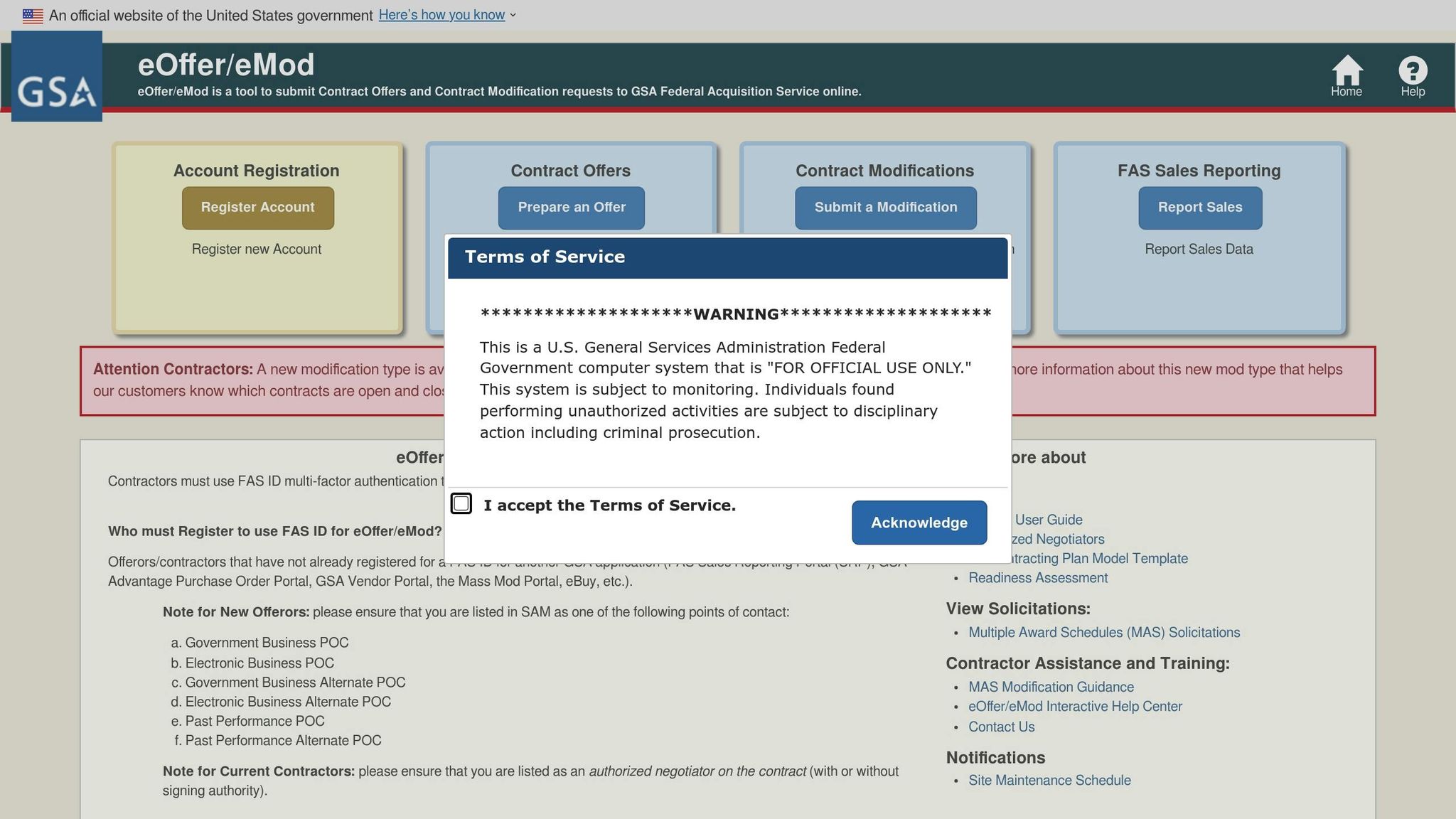
Head to eoffer.gsa.gov and log in with your FAS ID credentials. If you already use a FAS ID for other GSA tools like eBuy or the Sales Reporting Portal, those credentials will work here too.
"As of March 8th, 2021, contractors do not need a digital certificate to access eMod. Offerors will use FAS ID credentials to access eMod." – GSA.gov
Make sure you have both your Unique Entity Identifier (UEI) and GSA contract number handy. Since April 2022, the UEI is required to access eMod. If you can’t find your contract after logging in, you may not be listed as an Authorized Negotiator. In that case, reach out to your Contracting Officer to update the authorization list.
Step 2: Select the Right Modification Type
Once logged in, go to the "new eMods" section on the homepage and select your contract. From there, you’ll see a list of modification options.
- For price increases, choose Economic Price Adjustment (EPA).
- For price decreases (often required under the Price Reductions Clause), select Price Reduction.
- If you’re updating a part number or description without changing the price, opt for a Technical modification.
Keep in mind, you should submit only one pricing modification per request. However, administrative updates can be bundled together. If you’re also updating your company address or website, ensure those changes are made in SAM.gov first – eMod pulls this data directly from there.
Before moving forward, gather proof of commercial price changes. This might include invoices, updated commercial price lists, or similar documentation. If you’re reselling commercial off-the-shelf products and the manufacturer isn’t in the Verified Products Portal, include a Letter of Supply.
Step 3: Upload Required Documents
After selecting the modification type, upload the necessary documents, including your Price Proposal Template, a cover letter, and supporting market data. For resellers, don’t forget the Letter of Supply if needed.
Double-check your cover letter to ensure all placeholder text – usually highlighted in blue – has been replaced with the correct information. Once everything is uploaded, review the proposal summary generated by eMod for accuracy before moving forward.
Step 4: Submit and Track Your Request
When you’re confident everything is accurate, click "Submit." Your request will then move into the GSA review queue. You can monitor its progress directly in eMod, which will also notify you of any updates or additional information requests during the review process.
Once submitted, you’ll be ready to handle any post-approval updates that come next.
What to Do After Your Modification Is Approved
Once GSA approves and signs your price modification in eMod, it’s time to take the next steps: update your public catalog and ensure your contract documents are properly filed.
Update GSA Advantage! and Your Price Lists
Your contract requires you to upload approved price lists to GSA Advantage! so government buyers can access your current pricing. Since GSA Advantage! connects with a broad audience, keeping your pricing up to date is a must.
Depending on your contract setup, you’ll use SIP, EDI, or FCP to upload your price lists. If your contract has transitioned to FCP, you’ll see a "Go to FCP" button in eMod. GSA is actively moving around 700 contracts per month to this platform.
"All approved catalog-related modifications must be followed by a T&C upload to keep the Price List in line with the contract." – Vendor Support Center
Here’s what to upload based on your item type:
- Orderable products or services: An electronic catalog and a Terms and Conditions (T&C) Price List.
- Non-orderable services: A T&C file that includes both your price list and labor categories.
Under FCP, additions and changes will automatically publish once the award is signed, while deletions and temporary price reductions are published immediately upon submission.
Formatting tips:
- Avoid using special characters like "$" or "%" in number-only fields.
- Represent percentages as decimals (e.g., 5% becomes 0.05).
- For discount values in the Services Plus File, use no more than four decimal places.
Once your catalog updates are complete, move on to filing your documents.
Review and File Your SF-30
After both parties sign the modification, eMod will notify you. Log in to download the Standard Form 30 (SF-30) along with other related documents for your records. This form is your official contract modification – make sure to retain it.
If you receive an SF-30 via an automated "Robomod" (commonly used to remove non-compliant products), you must update your Contract Price List within 30 days. If you believe an item was mistakenly removed, contact your Contracting Officer immediately. Providing supporting evidence within the same 30-day period may help reverse the action.
Common Mistakes and How to Avoid Them
Navigating the price modification process can be tricky, even for experienced contractors. Missteps along the way can lead to frustrating delays. By understanding where others often go wrong, you can sidestep these issues and move your pricing approval along more smoothly.
Why Requests Get Rejected
One frequent reason for rejections is using outdated templates. GSA updates its Price Proposal Templates (PPT) regularly, and submitting an older version – or worse, using an "Offer" template instead of a "Modification" template – can result in immediate rejection. Always check the "MAS Scope and Templates" page to download the latest version before starting your modification.
"Not submitting current, accurate, and complete documentation is grounds for your Contracting Officer rejecting a modification." – Patrick Morgans, Manager, Winvale
Another common issue is pending mass modifications. If you have any mandatory mass modifications that haven’t been signed within 90 days, it can freeze your ability to process new requests.
Selecting the wrong modification type in eMod is another stumbling block. Each type requires specific documentation, so choosing incorrectly – like selecting "Add SIN" when you meant "Add Product" – will likely lead to rejection. Checking the MAS Modification Guide before starting can save you from this error.
Finally, errors on the SF-30 form can cause long-term problems. Contracting Officers may make clerical mistakes on this form, and if you sign it without reviewing every discount and term, you could be stuck with those errors. Always double-check the final award document before signing electronically.
Tips for a Smooth Approval Process
To prevent issues, make it a habit to download updated templates for every modification. Reusing old files from previous requests is a common mistake. GSA frequently refreshes its solicitation, and staying current ensures your request won’t be automatically rejected.
Most Favored Customer (MFC) compliance is critical. Your proposed GSA pricing must align with the customer relationship you established in your original contract. Any inconsistency could trigger additional questions or even denial.
For a faster approval process, include documentation that demonstrates urgency, such as a pending Request for Quote (RFQ) with a government buyer. This can help your Contracting Officer prioritize your request.
Other key steps include verifying that all uploaded documents match your eMod entries exactly, replacing all placeholder text in cover letters with your contract-specific information, and ensuring all authorized negotiators in the system are current. The document checklist in "Getting Ready to Submit Your Price Modification" is a great resource to help you avoid small but impactful oversights.
Conclusion
Adjusting your GSA Schedule prices involves a detailed process, starting with the initial eMod submission and continuing through post-approval updates. Each step requires close attention, from selecting the correct modification type in eMod to uploading precise documentation and keeping track of your submission. As GSA advises, "A modification is required whenever a change is made to your GSA Schedule contract". This underscores the importance of mastering the process.
Careful preparation can save you from delays or rejections. Using up-to-date templates, adhering to Most Favored Customer compliance, and verifying that all authorized negotiators are current are key to avoiding common issues. These steps aren’t just best practices – they’re contractual requirements that influence your ability to handle future modifications effectively. Once your modification is approved, completing the final steps ensures your contract remains compliant.
Post-approval, make sure to update your GSA Advantage! and eLibrary price lists within 30 days, carefully review your SF-30 before signing, and keep detailed records for future reference. These actions help maintain compliance and ensure your pricing is accurate across all government purchasing platforms.
If this process feels daunting, you can turn to professional services like GSA Focus. They provide small businesses with full-service support, including document preparation, compliance checks, and negotiation assistance. By outsourcing, you can save time and reduce the risk of errors that might result in costly rejections or clarification requests.
Whether you choose to handle modifications internally or seek expert assistance, staying informed about GSA requirements and keeping accurate records is essential for maintaining compliance and ensuring smooth contract management.
FAQs
How do I know if my contract uses the new EPA method?
If your contract includes clause 552.238-120, it has replaced previous clauses such as I-FSS-969 and 552.216-70. Contracts updated after the refresh period or referencing this clause now follow the updated EPA method. To confirm, review your contract documentation or reach out directly to your Contracting Officer or Contract Specialist for clarification.
What proof does GSA accept to justify a price increase?
GSA requires proof for a price increase to be submitted through a current, dated commercial price list, catalog, or standard rate sheet that wasn’t specifically created for the solicitation. Additional materials, like invoices or documentation of established pricing, may also be necessary. If the request is based on market conditions, you’ll need to provide a market analysis and supporting data to justify the adjustment.
What happens if I miss the 30-day catalog update deadline?
Missing the 30-day deadline for updating your GSA Schedule pricing catalog can have serious consequences. If you don’t submit your price modification on time, your updated pricing won’t show up on GSA Advantage! or GSA eLibrary within that period. This delay can hurt your compliance status and even impact your ability to stay competitive in the market. Government buyers rely on these platforms to see accurate pricing, so any lag in updates could mean missed opportunities. To avoid these issues, make sure to submit your updates promptly and stay ahead of deadlines.
Related Blog Posts
- How to Remove Products from GSA Schedule
- How to Update GSA Schedule Prices
- How to Submit Administrative Modifications in eMod
- Checklist for Substantive GSA Contract Modifications