

Start by using your commercial pricing as the baseline, benchmarking it against CALC+ Ceiling Rates, completing the Price Proposal Template (PPT) with formulas intact, choosing an Economic Price Adjustment (EPA) method before award, and filing any change through eMod with full supporting documentation.
Setting a compliant GSA labor rate is a documentation exercise as much as a pricing one. The PPT, CALC+, and eMod work together: CALC+ tells you where the market sits, the PPT turns that into a formal offer, and eMod carries the approved change into your contract. Skip a step, and a Contracting Officer will send the submission back. Open CALC+ or pull the current PPT template before you touch a spreadsheet.
TL;DR:
- Benchmark GSA labor rates using CALC+ Ceiling Rates, focusing on median and percentile data, and export results to support documentation and cost estimates.
- Submit the Price Proposal Template in its original format with formulas intact, clearly map commercial prices to GSA categories, and include supporting files for faster approval.
- Choose an EPA method before award, either fixed escalation or index-based adjustments, and provide supporting market data when requesting rate changes during the contract.
- Accurately map wage determinations to SCLS categories within the GSA-provided matrix, and update it annually to avoid task-order disputes and ensure compliance.
- Prepare eMod changes by attaching all supporting documents, informing the Contracting Officer, and keeping records like CALC+ exports to streamline the approval process.
Table of Contents
- Where do I benchmark GSA labor rates before I set my own?
- How do I prepare the Price Proposal Template and supporting documents?
- When should I set an Economic Price Adjustment method?
- How do wage determinations affect my GSA labor categories?
- How do I submit a labor rate change through eMod?
- What should I gather before I touch a rate change?
- What do GSA consultants see go wrong with rate submissions most often?
- What’s overrated in GSA labor rate advice, and what actually matters?
- How we help with PPTs, EPA selection, and eMod filings
- FAQ
- Sources
- Primary sources and tools to bookmark
Where do I benchmark GSA labor rates before I set my own?
CALC+ Ceiling Rates pulls not-to-exceed hourly rates from awarded Multiple Award Schedule (MAS) contracts, uploaded from the FAS Catalog Platform. These are ceiling rates, not guaranteed prices, but they tell you what the government has already accepted for a given labor category.
To run a useful search:
- Filter by labor category title, not just keyword, since titles vary across contracts.
- Set site type (customer site versus contractor site), since onsite rates often run higher.
- Narrow by business size and contract award year to compare against peers, not legacy pricing.
CALC+ Ceiling Rates supports exporting results as CSV, PDF, or graph, which matters because those exports document your market research for the contract file and any Independent Government Cost Estimate.
Look at median and percentile displays rather than the simple average. A handful of outlier awards can skew the mean, while the median shows where most contracts in your category actually land. Save the export the day you run it: CALC+ data updates as new awards post, and a Contracting Officer may ask when your benchmark was pulled.
How do I prepare the Price Proposal Template and supporting documents?
The Price Proposal Template (PPT) is the official vehicle for proposing MAS labor rates, and GSA expects it submitted in its exact Excel format, formulas untouched. Altering cells or pasting in values instead of formulas is one of the most common reasons submissions bounce back.
- Download the current PPT from GSA’s offer templates page, never reuse an older saved copy.
- Enter your commercial labor categories and rates first, then map each to the equivalent GSA category.
- Build in the Industrial Funding Fee of 0.75% so the proposed rate reflects the fully burdened price, as the MAS Modification Guide requires.
- Label every supporting file clearly: commercial price lists, invoices, signed contracts, and basis-of-award or most-favored-customer documentation.
- Attach a short price narrative explaining how your commercial practice ties to the proposed government rate.
Pro Tip: Open the PPT in a fresh download each time you revise it, since reused files often carry broken formulas from earlier edits that reviewers catch immediately.
Consistency matters more than any single number. If your commercial price list shows one discount structure and your invoices show another, expect questions before approval.
When should I set an Economic Price Adjustment method?
An Economic Price Adjustment (EPA) mechanism lets you raise labor rates during the contract period without renegotiating the whole schedule, but the method has to be agreed before award. You cannot add one mid-contract without a formal modification.
- Fixed annual escalation applies a set percentage increase each option year, simple to administer and predictable for both sides.
- Index-based adjustment ties increases to a published measure such as the Bureau of Labor Statistics Employment Cost Index, which tracks actual wage movement more closely.
- Whichever method you pick, it must appear in your contract terms at award, per EPA guidance on file with GSA’s regulatory docket.
When you later request an adjustment, include the cause, the effective date, the calculation method, and supporting market data, since a bare percentage request without backup gets returned for clarification.
How do wage determinations affect my GSA labor categories?
Service Contract Labor Standards (SCLS) wage determinations set wage floors for certain labor categories, and GSA requires mapping each affected category to its SCLS-equivalent code and wage determination number inside an SCLS matrix.
- Record the matching WD number and SCLS code directly in the matrix GSA provides, not in a separate internal spreadsheet.
- Wage determinations are incorporated into MAS contracts annually, so a labor category tied to a locality with lower prevailing wages can sometimes justify a price reduction request at task-order level.
- Note whether a rate applies to domestic or overseas work and to contractor-site or customer-site delivery, since these variations must be labeled separately in your PPT with invoices showing the actual price difference.
Getting this mapping wrong is a frequent cause of task-order pricing disputes down the line, since the agency buyer is working from your SCLS matrix, not your internal job titles.
How do I submit a labor rate change through eMod?
Once your PPT and supporting files are ready, the modification itself follows a fixed sequence.
- Finalize the PPT and attach all labeled supporting documents in one package.
- Upload the package through eMod and select the correct modification type for a price change.
- Notify your assigned Contracting Officer that the modification is in the queue, since eMod does not always trigger immediate review.
- Negotiate any questions the Contracting Officer raises, often around formula consistency or missing invoices.
- Receive the formal modification confirming the new rate and its effective date.
Per FAR 52.216-4, labor rate changes carry notification timelines and defined negotiation steps, and the adjustment takes effect only once the modification is formally executed, not on the date you submitted it. Keep your CALC+ export from the benchmarking stage in the same file: if the Contracting Officer asks why you proposed a particular figure, that export is your answer.
What should I gather before I touch a rate change?
A clean submission starts with a short internal checklist rather than a blank spreadsheet.
- Current PPT downloaded fresh, formulas untouched.
- Supporting documents labeled by type: commercial price lists, invoices, signed contracts.
- Written uncompensated overtime policy, if your categories use one.
- Updated SCLS matrix with current wage determination numbers.
- EPA method already selected and matching your contract terms.
- CALC+ export dated and saved alongside the PPT.
Pro Tip: Route the draft past finance for the numbers, HR for wage determination accuracy, and whoever manages your contract for the narrative, before it ever reaches eMod.
Keep every version and export in one contract file. When a Contracting Officer follows up months later, having the dated CALC+ pull and the signed PPT in one place turns a possible delay into a quick reply.
What do GSA consultants see go wrong with rate submissions most often?
The errors that stall modifications are rarely about the rate itself. They are about formatting: a formula replaced with a typed value, a supporting file that does not match the labor category it is meant to back, a price narrative that contradicts the invoices attached to it.
A readiness review before submission, checking that every PPT formula still calculates and every labeled document actually supports the category it is filed under, avoids an extra modification cycle that can add weeks. For deeper worked examples of labor category buildup, our guide to GSA labor rate development and our notes on proposal templates for GSA contracts walk through common fixes in more detail.
What’s overrated in GSA labor rate advice, and what actually matters?
Most guidance treats CALC+ benchmarking as the hard part of setting a labor rate. It is not. Pulling a ceiling rate takes minutes. The part that actually derails submissions is documentation discipline: matching invoices to price lists, keeping PPT formulas intact, and choosing an EPA method you can still defend two option years later.
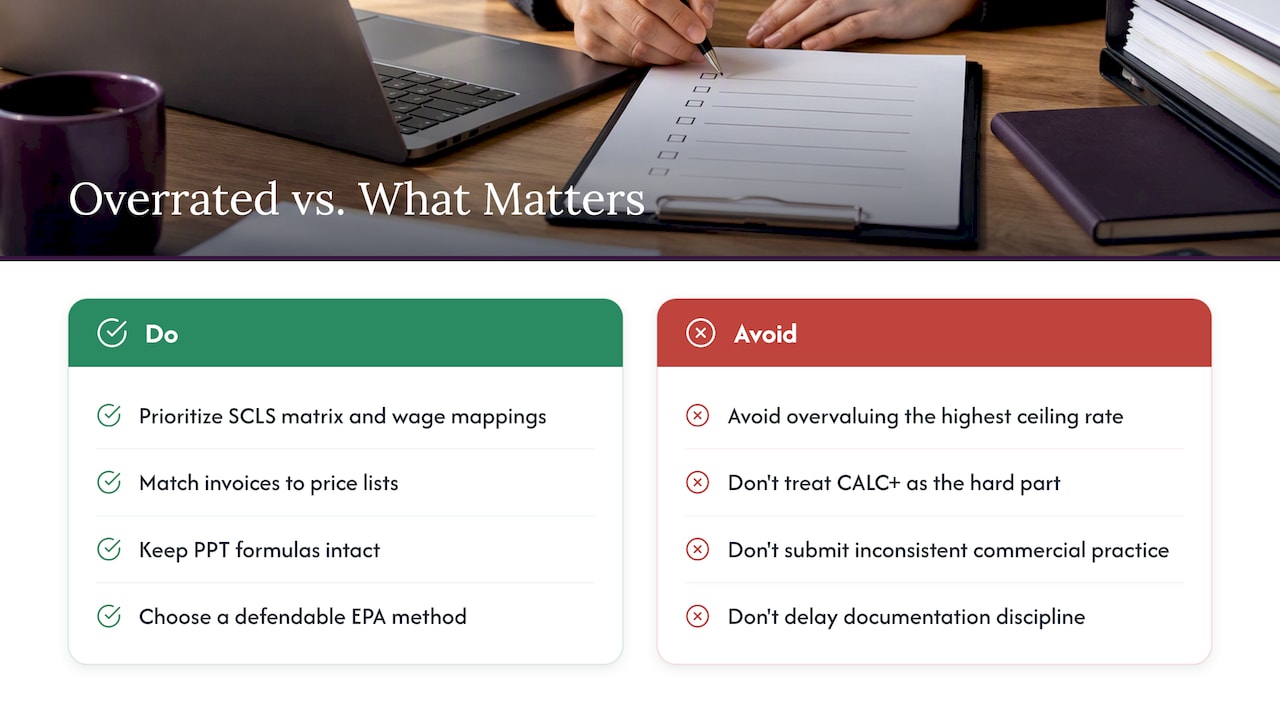
Contractors also overvalue hitting the highest defensible ceiling rate and undervalue consistency. A rate that sits slightly lower but matches your commercial practice exactly will clear review faster than an aggressive figure backed by a shaky narrative. Reviewers are checking for coherence between your commercial world and your government offer, not for the biggest number you can justify.
If you prioritize one thing, prioritize the SCLS matrix and wage determination mapping early. Getting that wrong ripples into task-order pricing long after the modification is approved, and it is far cheaper to fix before submission than after an agency buyer questions a quote.
**
How we help with PPTs, EPA selection, and eMod filings
We prepare Price Proposal Templates, select and document Economic Price Adjustment methods, map SCLS categories, and file eMod submissions directly, so you are not learning the formatting rules while a Contracting Officer’s clock is running.
- PPT preparation and CALC+ benchmarking for new or revised labor categories.
- SCLS mapping and wage determination documentation handled for you.
- eMod submission and negotiation support through to formal approval.
- Ongoing modification coverage through our maintenance plans, from one modification a year up to custom volumes.
This is optional support, not a requirement. Plenty of contractors file their own PPTs successfully. For teams without the hours to spare on formatting and documentation, our proposal packages and price list change services handle it directly. If you want a straightforward read on where your current rates stand, start with a free eligibility check.
FAQ
What are the current GSA labor rates?
There is no single published rate list, since GSA labor rates vary by labor category, contract, and award year. The way to find current figures is to run a query in CALC+ Ceiling Rates, which pulls ceiling rates from actual awarded MAS contracts and lets you filter by category and year.
How can I search for GSA rates?
Use the CALC+ Ceiling Rates tool, filtering by labor category, site type, business size, and contract year to narrow results to comparable awards. Export the results as a CSV or PDF so the search itself becomes part of your contract documentation.
What are the GSA per diem rates for 2026?
Per diem rates cover employee travel reimbursement and are a separate GSA program from Multiple Award Schedule labor pricing, so they do not factor into setting your contract labor rates. For federal per diem figures, check Sam and GSA’s travel resources directly rather than a schedule pricing tool.
What is a reasonable G&A rate?
A reasonable General and Administrative (G&A) rate depends on your industry, overhead structure, and labor category mix, and GSA does not publish a target percentage. What matters for your PPT is that your proposed rate, once G&A and fringe are layered in along with the 0.75% Industrial Funding Fee, stays consistent with the commercial pricing documentation you submit.
Sources
- CALC+ User Guide for Labor Ceiling Rates_V2.0
- Required templates for a MAS offer
- MULTIPLE AWARD SCHEDULE (MAS) MODIFICATION GUIDE (Nov 2025)
- GSA-GSAR-2023-0025-0001 (Economic Price Adjustment guidance)
- FAR 52.216-4 Economic Price Adjustment—Labor and Material
Primary sources and tools to bookmark
Bookmark the CALC+ Ceiling Rates tool for benchmarking labor rates against awarded MAS contracts, the MAS Modification Guide for PPT formatting and SCLS matrix rules, and FAR 52.216-4 for the legal clause governing EPA notice and negotiation timelines. File modifications through eMod once your package is complete. Check SAM.gov for registration status before submitting anything. For contractors who also want a partner on the marketing side after award, SemLocal’s marketing consulting supports federal-facing outreach once your schedule is in place.
Recommended
- Checklist for eMod Technical Compliance
- Federal Contract Document Checklist
- Checklist for GSA Construction Contract Compliance
- An Essential Checklist to Maintain Your GSA Schedule Contract