

If you have received an option notification from GSA, your clock is already running. Respond to the system-generated letter in eMod and confirm acceptance of all outstanding Mass Modifications before you do anything else. The contractor response window typically closes around 165 days before your contract expiration date. Missing it gives the contracting officer (CO) grounds to let the contract expire without reinstatement.
Here is what to do in the next seven days:
- Log into eMod and locate the system-generated option letter under your contract.
- Accept every outstanding Mass Modification (Mass Mod) before submitting any other modification request.
- If you plan to pursue a follow-on MAS via the Streamlined Offer process, start that paperwork now, not at the 165-day mark.
- If you are considering a new MAS award to maintain continuous coverage for active BPAs or orders, begin that process in parallel.
Pro Tip: Update your SAM.gov registration, authorized negotiator list, and Price List before you file anything in eMod. Outdated SAM.gov records and mismatched authorized negotiators are among the most common automatic rejection triggers COs encounter.
Key Takeaways
A GSA contract renewal requires responding to the OPEN option notification in eMod by the 165-day deadline, accepting all outstanding Mass Mods, and publishing updated contract data to GSA Advantage within 30 days of option exercise.
| Point | Details |
|---|---|
| 165-day response deadline | Submit your option response in eMod by this deadline or the CO may decline to exercise the option. |
| Mass Mods block everything | Accept all outstanding Mass Mods before filing any other modification or option response. |
| TDR is now mandatory | As of MAS Refresh 31, all SINs require acceptance of the Participate-in-TDR Mass Mod; reporting begins the first day of the following quarter. |
| Streamlined Offer prevents gaps | Existing MAS contractors can pursue a follow-on contract with reduced documentation and hold overlapping contracts to protect active BPAs. |
| Gsascheduleservices | Provides readiness assessments, eMod filing, Mass Mod remediation, and CO coordination to reduce rejection risk. |
Table of Contents
- How does the GSA contract renewal process actually work?
- What documents do you need before filing in eMod?
- What are the key deadlines in the GSA renewal timeline?
- How do you submit your option response through eMod?
- Why might GSA decline to exercise your option?
- Should you renew your option or pursue a new MAS?
- What happens after your option is exercised?
- Who do you contact and what do you do if something goes wrong?
- What does a GSA renewal support service actually do for you?
- What most contractors get wrong about GSA renewals
- Gsascheduleservices handles the renewal work so you can focus on delivery
- Sources
- FAQ
How does the GSA contract renewal process actually work?
GSA Schedule (MAS) contracts run for a base period plus option periods, and the renewal of a GSA Schedule is not automatic. Three distinct paths exist, and choosing the wrong one wastes time you do not have.
The OPEN process: what triggers your notification
OPEN (Option Process Ensuring iNtegrity) is GSA’s automated system for managing option periods. It runs queries on contracts expiring within roughly 250 days, prompts CO and contract specialist (CS) review, and then generates contractor notifications typically around 210 days before expiration. If the CO identifies compliance issues early, an exclusion determination letter may arrive before that 210-day mark. The contractor response window is typically 165 days before the contract expiration date. Miss that window and the CO may simply decide not to exercise the option.
The Streamlined Offer path
GSA’s Streamlined Offer Process lets successful existing MAS contractors pursue a follow-on MAS with a reduced documentation set. Detailed financials, certain past performance submissions, and project-experience packages are waived when you propose the same SINs and meet eligibility criteria. Critically, GSA allows overlapping contracts under this path, so active BPAs and orders on your legacy contract continue without interruption while the new award ramps up.
When to pursue a new MAS instead
A full new MAS offer is the right call when you need SINs outside your current award, when material changes to your Basis of Award cannot be affirmed, or when you want a fresh pricing structure. The administrative burden is higher, but a new award resets your contract clock and can be worth it for contractors making significant product or service line changes.
Key entities to know:
- Vendor Support Center (VSC / OPEN): official guidance hub for option and modification processes
- eMod: the portal where you submit all modification requests and option responses
- SAM.gov: must stay current for your contract to remain active
- GSA Advantage and FAS Catalog Platform: required publication destinations for your Price List and Terms & Conditions
- Mass Mods (MAS Refreshes): periodic contract updates you must accept before any other mod is processed
- Transactional Data Reporting (TDR): mandatory reporting program now expanded to all SINs as of MAS Refresh 31
As of MAS Refresh 31, TDR is mandatory for all SINs. Every contractor must accept the Participate-in-TDR Mass Mod, and TDR obligations become effective the first day of the quarter following acceptance.
What documents do you need before filing in eMod?
Getting rejected because of a missing document or a stale SAM.gov record is avoidable. Work through this checklist before you open eMod.
Required documents
- Corporate letter of intent: signed by an authorized officer, affirming intent to exercise the option
- Commercial Sales Practices (CSP-1) or affirmation: confirms no material change to pricing basis, or submits a revised CSP-1 if changes occurred
- Price List and Terms & Conditions file: current, formatted to GSA standards, with no duplicate line items or math errors
- Basis of Award paperwork: updated where required, especially if your most-favored customer pricing has changed
- Subcontracting plan: required for large businesses; must be current and reflect actual subcontracting activity
- Price Proposal Template (PPT): required when proposing price changes or adding items
System checks before you submit
- SAM.gov registration is active and accurate (legal name, CAGE code, NAICS codes)
- Authorized negotiators listed on the contract match current personnel
- FAS ID with MFA is active for the Mass Mod portal (MCM)
- All outstanding Mass Mods are accepted
- GSA Advantage publication is current with your latest Price List
Prerequisites that block approval
Per the MAS Modification Guide, GSA will not process any modification request until all overdue Mass Mods have been accepted. Signing a later Mass Mod (for example, Refresh 31) incorporates all earlier unsigned changes, including Refresh 30, so you do not need to sign each one individually if you have fallen behind. But you do need to sign at least the most current one before your option response will move forward.
| Document | Where to Upload | Common Rejection Reason |
|---|---|---|
| Corporate letter of intent | eMod attachment | Not signed by an authorized officer |
| CSP-1 or affirmation | eMod attachment | Missing or inconsistent with current pricing |
| Price List / T&C file | eMod + GSA Advantage | Math errors, duplicate part numbers |
| Subcontracting plan | eMod attachment | Expired plan or missing annual reports |
| Price Proposal Template | eMod attachment | Incorrect format or missing items |
| SAM.gov registration | SAM.gov (direct) | Expired or mismatched legal name |
Pro Tip: Keep a single folder with final PDFs and a cover letter that lists every uploaded document alongside its eMod transaction ID. This one habit cuts CO review time and eliminates disputes about whether a file was actually submitted.
What are the key deadlines in the GSA renewal timeline?
| Days Before Expiration | Event | Required Action |
|---|---|---|
| ~250 days | OPEN system query runs; CO/CS/ACO review begins | Internal readiness check; begin Mass Mod audit |
| ~210 days | Contractor receives option notification email | Confirm receipt; begin preparing response documents |
| ~165 days | Contractor response deadline in eMod | Submit option response with all required attachments |
| Within 30 days after option exercise | Publication to GSA Advantage and FAS Catalog Platform | Upload current Price List and Terms & Conditions |
| First day of quarter after Mass Mod acceptance | TDR obligations become effective | Begin transactional data reporting |
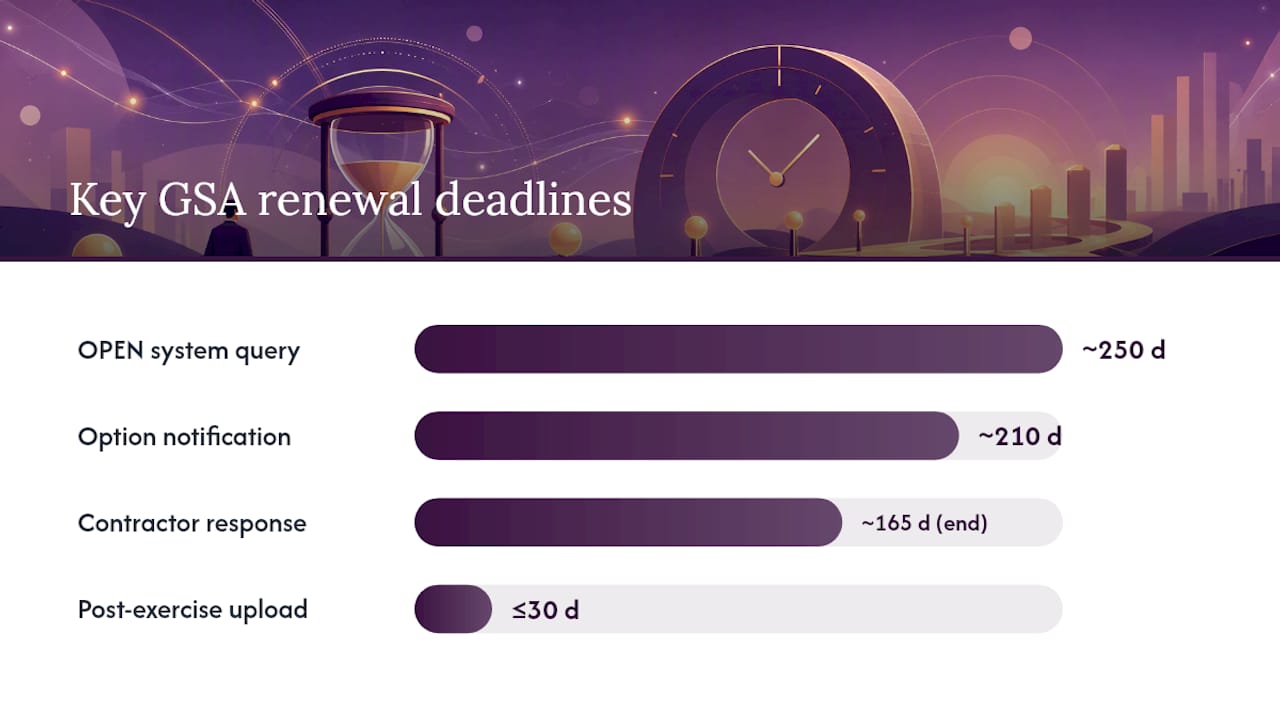
The 165-day deadline is the one that ends contracts. GSA’s requirements checklist is explicit: respond to the system-generated option letter via eMod around 165 days before your contract end date. If you miss it, the CO has full discretion to decline the option, and there is no reinstatement mechanism once the contract expires.
One nuance worth knowing: signing a later Mass Mod will incorporate all earlier refresh changes you have not yet signed. So if you missed Refresh 30 but sign Refresh 31, the Refresh 30 terms are folded in automatically. That said, you still cannot submit your option response until the current Mass Mod is accepted.
How do you submit your option response through eMod?
eMod is the official submission portal for all modification requests and option responses. Here is the exact sequence.
Step 1: Log into eMod at Eoffer and navigate to your contract. Locate the system-generated option letter under the “Modifications” tab.
Step 2: Prepare your corporate response letter. It must be signed by an authorized officer and include explicit declarations: either that there have been no changes to your CSPs, Price Reduction Clause (PRC) status, or Terms & Conditions, or a revised submission where changes have occurred.
Step 3: Attach all required files. The VSC option process guidance specifies what the CO expects: CSP-1 affirmation or revised form, current Price List, subcontracting plan (if applicable), and any updated Basis of Award documentation.
Step 4: Submit via eMod and capture screenshots of each successful upload confirmation.
Common rejection triggers to eliminate before you hit submit
- Outstanding Mass Mods not yet accepted
- Business size misrepresentation (size redetermination not completed)
- SAM.gov registration expired or legal name does not match contract
- CSP-1 missing, unsigned, or inconsistent with current commercial pricing
- Duplicate line items or arithmetic errors in the Price List
- SIN scope mismatch between what you propose and your current award
Most rejections come from administrative mismatches rather than substantive procurement disputes. Price List math errors, duplicated part numbers, and unsigned Mass Mods account for the bulk of delays. Fix those before submission and you eliminate the most common failure modes.
Pro Tip: Use the MAS Modification Guide checklists as your pre-flight checklist, and take screenshots of every successful eMod upload. If a CO later claims a file is missing, those timestamps are your evidence.
Why might GSA decline to exercise your option?
Option exercise is discretionary. GSA makes clear that COs evaluate contract compliance before exercising an option, and they can issue an exclusion determination if material issues exist.
Primary risk factors
- Unsigned Mass Mods: the single most common reason a CO delays or refuses an option exercise
- Undisclosed CSP or Basis of Award changes: if your commercial pricing changed materially and you did not disclose it, that is a compliance failure
- Expired subcontracting plan: large businesses must keep this current; an expired plan is an automatic flag
- Business size misrepresentation: if your size status changed and you did not complete a redetermination, the CO will catch it
- Failure to publish current electronic contract data: outdated Price Lists on GSA Advantage signal administrative neglect
Practical mitigation steps
- Accept all Mass Mods within 30 days of issuance, not just at renewal time
- Run internal CSP and Price List audits quarterly, not annually
- Keep your subcontracting plan updated and annual reports filed on time
- Verify authorized negotiator records every six months
- Contact your CO or CS at the 210-day mark, before you submit, to flag any known issues
Pro Tip: Assign one person as the compliance owner for your GSA contract. That person maintains a one-page renewal readiness status document listing outstanding Mass Mods, SAM.gov flags, and upcoming mandatory actions. When renewal season arrives, you are not scrambling.
Should you renew your option or pursue a new MAS?
This decision comes down to three factors: your SIN coverage needs, the state of your compliance record, and whether you have active BPAs or orders that require continuity.
Renew via option exercise when:
- Your current SINs cover everything you sell to the government
- No material changes to your CSPs or Basis of Award have occurred
- All Mass Mods are accepted and your compliance record is clean
- You have active BPAs or task orders that need uninterrupted contract coverage
- You meet past-performance and sales expectations under the current award
Pursue a new MAS (or Streamlined Offer) when:
- You need SINs that fall outside your current award scope
- Material changes to your CSPs or Basis of Award cannot be affirmed without a revised submission
- You want to reset pricing or pursue a fresh negotiation
- You have active BPAs and want to use the Streamlined Offer process to hold overlapping contracts and prevent a service gap
Scenario A: You have three active BPAs under your current MAS and your contract expires in 14 months. Start a Streamlined Offer now. GSA allows overlapping contracts under this path, so your BPAs continue on the legacy contract while the new award is established.
Scenario B: Your company has pivoted from IT products to professional services, and your current SINs no longer match your offerings. A new MAS is the right call. The Streamlined Offer waives some documentation, but you still need to demonstrate eligibility for the new SINs.
The administrative burden of overlapping contracts is real. You will file reports and accept Mass Mods on two contracts simultaneously. Weigh that against the cost of a coverage gap, especially if agencies are actively ordering against your schedule. For many contractors with active orders, the overlap is often considered worthwhile. See our guide to the GSA contract acquisition process for a fuller breakdown of what a new MAS award requires.
What happens after your option is exercised?
Approval is not the finish line. Several obligations kick in immediately after your option is exercised.
- Publish to GSA Advantage and the FAS Catalog Platform within 30 days of the option exercise. Upload your current Price List and Terms & Conditions. Failure to publish is cited as an administrative noncompliance that can hinder future modifications and orders. Check GSA eLibrary to confirm your contract expiration date reflects the new option period.
- TDR effective date: if you accepted the Participate-in-TDR Mass Mod, your transactional reporting obligations begin the first day of the quarter following acceptance. Set a calendar reminder.
- Sales thresholds: your contract carries cancellation-linked sales thresholds. The $100,000 threshold applies during the first five years; $125,000 applies to subsequent five-year periods. Falling below these figures gives GSA grounds to cancel.
- Subcontracting plan reports: large businesses must file Individual Subcontracting Reports (ISRs) and Summary Subcontracting Reports (SSRs) on schedule.
- Future Mass Mods: accept them within 30 days of issuance. Do not let them accumulate again.
- MCM portal: use the Mass Mod portal to confirm all Mass Mods are in accepted status after your option exercise.
For practical strategies to grow sales after renewal, the 17 strategies for GSA MAS federal sales article covers post-award marketing in detail.
Who do you contact and what do you do if something goes wrong?
Start with your assigned industrial operations analyst (IOA) or ACO/CO. They are your first point of contact for any compliance question, system error, or timeline concern. If you do not know who your IOA is, the Vendor Support Center can help you identify the right contact.
Practical operational tips:
- Build a renewal calendar tied to your contract expiration date with alerts at 250, 210, and 165 days
- Keep an audit trail of every Mass Mod acceptance, including date, mod number, and the name of the person who signed
- Run a renewal readiness check at the 210-day mark, before the notification arrives, not after
Contact list template to fill in now:
Escalation path: contact your CO or CS first. If you hit a system error in eMod, document it with screenshots and timestamps, then contact the eMod Help Center through the Vendor Support Center. Preserve all correspondence. If a Mass Mod is not showing as accepted in the MCM portal after you have signed it, contact your CS with the transaction ID and date.
Key insight: Most renewal failures are not caused by a contractor doing something wrong. They are caused by a contractor doing nothing — waiting for the notification email, assuming the option is automatic, and then discovering at the 165-day mark that unsigned Mass Mods have blocked the entire submission. The contractors who avoid this are the ones who treat renewal as a 250-day project, not a 30-day scramble.
Pro Tip: Check your contract expiration date in GSA eLibrary today, count back 250 days, and put that date in your calendar as “Start GSA renewal readiness review.” Everything else flows from that one habit.
What does a GSA renewal support service actually do for you?
Handling a GSA contract renewal in-house is manageable when your compliance record is clean, your Mass Mods are current, and your team has eMod experience. When any of those conditions are missing, the risk of rejection goes up fast.
A professional renewal support service covers:
- Readiness assessment: audit of outstanding Mass Mods, SAM.gov status, authorized negotiator records, and Price List accuracy before you file anything
- Document preparation: corporate letter, CSP-1 or affirmation, Price List formatting, subcontracting plan updates
- eMod filing: submission of the option response with all required attachments, with screenshots captured at each step
- Mass Mod backlog remediation: identifying and accepting all outstanding mods before the option response is filed
- CO/CS coordination: direct communication with your assigned contracting officer to flag issues early and reduce back-and-forth
- Subcontracting plan updates: drafting and filing current plans and annual reports for large businesses
The cases where hiring help pays for itself most clearly: tight timelines (you are already inside 210 days), a Mass Mod backlog of three or more unsigned mods, active BPAs that cannot tolerate a gap, or a team that has never filed an eMod modification before.
Pro Tip: A readiness assessment done at 210 days out typically surfaces two or three fixable issues that would have caused rejection at 165 days. Catching them early is the entire value proposition.
For a look at how agencies evaluate and use GSA contracts, the why agencies use GSA contracts article gives useful context on what COs are looking for when they review your compliance record.
What most contractors get wrong about GSA renewals
The conventional wisdom says the hard part of a GSA Schedule is getting the award. After 15-plus years of watching contractors navigate renewals, the harder part is the 250-day window before expiration, specifically the decisions that do not get made.
The most common mistake is treating Mass Mods as optional paperwork. They are not. They are contract amendments, and unsigned ones freeze your entire contract management capability. Contractors who accept Mass Mods promptly, every time, never face this problem. Contractors who batch them or ignore the notifications until renewal season arrive at the 165-day mark to find three or four unsigned mods blocking their option response.
The second mistake is waiting until the option notification arrives to decide between renewing and pursuing a new MAS. That decision should be made at 250 days, not 165. If you need a Streamlined Offer, you need time to prepare it. If you need a new MAS for different SINs, you need even more time. Starting at 165 days leaves you with no good options.
The third mistake is underestimating the value of overlapping contracts. Contractors with active BPAs sometimes let their schedule lapse because they assume the BPA will carry them through. It will not. A lapsed MAS contract means no new orders can be placed against it, and agencies will move on. The Streamlined Offer process exists precisely to prevent this scenario. Use it.
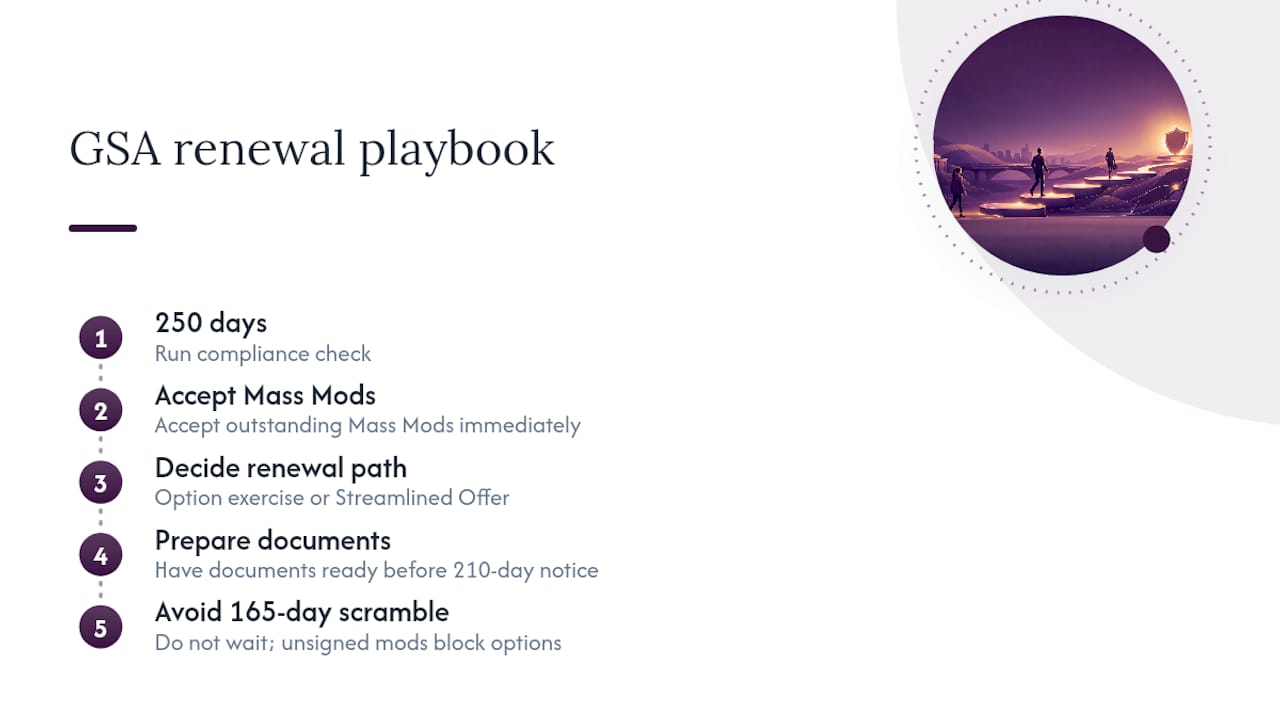
The playbook that works: run a compliance check at 250 days, accept any outstanding Mass Mods immediately, decide on your path (option exercise or Streamlined Offer), and have your documents ready before the 210-day notification arrives. By the time the system-generated letter lands in your inbox, you should be filing, not preparing.
Gsascheduleservices handles the renewal work so you can focus on delivery
GSA contract renewal paperwork is time-consuming, and a single missed step can delay your option exercise by weeks. Gsascheduleservices specializes in exactly this work: readiness assessments that surface problems before they become rejections, full document preparation (corporate letters, CSP-1 affirmations, Price Lists, subcontracting plans), eMod filing with transaction-level documentation, and direct CO/CS coordination to keep the process moving.
The most common engagement for option responses and Mass Mod clean-up is a fixed-scope package that covers the full submission from readiness audit through eMod filing. If you are inside the 210-day window and have not started, that is the package to ask about.
Schedule a discovery call to get a prioritized list of what needs to be fixed before your option response is filed.
Sources
These are the authoritative references for every process described in this article. When your contract terms conflict with general guidance, your MAS solicitation terms control.
- OPEN (Option Process Ensuring iNtegrity) – Options/Contract Renewal Process | Vendor Support Center
This article is general information, not a substitute for advice from a qualified lawyer. Consult a qualified legal professional about your own circumstances before acting on anything here.
FAQ
What is the GSA contract renewal process?
GSA uses the OPEN system to notify contractors of expiring contracts, typically around 210 days before expiration. Contractors must respond via eMod by approximately 165 days before the contract end date, with all required documents attached and all outstanding Mass Mods accepted.
How long does a GSA MAS contract last?
A GSA Multiple Award Schedule contract runs for a base period of five years, with up to three additional five-year option periods, for a maximum contract life of 20 years.
What is the GSA Schedule contract?
The GSA Multiple Award Schedule (MAS) is a long-term government-wide contract vehicle that pre-negotiates pricing, terms, and conditions, allowing federal agencies to purchase commercial products and services directly from approved vendors without a full competitive procurement.
What happens if you miss the 165-day response deadline?
The contracting officer has discretion to decline the option exercise, which means the contract expires with no reinstatement option. Missing this deadline is the most common way contractors lose their GSA Schedule.
Can you hold two GSA MAS contracts at the same time?
Yes. GSA’s Streamlined Offer process allows eligible contractors to pursue a follow-on MAS while their current contract remains active, specifically to protect active BPAs and orders from a coverage gap during the transition.
Recommended
- GSA Government Contracts: 7 Effective Steps to Maintain and Renew It.
- An Essential Checklist to Maintain Your GSA Schedule Contract
- Getting a GSA Contract (5 Steps)
- Renewing Your GSA Contract