

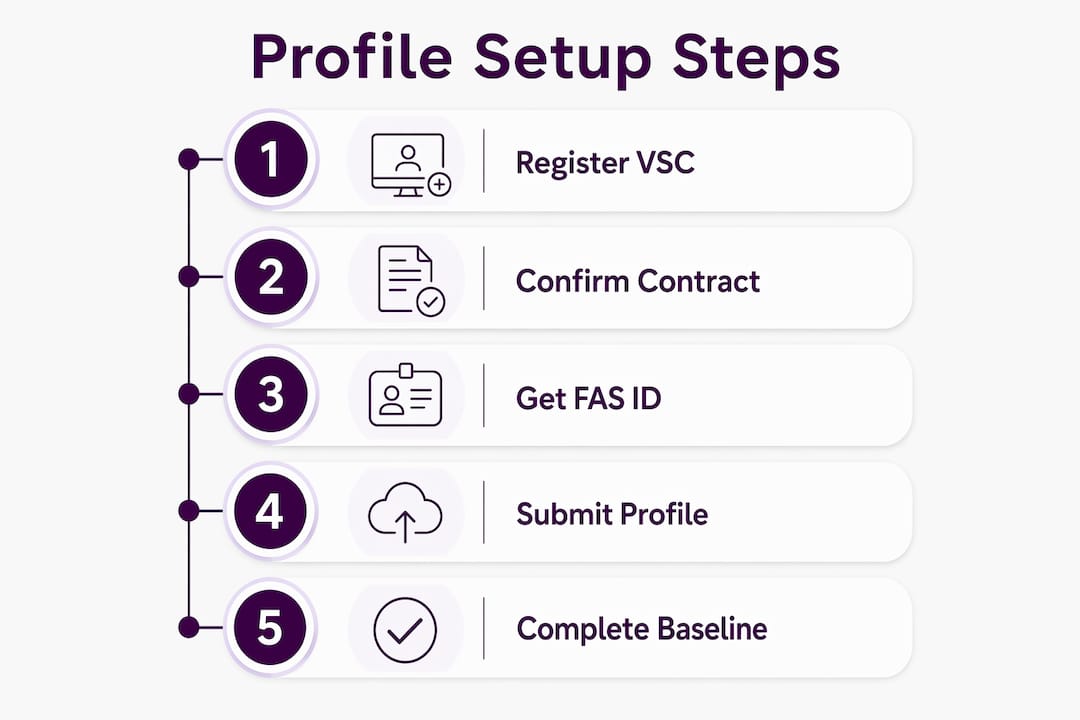
To get your GSA Advantage seller profile live, you need to complete five steps in order: register at the Vendor Support Center (VSC), confirm your MAS contract linkage and Authorized Negotiator roles, obtain your FAS ID and register for the FAS Catalog Platform (FCP) at catalog.gsa.gov/register, submit a complete Seller Profile, and then execute the Baseline action to publish your catalog to GSA Advantage. Skipping or reordering any of these steps causes downstream errors that can delay your catalog by weeks.
Quick-start checklist:
- Register at the GSA Vendor Support Center (VSC)
- Confirm MAS contract linkage and Authorized Negotiator roles in eMod
- Obtain or confirm your FAS ID and register for FCP at catalog.gsa.gov/register
- Submit your Seller Profile in FCP with contract-exact data
- Prepare your Product File or Services Plus File and T&C file
- Execute the Baseline action to publish to GSA Advantage
- Upload your Terms & Conditions (T&C) file post-baseline
Under Schedule clause 552.238-88, your electronic catalog must be received promptly after contract award. That clock starts the day your MAS contract is signed.
Pro Tip: Register at the VSC and catalog.gsa.gov before you touch any catalog data. Both systems must recognize your contract before any upload will validate. If you want expert help from the start, the Gsascheduleservices discovery page walks you through your options.
Table of Contents
- What is GSA Advantage, and why does your Seller Profile matter?
- How do you register with the VSC and confirm your MAS contract linkage?
- How do you get a FAS ID and access the FAS Catalog Platform?
- What fields does your Seller Profile require, and how do you submit it?
- What catalog data do you need to prepare before the Baseline?
- How do you submit files in FCP and complete the Baseline action?
- Common errors that cause Seller Profile or baseline failures
- How do you maintain your Seller Profile and catalog after going live?
- What are the costs and timeline for getting your catalog live?
- Where do you find official resources and support?
- Key Takeaways
- Why getting the baseline right is worth more than you think
- Gsascheduleservices handles the hard parts of catalog onboarding
- Useful sources and official references
- FAQ
What is GSA Advantage, and why does your Seller Profile matter?
GSA Advantage is the federal government’s online shopping and ordering system where authorized buyers, including federal agencies and many state and local governments, search for and purchase products and services directly from MAS contract holders. The FAS Catalog Platform (FCP) is the web-based system that replaced the legacy Schedule Input Program (SIP) and Electronic Data Interchange (EDI-832) for publishing catalog data to GSA Advantage and eLibrary. Transitioning to FCP is mandatory for eligible contracts.
Your Seller Profile is the foundation of everything that appears on GSA Advantage. It establishes your company’s identity, contract details, and ordering information for federal buyers. Without an approved Seller Profile, no catalog data can publish, and your contract will not appear on eBuy.
Key terms every contractor must know:
- GSA Vendor Support Center (VSC): The registration and support hub at vsc.gsa.gov
- FAS ID: Your unique GSA identity credential used to authenticate in FCP, eBuy, and eLibrary
- Authorized Negotiator (AN): The person(s) designated in eMod to manage your catalog and contract
- MAS contract: Your Multiple Award Schedule contract, the prerequisite for any Advantage listing
- FAS Catalog Platform (FCP): The current system at catalog.gsa.gov for all catalog submissions
- eBuy: GSA’s RFQ platform, linked to your Advantage profile
- Schedule clause 552.238-88: The contract clause requiring participation in GSA Advantage
- SIP / EDI: Legacy catalog submission methods now replaced by FCP for eligible contracts
Eligibility to participate is contract- and entity-specific. It cannot be transferred to subcontractors, and your contract record must match your VSC and eMod entries exactly to avoid approval delays.
How do you register with the VSC and confirm your MAS contract linkage?
VSC registration is the mandatory first step. Attempting FCP work before registering at the VSC will cause errors in FCP and prevent your contract from appearing on eBuy. Go to vsc.gsa.gov/vsc/app-registration and create your account.
Once registered, verify that your contract data in the VSC matches your awarded contract exactly. Even a minor mismatch, such as a transposed contract number or a different ordering POC name, will trigger compliance flags during baseline validation.
Required fields to verify in the VSC:
- Contract number (exactly as written in the award document)
- Contracting office and Contracting Officer name
- Ordering Point of Contact (POC) name, phone, and email
- Minimum order requirement
- Active Special Item Numbers (SINs)
- Contract effective and expiration dates
Authorized Negotiators are managed in eMod, not the VSC directly. Log into eMod and confirm that every person who will manage the Advantage catalog is listed as an Authorized Negotiator. That role assignment is what maps to FAS ID access in FCP. If someone is missing from eMod, they will not be able to authenticate in FCP regardless of what credentials they hold.
Pro Tip: Before you submit anything in FCP, pull up your existing eLibrary and GSA Advantage entries (if any) and compare them against your current contract data. Stale entries from a prior modification are one of the most common sources of baseline validation flags.
How do you get a FAS ID and access the FAS Catalog Platform?
Your FAS ID is the single credential that authenticates you across GSA systems, including GSA Advantage, eBuy, eOffer, and eMod. If you already have an account in any of those systems, you already have a FAS ID. Use those same credentials to log into catalog.gsa.gov. For a deeper look at the FAS ID transition for eOffer and eMod, that context is worth reviewing before you start.

For new MAS awardees, the process is increasingly automated. GSA sends advance notifications at 28, 14, and 7 days before your contract is identified for FCP onboarding. When that welcome email arrives, follow the instructions in it rather than forcing a manual registration. Manual registration before the automated process completes can create synchronization errors between your contract data and FCP.
For contractors with existing contracts who have not yet transitioned, go to catalog.gsa.gov/register and complete the FCP registration using your FAS ID. The Authorized Negotiator role in eMod must already be confirmed before you do this, or the system will not recognize your contract association.
Roles that matter in FCP:
- Authorized Negotiator: Full catalog management permissions, including submitting Seller Profile and Baseline actions
- Contracting Officer contacts: Referenced in the Seller Profile but do not log into FCP to manage catalog data
Pro Tip: Confirm your Authorized Negotiator assignments in eMod before requesting FCP access. A role mismatch between eMod and FCP is one of the most common onboarding delays, and fixing it requires a mod, which adds days to your timeline.
What fields does your Seller Profile require, and how do you submit it?
The Seller Profile is your company’s public-facing record on GSA Advantage. Every field must reflect your awarded contract exactly. The Seller Profile also controls which catalog offering type you use, and that choice determines which file format you must upload in the Baseline step.
Seller Profile field checklist:
- Company legal name and any trade names
- Unique Entity Identifier (UEI) and CAGE code
- Contract number and effective/expiration dates
- Ordering POC name, phone, and email
- Minimum order requirement (match the contract exactly)
- SAM.gov registration linkage
- eBuy participation flag
- Catalog offering selection: Product File, Services Plus File, or legacy PPT
The catalog offering selection is a decision with real downstream consequences. If you select Product File, you will upload a structured product data file. Services Plus File is for service-based offerings. Legacy Price Proposal Templates (PPTs) are a limited exception for certain SINs with specific templates. Choosing the wrong offering type means your file format will not validate, and you will need to correct the Seller Profile before re-submitting.
Log into catalog.gsa.gov, navigate to your contract, and complete the Seller Profile form. Submit it and wait for approval before moving to the Baseline step. The VSC General Instructions include FAQs on how each field appears on GSA Advantage, eLibrary, and eBuy.
Pro Tip: Copy the minimum order requirement and Ordering POC directly from your award document. Do not paraphrase or abbreviate. The Seller Profile functions as a compliance gatekeeper, and even a small discrepancy here can stop your catalog from publishing.
What catalog data do you need to prepare before the Baseline?
While your Seller Profile is under review, prepare your Product File or Services Plus File. Getting this data ready in parallel saves significant time. The GSA Contractor Start-Up Kit includes infographics and short training videos for both Products First Steps and Services Plus First Steps that map directly to FCP tasks.
Key fields required for each product or service record:
| Field | Why It Matters |
|---|---|
| Part number / CAGE code | Uniquely identifies the item for federal buyers and validation |
| Item description | Appears directly in GSA Advantage search results |
| Unit of measure (UOM) | Required for ordering; missing UOM blocks publication |
| National Stock Number (NSN) | Required if applicable to your SIN |
| GSA contract price | The price federal buyers see; must reflect awarded pricing |
| Price adjustments / discounts | Required for compliance with pricing terms |
| Minimum order quantity | Must match Seller Profile and contract |
| Lead time | Displayed to buyers; affects order planning |
| Product images | Strongly recommended; listings without images get less buyer engagement |
| Attachments / spec sheets | Optional but useful for complex items |
Pricing and T&C rules: Pricing belongs in the Product File or Services Plus File, not in the T&C file. If you are using a Product File or Services Plus File workflow, your T&C file must not include any pricing. The T&C file should reflect only the terms of your awarded contract. The exception is legacy PPT vendors, whose T&C file does include the price list.
SIN mapping drives the structure of your Services Plus File or PPT. Each SIN you are authorized to offer must be mapped correctly, and SINs with specific templates require you to use those templates. Check your awarded contract for the exact SINs and cross-reference them against the FCP template library.
Pro Tip: Run your Product or Services Plus File through the FCP validation rules before you submit the Baseline action. FCP will flag errors during submission, but catching them beforehand means fewer revision cycles and a faster path to publication.
How do you submit files in FCP and complete the Baseline action?
The Baseline action is the step that actually publishes your catalog to GSA Advantage. Submitting a Seller Profile alone is not enough. The Baseline creates the authoritative published catalog and price list. For legacy PPT vendors, the Baseline step is skipped and you move directly to T&C file upload.
For most contractors, FCP will pre-populate a Product File using data from your contract. Review that pre-populated file carefully. Fill in any missing fields and resolve any pre-flagged items before submitting.
Baseline submission steps:
- Log into catalog.gsa.gov and confirm your Seller Profile is approved.
- Navigate to the Baseline action for your contract.
- Review the pre-populated Product File (or upload your prepared Services Plus File).
- Run the Compliance and Pricing Report inside FCP and review all flags.
- Resolve compliance flags: correct data in FCP, or update contract data in eMod if a modification is required.
- Submit the Baseline action. This triggers a modification in eMod for Contracting Officer approval.
- Monitor the eMod mod for approval status.
- Once approved, upload your T&C file to complete onboarding.
- Visit GSA Advantage to confirm your catalog is live and all details are published correctly.
The notification cadence for new MAS awardees follows a 28/14/7-day advance schedule before your contract is identified for FCP. Once you submit the Baseline, review timelines vary. Build at least one to three weeks of review time into your project plan for the Contracting Officer approval cycle.
Pro Tip: After your catalog goes live, search for your company name and a few of your product or service descriptions directly on GSA Advantage. Buyers see what the search index returns, not what you uploaded. If something looks wrong, open a subsequent FCP action to correct it immediately.
Common errors that cause Seller Profile or baseline failures
Most baseline failures trace back to a small set of recurring mistakes. Knowing them in advance cuts your error-resolution time significantly.
Frequent validation errors and how to fix them:
- Mismatched contract fields: The contract number, minimum order, or Ordering POC in the Seller Profile does not match the awarded contract. Fix: correct the Seller Profile in FCP to match the award document exactly.
- Missing or incorrect Authorized Negotiator roles: The person submitting in FCP is not listed as an AN in eMod. Fix: update eMod via a contract modification, then re-register in FCP.
- SIN mismatches: A SIN in the Product File is not on your awarded contract. Fix: remove the SIN from the file, or file a modification to add it to your contract before re-submitting.
- Pricing in the T&C file: You included pricing in the T&C file when using a Product or Services Plus File workflow. Fix: remove all pricing from the T&C file and resubmit.
- Missing UOM or images: Product records are missing unit of measure or required fields. Fix: update the Product File and re-upload.
- SAM.gov registration lapse: Your SAM registration expired, breaking the linkage in the Seller Profile. Fix: renew SAM registration, then re-verify the Seller Profile linkage.
- Stale eLibrary entries: Old catalog data conflicts with the new Baseline submission. Fix: reconcile eLibrary entries before submitting the Baseline.
When you need to open a support ticket with the VSC or FCP help desk, include these details to get a faster resolution:
- Your contract number
- Your FAS ID (email address used to log in)
- The specific error code or message displayed
- Screenshots of the error
- The step in the process where the error occurred (Seller Profile, Baseline, T&C upload)
Pro Tip: If a flag requires a contract modification to resolve, open that mod in eMod immediately rather than waiting. The Contracting Officer approval cycle runs in parallel with any other prep work you can do, so starting it early keeps your timeline on track.
How do you maintain your Seller Profile and catalog after going live?
Your Seller Profile is a living document. Federal buyers rely on it for accurate ordering information, and stale data creates compliance exposure. Update your Seller Profile immediately whenever contact details, contract terms, or pricing change.
When to file a modification and update your catalog:
- Price changes (required within 30 days of any modification that changes catalog contents, per clause 552.238-82)
- Adding or removing SINs
- Ordering POC changes
- Minimum order updates
- New products or services
- Contract option exercises
Routine catalog updates go through FCP as a new catalog action, not a full Baseline. For changes that affect contract terms, you will need a mod in eMod first, then update FCP to reflect the approved changes. Post the updated information to eLibrary and confirm eBuy reflects the current SINs and pricing.
Check your eBuy profile separately. eBuy pulls from your Advantage catalog, but discrepancies can appear if a modification was not fully processed across all systems.
Update checklist:
- Review Seller Profile contact and POC data quarterly
- Verify pricing accuracy against current contract terms
- Confirm T&C file reflects current awarded terms
- Check that all active SINs are mapped correctly
- Verify SAM.gov registration is current (annual renewal required)
Pro Tip: Keep a versioned backup of your last submitted Product or Services Plus File and T&C file. When you need to file a modification, having the prior version makes it straightforward to identify exactly what changed and produce a clean updated file.
What are the costs and timeline for getting your catalog live?
The clock under clause I-FSS-600 and Schedule clause 552.238-88 starts at contract award and should be taken seriously. Missing it puts you out of compliance before you have made a single sale.
Milestone timeline:
| Milestone | Responsible Party | Realistic Time Estimate |
|---|---|---|
| VSC registration | Contractor | a few business days |
| FAS ID confirmation and FCP registration | Contractor | a few business days |
| Seller Profile preparation and submission | Contractor | several business days |
| Seller Profile approval | GSA / Contracting Officer | several business days |
| Product / Services Plus File preparation | Contractor | several business days |
| Baseline submission and validation | Contractor + GSA | typically a few weeks |
| T&C file upload and final approval | Contractor + GSA | several business days |
Internal staff time for a straightforward product catalog typically runs 20–40 hours across all steps. A complex services catalog with many SINs, custom pricing structures, or a large number of line items can run significantly higher. Consultant fees for full onboarding and catalog loading vary by scope. For contractors with limited internal bandwidth, complex SIN mapping, large SKU counts, or a history of compliance flags, professional help often pays for itself in avoided error cycles and faster time-to-publish.
When to hire a consultant:
- You have more than 50 SKUs or service line items
- Your SIN mapping involves multiple categories or custom templates
- You have received compliance flags in a prior submission
- Your internal team has no prior FCP experience
- You are under time pressure to meet the 30-day deadline
- You need ongoing modification support after initial publication
Where do you find official resources and support?
The VSC and catalog.gsa.gov/help are the two primary support destinations. Use the VSC for contract-level questions and registration issues. Use catalog.gsa.gov/help for FCP-specific questions about file formats, Baseline actions, and validation errors.
Primary official resources:
- VSC General Instructions: vsc.gsa.gov/drupal/node/96 — the authoritative step-by-step guide covering all six onboarding steps
- Catalog Management page: vsc.gsa.gov/drupal/node/212 — FCP overview, transition guidance, and notification schedules
- GSA Contractor Start-Up Kit (PDF): Available at the VSC; includes infographics and training video links for each FCP step
- catalog.gsa.gov/help: FCP help center with FAQs, file format guides, and Baseline FAQ
- Requirements after getting a MAS contract: gsa.gov — the official post-award checklist with clause references and deadlines
- eBuy: ebuy.gsa.gov — verify your SINs and profile appear correctly after catalog publication
When to escalate to the Contracting Officer versus opening a VSC ticket: use the VSC for system access, registration, and FCP errors. Contact your Contracting Officer when a modification is required to correct contract data, add SINs, or resolve a compliance flag that cannot be fixed within FCP alone.
Support ticket template for VSC or FCP help requests:
Subject: FCP Issue — Contract [Number] — [Brief Description]
Contract number: [your contract number]
FAS ID (login email): [your FAS ID]
Error code or message: [exact text from FCP]
Step where error occurred: [Seller Profile / Baseline / T&C upload]
Screenshots: [attached]
Description: [two to three sentences describing what you did and what happened]
Key Takeaways
Getting your GSA Advantage seller profile live requires completing five sequential steps in FCP, starting with VSC registration, and submitting the Baseline action within 30 days of contract award under clause 552.238-88.
| Point | Details |
|---|---|
| VSC registration comes first | Register at the VSC before touching FCP; skipping this step causes contract linkage errors. |
| Seller Profile data must be exact | Enter minimum order, Ordering POC, and contract number exactly as written in your award document. |
| Baseline publishes the catalog | Submitting a Seller Profile alone is not enough; the Baseline action is what makes your catalog live on GSA Advantage. |
| 30-day deadline is mandatory | Clause I-FSS-600 and 552.238-88 require your electronic catalog within 30 days of award, not 30 days after you feel ready. |
| Gsascheduleservices offers full onboarding support | For contractors with complex SIN mapping, large catalogs, or tight deadlines, Gsascheduleservices handles the entire FCP process, from Seller Profile through Baseline. |
Why getting the baseline right is worth more than you think
Most contractors treat the GSA Advantage profile as a paperwork obligation. That framing costs them real money. A mispublished catalog, one with wrong pricing, missing SINs, or a stale Ordering POC, does not just create compliance risk. It actively removes you from consideration for orders you would otherwise win. Federal buyers search GSA Advantage the way consumers search Amazon. If your listing is incomplete, inaccurate, or simply not there, the buyer moves to the next result.
The errors that cause the most damage are not the obvious ones. They are the quiet ones: a minimum order field that does not match the contract, an Authorized Negotiator who was never added to eMod, a T&C file that includes pricing it should not. These do not generate loud error messages. They generate a catalog that never publishes, or one that publishes with data that triggers a compliance review months later.
The contractors who move fastest through onboarding are the ones who treat the Seller Profile and Baseline as a precision task, not a form to fill out. They reconcile their VSC data against the award document before they log into FCP. They confirm AN roles in eMod before requesting FCP access. They pre-validate their Product File before submitting the Baseline. Each of those steps takes an hour. Skipping them can cost weeks.
Professional help is not always necessary, but it is worth being honest about when it is. A 50-SKU product catalog with straightforward pricing is manageable in-house if someone has the time. A services catalog with multiple SINs, custom pricing structures, and a 30-day deadline is a different problem. The cost of a compliance flag that requires a contract modification is not just the consultant fee. It is the lost revenue from every week your catalog is not live.
Gsascheduleservices handles the hard parts of catalog onboarding
Getting your catalog live on GSA Advantage is not complicated in theory. In practice, the combination of exact-match data requirements, role assignments across multiple systems, and a hard 30-day deadline catches a lot of contractors off guard. Gsascheduleservices exists for exactly that situation.
The team handles the full onboarding sequence: readiness assessment, VSC registration verification, Authorized Negotiator confirmation, Seller Profile preparation, Product and Services Plus File build-out, SIN and NAICS mapping, Baseline submission, and T&C file upload. For contractors with large SKU counts, complex service pricing, or prior compliance flags, that end-to-end support cuts time-to-publish and eliminates the revision cycles that come from trial-and-error file submissions.
Ongoing maintenance, including price modifications, SIN additions, and quarterly profile reviews, is also available for contractors who want their catalog kept current without dedicating internal staff to it.
If you are within your 30-day window, or you want to get your catalog right the first time, schedule a consultation with Gsascheduleservices to map out exactly what your onboarding requires.
Useful sources and official references
| Source | What it covers | Best used for |
|---|---|---|
| VSC General Instructions | All six FCP onboarding steps, clause references, field requirements | Primary reference for every step in this guide |
| Catalog Management — VSC | FCP overview, SIP/EDI transition, notification schedules | Understanding FCP and onboarding timing |
| GSA Contractor Start-Up Kit (PDF) | Infographics and training videos for Seller Profile, Products First Steps, Services Plus First Steps, Baseline | Step-by-step visual walkthroughs of each FCP task |
| Requirements after getting a MAS contract — GSA | Post-award checklist with clause references and deadlines | Confirming compliance obligations and timelines |
| Eligibility determinations — GSA | Who can buy through GSA programs and how eligibility is determined | FAQ answers on who can use GSA Advantage |
| catalog.gsa.gov/help | FCP help center, file format FAQs, Baseline FAQ | Troubleshooting FCP errors and file validation |
| Gsascheduleservices discovery page | Full onboarding and catalog support for MAS contractors | When you need professional help with FCP setup |
FAQ
Can anyone use GSA Advantage to buy or sell?
No. Sellers must hold an active MAS contract. Buyers must be federal agencies or authorized organizations such as eligible state, local, territorial, or tribal governments. Eligibility is contract- and entity-specific and cannot be transferred to subcontractors.
How do you get listed on GSA Advantage as a seller?
You must hold an active MAS contract, register at the VSC, obtain a FAS ID, register for FCP at catalog.gsa.gov/register, submit an approved Seller Profile, and complete the Baseline action. The VSC General Instructions walk through all six steps in sequence.
Is GSA Advantage the same as GSA Global Supply?
No. GSA Advantage is the online ordering platform where federal buyers purchase directly from MAS contract holders. GSA Global Supply is a separate program through which GSA stocks and distributes common-use items from its own inventory. They are distinct programs with different procurement mechanisms.
How do you set up a GSA FAS ID account?
If you already use any GSA system, including eBuy, eOffer, or eMod, you already have a FAS ID. Use those credentials at catalog.gsa.gov. New users register at the GSA FAS ID portal and then use that credential across all GSA applications, including GSA Advantage.
What happens if you miss the 30-day catalog submission deadline?
Missing the deadline puts you out of compliance with clause I-FSS-600 and Schedule clause 552.238-88. Your Contracting Officer may issue a cure notice. Submit your catalog as quickly as possible and document the steps you took to meet the requirement. If you need help meeting a tight deadline, Gsascheduleservices can accelerate the full onboarding process.
Recommended
- Using GSA Advantage Catalog to Sell products
- Fourth Step – GSA Registration (GSA Advantage, E-buy, … )
- 2 Steps to get a GSA Advantage eBuy Account
- GSA Advantage Sales: Your Gateway to Government Sales