
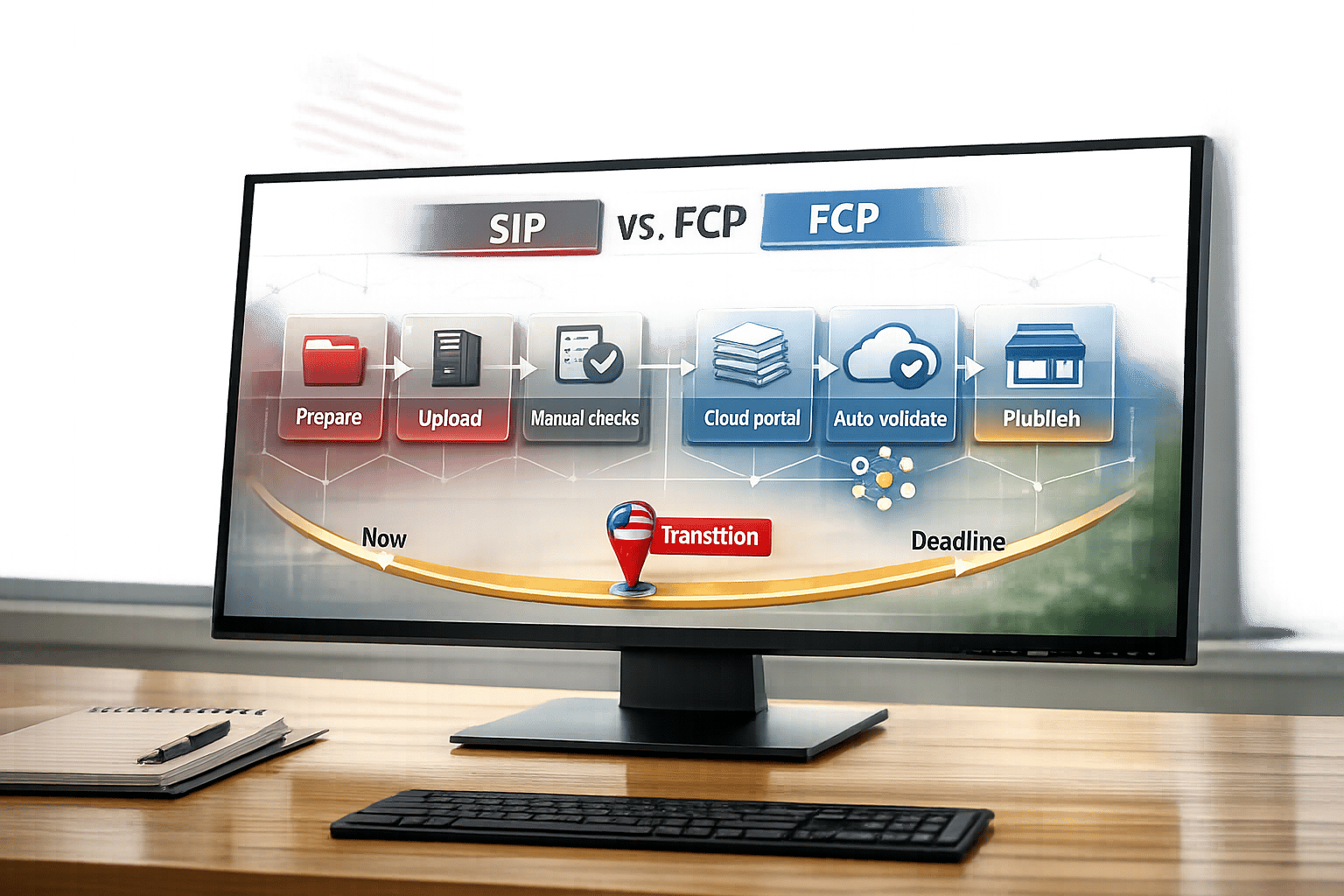
If you’re a GSA Schedule contractor, you must upload your catalog to GSA Advantage. This process is evolving as GSA transitions from the Schedule Input Program (SIP) to the new FAS Catalog Platform (FCP). By September 2025, all new contracts will use FCP, while existing contracts are being transitioned gradually. Here’s what you need to know:
- SIP: A desktop application (Windows-only) requiring manual updates and uploads, with limited integration and outdated features.
- FCP: A web-based platform offering cloud storage, automated validations, and integration with eMod for streamlined catalog updates.
Key Differences:
- SIP requires manual processes and local storage, while FCP automates updates and stores data in the cloud.
- FCP integrates directly with eMod, reducing delays and errors.
- SIP is still used for VA contracts and older agreements but is being phased out.
Quick Comparison:
| Feature | SIP | FCP |
|---|---|---|
| System Type | Desktop (Windows-only) | Web-based (any browser) |
| Data Storage | Local | Cloud |
| Validation | Manual | Automated |
| eMod Integration | None | Directly integrated |
| Publishing | Manual upload | Automatic upon award |
If you’re already using SIP, prepare for the switch to FCP by familiarizing yourself with its features and completing the baseline modification within 60 days of receiving access. Missing this deadline may risk your contract. For new contractors, FCP simplifies catalog management and ensures faster updates.
Takeaway: FCP modernizes catalog uploads, making them more efficient and accessible. Whether transitioning or starting fresh, understanding the differences between SIP and FCP is crucial for compliance and success in federal contracting.
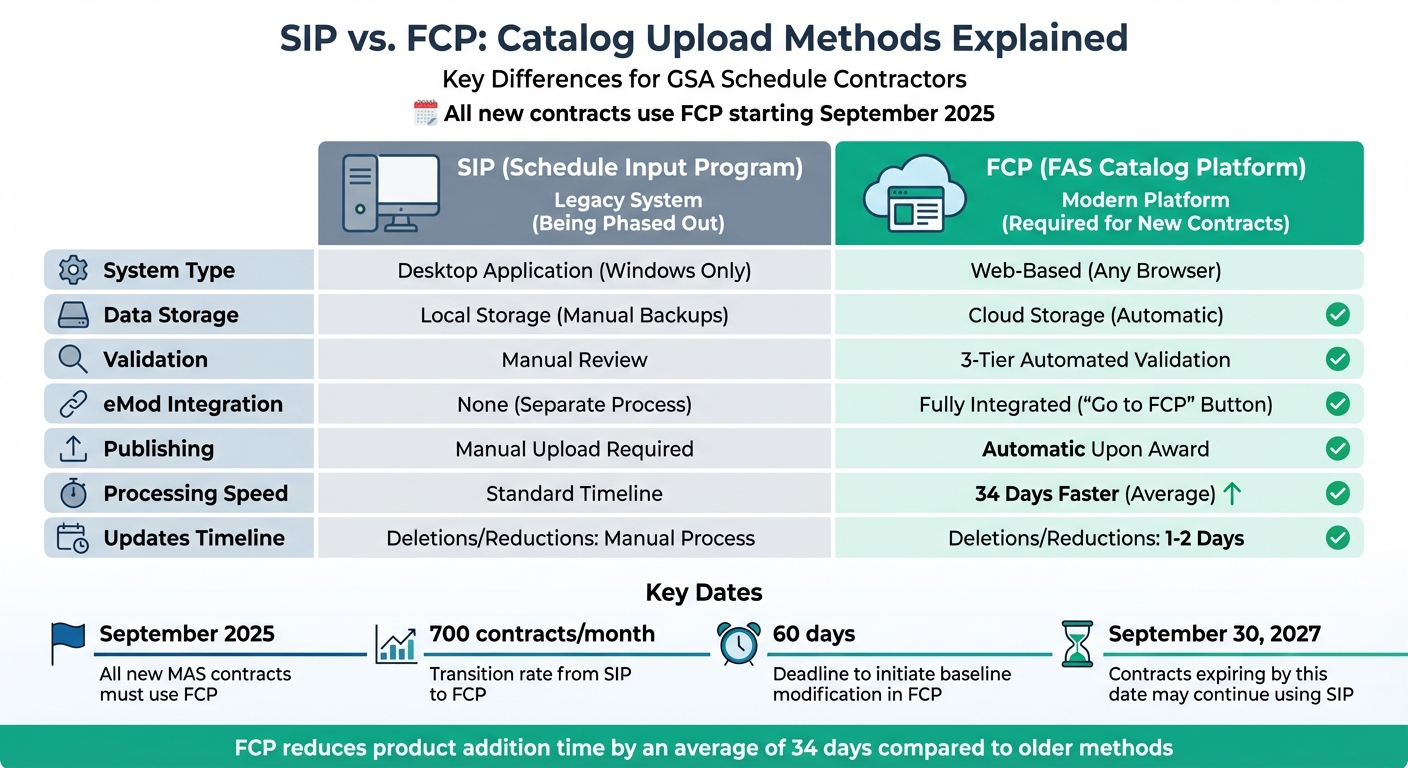
SIP vs FCP Comparison Chart for GSA Schedule Contractors
FCP Catalog First Steps Process: What is the Catalog First Steps Process? – MAS Vendor Training
What is SIP?
The Schedule Input Program (SIP) is a desktop application developed by GSA to help contract holders manage and upload their catalogs to GSA Advantage. Unlike cloud-based systems, SIP operates directly on your local computer or network and is compatible only with Windows.
"The Schedule Input Program (SIP) is a GSA proprietary software program provided to contract holders to assist with uploading their electronic catalog onto GSA Advantage." – Vendor Support Center
As of October 2025, SIP is officially classified as a legacy system. While new GSA Multiple Award Schedule (MAS) contractors are required to use the newer FAS Catalog Platform (FCP), SIP is still necessary for new VA contracts and for contractors who haven’t transitioned yet. This legacy designation highlights SIP’s outdated features compared to more modern tools.
The software supports catalog data imports from ASCII, DBF (v3.0+), or MS Excel (Office 97+) files. Once you submit your catalog, your Contracting Officer reviews it and provides a "Response File." You must download and process this file to ensure your catalog aligns with GSA Advantage. Additionally, to maintain compliance, you’re required to verify and re-upload your catalog files at least every two years, even if no changes occur. Failure to do so could lead to suspension from GSA Advantage. This manual process can be time-consuming compared to FCP’s more efficient update system.
For Mac users, running SIP requires a Windows emulator, as the software is strictly Windows-based. Despite its limitations, SIP does simplify one task: it automatically generates the required FSS Terms and Conditions Price List during catalog creation.
Next, we’ll dive into how the FAS Catalog Platform (FCP) simplifies catalog management.
What is FCP?
The FAS Catalog Platform (FCP) is a cloud-based application designed to replace the older SIP and EDI-832 systems. Unlike SIP, which required installation on a local computer, FCP operates entirely through your web browser. This means you can access and update your catalog from anywhere, with all your work securely stored in the cloud. It’s a modern solution that simplifies catalog management while improving efficiency and integration.
One of FCP’s standout features is its direct integration with GSA’s eMod contract modification tool. This connection merges catalog updates and contract modifications into a single workflow. To update your catalog, simply navigate to eMod, click the "Go to FCP" button, upload your files, and let FCP handle the rest. GSA Administrator Robin Carnahan praised this feature, calling it "a game-changer because it streamlines the process and reduces the time it takes for contractors to get their catalogs updated". In fact, FCP reduces the time required to add new products by an average of 34 days compared to older methods.
The platform uses two new file formats – the Product File and the Services Plus File (SPF) – to replace the outdated Price Proposal Templates. Both contractors and GSA staff work within the same interface, which makes collaboration and troubleshooting much easier. To further improve accuracy, FCP performs three automated validation checks to catch errors early in the process.
Another key feature is the Compliance & Pricing (C&P) report, which evaluates your catalog against market data. It flags potential issues, such as Trade Agreements Act violations, before you submit your modification. Updates like deletions and price reductions are processed quickly, appearing on GSA Advantage within 1–2 days. Additions and other updates are published automatically once the contract is awarded, eliminating the need for manual uploads and long waiting periods.
Starting in September 2025, all new Multiple Award Schedule contractors will automatically gain access to FCP when they register their contract number. For existing contracts, GSA is transitioning about 700 contracts per month to the platform. Federal Acquisition Service Commissioner Sonny Hashmi highlighted the platform’s benefits, stating, "The FCP will help contractors keep their catalogs current, compliant, and competitive".
Key Differences Between SIP and FCP
Understanding the distinctions between SIP (Schedules Input Program) and FCP (FAS Catalog Platform) is essential for navigating the evolution of catalog management. While SIP is a legacy desktop application limited to Windows, FCP is a modern, browser-based platform that offers the flexibility to update your catalog from virtually anywhere. This shift eliminates the need for Mac users to rely on Windows emulators, making the process more accessible.
One of the standout differences lies in system integration. FCP integrates directly with eMod through a "Go to FCP" button, streamlining catalog updates alongside contract modifications. In contrast, SIP operates as a standalone tool, requiring manual processes. As Lucy Hoak, Lead Proposal Writer at Winvale, explains: "While the Schedule Input Program (SIP) is a desktop software application, FCP is a web-based program, allowing contractors to manage their GSA catalog from wherever they are."
Data handling also sets these systems apart. FCP automatically saves and validates data through three automated checks, reducing the risk of errors. SIP, on the other hand, relies on manual backups and synchronization using GSA response files. Additionally, FCP generates a Compliance & Pricing report, helping vendors address pricing or compliance issues before their submission reaches the Contracting Officer. This feature directly supports the focus on catalog accuracy mentioned earlier.
The publishing process has also been modernized in FCP. Catalog updates are automatically published upon modification award, whereas SIP requires a manual upload process.
Here’s a side-by-side comparison of the two systems for a clearer breakdown:
Comparison Table: SIP vs. FCP
| Feature | SIP (Schedules Input Program) | FCP (FAS Catalog Platform) |
|---|---|---|
| Interface Type | Desktop-based software (Windows only) | Web-based application (accessible via any browser) |
| User Interface | Multiple tabs; outdated layout | Streamlined 2-tab interface |
| eMod Integration | None; separate manual process | Fully integrated; features a "Go to FCP" button |
| Data Storage | Manual/local (requires backups) | Automatic/cloud-based |
| Validation | Manual review by the Contracting Officer | Three-stage automated pre-submission checks |
| File Templates | Separate Price Proposal Template and Catalog File | Consolidated Product/Services Plus Files |
| Publishing | Manual upload after modification award | Automated publishing upon modification award |
| System Access | Windows PC required | Accessible on any device with a web browser |
These differences highlight the ways in which FCP simplifies and enhances catalog management compared to SIP, paving the way for a more efficient and user-friendly experience.
Pros and Cons of SIP
SIP has features that many GSA contractors find useful. For instance, the "Change" button allows selective updates to the catalog without needing to replace the entire file. It also supports ASCII, DBF, and MS Excel file formats, offering flexibility for data imports. Since SIP is a desktop application, vendors can prepare and save product data offline, only connecting to the internet when they’re ready to upload. These features make it a practical tool for many, but there are some notable drawbacks.
Stephanie Hagan from Winvale describes SIP as "dense and frustrating" for GSA contractors. A major limitation is that SIP is Windows-only, which means Mac users need to rely on emulators to access it. Additionally, SIP separates catalog updates from eMod, requiring extra manual steps. Another issue is the manual processing of the Response File, which creates delays – vendors can’t submit a new catalog update until the previous submission’s response file has been processed in SIP. On top of that, because SIP stores data locally on PCs or LANs, there’s a higher risk of data loss. Contractors must also re-upload their catalog at least every two years, even if no changes have been made, to avoid suspension.
Here’s a quick breakdown of SIP’s pros and cons:
Pros and Cons Table: SIP
| Pros | Cons |
|---|---|
| Incremental updates using the "Change" button reduce risks of damaging established catalog files | Windows-only application; Mac users need emulators |
| Flexible data import options: Excel, DBF, and ASCII text formats | No eMod integration, requiring manual upload after modification awards |
| Offline data preparation lets vendors work without an internet connection | Sequential processing delays due to mandatory response file processing before new updates |
| Built-in help accessible via the F1 key | Manual updates required, as users must check for and install new software versions |
| Enables immediate price reductions on GSA Advantage after eMod completion | Risk of data loss from local storage on PCs or LANs |
| Familiar interface for long-term users | Mandatory re-upload every two years, even without catalog changes |
Pros and Cons of FCP
FCP introduces a range of features designed to simplify catalog management, but it also comes with its fair share of challenges. One of its standout capabilities is the automation of catalog updates. When a modification is awarded, FCP automatically publishes updates to GSA Advantage, cutting out the need for duplicate uploads. It also includes a robust three-tier validation system – Basic, Business Rule, and Authoritative Repository – that flags errors before submission. On top of that, Compliance & Pricing reports offer vendors valuable pricing insights before they submit to their Contracting Officer. As the FAS Commissioner stated, "The FCP will help contractors keep their catalogs current, compliant, and competitive".
However, these benefits come with some hurdles. Vendors must initiate the baseline modification within 60 days, or they risk losing their contracts. Lucy Hoak, Lead Proposal Writer at Winvale, cautioned, "Failing to initiate the baseline modification within 60 days of receiving FCP access could result in consequences, including contract cancellation". While the automated validation system is helpful, it’s also very rigid, rejecting files for small formatting issues like using "%" instead of decimals or including "However, these benefits come with some hurdles. Vendors must initiate the baseline modification within 60 days, or they risk losing their contracts. Lucy Hoak, Lead Proposal Writer at Winvale, cautioned, "Failing to initiate the baseline modification within 60 days of receiving FCP access could result in consequences, including contract cancellation" [14]. While the automated validation system is helpful, it’s also very rigid, rejecting files for small formatting issues like using "%" instead of decimals or including "$" symbols in numeric fields [13]. Additionally, vendors must adapt to new templates, such as the Product File and Services Plus File.quot; symbols in numeric fields. Additionally, vendors must adapt to new templates, such as the Product File and Services Plus File.
The platform’s web-based design and cloud storage eliminate Windows-only limitations and reduce the risk of data loss. But there’s a catch – vendors can’t submit new catalog modifications until they complete the "First Steps" baseline process, which can cause temporary delays. As GSA continues to move existing contracts to FCP, vendors are navigating these complexities.
Here’s a closer look at FCP’s advantages and drawbacks, summarized in the table below:
Pros and Cons Table: FCP
| Pros | Cons |
|---|---|
| Automated publishing to GSA Advantage after modification approval, eliminating duplicate uploads | Transition downtime delays new catalog modifications until the "First Steps" baseline is completed |
| eMod integration allows seamless navigation from eMod to FCP during an open modification | Strict 60-day deadline to initiate baseline modification or risk contract cancellation |
| Three-tier automated validation prevents submission errors by flagging formatting and business rule issues | Rigid formatting rules reject files for minor errors like special characters in numeric fields |
| Cloud-based platform accessible from any browser, removing Windows-only restrictions | Learning curve for new Product File and Services Plus File templates |
| Compliance & Pricing reports offer automated market research before pricing submission | Immediate SIP lockout requires restarting unpublished SIP actions in FCP |
| Temporary Price Reductions are automatically published when a modification is submitted in eMod | Manual Unique Catalog ID creation needed for all service offerings |
This table highlights how FCP’s features aim to streamline processes but also present new requirements that vendors must adapt to.
When to Use SIP vs. FCP
Deciding between SIP and FCP largely depends on the award date of your contract. Starting in September 2025, all new GSA Multiple Award Schedule (MAS) contracts will require the use of the FAS Catalog Platform (FCP). If your contract is awarded after this date, you’ll automatically gain access to FCP, as SIP will no longer be an option.
For contractors with existing agreements, the transition timeline is a bit different. Contracts set to expire on or before September 30, 2027, will continue using SIP. However, newer contracts will shift to FCP after receiving official notifications, which are sent 28, 14, and 7 days prior to the transition.
The type of agency also plays a role in determining which system to use. While GSA is moving toward full adoption of FCP, the Schedule Input Program (SIP) remains the standard for Department of Veterans Affairs (VA) contractors. Additionally, contracts involving 4PL SINs will stick with SIP until at least FY2026. These distinctions are critical to ensuring catalog accuracy and compliance on GSA Advantage.
Key Differences Between SIP and FCP
- System Requirements: SIP is a desktop application that requires a Windows operating system (or an emulator for Mac users). In contrast, FCP is a browser-based platform, making it accessible from any modern device.
- Flexibility and Accessibility: As Lucy Hoak, Lead Proposal Writer at Winvale, explains:
"While the Schedule Input Program (SIP) is a desktop software application, FCP is a web-based program, allowing contractors to manage their GSA catalog from wherever they are, whenever is convenient".
This web-based functionality makes FCP especially convenient for contractors who need to manage their catalogs remotely.
Benefits of FCP for Service Catalogs
For contractors managing complex service catalogs, FCP offers distinct advantages. It simplifies the process by automatically generating and publishing formatted pricelists using the Services Plus File. Additionally, its Compliance & Pricing reports help identify potential issues, such as TAA compliance violations or pricing outliers, before the modification reaches the Contracting Officer.
Moving from SIP to FCP
The shift from SIP to FCP is designed to happen automatically, with GSA keeping you informed every step of the way. You’ll receive notifications at 28, 14, and 7 days before the transition, and on the actual transition day, access to SIP will be terminated immediately. Any unfinished tasks in SIP will need to be restarted in FCP once the switch occurs.
Once you access FCP, it’s crucial to initiate your baseline modification within 60 days to avoid jeopardizing your contract. Lucy Hoak, Lead Proposal Writer at Winvale, underscores the importance of this step:
"Failing to initiate the baseline modification within 60 days of receiving FCP access could result in consequences, including contract cancellation".
Before beginning your baseline modification, ensure your catalog management team is fully prepared. Verify that all relevant staff are listed as "Authorized Negotiators" in eMod, as FCP relies on your FAS ID for authentication. For product sellers, review your current GSA Advantage listings since FCP uses this data to pre-populate your baseline file.
The new workflow integrates seamlessly with eMod. Here’s how it works:
- Start your modification in eMod.
- Use the "Go to FCP" button to upload your catalog files.
- Return to eMod to finalize the submission.
For services contractors, the process involves manually preparing the Services Plus File using the last awarded Price Proposal Template. Meanwhile, product contractors can simply download their "Last Approved Product File" directly from FCP.
To make the transition smoother, focus on training your team to use FCP’s automated validation tools and its Compliance & Pricing report, which flags potential issues before submission. This shift not only updates your system but also brings the benefits of streamlined catalog management. For additional support, GSA offers resources like user guides, how-to videos, and "Ask FCP", an AI-powered assistant available at catalog.gsa.gov/help.
Conclusion
Starting in September 2025, the Federal Catalog Platform (FCP) will become mandatory for contracts, with the Schedule Input Program (SIP) being phased out at a rate of about 700 contracts per month. Contractors must complete their baseline modifications within 60 days to avoid potential contract issues.
The move to FCP marks a major step forward in catalog management. This web-based platform introduces features like automated validation, integrated eMod workflows, and real-time compliance reports that help identify and address errors before submission – capabilities that SIP lacks. Highlighting the benefits of this transition, the GSA Federal Acquisition Service Commissioner stated, "The FCP will help contractors keep their catalogs current, compliant, and competitive". These improvements not only simplify the process but also strengthen your position in the federal marketplace.
Uploading an accurate catalog is critical for success in federal contracting. Mistakes in your catalog can lead to delays, additional reviews, or even jeopardize your GSA Schedule. FCP’s Compliance & Pricing reports are designed to catch these errors early, ensuring they don’t reach your Contracting Officer.
However, the transition to FCP involves a steep learning curve. From meeting precise formatting standards – such as converting percentages to decimals between 0 and 1 – to correctly listing Authorized Negotiators in eMod and navigating the baseline modification process, there are many details to manage. Fortunately, expert assistance is available to help you through these changes.
GSA Focus offers specialized support for small businesses managing GSA Schedule Contracts. Their services include document preparation, compliance checks, and hands-on guidance through the catalog upload process. With a 98% success rate and a done-for-you approach, they can save you time and reduce the risk of costly mistakes.
Whether you’re shifting from SIP or starting out with FCP, effective catalog management is essential for thriving in federal contracting. FCP helps you stay compliant, efficient, and competitive.
FAQs
How do I know whether my contract uses SIP or FCP?
If you’re unsure whether your contract relies on SIP or FCP for catalog uploads, the award date of your GSA MAS contract is the key. Contracts awarded before September 2025 typically use the Schedule Input Program (SIP). Meanwhile, contracts awarded on or after September 2025 will use the FAS Catalog Platform (FCP). To be certain, check your contract award documents or reach out to your GSA representative for clarification.
What happens if I miss the 60-day baseline modification deadline?
Missing the 60-day deadline for baseline modifications can put your catalog out of compliance. This might impact your ability to sell on GSA Advantage and could lead to the need for corrective measures to restore compliance. To prevent interruptions, make sure to update your catalog on time.
What file formats are required to upload products and services in FCP?
To list products, upload a Product File that includes all approved items. For services, provide a Terms and Conditions (T&C) file, outlining contract terms, conditions, and approved pricing. This is usually formatted as a Price List or Service Plus File. Make sure your files comply with GSA requirements to ensure smooth processing.
Related Blog Posts
- SIP Training Basics for GSA Vendors
- Checklist for GSA Advantage Product Uploads
- GSA Advantage SIP Uploads Explained
- Common GSA Catalog Update Mistakes
