

Submitting a GSA price list can feel overwhelming, but avoiding common mistakes can save time, money, and headaches. Here are the top five errors contractors often make – and how to prevent them:
- File Format Issues: Using incorrect file formats or outdated tools like SIP instead of the FAS Catalog Platform (FCP) can lead to immediate rejections. Double-check GSA’s latest requirements before uploading.
- Pricing Errors: Discrepancies in pricing, failing to meet the Most Favored Customer (MFC) policy, or violating the Price Reductions Clause (PRC) can result in contract rejection or penalties. Regularly audit your pricing and ensure alignment with GSA guidelines.
- Unclear Product Descriptions: Vague or non-compliant descriptions can cause rejection or make your products hard to find. Follow the "3/10 Rule" (3+ words in names, 10+ in descriptions) and include technical details.
- Outdated Catalog Data: Marketing discontinued items or failing to update pricing after contract modifications can lead to compliance issues. Update your catalog within 30 days of changes and conduct regular reviews.
- Missing Keywords: Without the right keywords, your products may not appear in searches. Use precise terms like "TAA-compliant" and follow GSA’s naming conventions.
These errors are avoidable with proper preparation and regular reviews. If managing this process feels complex, consider professional support to simplify submissions and ensure compliance.
1. File Format and Upload Problems
Compliance with GSA Requirements
Submitting your GSA price list in the wrong file format is one of the quickest ways to face rejection. Starting September 2025, all newly awarded contracts must use the FAS Catalog Platform (FCP) instead of the older Schedules Input Program (SIP). If you’re still using SIP, keep in mind it only supports ASCII text, DBF (v3.0 or higher), or Excel (v97 or later). Mac users will need a Windows emulator to run SIP. For Terms and Conditions Price Lists, GSA accepts only .pdf, .doc, .xls, or .htm files, and filenames must not contain spaces. These files should also be stored in the specific SIP directory. Missing these details can directly affect how quickly your submission is processed – or whether it’s accepted at all.
Impact on Submission Success
Mistakes with file formats can completely derail your submission. If your price list is rejected, you’ll have just 30 calendar days to make corrections and resubmit. The new Formatted Product Tool (FPT) module adds another layer of complexity, with a strict limit of 100,000 line items per submission. For contractors using SIP, there’s an extra step: you must process a response file from the Contracting Officer before making any updates to your catalog. These requirements emphasize how critical accuracy is from the start.
Ease of Resolution or Prevention
The good news? File format issues are entirely avoidable. Double-check your file against GSA’s specifications before uploading. The FPT tool offers built-in validation features to catch errors early, saving you time and frustration. However, standardizing data like Manufacturer Part Numbers and UPC-A codes can take anywhere from 15 minutes to several hours, depending on the size of your catalog. To avoid unnecessary delays, confirm your filenames, formats, and platform compatibility before submitting. A little extra effort upfront can save a lot of headaches later.
2. Pricing Errors and Compliance Violations
Compliance with GSA Requirements
Getting pricing right is non-negotiable when it comes to GSA submissions. The General Services Administration (GSA) insists on pricing that aligns with their Most Favored Customer (MFC) policy, which means your GSA pricing must be as good as – or better than – what you offer your best commercial clients. To stay compliant, you need to provide accurate details about customer types, discount structures, and terms in your Commercial Sales Practices (CSP) documentation. Any inconsistencies between your invoices, CSP disclosures, or price proposal template can immediately raise red flags.
GSA can see discrepancies between invoices, Commercial Sales Practices, and your price proposal template as a red flag – make sure your numbers add up.
To back up your pricing, GSA requires proof such as invoices, quotes, or published price lists. If your contract includes the Price Reductions Clause (PRC), you’re obligated to maintain the discount relationship established when your contract was awarded. Failing to track commercial discounts can lead to compliance violations. However, opting into Transactional Data Reporting (TDR) for eligible SINs can simplify things by removing the need to track PRC compliance and disclose CSPs, offering you more flexibility with your pricing.
Impact on Submission Success
Pricing errors can have serious consequences, often derailing your GSA submission entirely. Roughly 20% of GSA contracts exhibit pricing discrepancies, and rejection rates for proposals often exceed 50%. For example, in 2025, a small manufacturing company faced rejection and a year-long delay in accessing the government market. Why? They failed to disclose lower prices offered to a commercial client and submitted outdated financial documents. Beyond rejection, pricing violations can lead to contract termination, financial penalties, and long-term damage to your reputation in the federal contracting world.
Ease of Resolution or Prevention
Avoiding these pitfalls requires proactive management. Tools like GSA’s CALC and GSA Advantage! can help you benchmark your pricing against competitors. Regularly review your pricing – quarterly is a good rule of thumb – to ensure your GSA rates align with your commercial discount structure. Training your sales team on discount policies is another key step to avoid accidental PRC violations. And don’t overlook the Industrial Funding Fee (IFF); you’re required to report GSA sales and pay the 0.75% fee every quarter.
Consider the example of a mid-sized IT services firm in 2025. By hiring professional support for market research and setting up internal review processes, they secured their GSA Schedule on the first try. The result? A 30% boost in annual revenue within the first year. Taking the time to prepare correctly can make all the difference.
3. Incomplete or Unclear Product Descriptions
Compliance with GSA Requirements
Getting your product descriptions right isn’t just a good idea – it’s a must. Starting July 28, 2025, the GSA will enforce stricter standards for product descriptions through the Federal Acquisition Service Catalog Platform (FCP). To meet these guidelines, product names must contain at least 3 words and stay within a 40-character limit, while descriptions must have at least 10 words but not exceed 1,000 characters. Submissions that don’t meet these requirements will be automatically rejected, so precision and clarity are non-negotiable.
Avoid using manufacturer or vendor part numbers in product names, and strip out promotional phrases like "Best Deal" or "Free Shipping". Instead, focus on technical specifications, key features, and specific applications. Federal buyers rely on detailed, accurate descriptions to ensure compliance with government standards. Adapting your descriptions to include federal terminology and technical details is essential.
"Vague, non-descriptive Product Names and Product Descriptions that repeat part numbers and contractual terms make it hard to find needed items." – GSA
Impact on Submission Success
A poorly crafted product description doesn’t just risk rejection – it can make your product invisible to buyers. Federal buyers on GSA Advantage! use specific keywords to search, and if your description relies on repeated part numbers instead of descriptive terms, your products won’t show up in search results. This can lead to missed sales opportunities, as buyers will simply turn to competitors with clearer, more detailed information.
On top of that, GSA’s automated tools like RoboMod actively scan for non-compliance. Errors in critical fields can result in immediate removal of your items. Worse, inaccurate descriptions may trigger audits, putting your entire contract in jeopardy.
Ease of Resolution or Prevention
Stick to the "3/10 Rule": every product name should have at least 3 words, and every description should have at least 10 words to meet FCP validation. A good formula for naming is: Brand + Model + Product Type + Key Features. This approach ensures your product names are both clear and searchable.
Incorporate federal-specific terms like "TAA-compliant" or "Section 508", along with technical identifiers such as NSN (National Stock Number), country of origin, or FIPS 140-2 compliance. These details not only enhance compliance but also improve search visibility. By aligning your descriptions with FCP criteria and including precise technical details, you’ll make your products easier to find while staying on the right side of GSA’s requirements.
4. Outdated Product Catalog Data
Compliance with GSA Requirements
Your GSA catalog acts as the operational backbone of your contract. If it doesn’t align with your actual contract terms, you could end up marketing non-compliant or discontinued items to federal buyers. To stay compliant, GSA mandates contractors to update their catalogs within 30 days of any contract modification or biennial refresh. Missing these deadlines can lead to catalog suspension or even audit findings that threaten your contract.
The Trade Agreements Act (TAA) adds another layer of responsibility. Manufacturers often shift production locations, and without quarterly TAA verification checks, you risk selling products that no longer meet federal standards. Ignoring TAA updates could result in contract termination or financial penalties, making regular compliance checks a must.
Impact on Submission Success
Failing to keep your catalog updated doesn’t just create compliance issues – it can hurt your reputation and bottom line. For instance, if your pricing isn’t current after an Economic Price Adjustment (EPA), you could face billing errors and revenue losses.
Federal buyers expect accurate and up-to-date information. If outdated data leads to canceled orders or product substitutions, trust erodes quickly. Buyers will simply turn to contractors who maintain reliable catalogs. Even worse, failing to update your catalog can result in suspension from GSA Advantage! and GSA eBuy, cutting off access to key federal procurement platforms.
Ease of Resolution or Prevention
The risks tied to outdated catalog data highlight the importance of proactive management. Start with a master price list that serves as your single source of truth. This list should match your signed contract and align perfectly with your GSA Advantage! catalog. To stay ahead:
- Review your catalog monthly to remove discontinued items.
- Conduct quarterly audits for pricing and TAA compliance.
- Reconcile your master list immediately after any contract modification – don’t wait for the 30-day deadline.
The Federal Acquisition Service Catalog Platform offers validation tools that flag data issues before submission, helping you catch errors early. Make these tools part of your routine. Assign catalog updates to a specific team member and maintain a change log to track updates and approvals. This level of organization ensures accountability, prevents catalog drift, and keeps your federal contracting efforts on solid ground.
5. Missing or Incorrect Keywords
Compliance with GSA Requirements
To meet Federal Acquisition Service Catalog Platform (FCP) guidelines and improve visibility, GSA product listings must include specific keywords. Starting July 28, 2025, the FCP will automatically reject submissions that fail to meet descriptive requirements. For example, GSA explicitly prohibits using manufacturer or vendor part numbers in the product name field and bans promotional phrases like "Best Deal" or "Free Shipping" in descriptions.
Using the recommended naming format – "Brand + Model + Product Type + Key Features/Attributes" – makes it easier for federal buyers to identify your products. For instance, "Dell 27 Inch 4K UHD Computer Monitor" is far more descriptive and effective than just "Monitor". This approach not only ensures compliance but also incorporates targeted keywords that improve searchability for federal buyers.
By adhering to these keyword standards, your products stand a better chance of being discovered and selected in federal searches.
Impact on Submission Success
Beyond meeting compliance, a strong keyword strategy is essential for engaging buyers and securing contracts. Without the right keywords, even competitively priced and well-specified products can go unnoticed. As GSA explains, "Since buyers search by keywords (e.g., laptop, desk, etc.), product names should be descriptive, clear, and meaningful to customers". Listings without crucial identifiers like National Stock Numbers (NSNs) or manufacturer part numbers risk being overlooked entirely.
Keywords also communicate regulatory compliance, which is critical in federal procurement. Buyers often look for specific terms like "TAA-compliant" or "FIPS 140-2" to ensure products meet government standards. Failing to include these markers in your descriptions can not only deter buyers but also trigger audits or automated removals.
Ease of Resolution or Prevention
To avoid keyword-related issues, start by reviewing the target SIN terminology in the GSA eLibrary. Additionally, analyze competitor listings under the same SIN on GSA Advantage! to identify effective keyword usage and technical language patterns. Align your product descriptions with the language found in RFPs and agency websites to match federal buyers’ expectations.
Develop a keyword checklist for each product category. This checklist should include manufacturer part numbers, SIN-specific terms, compliance indicators, and technical specifications. Spell out less common acronyms to improve searchability. Focus on creating clear, informative descriptions rather than overloading them with keywords. Finally, use FCP validation tools to confirm your submission meets all requirements.
Compliance & Pricing Report in FCP – MAS Vendor Training
Error Comparison Table
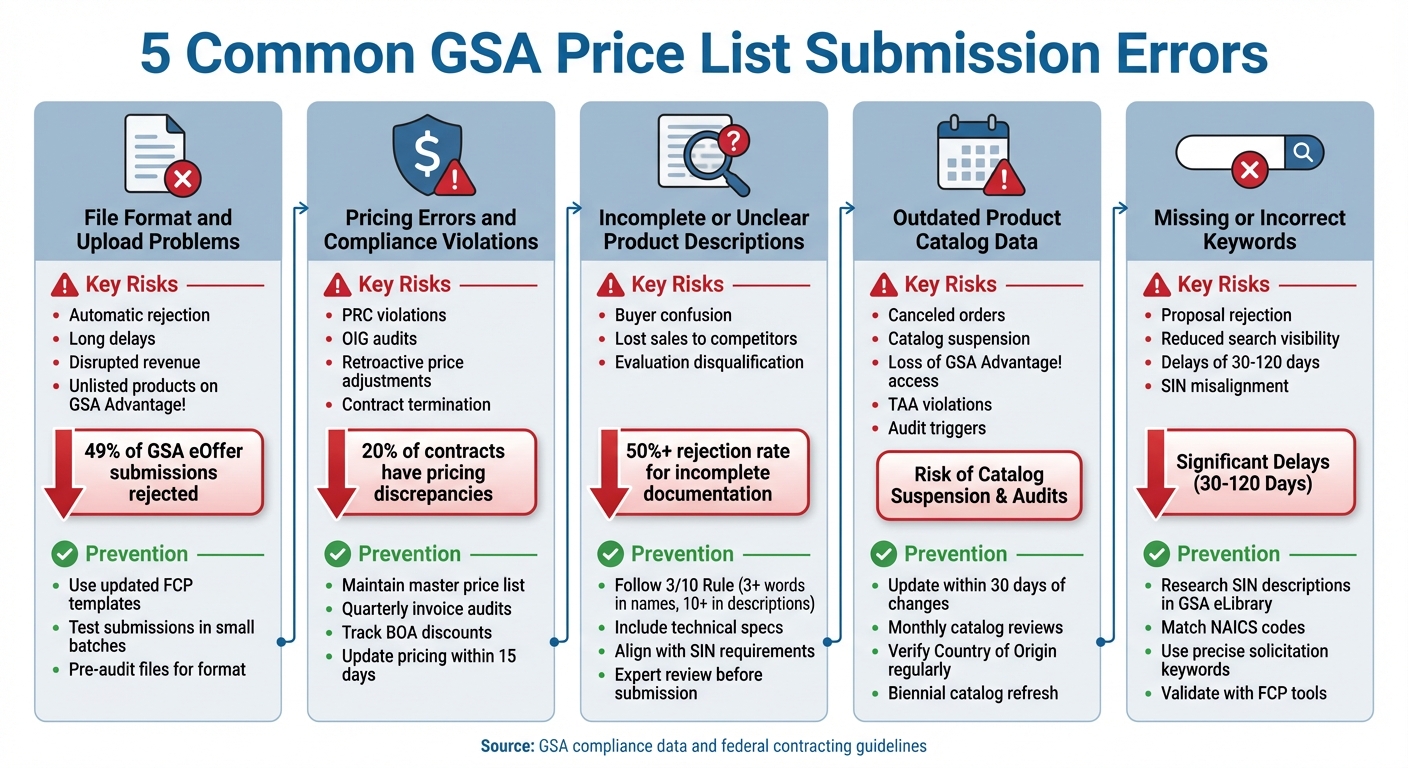
5 Common GSA Price List Submission Errors: Risks and Prevention Strategies
Below is a summary of five common errors in GSA price list submissions, along with their associated risks and ways to prevent them.
| Error Type | Key Risks | Prevention Solutions |
|---|---|---|
| File Format and Upload Problems | Automatic rejection, long delays, disrupted revenue, and unlisted products on GSA Advantage! | Use updated FCP templates, test submissions in small batches, and pre-audit files for proper format and completeness. |
| Pricing Errors and Compliance Violations | Price Reductions Clause (PRC) violations, OIG audits, retroactive price adjustments, mandatory refunds, and contract termination (pricing discrepancies found in 20% of contracts) | Maintain a master price list, perform quarterly invoice audits, track BOA discounts, provide accurate Commercial Sales Practices documentation, and update pricing within 15 days of any commercial changes. |
| Incomplete or Unclear Product Descriptions | Buyer confusion, lost sales to competitors, and evaluation disqualification (over 50% of applications are rejected for incomplete documentation) | Check product details against the GSA SIN-MOL-Photo-UPC table, include dimensions and technical specs, align descriptions with SIN requirements from GSA eLibrary, and have an expert review before submission. |
| Outdated Product Catalog Data | Canceled orders, catalog suspension, loss of GSA Advantage! and eBuy access, TAA violations, audit triggers, and overpricing charges | Update catalogs within 30 days of changes, conduct monthly reviews, keep detailed records of invoices and discount structures, verify Country of Origin regularly, and refresh the catalog every two years. |
| Missing or Incorrect Keywords | Proposal rejection, flagged items as "outside of scope", reduced visibility in federal searches, delays of 30–120 days, and SIN misalignment | Research SIN descriptions in GSA eLibrary, match NAICS codes, use precise solicitation keywords, document SIN selection justifications, and validate with FCP tools before submission. |
This table highlights the risks and solutions at a glance, but the real-world impacts of these errors are worth noting.
For instance, nearly half (49%) of GSA eOffer submissions are rejected due to missing documents or formatting issues. Avoiding these pitfalls requires consistent preparation and regular reviews. Each error type demands attention to detail, and addressing them early can save time, money, and opportunities.
Consider this: A technology firm lost its GSA contract for failing to disclose a 15% deeper discount, while a construction services company faced termination after keeping static prices for five years. These cases demonstrate just how critical it is to implement systematic error prevention when navigating federal contracting.
If this process feels overwhelming, GSA Focus offers tailored services like document preparation, compliance checks, and negotiation support to simplify submissions and help businesses avoid costly mistakes.
Conclusion
Submitting an accurate GSA price list is a cornerstone of success in federal contracting. Mistakes in your submission can jeopardize your contract, reduce visibility on GSA Advantage!, and impact your federal sales. The five common errors – issues with file formats, pricing violations, vague product descriptions, outdated catalog data, and missing keywords – are entirely avoidable. Alarmingly, 49% of GSA eOffer submissions are rejected due to these kinds of mistakes.
GSA’s automated systems, like RoboMod, are constantly scanning catalogs for compliance. Products that don’t meet the standards can be removed without any prior notice. Repeated errors, such as exceeding awarded rates or failing to disclose discounts, can lead to audits or even suspension of your contract. These preventable errors have cost many businesses their GSA schedule.
The key is staying vigilant. Regularly review your catalog – monthly if possible – use the latest FCP templates, validate files before submission, and keep detailed records of changes. After every update, double-check pricing to avoid conflicts with the Price Reduction Clause. If these steps feel overwhelming, seeking professional guidance can make all the difference.
For those looking to simplify the process, GSA Focus offers a reliable solution. With a track record of helping over 600 clients, they boast a 98% satisfaction rate and an average ROI of 87x. Their comprehensive services cover everything from document preparation to compliance checks and catalog management. As they put it:
"A qualified GSA consultant isn’t an expense – it’s insurance".
Taking proactive steps now can protect your federal contracting opportunities and set you on the path to success.
FAQs
Do I have to switch from SIP to FCP?
If your current platform, SIP, is still meeting your needs, there’s no pressing reason to switch to FCP. However, it’s worth noting that FCP is the GSA’s latest platform, designed to replace SIP. Being aware of potential hurdles with FCP can help you stay compliant and ensure your submissions remain seamless.
How do I avoid MFC/PRC pricing violations?
To steer clear of MFC/PRC pricing violations, it’s crucial to keep your GSA price list up-to-date and aligned with your negotiated rates. Make sure to include all applicable discounts and adhere to the Price Reductions Clause by consistently monitoring your commercial pricing. If your commercial rates shift, adjust your GSA prices accordingly. Taking these steps can help you stay compliant and sidestep potential complications.
What keywords should I add for GSA Advantage!?
When creating product or service listings for federal contracts, it’s crucial to include keywords that align with government search terms. For instance, integrating terms like TAA (Trade Agreements Act) ensures your offerings meet compliance standards for federal purchasing. Including NSN (National Stock Numbers) can also make your products easier to find, as these are widely used by government agencies to identify and procure items.
Additionally, referencing certifications such as FIPS 140-2 (Federal Information Processing Standards) is essential if your products involve encryption or cybersecurity solutions. This certification demonstrates compliance with government security requirements, making your listing more competitive.
To further enhance visibility, include relevant SINs (Special Item Numbers) that correspond to your products or services. SINs act as classification codes under GSA Schedules, helping contracting officers quickly locate what they need. For example, if you offer IT services, adding SIN 54151S (Information Technology Professional Services) can improve your chances of being seen by federal buyers.
By carefully tailoring your listings with these terms and classifications, you can boost visibility and ensure compliance with federal procurement standards.
Related Blog Posts
- Common GSA Compliance Mistakes And Fixes
- Common Mistakes When Applying for GSA Product Approval
- Top GSA Price List Errors and How to Avoid Them
- Common GSA Price List Mistakes
