

Navigating GSA Advantage can be tricky for small businesses. Mistakes like incorrect SIN selection, pricing errors, or compliance issues can lead to penalties, contract cancellations, or lost opportunities. Here’s a quick rundown of the most common errors and how to avoid them:
- Wrong SIN Selection: Misaligned SINs lead to proposal rejections. Always verify your offerings match SIN scope descriptions exactly.
- Non-Compliant Products: Ensure all products meet Trade Agreements Act (TAA) and Section 889 requirements to avoid penalties or removal.
- Pricing Violations: The government must receive your best pricing. Monitor discounts and follow the Price Reductions Clause rules.
- IFF and Sales Reporting Errors: Report sales quarterly and pay the 0.75% Industrial Funding Fee (IFF) on time to stay compliant.
- Outdated Catalogs: Regular updates prevent compliance risks and missed sales opportunities.
- Weak Past Performance: Provide relevant and recent examples aligned with your SINs to strengthen your proposal.
- Incomplete Submissions: Missing forms or errors in financial documentation often lead to rejection.
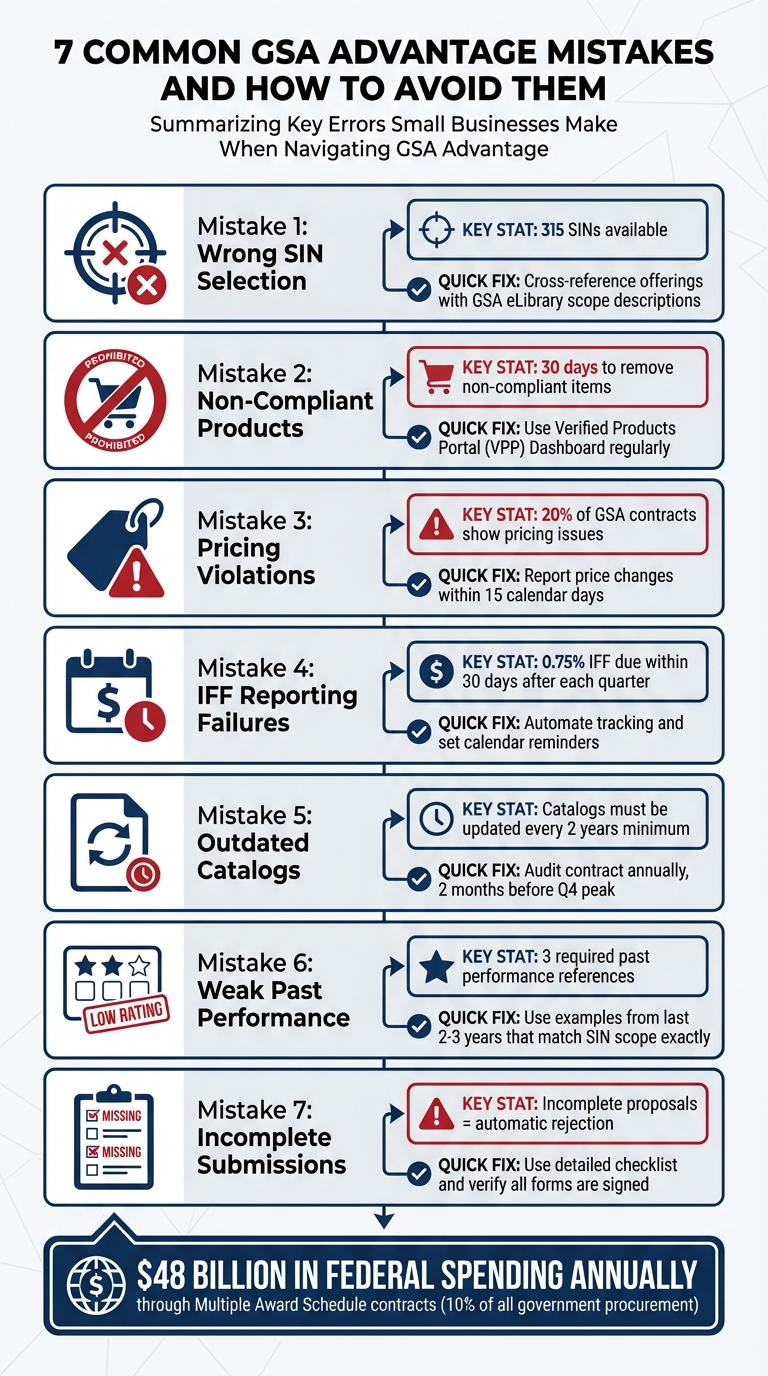
7 Common GSA Advantage Mistakes and How to Avoid Them
Tips for GSA Schedule Compliance and Success
Mistake 1: Choosing the Wrong Special Item Number (SIN)
A Special Item Number (SIN) is how the GSA organizes products and services under its Multiple Award Schedule (MAS) program. With 315 SINs available, picking the right one is critical. It defines everything from the required documentation to technical evaluations. If your selection doesn’t align with your offering, your proposal faces immediate rejection – no exceptions. This misstep can derail your entire submission and create compliance headaches down the road.
One common error? Assuming your service or product fits a SIN without thoroughly reviewing its scope. GSA is highly specific about SIN alignment – your offering must match the scope description word-for-word. If it doesn’t, the Contracting Officer will reject your proposal outright. For instance, businesses often confuse categories like IT and Professional Services, which have entirely separate requirements under GSA’s Large Category system.
"If your service doesn’t match the scope language, the Contracting Officer will reject your entire offer – no matter how strong your experience is." – GSA Focus
Another frequent issue is submitting past performance examples that don’t align with the chosen SIN. For example, applying under a Professional Services SIN but providing IT project examples will result in an out-of-scope rejection. Reviewers meticulously check for scope accuracy before assigning SINs.
How to Avoid SIN Selection Errors
To prevent SIN-related rejections, start by cross-referencing your offerings with the GSA eLibrary’s detailed SIN scope descriptions. Don’t rely on assumptions or just the category names – read the full "Scope of Work" section in the MAS Solicitation to understand exactly what’s required.
Once you’ve confirmed the correct SIN, focus on meeting its specific technical requirements. For example, some IT-related SINs may require NIST compliance, while others for products might call for specific testing certifications. Download the Large Category attachments from SAM.gov early in the process to identify these technical requirements. Also, ensure your NAICS codes on SAM.gov align perfectly with your chosen SINs to avoid raising red flags.
If you’re unsure about your alignment, it’s wise to consult a GSA specialist. They can verify your SIN match and help you avoid rejection triggers. While professional consulting services typically cost between $5,000 and $25,000, they can save you from the costly delays of a rejected proposal. Keep in mind, the GSA proposal process can take 3 to 6 months for the initial submission and around 7 months in total for an award. Investing in accuracy upfront pays off in the long run.
Mistake 2: Offering Non-Compliant Products or Services
Selling products or services that don’t align with federal regulations on GSA Advantage can lead to serious consequences, including contract termination and hefty penalties. A key regulation to keep in mind is the Trade Agreements Act (TAA), which mandates that all products must either be manufactured or "substantially transformed" in the United States or a TAA-designated country. In fact, non-compliance with TAA is one of the top reasons why GSA removes products from Multiple Award Schedule contracts.
Adding to the challenge, GSA uses an automated system called "RoboMod" to instantly remove non-compliant items – often without notifying you beforehand. Patrick Morgans, Manager at Winvale, explains:
"You often will not even get notification before the items are removed in this automatic ‘RoboMod’ process".
If your products are flagged, you must act quickly. Non-compliant items must be removed from your Contract Price List and catalog files within 30 days. Failing to meet this deadline could result in severe consequences, such as contract cancellations, financial penalties, or even the complete removal of your GSA Schedule pricelist.
Compliance doesn’t stop at TAA. Section 889 regulations also prohibit certain technologies and vendors – like Kaspersky Lab – from being listed. Mislabeling a product’s origin, such as incorrectly marking an item as "Made in America", can also lead to violations and removal. These strict rules make it essential to verify every product’s origin and eligibility before listing it for sale.
How to Ensure Product and Service Compliance
Staying ahead of compliance issues requires a proactive approach. Start by regularly checking the Verified Products Portal (VPP) Participation Dashboard. This tool helps you confirm that your manufacturers provide accurate Country of Origin (COO) data. The VPP was specifically designed to reduce supply chain risks and protect buyers from counterfeit or non-compliant products. If your manufacturer is listed in the VPP and has authorized you as a reseller, you won’t need to obtain a Letter of Supply for those products.
For manufacturers not participating in the VPP, you’ll need to secure a Letter of Supply (LoS), especially when selling under categories like IT (Category F) or the Printing and Photographic Equipment Subcategory (A10). Additionally, cross-check every product’s manufacturing location against the four TAA-compliant country groups:
- WTO Government Procurement Agreement Countries
- Free Trade Agreement Countries
- Least Developed Countries
- Caribbean Basin Countries
This ensures compliance with federal requirements.
Make it a habit to regularly audit your catalog. Doing so can help you catch outdated products, incorrect part numbers, or COO errors before GSA’s automated system flags them. If a manufacturer changes their production location, don’t wait – submit a technical modification immediately to avoid compliance issues. By staying vigilant, you can prevent costly mistakes and maintain your standing with GSA.
Mistake 3: Pricing Errors and Most Favored Customer (MFC) Violations
Getting pricing wrong on GSA Advantage can lead to audits, penalties, or even losing your contract entirely. The Most Favored Customer (MFC) policy requires that the government receives pricing that matches – or beats – the best terms you offer to any comparable commercial customer. When setting up your contract, you’ll need to designate a specific customer or category as your Basis of Award (BOA). The discount relationship between your BOA and the government must stay consistent throughout the life of your contract.
The Price Reductions Clause (PRC) comes into play if you lower your commercial catalog prices, give your BOA better discounts than what’s outlined in your contract, or offer special discounts to the BOA without valid reasons. If any of these happen, you’re required to notify your GSA Contracting Officer within 15 calendar days. Missing this deadline is a compliance breach that could have serious repercussions. In fact, about 20% of GSA contracts reviewed show pricing issues, often tied to MFC violations. These problems frequently arise because sales teams don’t fully grasp how offering unauthorized "special" discounts to commercial customers can trigger mandatory price reductions for the government.
How to Maintain Accurate Pricing
Avoiding these pitfalls starts with strong pricing and discount monitoring systems. Use tools to track the relationship between your commercial sales and your BOA discounts. Train your sales team on the Price Reductions Clause so they understand the compliance risks tied to their pricing decisions.
Conduct regular internal audits to ensure your pricing remains consistent. Update your GSA Advantage pricing whenever your commercial catalog changes. Keep thorough records of all commercial pricing, especially for cases where extenuating circumstances – like orders exceeding the maximum threshold – might exempt a discount from triggering the PRC. If your commercial prices increase due to market changes, you can request adjustments using the Economic Price Adjustment (EPA) method after the first 12 months of your contract. By staying proactive and organized, you can steer clear of costly violations and keep your contract in good standing.
Mistake 4: Failing to Report Sales and Remit IFF Properly
If you’re a GSA Schedule contractor, reporting all sales and paying the Industrial Funding Fee (IFF) isn’t optional – it’s a contractual obligation. The IFF, set at 0.75% of reported sales, must be submitted along with accurate sales reports. This requirement, outlined in GSAR Clause 552.238-80, demands strict adherence. Missing deadlines or submitting incorrect reports can land you in breach of contract. Contractors are required to submit these reports and remit the IFF within 30 calendar days after each quarter ends. For those participating in the Transactional Data Reporting (TDR) program, monthly reporting is an option, but payments still need to be made within the same 30-day window.
Why does this matter so much? Non-compliance carries serious consequences. Under Clause 552.238-83, GSA has the right to audit your records to ensure sales figures and IFF payments are accurate. Late payments trigger interest charges under FAR Clause 52.232-17. Even worse, consistent failure to report sales or maintain activity could lead to contract cancellation under Clause 552.238-79. Considering that Multiple Award Schedule contracts represent a massive $48 billion in federal spending annually – over 10% of all government procurement – losing access to this market is a costly mistake.
To avoid these risks, contractors must follow best practices, including submitting "zero sales" reports when applicable to prevent contract cancellation. Misclassifying GSA sales versus open market sales is another common error that can lead to audits. Always ensure you’re reporting only sales made under your GSA contract number.
Best Practices for Sales Reporting and IFF Compliance
To stay on top of your reporting and IFF obligations, consider these practical strategies:
- Automate Tracking: Use accounting software to separate GSA sales from other revenue streams. Look for tools that can flag GSA transactions and categorize them by Special Item Number (SIN). This reduces manual errors and helps meet TDR requirements if you’re part of the program.
- Conduct Regular Reviews: Even if you’re reporting quarterly, review your sales data monthly. This helps catch discrepancies early, giving you time to correct them before the 30-day reporting deadline. Set calendar reminders to ensure you never miss a payment window – late submissions are a red flag for compliance reviews.
- Maintain Detailed Records: Keep thorough documentation for every order, including the contract number, SIN, and final price paid. These records should be easily accessible for government inspections. If you’re uncertain whether a specific order qualifies as a GSA sale, verify with the ordering agency to confirm that your GSA contract number was used.
Mistake 5: Poor Catalog and Contract Modification Management
After addressing pricing and sales reporting challenges, it’s equally important to focus on keeping your catalog and contract up-to-date.
Your GSA Schedule isn’t a static document – it’s a living contract that needs regular attention to stay compliant and competitive. Unfortunately, many contractors treat it as if it’s set in stone after the award. As Patrick Morgans, Manager at Winvale, explains:
"Your GSA Schedule is a living document, and changes are often required to ensure that it remains up-to-date and compliant".
Delaying updates can lead to compliance risks, lost sales, and missed opportunities.
Outdated pricing or missing products can stop agencies from placing orders. Even worse, failing to sign mandatory mass modifications within the required 90-day window could result in your Contracting Officer refusing to process future modification requests. The financial consequences can be harsh: if your costs go up but your GSA ceiling prices haven’t been updated through an Economic Price Adjustment (EPA), you might end up fulfilling orders at a loss. FEDSched highlights this risk:
"An outdated GSA Contract can cost you sales. Conversely, an up-to-date GSA Contract… can foster sales growth".
Inconsistent or outdated catalogs can also damage your reputation with government buyers.
Incorrect contact information or expired contracts may lead to missed communications or even contract cancellation. This not only jeopardizes compliance but also makes it nearly impossible to meet minimum sales thresholds if agencies can’t find or order your products.
How to Keep Catalogs and Contracts Updated
Staying on top of catalog updates is essential for maintaining compliance and driving sales. Conduct a thorough audit of your contract at least once a year, ideally two months before the fourth-quarter peak. Keep a detailed change log to track modifications and ensure enough time to submit updates, as GSA’s review process for adding products can take over a month.
Before submitting modifications, always download the latest Price Proposal Template (PPT) from the GSA website. It’s critical to select the correct modification type in eMod – confusing "Add SIN" with "Add Product" can cause unnecessary delays. Once your modification is approved, carefully review the Standard Form 30 (SF-30) before signing. As Morgans advises:
"Contracting Officers are human and can make mistakes when entering information on [the SF-30] form. Please make sure that all information on the SF-30 is correct before signing it".
GSA’s FAS Catalog Platform (FCP) now syncs approved modifications with GSA Advantage automatically. If you’re still using SIP, make sure to manually upload changes within 30 days of modification approval. Use SIP’s internal checker or EDI validation tools to catch formatting errors, and regularly review upload logs for error codes.
GSA Advantage search rankings prioritize part numbers first, followed by product names, company names, and product descriptions. Including relevant keywords and ensuring accurate listings can improve your visibility. Additionally, update EPA ceilings promptly to reflect cost changes. Mark your calendar – GSA requires catalogs to be updated at least once every two years to remain compliant.
Mistake 6: Weak Past Performance Documentation
Your past performance is your track record – it shows GSA that you’re reliable and capable. But weak or irrelevant examples can undermine your entire proposal.
When offering services, your past performance must align with your primary strengths. If you can’t back up a service with recent work – ideally from the last two years – your proposal is at risk of rejection. The Price Reporter Team puts it plainly:
"Past performance is crucial as it demonstrates your reliability and ability to fulfill future contractual obligations".
One of the most critical errors is submitting examples that don’t align with your proposed Special Item Numbers (SINs). GSA is particularly strict about keeping IT and Professional Services separate, and mismatched documentation often means you’ll have to start over. To avoid this, ensure every past performance example matches the exact scope of your proposed SIN.
Another common pitfall is leaving out required documentation, like the Past Performance Questionnaire, or ignoring negative feedback in CPARS. Missing even one of the three required past performance references can lead to automatic disqualification during GSA’s pre-screening process.
GSA also pays close attention to risk ratings. A "Marginal" or "Unsatisfactory" rating can seriously hurt your chances, and even a "Satisfactory" rating might not be enough to stand out. Building a strong performance record is essential to remain competitive.
How to Build Strong Past Performance Records
To strengthen your past performance, make sure your project descriptions align exactly with the SIN scope listed in the GSA eLibrary. Your examples need to be:
- Recent: Completed within the last two to three years.
- Relevant: Closely matching the scope and complexity of your proposed SINs.
- Quality-driven: Backed by measurable success metrics.
When documenting success, use specific and quantifiable results. For instance, instead of saying a project was successful, highlight achievements like "completed 20% under budget" or "maintained a 95% client satisfaction rate." Concrete metrics carry more weight than vague claims.
If you’ve received negative feedback in CPARS, address it head-on. Detail the corrective actions you’ve taken. This shows GSA that you’re accountable and committed to improving.
Additionally, verify references early. Use a consistent template that includes contract numbers, performance periods, and technical approaches. This ensures your documentation is complete and easy to review.
For those without federal experience, showcase commercial projects that align with federal standards. Draw parallels between the scope and complexity of your commercial work and federal requirements. If your company has a limited history, highlight the expertise of your team or partners. Demonstrating your team’s capability – whether through federal or commercial experience – can make a big difference.
Strong past performance records don’t just meet GSA’s requirements; they also position you as a reliable and competitive contractor.
Mistake 7: Incomplete Administrative and Financial Submissions
Missing forms, unsigned documents, or errors in financial statements can quickly derail your GSA proposal. Every submission is pre-screened for completeness before being assigned to a Contracting Officer, and incomplete proposals are automatically rejected. Even something as minor as a missing signature or form can lead to significant delays.
Financial statement issues are just as problematic. GSA requires businesses to submit annual financial statements for the past two years, including a balance sheet and an income statement. Submitting statements showing a net loss without explanation raises red flags. As Jen Camp, Proposal Writer at Winvale, points out:
"Businesses that submit financial statements with a net loss will be flagged during a contracting officer’s review and can struggle with getting past this stage without the right supplemental information".
Inconsistencies in data also cause delays. Reviewers often find mismatches between pricing, labor categories, or Commercial Sales Practices (CSP) forms and supporting documents like invoices or corporate records. Even a small typo in a CSP form can create significant setbacks. Additionally, failing to use the exact GSA-provided templates for pricing and administrative sections can result in automatic rejection during pre-screening.
How to Ensure Complete and Accurate Submissions
A solid starting point is using a detailed contract proposal checklist to ensure you include all required documents, both universal and SIN-specific. If your business is classified as "other than small", make sure to include a subcontracting plan – its absence will lead to automatic rejection.
For financial statements, address potential issues upfront. If your financials show a net loss, include a supplemental explanation detailing the cause, such as investments in growth, research and development, or restructuring efforts. While GSA doesn’t require audited statements, they prefer them. Consulting an accountant to ensure your financials meet GAAP standards can help minimize the risk of rejection.
Carefully review your Commercial Sales Practices form to ensure every figure aligns with your Price Proposal Template and historical invoices. Any discrepancies will be flagged, leading to time-consuming clarifications and delays.
Make sure your SAM.gov registration is active and updated annually, with NAICS codes that match the Special Item Numbers (SINs) you’re proposing. Always check the "MAS Scope and Templates" page on GSA’s website to confirm you’re using the latest templates, especially after a Solicitation Refresh. Lastly, before signing Standard Form 30 (your official award document), double-check all details – especially discounts – since this document becomes the permanent reference for your contract. These administrative steps are just as critical as the technical requirements covered earlier.
How GSA Focus Helps You Avoid These Mistakes
Tackling the GSA Schedule process on your own can feel like walking through a minefield. From selecting the wrong SIN (Special Item Number) to pricing missteps, incomplete submissions, or compliance violations, there are plenty of ways things can go wrong. That’s where GSA Focus steps in to make a difference. Their team zeros in on these common errors – ensuring your proposal is airtight, from accurate SIN selection to precise documentation and pricing. They’re not just helping you avoid mistakes; they’re setting you up for success with a service that covers both document preparation and long-term contract management.
With a track record of serving over 600 clients and boasting a 98% satisfaction rate, GSA Focus has earned its reputation by preventing the very errors that often derail GSA proposals. Their process includes a thorough review of your service offerings and supporting documentation, ensuring compliance and precision at every step. This includes applying for the correct SIN to avoid costly rejections.
What really sets them apart? Their refund guarantee. It’s a bold promise that gives small businesses peace of mind as they navigate the GSA Schedule process. This guarantee reflects their confidence in helping clients bypass the "DIY Trap", where inexperience can lead to months of wasted effort and eventual rejection. As GSA Focus explains:
"A qualified GSA consultant isn’t an expense – it’s insurance. They know what language reviewers expect, how to format documents, and how to avoid rejection triggers".
And the results speak for themselves. Clients report an 87x ROI, highlighting the financial upside of getting a compliant GSA Schedule. While GSA consulting services typically cost between $5,000 and $25,000, this investment pays for itself by avoiding delays, rejections, and lost opportunities.
This attention to detail and proactive approach lays the groundwork for the streamlined support described below.
How GSA Focus Simplifies the Process
Beyond helping you avoid pitfalls, GSA Focus makes the entire GSA Schedule process simpler and more manageable.
Their team handles everything from acquisition to ongoing contract maintenance. They ensure that your submission language aligns with what GSA reviewers expect, format your documents correctly, and double-check that all files are consistent and error-free. Using tools like CALC and GSA eLibrary, they benchmark your rates to keep your pricing competitive and fully compliant.
But their support doesn’t stop once you’ve secured your GSA award. GSA Focus provides ongoing post-award assistance to help you maintain your contract. This includes catalog updates, contract modifications, and sales reporting – tasks that can overwhelm new contractors. By treating compliance as an ongoing responsibility rather than a one-and-done task, they help you keep your contract in good standing while maximizing opportunities in the federal marketplace.
Conclusion
To wrap up, avoiding the common pitfalls in the GSA Schedule process is key to success. Missteps in areas like SIN selection, pricing, TAA compliance, and sales reporting can lead to serious consequences – ranging from contract cancellations and financial penalties to months of effort wasted on rejected applications. Staying proactive with compliance and maintaining your contract properly is far easier – and far less stressful – than trying to fix issues once they’ve reached a Contracting Officer’s desk.
As we’ve discussed, every mistake comes with its own cost. This is where expert guidance makes all the difference. Instead of struggling through technical rules and formatting requirements for months, only to face rejection, professional support can help you navigate these challenges with confidence. Think of it as an investment, not an expense – expert advisors ensure your documentation meets GSA standards, keep your pricing competitive, and help maintain compliance throughout the entire process, from submission to post-award management.
Whether you’re a newcomer to the GSA Schedule or a seasoned manager, success in the federal marketplace boils down to careful preparation and consistent attention to detail. By staying on top of these essentials, you can turn your GSA Schedule into a valuable and productive asset.
FAQs
How can I make sure my products meet GSA compliance requirements?
To make sure your products meet GSA regulations, start by assigning the right Special Item Number (SIN) to each item. Be thorough – include crucial details like TAA status, NSN, and compliance tags (such as FIPS 140-2). Crafting accurate, keyword-rich descriptions not only boosts search visibility but also ensures your listings meet federal documentation standards.
Next, confirm TAA compliance by verifying the product’s country of origin. Keep essential documents like Letters of Supply or certifications up to date. Pricing is another critical area – ensure your prices match your GSA contract, update any changes within 30 days, and maintain detailed records for Commercial Sales Practices (CSP), volume discounts, and the price reduction clause to avoid potential penalties.
Compliance doesn’t end once your listings are live. Regularly audit your product catalog to catch outdated SKUs, expired warranties, or missing information. Additionally, stay current with reporting obligations, including submitting sales reports and paying the Industrial Funding Fee (IFF) on time. By following these steps, you can minimize errors and keep your GSA schedule audit-ready.
What happens if I choose the wrong Special Item Number (SIN) on my GSA Schedule?
Selecting the wrong Special Item Number (SIN) for your GSA Schedule can lead to serious setbacks. Each SIN comes with specific requirements for technical details, pricing, and past performance. If you submit your product or service under the wrong SIN, your proposal is likely to be rejected. This not only means starting the submission process over but also dealing with extra costs, delays, and missed business opportunities.
Even worse, if the mistake goes unnoticed and your listing becomes active on GSA Advantage, it could lead to compliance reviews or audits. Depending on the severity of the issue, you might need to go through contract modifications – or, in extreme cases, face contract termination if the problem isn’t resolved quickly. Partnering with an experienced specialist can help you navigate these complexities and ensure your SIN selection meets GSA guidelines from the very beginning.
What are the best ways to avoid pricing mistakes on GSA Advantage?
To avoid pricing errors on GSA Advantage, think of your price list as more than just a sales tool – it’s a compliance document. Every price you list must align with the rates in your GSA contract, including any required discounts, such as Most-Favored Customer (MFC) pricing, to meet the requirements of the Price Reductions Clause (PRC) and other FAR regulations. It’s also critical to ensure that unit descriptions (e.g., "each" versus "per box") are precise and that details like SKU numbers and country of origin are included to avoid catalog rejections.
Here are some essential steps to help you stay compliant:
- Use your commercial price list as a foundation and factor in any required discounts or adjustments, like volume discounts or prompt-payment terms.
- Keep your prices updated within 30 days of any contract changes to ensure they’re consistent with your GSA contract terms.
- Perform regular pricing audits, ideally every quarter, to verify compliance with contract requirements and current GSA guidelines.
By staying on top of these details and routinely reviewing your listings, you can maintain a GSA Advantage catalog that’s not only accurate and compliant but also attractive to federal buyers.
Related Blog Posts
- Common GSA Compliance Mistakes And Fixes
- GSA Contracting vs. Federal Bidding: Mistakes to Avoid
- Common GSA Vendor Mistakes
- Common Mistakes When Applying for GSA Product Approval
