

Your GSA price list is more than a document – it’s a binding contract. Mistakes can lead to audits, fines, or even losing your contract. Here’s a quick breakdown of common errors and how to avoid them:
- Inaccurate Descriptions: Missing details or vague product/service descriptions confuse buyers and raise compliance issues.
- Wrong Categories: Misclassifying items under incorrect SINs (Special Item Numbers) leads to rejections and pricing problems.
- Pricing Errors: Charging above approved rates or failing to report discounts violates GSA rules.
- Outdated Info: Old catalogs and non-compliance with Trade Agreements Act (TAA) can suspend your listings.
- Formatting Issues: Incorrect units of measure, missing documents, or submission errors delay approvals.
Key Fixes:
- Double-check your descriptions and align them with GSA standards.
- Ensure SINs match your past performance and invoices.
- Audit pricing quarterly to meet the Price Reductions Clause.
- Regularly update catalogs and confirm TAA compliance.
- Use tools like SIP and FCP to ensure proper formatting.
Mistakes are costly, but a proactive approach – like regular audits and professional reviews – keeps your GSA contract compliant and competitive. Don’t let errors jeopardize your federal sales opportunities.
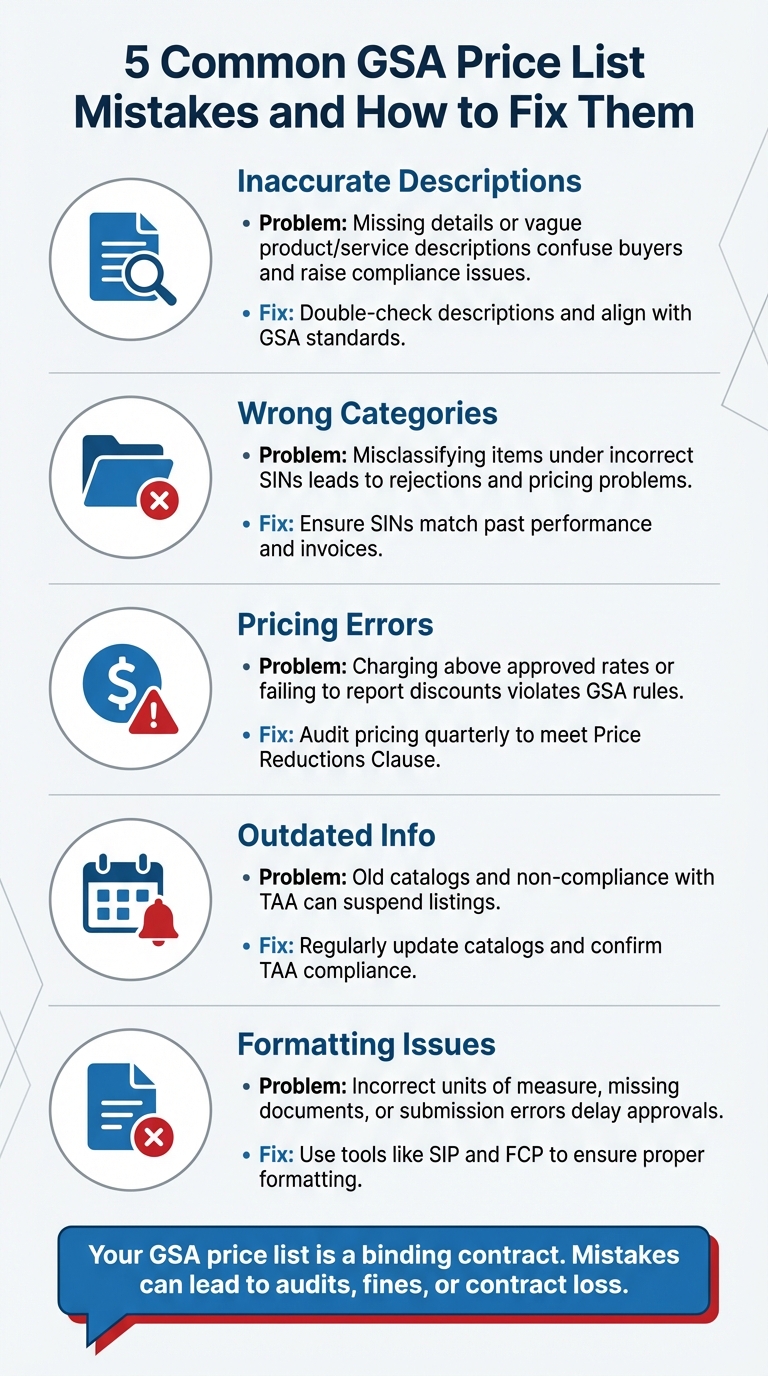
5 Common GSA Price List Mistakes and How to Fix Them
Top Government Contract Mistakes You Must Avoid!
Incorrect Product or Service Descriptions
Your product and service descriptions act as binding commitments that federal buyers rely on to evaluate your offerings. When government procurement officials browse GSA Advantage!, they compare your listings directly with competitors, using your price list as a key reference. Vague or inaccurate descriptions not only confuse buyers but also raise compliance and audit concerns.
Problems With Unclear Descriptions
Federal buyers expect detailed and precise specifications, similar to what they find on major commercial platforms. If your descriptions lack essential details – such as exact dimensions, technical specs, or clearly defined responsibilities for services – buyers may struggle to determine whether your offering meets their needs. In such cases, they’ll likely turn to a competitor who provides clearer information.
Both product and service descriptions must include critical details and meet specific requirements. For service contractors, this means outlining minimum education levels, required years of experience, and detailed job responsibilities. Failing to meet these standards can lead to serious consequences. For instance, assigning employees who don’t meet the qualifications listed in your description – commonly referred to as under-staffing a contract – could result in being required to refund billed payments to the government.
Additionally, ensuring your offerings are placed in the correct categories is essential for maintaining compliance and avoiding pricing discrepancies.
Wrong Product Categories
Misclassifying your offerings by selecting the wrong SIN (Special Item Number) is a common mistake that often leads to proposal rejections. Each SIN comes with specific requirements, and GSA enforces strict rules to ensure your past performance aligns with the scope of services you’re proposing. Incorrect categorization can also complicate pricing, making it harder to justify your rates. To avoid these issues, ensure your chosen SIN accurately reflects your past work and that your commercial invoices align with the selected SIN to support your pricing.
Solution: Verify Against GSA Standards
To prevent these errors, always verify your listings against GSA’s "Schedules SIN-MOL-Photo-UPC" table to confirm the correct SIN, manufacturer, product number, and detailed descriptions. Any catalog updates must be completed within 30 days of modifications, and a full audit should be conducted at least twice a year. Utilize tools like the Schedule Input Program (SIP) and FAS Catalog Platform (FCP) guides to ensure your formatting complies with GSA standards. If your internal accounting terms differ, create a crosswalk to maintain consistency and accuracy.
Pricing Mistakes
Mistakes in GSA pricing can lead to compliance issues, canceled contracts, and even forced refunds. The Price Reductions Clause requires a strict relationship between the prices offered to the government and those given to your Basis of Award (BOA) customer. Any deviation can result in serious financial and legal consequences. Below are some common pricing errors and practical ways to address them.
Prices Higher Than Approved Rates
Charging above your GSA-approved rates is a clear compliance violation. This can lead to rejected contracts or the removal of products from your schedule. If overcharges occur, you may be required to issue refunds. These errors often result from internal miscommunication or pricing misalignment.
Under the Economic Price Adjustment (EPA) clause, there are strict limits on price increases: 4% for Human Capital, 5% for Professional Services and Travel, and 10% for other categories. Any unauthorized increase beyond these caps could result in product removal from your contract.
Missing Required Discounts
The Most Favored Customer discount structure is a binding requirement. If you offer a better discount to a commercial customer (your BOA) than what was disclosed during contract negotiations, you must inform your GSA Contracting Officer within 15 calendar days. Failing to report such changes can trigger retroactive price reductions and lead to expensive disputes.
"The Price Reductions Clause is one of the most important clauses guiding your contract. Like the Most Favored Customer Clause, the PRC impacts not only your GSA MAS Contract sales practices, but also the sales practices related to your Basis of Award (BOA)/Most Favored Customer." – FEDSched
If commercial discounts are offered without proper reporting, the government may enforce mandatory price reductions.
Solution: Review Your Pricing Carefully
To avoid these pricing pitfalls, consider these steps:
- Track Discounts: Implement a system to monitor your commercial and BOA discount relationships.
- Educate Teams: Train your sales teams on the implications of the Price Reductions Clause.
- Conduct Audits: Perform quarterly audits to ensure invoices align with approved rates.
For services, establish a financial crosswalk that ties salaries and markups to GSA labor categories. Keep a detailed changelog of all updates to ensure your SIP data stays accurate. When proposing pricing changes, use tools like GSA Advantage! for products and the CALC tool for services to confirm compliance and competitiveness.
For thorough pricing reviews and expert compliance support, consider partnering with GSA Focus.
Outdated or Non-Compliant Information
Keeping your GSA price list accurate isn’t just about avoiding mistakes – it’s a legal requirement. Failing to update your catalog with current information can jeopardize your federal contract, block access to procurement channels, and erode trust with government buyers. Staying compliant ensures your business remains in good standing with federal agencies.
Old Catalogs and Pricing
Contractors are obligated to honor the pricing listed in their published GSA Advantage! catalog. If your catalog includes outdated prices or discontinued products, you could face serious compliance risks, making it harder for government agencies to place orders.
The consequences of neglecting updates can be severe. An inaccurate price list may lead to catalog suspension, cutting you off from GSA Advantage! and GSA eBuy. Additionally, failing to promptly update your listings after contract modifications could result in their removal from government systems. New contractors have a six-month window from their initial award to upload their price list and must refresh it at least every two years to stay compliant.
"You are required to honor the pricing listed in your published catalog/pricelist. If you fail to do this, your catalog could be suspended, restricting access to not only GSA Advantage!, but GSA eBuy as well."
– Nicholas Williamson, Lead Consultant, Winvale
Another critical area to monitor is compliance with the Trade Agreements Act (TAA).
TAA Compliance Failures
The Trade Agreements Act mandates that all products sold through GSA contracts must either be manufactured in the U.S. or significantly transformed in a designated country. Every item in your GSA Advantage! catalog must meet these requirements. Notably, North Macedonia was added to the list of designated countries in November 2023 – the first update in seven years. With federal agencies spending over $50 billion annually through the GSA Schedule, failing to meet TAA requirements could result in contract suspension or even termination.
"It is a good practice to periodically review the country of origin of products offered on your GSA contract, as manufacturers sometimes change their manufacturing points."
– Vendor Support Center, GSA
Solution: Update and Audit Regularly
Regular audits are key to maintaining compliance. Manufacturers often change production locations, so it’s crucial to review the country of origin for your products periodically and update your listings as needed. Use the Schedule Input Program (SIP) through the Vendor Support Center to manage updates to GSA Advantage! and eLibrary; once approved, changes typically appear in GSA systems within 24 hours.
Your I-FSS-600 file must include essential details such as the Special Item Number, manufacturer name, product number, product description, GSA price, volume discounts, and country of origin for each item. Keeping an updated list of TAA Designated Countries and cross-referencing it with your product catalog is equally important. If a product becomes non-compliant, update your GSA Advantage! listing immediately and inform your Contracting Officer.
Formatting and Submission Mistakes
Technical hiccups in file formatting can throw a wrench into your application process. Simple errors like these might seem minor, but they can lead to delays or even outright rejection. Surprisingly, these preventable mistakes are all too common, especially for first-time contractors.
Wrong Units of Measure
Using the wrong units of measure can confuse evaluators and make your bid look inconsistent. When preparing your bidding schedule, it’s essential to clearly specify how items are being sold – whether it’s by the package, each, dozen, or another unit. Pricing should also be expressed consistently, as a single percentage factor for an entire group, rather than varying rates for individual items.
For instance, if you’re bidding on drill bits, your schedule should list "Pkg" (package) consistently and apply one percentage discount to the entire drill bit category. This aligns with the General Services Administration Acquisition Manual, which mandates bidders to "quote only one percentage factor for each group". Submitting different percentages for items within the same group violates these rules and can result in your bid being rejected.
Now, let’s dive into another common stumbling block: file upload and formatting challenges.
File Upload and Format Problems
Contracting Officers begin by checking if your offer is complete, and missing documents can quickly derail the process. Simple oversights like failing to include duplicate pricelists, outdated financial statements, or mismatched NAICS and SIN data can lead to unnecessary delays – or worse, rejection.
"Missing documentation can be an avoidable cause of delay in getting your contract awarded; worse, it can contribute to a complete rejection of your GSA proposal."
– Jen Camp, Proposal Writer, Winvale
The FPT tool, which is used to submit pricing, has strict requirements. Issues like excessive line items or misaligned content can cause your submission to be flagged or rejected. During the baselining process – when transitioning an existing catalog to the FPT format – any products or services not included in your new submission are automatically considered deleted by GSA. Additionally, if you’re offering services, they must be uploaded in a text file rather than the standard FPT pricing template.
To avoid these pitfalls, a proactive approach is key.
Solution: Get Professional Help
Hiring professionals to review your submission can make all the difference. They can pre-audit your documentation, verify required fields, and ensure everything is correctly formatted before submission. This includes identifying pricing anomalies, confirming your SAM.gov registration matches your proposed SINs, and preparing all necessary documentation.
GSA Focus is one example of a service that specializes in helping small businesses navigate the GSA Schedule process. Their team handles everything from document preparation to compliance checks, ensuring your submission meets all technical requirements. With a 98% success rate, their comprehensive approach minimizes the risk of rejection due to technical errors that might otherwise go unnoticed.
Conclusion
Creating an accurate GSA price list demands meticulous attention to detail. Everything matters – clear product descriptions, correct categories, compliant pricing, and adherence to TAA regulations. Even minor missteps, like mismatched NAICS codes, outdated financial statements, or incorrect units of measure, can lead to significant delays or outright disqualification. Missing documentation or inconsistent pricing? Those are automatic rejection triggers.
Securing a Multiple Award Schedule contract is no small feat, but the rewards are substantial. These contracts can simplify federal procurement for up to 20 years, offering a pathway to long-term revenue stability. However, a single rejection can unravel months of effort. That’s why expert support can make all the difference in navigating this high-stakes process.
Professionals can ensure your SAM.gov registration aligns with your proposed Special Item Numbers, audit your pricing for consistency, and verify compliance with critical regulations like the Price Reductions Clause. They can also help address potential issues – such as explaining a net loss in financial statements – before they become obstacles. For instance, GSA Focus offers comprehensive services, from document preparation to compliance checks. With a 98% success rate, their "done-for-you" approach minimizes your time investment while maximizing your chances of success.
FAQs
How can I ensure my GSA price list descriptions meet compliance requirements?
To keep your GSA price list descriptions compliant, focus on precision, clarity, and sticking to federal guidelines. Start by crafting descriptions specifically for government buyers, ensuring they include key details like part numbers, product names, and any necessary compliance information (e.g., TAA-compliant). Use clear, consistent language, and include measurable details such as size, weight, or performance metrics. Avoid using vague or overly broad terms.
Make sure to naturally include relevant federal keywords to enhance visibility and show compliance. Double-check certifications like TAA and provide information such as the country of origin to steer clear of listing prohibited items. Regular updates are essential – aim to review and revise your price list every 30 days or whenever there are contract changes to ensure accuracy. Adding high-quality images and technical data sheets can also help buyers make well-informed decisions.
For a hassle-free process, GSA Focus provides comprehensive support to keep your price list accurate, compliant, and ready for federal contracting opportunities.
How can I ensure my products are classified under the correct SINs?
To make sure your products are classified under the right Special Item Numbers (SINs), start by exploring the SIN descriptions available in the official GSA eLibrary. Each SIN is tied to specific NAICS codes, and an incorrect match could prevent your products from showing up in federal searches.
- Find the right SIN: Use the GSA eLibrary to locate the SIN that best matches your product or service. Review its description, associated NAICS code, and example items to confirm it aligns with what you’re offering.
- Verify details on the VSC: Cross-check the SIN against the lookup table on the Vendor Support Center (VSC). This will help you confirm requirements like catalog file formats or any additional product details needed.
- Match your NAICS code: Double-check that your internal NAICS code aligns with the one linked to the chosen SIN. If it doesn’t, you may need to adjust your classification or select a different SIN.
Once you’ve chosen a SIN, test your classification by uploading a sample product to the FAS Catalog Platform (FCP) or GSA Advantage. If the system accepts it without errors, your classification is likely accurate. On the other hand, if you receive rejection messages, these will pinpoint any issues, giving you a chance to fine-tune your selections before submitting your final price list.
What happens if my GSA listings are not TAA compliant?
Failing to keep your GSA listings TAA-compliant can lead to significant repercussions. These might include GSA audits, contract termination, financial penalties, or even the removal of your GSA Schedule price list.
To steer clear of these issues, make sure every product and service on your GSA Schedule aligns with TAA requirements. Take the time to regularly review your offerings and update your listings as necessary to maintain compliance and safeguard your federal contracting opportunities.
Related Blog Posts
- Common GSA Compliance Mistakes And Fixes
- Common GSA Audit Issues and How to Avoid Them
- Common Mistakes When Applying for GSA Product Approval
- Top GSA Price List Errors and How to Avoid Them
