

Most businesses fail at GSA registration because of avoidable data mismatches, incomplete documentation, and procedural oversights that stall or permanently disqualify their applications. The General Services Administration’s SAM.gov portal runs automated validation checks against IRS records, Federal Acquisition Regulation (FAR) requirements, and entity databases. Any discrepancy triggers a rejection. Understanding exactly where these failures occur is the fastest way to avoid them.
Why businesses fail at GSA registration: the core causes
The root of most GSA registration failures is a mismatch between what a business submits and what federal databases already hold on record. SAM.gov does not give you the benefit of the doubt. It compares your submission against IRS EIN records, USPS address databases, and entity type classifications. One wrong character can block your entire application.
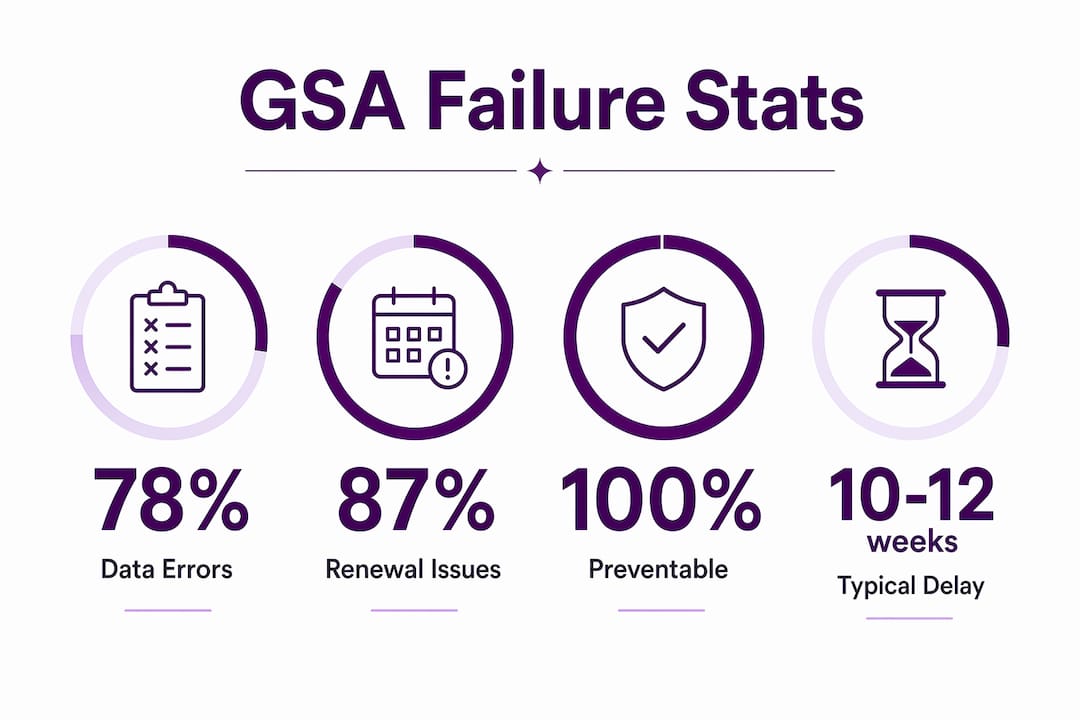
78% of initial registrations face data validation errors. That number tells you this is not a rare edge case. It is the default experience for businesses that walk in unprepared.

The three primary failure categories are data validation errors, administrative and renewal pitfalls, and unrealistic expectations about what registration actually delivers. Each one is preventable. Each one is also surprisingly common among experienced business owners who assume the process is simpler than it is.
What are the most common data validation errors?
Data validation errors are the single biggest reason GSA registration applications stall or fail outright. SAM.gov’s automated system checks your submitted information against IRS and USPS records in real time. A mismatch at any point triggers a hold.
Name mismatches with IRS records
Name mismatches between IRS EIN records and SAM.gov cause most entity validation failures. The IRS only recognizes the legal name on your original EIN application, specifically Form SS-4. If your business has since rebranded, added a DBA, or changed its legal structure, the IRS record may not reflect that. Even minor punctuation differences, such as “Inc.” versus “Inc” without the period, are enough to block validation.
The fix is straightforward but requires advance preparation. Request IRS Letter 147C or locate your CP 575 notice. Use the exact legal name printed on that document, character for character, when completing your SAM.gov profile.
Address and entity type conflicts
Using a P.O. box as your primary address in SAM.gov causes an automatic validation failure. SAM.gov requires a physical street address for your primary business location. Many small businesses, particularly home-based operations or those using registered agent addresses, run into this wall immediately.
Entity type conflicts are equally common. If your IRS records classify your business as a sole proprietorship but your SAM.gov submission lists it as an LLC, the system flags the discrepancy. This often happens after a business restructures without updating its IRS filings.
- Verify your legal name against IRS Letter 147C or CP 575 before entering anything
- Use a physical street address, not a P.O. box or mail forwarding service
- Confirm your entity type matches exactly what IRS records show
- Upload supporting documents in the correct format (PDF, not scanned images with poor resolution)
- Double-check DUNS or UEI numbers against your Dun & Bradstreet profile
Pro Tip: If you are unsure what name the IRS has on file, call the IRS Business and Specialty Tax Line at 800-829-4933 and request a 147C letter. It arrives by fax or mail and is the definitive source of truth for your legal business name.
How do administrative and renewal pitfalls cause failures?
Administrative errors are responsible for a significant share of GSA registration failures, and they are often the most frustrating because the business did everything right initially. The problem surfaces weeks or months later when a renewal lapses or a critical document never arrives.
87% of contractors face problems during SAM.gov renewal. That figure is striking because renewal is theoretically simpler than initial registration. The reality is that most businesses treat renewal as an afterthought until it is too late.
The FAR 52.204-7 compliance risk
FAR 52.204-7 requires an active SAM registration at both offer submission and contract award. A lapse of even one day is enough to trigger automatic disqualification from a procurement. The Government Accountability Office enforces this strictly. Contracting officers cannot waive it.
This is not a technicality. Businesses have lost awarded contracts because their SAM registration expired between the award decision and the formal signing. The financial damage from that scenario far exceeds the cost of a calendar reminder.
The notarized letter requirement
Failing to submit the notarized entity administrator letter causes automatic purging of your registration within 30 days. Many businesses complete the entire online registration process correctly and then assume they are done. They are not. The physical notarized letter must be mailed to the Federal Service Desk. Without it, the system treats your registration as incomplete and removes it.
Here is the sequence of administrative steps that prevent these failures:
- Complete your SAM.gov online registration in full
- Print, notarize, and mail the entity administrator letter to the Federal Service Desk immediately after online completion
- Set a calendar reminder 90 days before your annual registration expiration date
- Assign a dedicated, monitored email address as your primary SAM.gov contact
- Verify that renewal reminders sent at 60 and 30 days before expiration are reaching an inbox someone actually checks
Generic or unmonitored email addresses cause missed renewal reminders, leading to lapses and registration inactivation. SAM.gov sends automated reminders 60 and 30 days before expiration. If those emails land in a shared inbox no one monitors, or in a spam folder, you will not know your registration has lapsed until a contracting officer tells you.
Pro Tip: Create a dedicated email address specifically for SAM.gov and GSA correspondence. Set it to forward to at least two people in your organization. This single step eliminates one of the most common and preventable causes of registration failure. For guidance on maintaining correct business contact details, see this resource on registered agent best practices.
What are realistic timelines when errors occur?
Registration timelines are one of the most misunderstood aspects of the GSA process. Businesses often plan their government contracting strategy around an assumed two-week registration window. That assumption is wrong for most applicants.
Simple registrations clear in 3–7 days. Registrations with IRS mismatches take 4–8 weeks. Complex cases involving multiple errors or manual reviews by the Federal Service Desk can take 10–12 weeks to resolve. That is a three-month delay for businesses that made multiple common mistakes.
The Federal Service Desk handles manual reviews for registrations where automated systems cannot resolve mismatches. These reviews add weeks to the process and require direct communication with a case representative. Most businesses are not prepared for this level of back-and-forth.
| Failure Point | Typical Resolution Time |
|---|---|
| Clean registration, no errors | 3–7 business days |
| Minor data entry correction | 1–2 weeks |
| IRS name or EIN mismatch | 4–8 weeks |
| Address validation failure | 2–4 weeks |
| Missing notarized letter | 30 days before auto-purge |
| Multiple compounding errors | 10–12 weeks |
“The difference between a 7-day registration and a 12-week registration is almost always preparation. Businesses that verify their IRS records before they start the process clear in days. Those that discover mismatches after submission wait months.”
Plan your GSA contracting timeline with the 10–12 week window as your baseline assumption. If your registration clears faster, that is a bonus. If it does not, you will not be scrambling to explain delays to a contracting officer.
How can small businesses overcome GSA registration challenges?
The most effective way to avoid GSA registration pitfalls is to treat the process as a documentation audit before it is a registration exercise. Every piece of information you submit must match an existing federal record. Verify first, submit second.
These are the preparation steps that consistently produce clean registrations:
- Pull IRS Letter 147C or CP 575 and use the exact legal name printed on it
- Confirm your physical street address matches USPS records (use the USPS address lookup tool to standardize it)
- Check that your entity type in SAM.gov matches your IRS classification
- Prepare all supporting documents in PDF format before starting the online application
- Assign a dedicated email address for all SAM.gov and GSA correspondence
- Set calendar reminders at 90, 60, and 30 days before your annual expiration date
- Mail the notarized entity administrator letter the same day you complete your online registration
One point that does not get enough attention: a GSA Schedule contract is a license to compete, not a guarantee of revenue. A small percentage of firms win the majority of federal contract dollars even among registered GSA Schedule holders. Registration opens the door. Proactive business development is what generates actual sales.
Review the most common GSA Schedule mistakes that businesses make beyond the registration stage. Many contractors invest months in registration and then go silent, waiting for agencies to find them. That approach does not work.
Pro Tip: Do not wait for the government to discover your GSA Schedule. Identify target agencies, build relationships with contracting officers, and list your offerings on GSA Advantage. Registration is the starting line, not the finish line.
Key takeaways
GSA registration failures are almost entirely preventable when businesses verify their federal records before submitting and treat renewal as an ongoing operational responsibility, not a one-time task.
| Point | Details |
|---|---|
| Verify IRS records first | Pull Letter 147C or CP 575 and match your legal name exactly before starting SAM.gov. |
| Use a physical address | P.O. boxes cause automatic validation failure; always use a verified street address. |
| Mail the notarized letter | Online completion alone is not enough; missing this letter triggers auto-purge within 30 days. |
| Monitor renewal deadlines | Set reminders at 90, 60, and 30 days before expiration to avoid FAR 52.204-7 disqualification. |
| Registration is not revenue | A GSA Schedule opens access to federal buyers; proactive outreach is required to generate actual contracts. |
The part most businesses get wrong from the start
I have worked with hundreds of small and medium-sized businesses pursuing GSA Schedules, and the pattern is remarkably consistent. The businesses that struggle most are not the ones with complicated entity structures or unusual business models. They are the ones that underestimate the process.
The most common misconception I encounter is that SAM.gov registration is a form-filling exercise. It is not. It is a data reconciliation exercise. Every field you complete gets checked against a federal database. If your business has evolved since you filed your original EIN application, that history will surface as a mismatch.
The second misconception is that registration equals revenue. I have seen businesses celebrate their GSA Schedule approval and then do nothing with it for 18 months. A GSA contract is a procurement vehicle. It gives federal buyers a compliant way to purchase from you. It does not make them aware you exist, and it does not make them choose you over 20 other registered vendors. Read more about common GSA contract myths that cost businesses time and money.
The businesses that succeed treat their GSA registration as the beginning of a federal sales program, not the end of a compliance checklist. They stay registered, they monitor their account, and they actively pursue agency relationships. That combination is what actually generates government revenue.
— Josh
Get expert help with your GSA registration
GSA registration errors cost businesses weeks or months of delay and, in some cases, disqualify them from contracts they were otherwise positioned to win. Gsascheduleservices.com specializes in helping small and medium-sized businesses get through the registration process cleanly and stay compliant long after approval. The team handles readiness assessments, document preparation, validation troubleshooting, and renewal management so you are not navigating the Federal Service Desk alone. If you are starting a new registration or dealing with a stalled application, a GSA registration consultation with Gsascheduleservices gives you a clear path forward without the guesswork.
FAQ
What causes most GSA registration applications to fail?
Name mismatches between IRS EIN records and SAM.gov are the leading cause of validation failures. Even minor punctuation differences in your legal business name are enough to block your application.
How long does GSA registration take if there are errors?
Simple registrations clear in 3–7 days, but IRS mismatches extend timelines to 4–8 weeks, and complex cases with multiple errors can take 10–12 weeks to resolve.
What happens if my SAM.gov registration expires?
FAR 52.204-7 requires active SAM registration at both offer submission and contract award. A lapse of even one day results in automatic disqualification from active procurements.
Is a GSA schedule contract enough to win federal business?
No. A GSA Schedule is a license to compete, not a revenue guarantee. Proactive outreach to federal agencies and contracting officers is required to generate actual sales.
What is the notarized entity administrator letter?
It is a physical document that must be mailed to the Federal Service Desk after completing your online SAM.gov registration. Failing to submit it causes your registration to be automatically purged within 30 days, regardless of whether your online application was completed correctly.
Recommended
- (Infographic) 25 Reasons GSA Contracts are Rejected
- Fourth Step – GSA Registration (GSA Advantage, E-buy, … )
- The Most Common Mistakes Companies Make When Pursuing a GSA Schedule Contract
- Avoid Rough Seas with your GSA Contract
