
The GSA Vendor Support Center is defined as the primary technical and administrative hub for businesses holding or pursuing Multiple Award Schedule (MAS) contracts, reachable at vsc.gsa.gov with staffed phone and email support Monday through Friday, 8:30 AM–5:30 PM EST. For small and medium-sized businesses entering federal procurement, knowing exactly what this resource does, and what it does not do, is the difference between efficient contract management and months of frustration. Gsascheduleservices works with contractors every day who underuse or misuse this resource, and the patterns are consistent enough to be worth addressing directly.
What does the vendor support center actually do?
The VSC is the central technical gateway for GSA MAS contract management. It handles the electronic systems and compliance tasks that keep your contract active and in good standing with the General Services Administration.
The core functions covered by the supplier support portal include:
- Quarterly sales reporting: Vendors must submit Industrial Funding Fee (IFF) reports through the VSC portal. Missing these deadlines puts your contract at risk.
- Electronic catalog management: Uploading and updating your product or service catalog on GSA Advantage! runs through VSC tools.
- eBuy proposal submissions: Vendors respond to government solicitations posted on eBuy directly through VSC-linked systems. A solid understanding of GSA Advantage and eBuy is worth building before you need it.
- System access and password support: Login issues, portal navigation errors, and account setup questions all go to the VSC helpdesk.
- Contract modification assistance: Technical guidance on submitting modifications through the eOffer/eMod system is available through the VSC.
The VSC is reachable by phone at 877-495-4849 or by email at vendor.support@gsa.gov. Response times vary, so email works best for non-urgent technical questions where you need a written record.
One boundary the VSC holds firmly: it does not interpret contracts or provide legal guidance. Questions about pricing compliance, contract terms, or solicitation disputes belong with your Contracting Officer or Administrative Contracting Officer, not the VSC helpdesk. Vendors who call the VSC expecting contract advice lose time they cannot recover.

Pro Tip: Before contacting the VSC, document your issue with screenshots and your contract number ready. VSC staff resolve technical tickets faster when you provide specific error messages rather than general descriptions.
How does the VSC fit into the broader vendor support ecosystem?
The VSC is one piece of a larger support structure. Treating it as the only resource available is one of the most common and costly mistakes small contractors make.
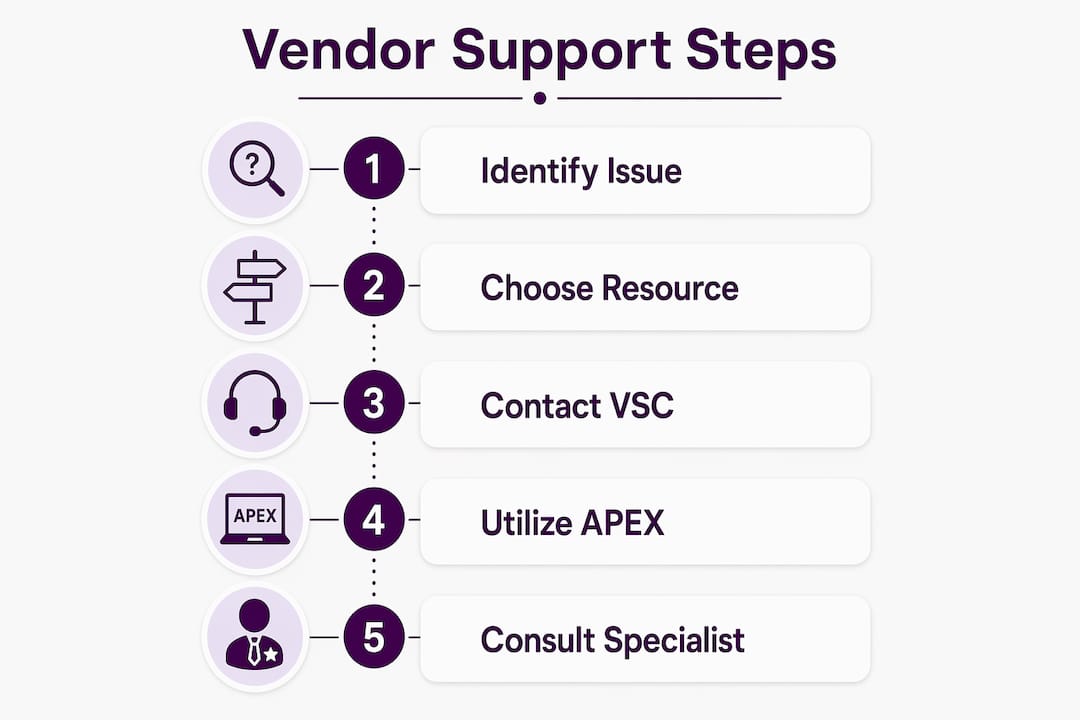
The federal vendor assistance ecosystem breaks down into three distinct layers:
- Technical support (VSC): System access, portal navigation, compliance reporting, and catalog management.
- Contractual and legal support (Contracting Officers): Contract interpretation, pricing disputes, modification approvals, and compliance determinations.
- Strategic and business development support (APEX Accelerators and GSA Small Business Specialists): Bid preparation, agency outreach, system registration, and procurement strategy.
APEX Accelerators, formerly known as PTACs, provide free, personalized counseling for vendors in pre-award phases. They help with everything from SAM.gov registration to reading solicitations and preparing competitive bids. This is the resource most small businesses overlook because it requires proactive outreach rather than a simple phone call.
GSA Small Business Specialists operate at the agency level and handle issues that fall outside both the VSC and APEX Accelerators. If you face an unfair solicitation, a payment dispute, or a barrier to competing for a contract, the GSA Office of Small Business is the right contact, not the VSC. Understanding this distinction saves you from routing complaints to a helpdesk that has no authority to resolve them.
For broader vendor development context, public support strategies for small businesses in professional services often mirror the layered approach GSA uses, combining technical systems support with strategic counseling at different stages of business growth.
Pro Tip: Map your question to the right resource before you pick up the phone. Technical system error? Call the VSC. Contract dispute? Contact your Contracting Officer. Need help writing a bid? Call your local APEX Accelerator.
What mistakes do vendors make with the VSC?
The most damaging mistake is expecting the VSC to handle questions it was never designed to answer. Vendors who call the helpdesk with contract interpretation questions get redirected, lose time, and sometimes miss deadlines while waiting for a resolution that never comes from that channel.
The second most common mistake is applying for a GSA Schedule before assessing readiness. The VSC offers a Readiness Assessment tool to help firms evaluate their operational and financial preparedness before pursuing a MAS contract. Skipping this step leads to premature applications, high administrative overhead, and contracts that generate little revenue because the business was not positioned to compete. Early referral to programs like GCAP helps businesses avoid exactly this outcome.
- Contacting the VSC for contract or legal questions. Direct those to your Contracting Officer. The VSC has no authority over contract terms.
- Applying for a GSA Schedule without a readiness check. Use the VSC Readiness Assessment or work with an APEX Accelerator before submitting.
- Ignoring quarterly IFF reporting deadlines. The VSC portal tracks these, but it will not remind you. Set your own calendar alerts.
- Failing to keep electronic catalogs current. Outdated pricing on GSA Advantage! creates compliance risk and costs you sales.
- Not documenting VSC interactions. Always follow up phone calls with an email summary. Written records protect you if a dispute arises later.
Small business owners frequently confuse technical system support with contractual advocacy. The VSC and the GSA Office of Small Business serve different purposes, and routing your issue to the wrong office delays resolution every time.
Pro Tip: Set a recurring calendar reminder 30 days before each quarterly IFF reporting deadline. The VSC portal does not send automatic reminders, and late or missed reports can trigger contract termination.
How should small businesses prepare to engage with the VSC?
Preparation before you engage the VSC makes every interaction more productive. Vendors who arrive at the portal with organized records, clear questions, and an understanding of the system get faster resolutions and fewer compliance problems.
The GSA Small Business Office offers free training and live events that cover VSC tools, GSA Advantage!, and eBuy. These sessions shift vendors from passively finding opportunities to competing for them with a real strategy. Attending at least one training session before your contract goes active is worth the time investment.
For vendors managing active contracts, the VSC works alongside two other critical portals:
- GSA Advantage!: Your electronic storefront where government buyers browse and purchase directly. Catalog accuracy here directly affects your sales volume. The ultimate guide to GSA Advantage and eBuy covers the mechanics in detail.
- eBuy: The solicitation platform where agencies post RFQs and vendors submit proposals. VSC access is required to participate.
- eOffer/eMod: The system for submitting new offers and contract modifications. VSC technical support covers this system directly.
| Resource | Primary function | Cost | Best used for |
|---|---|---|---|
| VSC (vsc.gsa.gov) | Technical and system support | Free | Portal issues, reporting, catalog updates |
| APEX Accelerators | Procurement counseling | Free | Bid prep, registration, pre-award strategy |
| GSA Small Business Office | Contractual advocacy | Free | Payment disputes, solicitation fairness |
| Contracting Officers | Contract interpretation | Free | Pricing, terms, modification approvals |
Finding your local APEX Accelerator takes less than five minutes through the APEX Accelerator website. The counseling is free, personalized, and available to businesses at any stage of federal contracting. Vendors who use APEX Accelerators alongside the VSC consistently outperform those who rely on the VSC alone.
Key Takeaways
Effective use of the GSA Vendor Support Center requires knowing its exact scope, pairing it with APEX Accelerators and Contracting Officers, and completing a readiness assessment before pursuing a GSA Schedule contract.
| Point | Details |
|---|---|
| VSC scope is technical only | Use the VSC for portal access, catalog updates, and reporting. Direct contract questions to your Contracting Officer. |
| Readiness assessment first | Complete the VSC Readiness Assessment before applying for a GSA Schedule to avoid wasted resources. |
| APEX Accelerators fill the gap | Free APEX Accelerator counseling covers bid preparation and pre-award strategy that the VSC does not provide. |
| Document every interaction | Follow up VSC phone calls with email summaries to create a written record for compliance purposes. |
| Quarterly reporting is non-negotiable | Set your own IFF reporting reminders. The VSC portal does not send automatic deadline alerts. |
What I’ve learned from watching vendors use the VSC wrong
The VSC is genuinely useful. I want to be clear about that. The team at vsc.gsa.gov resolves real technical problems every day, and the portal itself is one of the better-organized federal systems I’ve seen. The problem is not the VSC. The problem is the gap between what vendors expect it to do and what it actually does.
I’ve watched small business owners spend weeks trying to get contract pricing guidance from the VSC helpdesk, growing more frustrated with each call, when a single conversation with their Contracting Officer would have resolved the issue in an afternoon. That gap exists because nobody sat down with them early and explained the difference between technical support and contractual advocacy.
The vendors who succeed in federal contracting treat the VSC as one tool in a larger kit. They use APEX Accelerators for strategy, Contracting Officers for contract questions, and the VSC for exactly what it does best: keeping their systems running and their compliance records clean. That combination, used proactively rather than reactively, is what separates contractors who grow their federal revenue from those who stall after their first contract. If you are working with a GSA contract support specialist, make sure they help you build that full picture, not just the technical layer.
— Josh
Expert GSA contract support from Gsascheduleservices
Managing a GSA Schedule contract means staying on top of quarterly reporting, catalog accuracy, eBuy participation, and compliance requirements across multiple federal systems. Gsascheduleservices works directly with small and medium-sized businesses to handle the administrative complexity that slows most contractors down. From readiness assessments before you apply to ongoing contract management after award, the team provides the kind of hands-on guidance that turns a GSA Schedule into a real revenue source. If you want to understand exactly what support is available for your situation, the GSA services discovery page is the right place to start.
FAQ
What is the GSA Vendor Support Center?
The GSA Vendor Support Center is the primary technical and administrative resource for Multiple Award Schedule vendors, available online at vsc.gsa.gov with phone and email support during business hours. It handles system access, compliance reporting, and electronic catalog management.
How do I contact vendor support at the GSA?
Vendors can reach the VSC by phone at 877-495-4849 or by email at vendor.support@gsa.gov, Monday through Friday, 8:30 AM–5:30 PM EST. Email is recommended for non-urgent issues where a written record is useful.
Does the VSC handle contract disputes or legal questions?
No. The VSC provides technical and system support only. Contract interpretation, pricing disputes, and legal questions must go to your Contracting Officer or Administrative Contracting Officer.
What is an APEX Accelerator and how does it differ from the VSC?
APEX Accelerators provide free, personalized procurement counseling covering bid preparation, agency outreach, and pre-award strategy. The VSC covers technical system support after a contract is in place.
When should a small business use the VSC readiness assessment?
Use the readiness assessment before applying for a GSA Schedule contract. It evaluates your operational and financial preparedness and helps you avoid the overhead of a premature application that generates little federal revenue.
Recommended
- Important Links for your GSA Contract
- GSA Federal Agencies: Procurement & Services Guide
- GSA Contract Eligibility Criteria – Quick Guide
- Need Support with Your GSA Contract?