

GSA contract data validation is the process of confirming that every detail on your active GSA Schedule contract matches the records held by the Federal Acquisition Service (FAS), SAM.gov, and GSA eLibrary. Errors in this data put your contract eligibility at risk and can trigger federal audits. Knowing how to validate GSA contract data is not optional for any contractor who wants to keep selling to the government. This guide walks you through the tools, steps, and habits that keep your contract information accurate and your compliance record clean.
How to validate GSA contract data: prerequisites and tools
Before you run a single check, you need the right access and the right systems. Missing even one of these prerequisites will block you from completing a full GSA contract verification process.
The first requirement is a FAS ID. This credential gives you access to the FAS Sales Reporting Portal (SRP), where you report sales by Special Item Number (SIN) and verify that your submissions are current. Without a FAS ID, you cannot confirm whether your sales data is accurate or overdue.

The second system is SAM.gov. SAM.gov replaced ezSearch in 2026 and now serves as the central hub for contract award data, modifications, and business profile management. You need an active SAM.gov user account to pull your contract history and confirm that your registration details are current.
GSA eLibrary is the third platform you must know. It publishes pricing and contract award information that lets you compare your listed offerings against what agencies are actually buying. The FAS Catalog Platform (FCP) rounds out the toolkit. The FCP replaced older systems like SIP and EDI for electronic catalog uploads, and contractors eligible for FCP should transition to it without delay.
| Tool | Primary purpose | Access requirement |
|---|---|---|
| FAS Sales Reporting Portal | Report and verify SIN-level sales data | Active FAS ID |
| SAM.gov | Manage business profile, view contract awards | SAM.gov user account |
| GSA eLibrary | Check pricing, SIN offerings, and contract details | Public access; no login required |
| FAS Catalog Platform (FCP) | Submit and update electronic catalog data | FAS ID and FCP eligibility |
Understanding your Special Item Numbers and NAICS codes is equally critical. These identifiers define what you are authorized to sell. If they are wrong on any platform, your contract data fails validation before an auditor even opens a file.
Step-by-step process to verify your GSA contract data
GSA data accuracy validation follows a logical sequence. Each step builds on the last, so skipping one creates gaps that compound over time.
Step 1: Check contract award details and pricing on GSA eLibrary. GSA eLibrary publishes your awarded prices and SIN categories. Pricing intelligence from eLibrary also tells you whether your rates are competitive against what agencies are paying other contractors. Log in, pull your contract record, and compare every line item against your internal price list.
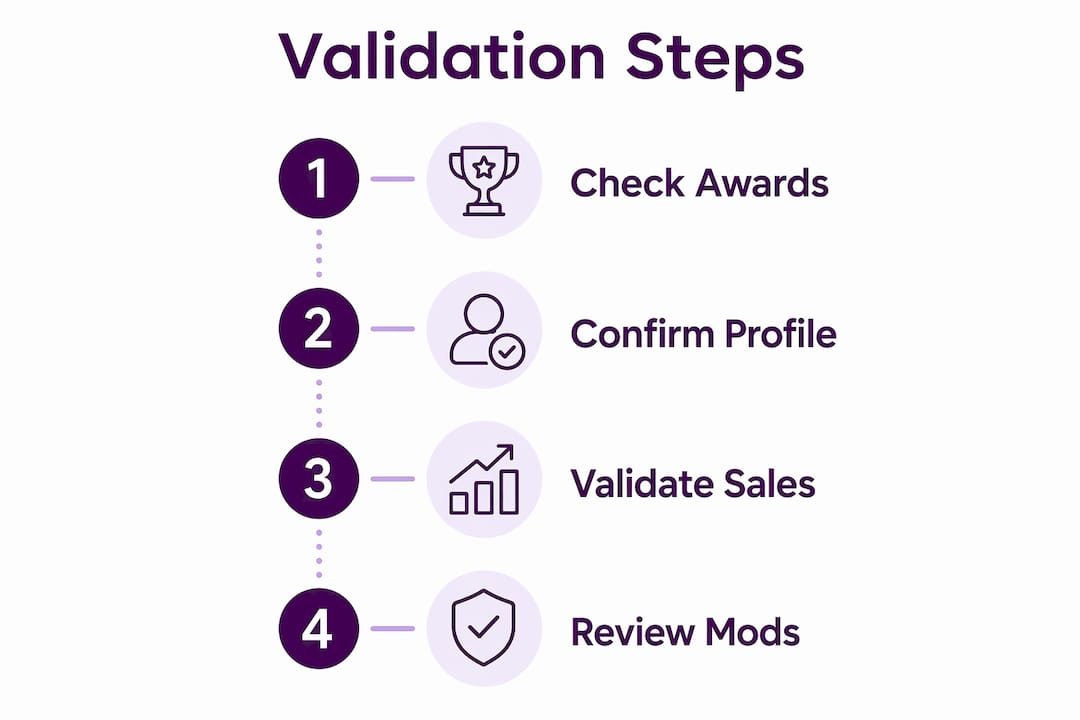
Step 2: Confirm your business profile on SAM.gov. Your SAM.gov registration must stay active through the final payment on any contract, per FAR clauses. Check that your NAICS codes, points of contact, and business size certifications reflect your current operations. SAM.gov requires semi-annual and annual updates to maintain eligibility, so set a calendar reminder now if you have not already.
Step 3: Validate sales data through the FAS Sales Reporting Portal. Contractors must report sales by SIN within 30 days after each reporting quarter or month ends. Log into the SRP with your FAS ID and confirm that every quarter’s submission is on file and matches your internal sales records. A missing or mismatched submission is one of the fastest ways to trigger a compliance review.
Step 4: Review contract modifications and catalog uploads. Use SAM.gov to pull your full modification history and confirm that every approved change is reflected in your active contract. Then check the FAS Catalog Platform to verify that your current catalog is published correctly on GSA Advantage. Electronic catalog submissions through FCP are required for publication accuracy, and an outdated catalog is a direct compliance risk.
Pro Tip: Run this four-step check at least once per month. Monthly checks catch discrepancies before they age into audit findings. Contractors who check quarterly often discover problems that are months old and far harder to correct.
Common mistakes when validating GSA contract data
Most validation failures come from the same small set of errors. Knowing them in advance is the fastest way to avoid them.
Mismatched NAICS codes and SIN lists are the most common trigger for audit friction. Inaccurate public profiles on GSA eLibrary and SAM.gov cause compliance problems during federal audits because the data an agency sees does not match what you actually do. Contractors often update their operations without updating their contract records, and that gap is exactly what auditors look for.
Here are the top mistakes and their fixes:
- Outdated NAICS or SIN codes: Review your codes against your current service offerings every six months. Submit a modification through eMod if any code no longer fits.
- Misreported sales figures: Cross-reference your internal invoices against SRP submissions every quarter. A single transposed number can flag your account for review.
- Expired SAM.gov registration: Set a recurring annual reminder 60 days before your registration expires. An expired registration can suspend your ability to receive payments.
- Incomplete catalog data on FCP: After every price modification, verify that the updated catalog is live on GSA Advantage within the required timeframe.
- Ignored contract modifications: Pull your modification history on SAM.gov monthly. Unacknowledged mods can create a legal mismatch between your contract terms and your actual pricing.
The mismatch between actual operations and public contract data is a major audit trigger. That single fact should motivate every contractor to treat validation as a standing business process, not a one-time task.
Pro Tip: Before any federal audit, run a full four-step validation check and document your findings. Keep a dated log of every check you perform. That log is your first line of defense if a contracting officer questions your data. You can also review the GSA compliance risks that most contractors overlook to build a stronger audit defense.
How to maintain ongoing accuracy in your GSA contract data
One-time validation is not enough. Ongoing GSA contract review techniques are what separate contractors who stay compliant from those who face corrective action.
The foundation is a compliance schedule. Set fixed dates each month for checking SAM.gov, GSA eLibrary, and the FAS Sales Reporting Portal. Treat these dates the same way you treat payroll deadlines. Missing them has real financial consequences.
Monthly checks on GSA eLibrary and SAM.gov keep your listed NAICS codes, contact information, and SIN offerings current. This is not just good practice. It is the standard that contracting experts recommend to avoid audit compliance issues. Contractors who rely on quarterly or annual checks consistently find problems that have already compounded.
The table below compares manual and automated approaches to ongoing compliance:
| Strategy | Frequency | Effort level | Risk of missed deadlines |
|---|---|---|---|
| Manual calendar reminders | Monthly | Moderate | Medium if reminders are ignored |
| Automated SRP alerts | Per reporting period | Low | Low with proper setup |
| Dedicated compliance staff | Ongoing | High | Low with clear accountability |
| Third-party compliance support | As needed | Low for contractor | Very low with expert oversight |
Integrating validation into your regular business workflow is the most reliable method. Assign a specific team member to own the compliance calendar. Build the four-step validation check into your monthly close process. Review your GSA Schedule maintenance checklist regularly to confirm you are not missing any standing requirements. The contractors who treat validation as a workflow item rather than a reaction to problems are the ones who avoid costly corrections.
Key Takeaways
Validating GSA contract data requires consistent use of SAM.gov, GSA eLibrary, and the FAS Sales Reporting Portal, combined with a monthly compliance schedule that catches errors before they become audit findings.
| Point | Details |
|---|---|
| Get the right access first | A FAS ID and active SAM.gov account are required before any validation can begin. |
| Follow the four-step check | Verify pricing on GSA eLibrary, confirm SAM.gov profile, validate SRP submissions, and review catalog data monthly. |
| Common errors are predictable | Outdated NAICS codes, misreported sales, and expired SAM registrations are the top audit triggers. |
| Build a compliance schedule | Set fixed monthly dates for each platform check and assign clear ownership within your team. |
| Document every check | A dated validation log is your primary defense during a federal audit or contracting officer inquiry. |
What I have learned from watching contractors get this wrong
The contractors who struggle most with GSA data validation are not the ones who lack knowledge. They are the ones who treat validation as something to do when a problem appears. By then, the damage is usually already done.
I have seen businesses with strong federal sales records face compliance reviews because a NAICS code was never updated after a service expansion. The contract still listed the old code. The agency’s records showed something different. That mismatch took months to resolve and froze new task order awards in the meantime.
The uncomfortable truth is that most validation failures are not technical. They are organizational. No one owned the task. No one set the reminder. The four-step process described here takes less than two hours per month when done consistently. It takes weeks to fix when it is not done at all.
GSA eLibrary is underused as a self-check tool. Most contractors think of it as a place to research competitors. It is actually one of the fastest ways to see exactly what a contracting officer sees when they look up your contract. If what you see there does not match your internal records, you have a problem worth fixing today.
Build the habit before you need it. Contractors who avoid compliance surprises do so because they made validation a routine, not because they are more experienced than everyone else.
— Josh
Gsascheduleservices can help you stay on top of GSA compliance
Keeping GSA contract data accurate is a standing obligation, not a one-time project. Gsascheduleservices works with small and medium-sized businesses to manage exactly this kind of ongoing compliance work. From readiness assessments to modification support and sales reporting guidance, the team at Gsascheduleservices handles the details that contractors often miss. If you want expert support to confirm your contract data is accurate and your compliance record is clean, schedule a discovery call to see how Gsascheduleservices can reduce your risk and protect your federal sales pipeline.
FAQ
What systems do I need to validate GSA contract data?
You need a FAS ID, an active SAM.gov account, and access to GSA eLibrary and the FAS Catalog Platform. These four systems cover sales reporting, business profile management, pricing verification, and catalog accuracy.
How often should I check my GSA contract data?
Monthly checks are the standard recommended by contracting experts. Quarterly checks leave too much time for errors to compound before you catch them.
What happens if my SAM.gov registration expires?
An expired SAM.gov registration can suspend your eligibility to receive contract payments. FAR clauses require your registration to stay active through the final payment on every contract.
What is the deadline for GSA sales reporting?
Contractors must report sales by SIN within 30 days after each reporting quarter or month ends through the FAS Sales Reporting Portal.
What is the most common cause of GSA audit issues?
Mismatches between your actual business operations and the NAICS codes, SIN lists, and contact data on public platforms are the leading audit trigger for GSA Schedule contractors.
Recommended
- An Essential Checklist to Maintain Your GSA Schedule Contract
- GSA Compliance: Don’t Get Lost | GSA Focus
- (Infographic) 25 Reasons GSA Contracts are Rejected
- Navigating GSA Schedule Compliance
