

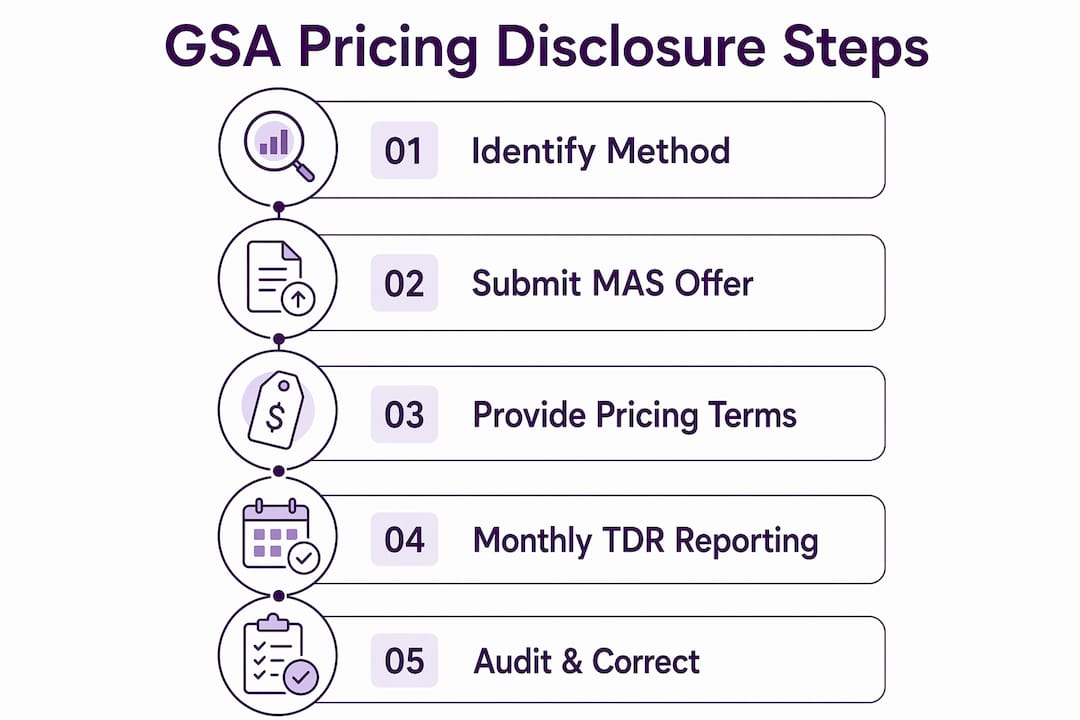
GSA pricing disclosure steps are the structured process by which Multiple Award Schedule (MAS) contractors submit, report, and maintain accurate commercial pricing data to satisfy General Services Administration compliance requirements. With Transactional Data Reporting (TDR) now mandatory under Refresh 31, small and medium-sized businesses face a sharper compliance standard than ever before. Getting these steps right protects your contract, strengthens your credibility with government buyers, and positions your bids competitively. This guide covers every stage: required templates, monthly sales reporting via the FAS Sales Reporting Portal (SRP), workflow redesign, and the most common errors that trigger audit findings.
What are the GSA pricing disclosure steps for MAS offers?
The GSA pricing disclosure process formally begins before you submit your MAS offer and continues throughout the life of your contract. Two distinct phases define it: the initial pricing submission and the ongoing transactional reporting obligation. Most contractors focus heavily on the first phase and underestimate the second. That imbalance is where compliance problems start.
The initial submission requires you to demonstrate that the prices you offer the government are fair and reasonable relative to what you charge your best commercial customers. The ongoing phase, now governed by TDR, requires you to prove that relationship month after month through actual sales data. Understanding both phases as a connected system, not two separate tasks, is the foundation of a compliant GSA pricing policy.

Identifying the correct pricing disclosure method upfront, whether Commercial Sales Practices (CSP) or TDR, avoids over-reporting risks and keeps your compliance workload manageable. Contractors who skip this determination often find themselves submitting data under the wrong framework, which creates discrepancies that are difficult to correct retroactively.
What documents and templates are required for a MAS pricing submission?
The Pricing terms template is mandatory for every MAS offer, regardless of the products or services you sell. It is the document GSA contracting officers use to evaluate whether your proposed prices reflect what you actually charge commercial customers. No offer moves forward without it.
Beyond the Pricing terms template, several supporting documents round out a complete submission package. Your Commercial Price List or catalog is the anchor document. It shows the prices you offer to non-government customers and forms the baseline GSA uses to assess your offer. The established pricing documents must reflect real commercial transactions, not aspirational list prices that no customer actually pays.
Pro Tip: If you use a third-party agent or consultant to submit your MAS offer, include the Agent Authorization Letter as part of your package. Omitting it delays review and can trigger a deficiency notice from your contracting officer.
Here is a clear breakdown of required versus optional documents:
| Document | Status | Purpose |
|---|---|---|
| Pricing terms template | Required | Demonstrates commercial pricing basis for GSA evaluation |
| Commercial Price List or catalog | Required | Shows prices offered to non-government customers |
| Agent Authorization Letter | Optional (conditional) | Required only when a third-party agent submits on your behalf |
| Discount schedule or pricing narrative | Optional | Clarifies volume discounts or special pricing arrangements |
Accuracy in these documents is not a formality. GSA contracting officers cross-reference your submitted pricing against market data and prior contract awards. Any gap between your Commercial Price List and your Pricing terms template raises immediate questions. Review your GSA contract pricing documentation carefully before submission to catch inconsistencies before your contracting officer does.
How to comply with TDR monthly sales reporting requirements
TDR reporting obligations begin at the start of the calendar quarter following your acceptance of the TDR modification. This means your first reporting deadline arrives faster than most contractors expect. Missing that first submission puts you in non-compliance immediately, which can trigger a cure notice from your contracting officer.
The monthly reporting cycle works as follows: you submit sales data through the FAS Sales Reporting Portal within 30 calendar days after each month ends. Industrial Funding Fee (IFF) payments, by contrast, are due quarterly. That difference in cadence is a frequent source of confusion. Many contractors assume that because IFF is quarterly, reporting is too. It is not. Sales data is monthly; payment is quarterly.
GSA’s TDR framework shifts compliance focus from periodic discount monitoring to ongoing transaction-level data accuracy. This is a fundamental change from the old Price Reduction Clause model, where you monitored discount relationships and reported exceptions. Under TDR, you report every transaction, every month, with exact data.
Follow these steps each month to stay current with your monthly sales reporting obligations:
- Close your GSA sales data at the end of each calendar month, not your internal accounting period.
- Log into the FAS Sales Reporting Portal and select the correct contract and reporting period.
- Enter each transaction with the exact part number, labor category, or Unique Code Identifier (UCID) that appears in your FAS Catalog Platform Product File or Services Plus File.
- Verify that the unit price reported matches your approved schedule pricing exactly.
- Submit before the 30-day deadline and save your confirmation number.
- At the end of each quarter, calculate and remit your IFF payment based on the three months of submitted sales data.
Pro Tip: Set your internal accounting cutoff to align with the calendar month end, not your billing cycle. Contractors who report based on invoice dates instead of calendar periods routinely submit data for the wrong reporting period, which creates discrepancies that are difficult to correct after the fact.
What internal workflow changes does TDR compliance require?
Accepting the “Participate in TDR” modification is not just a contract action. It is a trigger for workflow redesign across your finance, contracts, and operations teams. Contractors who treat it as a paperwork exercise and make no process changes are the ones who end up with compliance findings six months later.
The old Price Reduction Clause (PRC) model required contractors to monitor their discount relationships and notify GSA when a better price was given to a tracked customer. It was reactive and periodic. TDR is proactive and continuous. Every month, you must produce a clean, accurate data file that matches your approved catalog exactly. That requires a different kind of internal discipline.
Contractors must accept the Refresh 31 modification first, then the TDR modification, within 90 days. TDR reporting then becomes effective at the start of the following sales reporting quarter. That 90-day window is your implementation runway. Use it to build the processes you need before the first report is due.
Here are the best practices for building a TDR-ready internal compliance workflow:
- Assign a dedicated TDR owner. One person or team should own the monthly reporting cycle end to end. Shared responsibility without clear ownership produces missed deadlines.
- Map your sales data to your catalog. Create a standing reconciliation between your FAS Catalog Platform file and your order management system so part numbers and UCIDs stay synchronized.
- Build a monthly close checklist. Include data extraction, catalog cross-check, portal submission, and confirmation archiving as discrete steps with assigned owners and due dates.
- Separate monthly reporting from quarterly IFF. Treat them as two distinct processes with two distinct calendars to avoid conflating their deadlines.
- Document every submission. Keep confirmation numbers, screenshots, and data files for at least three years. GSA audits can reach back that far.
What are common mistakes in GSA pricing disclosure and how do you fix them?
Non-compliance most often stems from data mismatches: incorrect part numbers, wrong labor category titles, or Unique Code Identifiers that do not match what is in the FAS Catalog Platform. These are not minor formatting issues. They signal to GSA that your reported transactions cannot be verified against your approved pricing, which is the core purpose of TDR.
Late submissions are the second most common failure point. Monthly reporting deadlines are anchored to calendar month ends, and contractors who use invoice dates instead of the correct reporting period routinely file data for the wrong month. A report submitted on time but covering the wrong period is treated as a late or missing report. The distinction matters enormously during a compliance review.
Pricing mismatches between your Pricing Proposal Template and your TDR submissions are the third major failure category. Exact matching of pricing data across your FAS Catalog Platform file and your monthly TDR reports is not optional. Even a one-cent discrepancy on a unit price can trigger a compliance flag. Review your common GSA mistakes before your next submission cycle.
- Audit your FAS Catalog Platform file quarterly and compare it line by line against your order management system.
- Use a pre-submission checklist that verifies part numbers, UCIDs, labor category titles, and unit prices before you log into the FAS SRP.
- If you discover an error after submission, contact TDRteam@gsa.gov immediately. GSA’s TDR team can guide you through the correction process before the error compounds.
- Never assume a zero-sales month requires no action. You must submit a zero-sales report to confirm no transactions occurred. Silence is not accepted as a null report.
Pro Tip: Run an internal audit of your TDR submissions at the 90-day mark after your first report. Compare your submitted data against your actual invoices and your approved catalog. Catching a systematic error at 90 days is far less costly than discovering it during a formal GSA compliance review.
Key takeaways
Compliant GSA pricing disclosure requires exact data matching between your approved catalog and monthly TDR submissions, with sales reported within 30 days of each month end.
| Point | Details |
|---|---|
| Pricing terms template is mandatory | Every MAS offer requires this template to demonstrate commercial pricing to GSA evaluators. |
| TDR reporting starts the next quarter | Accept the Refresh 31 and TDR modifications within 90 days; reporting begins the following calendar quarter. |
| Monthly reporting differs from quarterly IFF | Sales data is due within 30 days of each month end; IFF payments are remitted quarterly. |
| Data must match exactly across systems | Part numbers, UCIDs, and unit prices in TDR submissions must mirror your FAS Catalog Platform file precisely. |
| Zero-sales months still require a report | Submitting a zero-sales report confirms no transactions occurred and keeps your compliance record clean. |
Why the TDR transition is the most important compliance shift I’ve seen in years
I have worked with dozens of small and medium-sized businesses through GSA contract cycles, and the shift from the Price Reduction Clause to Transactional Data Reporting is the single most operationally significant change I have seen in the MAS program. The PRC was a monitoring obligation. TDR is a reporting obligation. That distinction sounds subtle, but it changes everything about how you run your contract.
The contractors who struggle most are the ones who treat TDR acceptance as a contract modification and nothing more. They sign the modification, file it away, and then scramble when the first monthly deadline arrives with no process in place to produce clean data. The contractors who thrive are the ones who treat TDR acceptance as a systems project. They map their data, assign ownership, and build checklists before the first report is due.
My strongest recommendation: do not wait for your contracting officer to prompt you on the Refresh 31 and TDR modifications. Accept them proactively, use the 90-day window to redesign your workflow, and treat the first three monthly submissions as a dry run with extra scrutiny. The government buyers who see consistent, accurate TDR data from you will trust your pricing. That trust translates directly into contract renewals and competitive positioning on future bids. You can read more about staying ahead of these requirements in the GSA compliance guide from Gsascheduleservices.
— Josh
How Gsascheduleservices can help you get pricing disclosure right
GSA pricing disclosure is technical, deadline-driven, and unforgiving of errors. Gsascheduleservices works directly with small and medium-sized businesses to handle every stage of the process, from initial Pricing terms template preparation and Commercial Price List review to TDR workflow setup and monthly reporting support. If you are approaching the Refresh 31 modification deadline or building your first MAS offer, the time to get expert support is before your first submission, not after your first compliance finding. Start with a GSA contract consultation to assess your readiness and build a disclosure process that holds up under scrutiny.
FAQ
What is the Pricing terms template in a GSA MAS offer?
The Pricing terms template is a mandatory document for all MAS offers that demonstrates your commercial pricing to GSA contracting officers. It forms the basis for price evaluation and must accurately reflect what you charge non-government customers.
When does TDR reporting start after I accept the modification?
TDR reporting begins at the start of the calendar quarter following your acceptance of the TDR modification. Contractors must first accept the Refresh 31 modification, then the TDR modification, within 90 days.
How often do I submit sales data under TDR?
Sales data must be submitted monthly through the FAS Sales Reporting Portal within 30 calendar days after each month ends. Industrial Funding Fee payments are separate and remitted quarterly.
What happens if my TDR data does not match my FAS Catalog Platform file?
Discrepancies between your submitted sales data and your approved catalog file, including mismatched part numbers, labor category titles, or UCIDs, constitute non-compliance. Contact TDRteam@gsa.gov immediately if you identify an error after submission.
Do I need to report if I had no GSA sales in a given month?
Yes. A zero-sales report is required even when no transactions occurred during the reporting period. Failing to submit any report, including a zero-sales report, is treated as a missing submission and creates a compliance gap in your record.
