

The Schedule Input Program, known as GSA SIP, is a proprietary desktop software GSA provided to contract holders for uploading electronic catalogs to GSA Advantage. As of October 2025, SIP is legacy software. GSA now requires all new Multiple Award Schedule (MAS) contractors to use the FAS Catalog Platform (FCP) instead, and existing contractors are being moved over in phases.
Key facts about the current status:
- SIP remains available only for existing VA contractors and GSA contractors already mid-process in SIP.
- New MAS awardees from September 2025 onward receive automatic FCP access, bypassing SIP entirely.
- GSA has onboarded over 7,000 existing contracts to FCP since its 2023 launch.
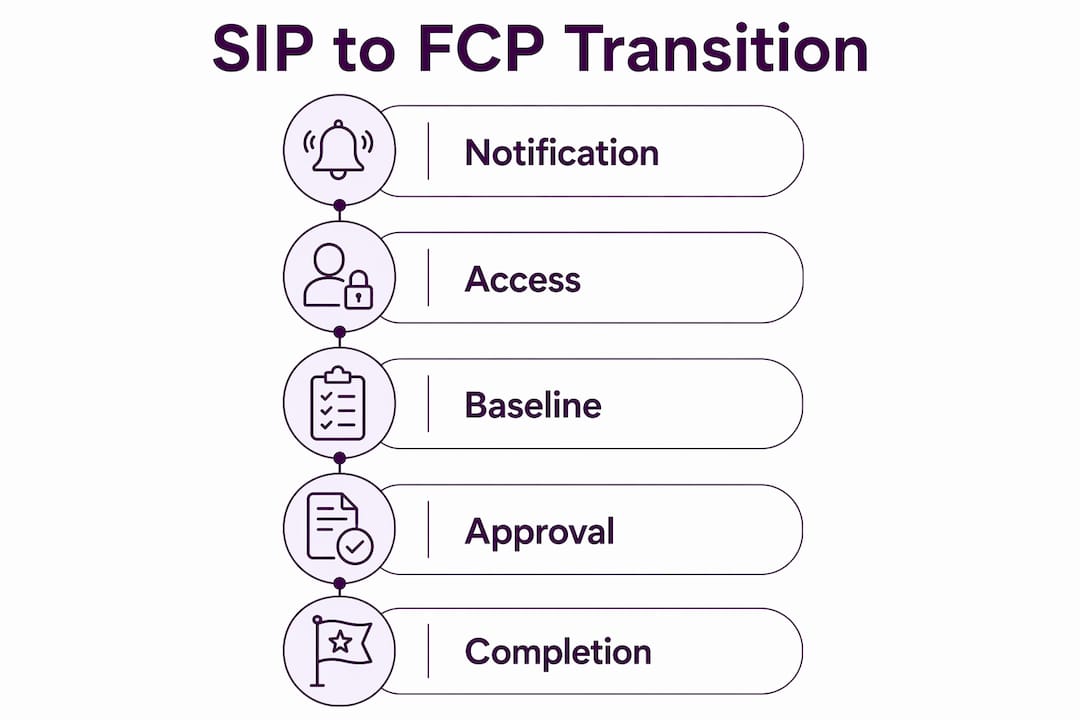
- Existing contractors transition in phases with notifications sent 28, 14, and 7 days before their contract moves.
If you still hold an active SIP-based catalog, the guidance below covers everything from installation through the FCP switch.
How to download, install, and set up GSA SIP
SIP is available through the GSA Vendor Support Center (VSC) at vsc.gsa.gov. Download it only from that official source. The software comes in two formats: an .exe installer and a .zip archive for contractors whose firewalls block .exe downloads. Both files run approximately 9.6 MB.
System requirements before you install:
- Windows 10 or Windows 11 operating system
- Pentium II processor or better
- 32 MB of RAM minimum (more disk space may be needed for large product catalogs)
- 12 MB of available hard disk space
- Active internet connection for uploads
- Mac users must run a Windows emulator; SIP has no native Mac version
After downloading, run the installer and follow the on-screen prompts. Once installed, register your contract at vsc.gsa.gov before attempting any upload. Registration generates a unique password tied to your contract number, which SIP uses for all catalog submissions.
Pro Tip: SIP version 9.x checks for updates automatically when you open it. If you are running an older version or have a firewall that blocks auto-updates, download the latest version manually from the VSC and back up your data file (backup.001) to a separate drive before upgrading.

Best practices for uploading catalogs with SIP
Catalog accuracy in SIP directly affects what government buyers see on GSA Advantage, so preparation before upload matters as much as the upload itself.
Before every upload, run through this checklist:
- Back up your SIP data folder to an external location. SIP’s built-in backup runs during the “Create Catalog Files” step, but a manual copy gives you a second recovery point.
- Verify all pricing against your current contract terms. Discrepancies between your SIP file and the written contract will trigger rejection by your Contracting Officer (CO).
- Check that no fields required for your Special Item Number (SIN) are blank, particularly Manufacturer Name, Manufacturer Part Number, and Country of Origin.
- Confirm your internet connection is stable and that FTP port 22 is open both inbound and outbound to vsc.gsa.gov if you are on a corporate network.
- Process any pending response files before starting a new submission. SIP locks you out of sending a new catalog until the previous response file is downloaded and processed.
After upload, SIP generates a response file once your CO reviews the submission. That file either approves your catalog for posting or flags the reasons for rejection. You must process it before submitting again.
How to use Excel import in SIP for catalog data
The Excel import function is the fastest way to load large product sets into SIP. GSA recommends it for catalogs with 100 or more products.
- Locate the import templates in the C:SIPV9importtemplate folder after installation. The VSC website also hosts the SIP Excel import document with field-by-field instructions.
- Open the correct template for your catalog type. Product templates differ from service templates, so confirm you are using the right one for your SIN.
- Fill in every required column. The three fields that cause the most rejections when left incomplete are Manufacturer Name, Manufacturer Part Number, and Country of Origin.
- Save the file in .xls format. SIP’s import program accepts Excel files from MS Office 97 or later, as well as ASCII text (.txt) and database (.dbf) files.
- In SIP, navigate to the Import Program and select your completed file. SIP will validate the data and flag rows with errors before importing.
- Review all flagged rows and correct errors in the spreadsheet, then re-import. Do not skip this step; partial imports can leave your catalog in an inconsistent state.
- After a clean import, proceed to “Communications” and select “Create Catalog Files” to generate your upload package.
Pro Tip: Keep a master Excel template with your standard product fields pre-populated. Update only the cells that change each cycle. This cuts data entry time and reduces the chance of accidentally clearing a required field.
Where to find SIP user guides, training, and helpdesk support
The SIP User Guide is available as a PDF directly from the VSC website. It covers every screen, field, and workflow in SIP version 9.x and is the authoritative reference for anything not covered by the software’s built-in F1 help function.
Available support resources:
- VSC Helpdesk: Toll-free at 877-495-4849, Monday through Friday, 8:30 AM to 5:30 PM EST. Email: vendor.support@gsa.gov. The VSC handles technical and password issues only; contract questions go to your Procuring Contracting Officer (PCO) or Administrative Contracting Officer (ACO).
- In-software help: Press F1 on any input field for context-sensitive guidance without leaving SIP.
- FCP training and videos: For contractors already moving to FCP, visit catalog.gsa.gov/help for the user guide, FAQ, and training videos.
The VSC does not advise on contract terms or pricing strategy. If your catalog gets rejected for a contract compliance reason rather than a technical one, that conversation belongs with your CO.
Transitioning from SIP to FAS Catalog Platform (FCP)
The FCP is a web-based platform that replaces SIP’s desktop model entirely. Unlike SIP, FCP runs in a browser, stores data in the cloud, and connects directly with GSA’s contract writing systems, eliminating the duplicate data entry that SIP required.
Key FCP advantages over SIP:
- Multi-location access from any device with a browser, no installation required
- Automated data validation checks that catch errors before submission
- A central hub showing all catalog actions and their current status
- Direct integration with contract writing systems, so pricing and terms stay consistent
- Automatic Compliance and Pricing Reports delivered to contractors
- Catalog history accessible at any time
Transition timeline for existing contractors:
Contractors receive a 60-day advance notification email before their contract moves to FCP. Follow-up reminders arrive at 28, 14, and 7 days. On the transition date, SIP access is disabled. Any SIP actions not yet published at that point must be reflected through the FCP Baseline action instead.
Once you gain FCP access, you have 60 days to complete the baseline. FCP will generate a “Last Approved Product File” pre-populated with your current GSA Advantage catalog. Download that file immediately and use it as your starting point. Missing the baseline window delays your ability to update your catalog, which affects your visibility to government buyers.
New MAS contractors awarded from September 2025 onward skip SIP entirely and receive FCP registration instructions automatically. If you are in the process of securing a GSA contract, you will go straight to FCP.
Expert guidance on managing your GSA catalog through the transition
The single most consequential SIP setting most contractors overlook is the difference between the “Change” and “Replace” functions. Using “Change” preserves your existing GSA Advantage catalog and updates only the specific items you modify. “Replace” overwrites your entire catalog file. Accidentally triggering a Replace when you intended a Change can wipe out your published catalog, requiring a full re-upload and CO review.
Practical tips for a clean transition:
- Download your Last Approved Product File from FCP the day you receive system access. Do not wait.
- Cross-check that file against your current contract terms before submitting the baseline.
- Monitor your Authorized Negotiator email closely. Transition notifications go there, and missing them means missing your window.
- Keep a local copy of your SIP data as an archive even after transitioning. You may need it to resolve disputes about historical catalog entries.
- Consider working with a Google Ads for Professional Services provider if your catalog is large or complex. The baseline process is straightforward for small catalogs but can surface contract compliance issues that need expert review in larger ones.
The federal contracts onboarding process has enough moving parts that a missed step in FCP can stall your catalog for weeks. Getting ahead of the timeline is the only reliable way to avoid that.
Key Takeaways
The GSA SIP to FCP transition is mandatory, and contractors who baseline early avoid the catalog gaps that cost them government buyer visibility.
| Point | Details |
|---|---|
| SIP is legacy software | As of october 2025, SIP is only for existing VA and GSA contractors already using it. |
| FCP replaces SIP entirely | FCP is web-based, cloud-stored, and integrated with GSA contract writing systems. |
| Over 7,000 contracts moved | GSA has onboarded over 7,000 existing contracts to FCP since the 2023 launch. |
| 60-day baseline window | Contractors have 60 days from FCP access to complete their catalog baseline. |
| “Change” beats “Replace” | Use “Change” in SIP to update specific items; “Replace” overwrites your entire catalog. |
FAQ
What is GSA SIP?
GSA SIP (Schedule Input Program) is a proprietary desktop software GSA provided to contract holders for uploading and managing their electronic catalogs on GSA Advantage. As of october 2025, it is legacy software being replaced by the FAS Catalog Platform (FCP).
What does GSA stand for?
GSA stands for General Services Administration, an independent federal agency that manages government procurement and provides contract vehicles like the Multiple Award Schedule program.
Who is eligible for a GSA Schedule contract?
Eligibility is open to businesses, nonprofits, and educational institutions that meet GSA’s compliance and experience requirements. Prospective contractors must demonstrate financial stability, relevant past performance, and pricing that meets GSA standards.
What is GSA FCP?
The FAS Catalog Platform (FCP) is GSA’s modern, web-based replacement for SIP. It allows contractors to manage product and service catalogs from any browser, with direct integration into GSA contract writing systems and automated data validation, eliminating the manual steps SIP required.
Recommended
- Federal Supply Class Categories for GSA: 2026 Guide
- GSA Advantage Catalog – 3 Important Facts
- Get the Best Deals with the GSA Advantage Catalog
- Using GSA Advantage Catalog to Sell products