
The GSA Vendor Support Center (VSC), found at vsc.gsa.gov, is GSA’s official technical hub where schedule contractors register their contracts, access catalog upload tools, and get helpdesk support for system issues. It is not a place to get contract-specific advice. Here are your three immediate actions:
- Register your contract at vsc.gsa.gov using your contract number, SAM UEI, and authorized negotiator credentials.
- Contact the helpdesk for any technical or system issue: call 877-495-4849 or email vendor.support@gsa.gov, Monday through Friday, 8:30 a.m. to 5:30 p.m. ET.
- Reach your PCO, ACO, or IOA for anything involving pricing, compliance, or contract-specific guidance. The VSC helpdesk will redirect you there anyway.
Those three steps cover the vast majority of what contractors need from the VSC. Everything below explains the details.
Table of Contents
- What does the GSA VSC actually do for contractors?
- How do you register your contract on the VSC?
- How do you use the VSC for catalog uploads and eTools?
- What will the VSC helpdesk actually help you with?
- What changed in the VSC redesign and what is the MAS Project Center?
- When is the VSC enough, and when should you hire a consultant?
- Key Takeaways
- The part most contractors get wrong about the VSC
- How Gsascheduleservices fills the gaps the VSC leaves open
- Useful sources
- FAQ
What does the GSA VSC actually do for contractors?
The VSC serves two broad audiences: contractors who are new to GSA and need to get their contract set up, and existing contractors managing ongoing catalog and compliance tasks. Its scope is deliberately technical, not advisory.
Core capabilities include:
- Helpdesk support — for password resets, login issues, and troubleshooting VSC-hosted system applications
- Contract registration gateway — that connects your contract to GSA eTools like GSA Advantage and eBuy
Two resources worth bookmarking immediately: the Contractor Start-up Kit, which walks new MAS contractors through their first catalog upload, and the MAS Project Center, which consolidates resources for special projects like MAS consolidation. Before the VSC redesign, contractors had to pull those materials from multiple locations. Now they live in one place.
What the VSC does not do is equally important. It will not advise you on pricing strategy, help you negotiate a modification, or interpret compliance requirements. Those questions go to your contracting officer.
How do you register your contract on the VSC?
Registration on the VSC is the prerequisite for accessing GSA eTools. Without it, you cannot participate in eBuy solicitations or list products on GSA Advantage. The process is straightforward, but two common mistakes slow contractors down: missing authorized negotiator status and having an outdated SAM UEI.
What you need before you start:
- Your GSA contract number
- Your SAM.gov Unique Entity Identifier (UEI), registered and active at sam.gov
Step-by-step registration:
Pro Tip: If your registration fails at the authorized negotiator step, do not call the helpdesk first. Log into eMod and submit an administrative modification to add yourself or the correct person as an authorized negotiator. Once GSA processes that mod, registration will go through. Calling the helpdesk before fixing the eMod just adds a delay.
How do you use the VSC for catalog uploads and eTools?
Once your contract is registered, the next task is getting your products or services onto GSA Advantage so federal buyers can find and order from you. The Contractor Start-up Kit is the canonical resource here. It covers file format requirements, submission instructions, and the differences between the three upload paths.
The general workflow runs like this: register your contract, prepare your catalog per the Start-up Kit guidance, submit via FCP, SIP, or EDI, verify the upload, and then gain active access to both eBuy and GSA Advantage.
Choosing the right upload path:
| Method | Best For | Technical Level |
|---|---|---|
| FCP (FAS Catalog Platform) | Most MAS contractors; the current standard path | Moderate — web-based interface, no EDI knowledge needed |
| SIP (Schedule Input Program) | Legacy MAS users and some VA FSS contractors | Low to moderate — desktop software, older workflow |
| EDI (Electronic Data Interchange) | Large contractors with existing EDI infrastructure | High — requires Electronic Data Interchange capability |
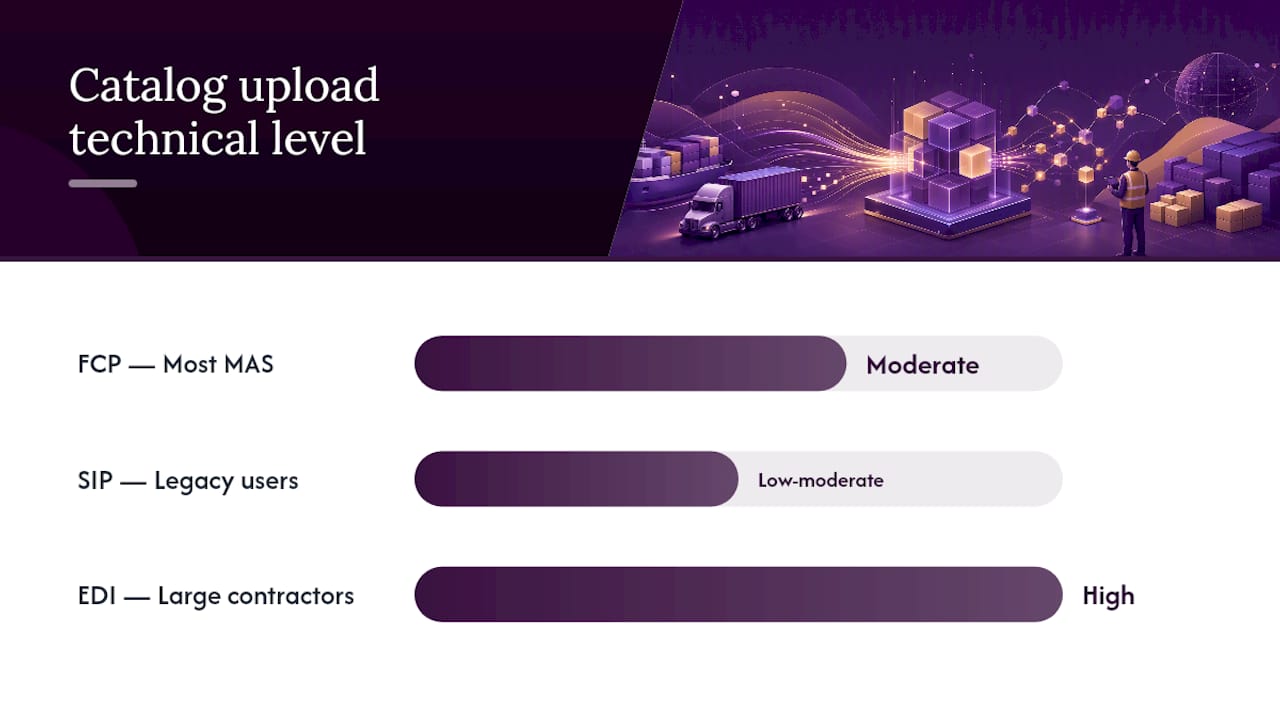
FCP is where most new MAS contractors should start. It is the platform GSA actively maintains and the one the Contractor Start-up Kit references most heavily. SIP still works but is a legacy path. EDI makes sense only if your organization already runs EDI integrations at scale.
After a successful catalog upload, GSA Advantage reflects your pricing and products, and eBuy sends you solicitation notifications that match your awarded Special Item Numbers (SINs). Both depend on a clean, validated catalog file, so read the FCP submission instructions carefully before you upload.
What will the VSC helpdesk actually help you with?
The VSC helpdesk handles technical and system-level questions. That scope is narrower than most contractors expect, and knowing the boundary before you call saves real time.
What the helpdesk covers:
- Password resets and account access for VSC-hosted applications
- Login errors and system outages
- Catalog upload errors within FCP, SIP, or EDI
- Navigation questions about VSC tools and resources
- Routing you to the right contracting officer when your question is out of scope
What the helpdesk will not cover:
- Contract-specific pricing or negotiation questions
- Compliance interpretations or modification strategy
- Disputes with a contracting officer
- Questions about your specific contract terms
The VSC FAQ states this explicitly: VSC staff will not provide guidance on contract matters and will redirect those calls to your PCO, ACO, or IOA. Know those contacts before you call.
Pro Tip: When you open a support ticket, include your FAS ID, contract number, the specific system you are using (FCP, eBuy, etc.), a brief description of the error message or behavior, the steps you already tried, and a screenshot if possible. Tickets with that information get resolved faster because the helpdesk does not have to chase you for basics.
Helpdesk contact reference:
| Contact Method | Details |
|---|---|
| Phone (Toll Free) | 877-495-4849 |
| vendor.support@gsa.gov | |
| Hours | Monday–Friday, 8:30 a.m.–5:30 p.m. ET |
What changed in the VSC redesign and what is the MAS Project Center?
GSA redesigned the VSC to shift from a document-dump model to a contractor-journey model. The difference is practical: instead of hunting through a flat list of PDFs, you now navigate by goal.
The three primary journey categories are:
- “I Want a Contract” — for contractors pursuing a new GSA Schedule
Beyond the navigation overhaul, the redesign added a site-wide search function, moved helpdesk access to the home page so it is never more than one click away, and added PCO/ACO/IOA locators so contractors can find their contracting officer without a separate search.
The MAS Project Center is one of the redesign’s most useful additions. MAS Program staff built it specifically to house resources for special projects, with MAS consolidation being the primary use case. Before the Project Center existed, a contractor going through MAS consolidation had to pull guidance documents, modification templates, and deadline information from several different pages. Now it is all in one place, which matters when consolidation timelines are tight.
When is the VSC enough, and when should you hire a consultant?
The VSC handles the technical layer of GSA contract management well. Where it stops short is the strategic and compliance layer, and that gap is where contractors run into real problems.
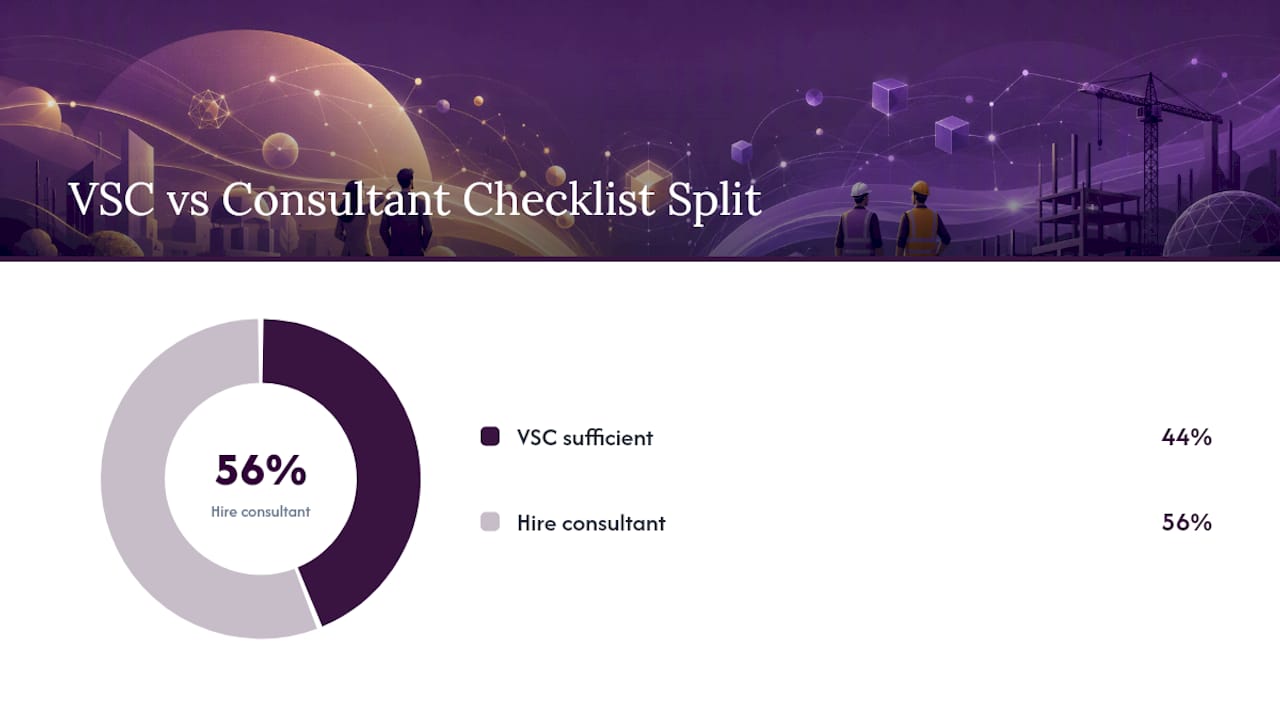
Use this checklist to decide:
The VSC is probably enough if:
- Your question is about system access, passwords, or a catalog upload error.
- You need to find a specific GSA resource or document.
- You are registering a new contract and have all required credentials ready.
- You need to locate your PCO/ACO/IOA contact.
Consider bringing in a consultant if:
- You are unsure whether your pricing structure passes a price analysis review.
- You need to submit a modification but do not know which mod type applies.
- Your catalog upload keeps failing and you cannot identify the file error.
- You are approaching a compliance deadline and your internal team lacks GSA experience.
- You are a new contractor and the Contractor Start-up Kit is not answering your specific questions.
A contractor who calls the VSC helpdesk asking whether their labor rates are compliant will be redirected to their PCO. That is the right answer, but it is also a delay. A GSA schedule consultant can review pricing structure, flag compliance gaps, and prepare modification packages before you ever reach that point. The VSC gives you the tools; a consultant helps you use them correctly under your specific contract terms.
Pro Tip: Before any compliance deadline, pull your contract’s modification history from eMod and cross-reference it against your current catalog. Discrepancies between your awarded pricing and your live GSA Advantage catalog are one of the most common audit triggers. The VSC cannot catch that for you.
Key Takeaways
The GSA VSC is your technical gateway to GSA eTools, but contract-specific guidance always requires a contracting officer or a qualified consultant.
| Point | Details |
|---|---|
| VSC scope | Covers technical support, contract registration, and catalog upload tools — not pricing or compliance advice. |
| Registration prerequisites | You need your contract number, active SAM UEI, and authorized negotiator status before VSC registration will succeed. |
| Helpdesk contact | Call 877-495-4849 or email vendor.support@gsa.gov, Monday–Friday, 8:30 a.m.–5:30 p.m. ET. |
| MAS Project Center | Centralizes special-project resources (including MAS consolidation) that were previously scattered across multiple pages. |
| Gsascheduleservices | Provides hands-on consulting for the tasks VSC cannot handle: pricing review, modification prep, catalog troubleshooting, and compliance support. |
The part most contractors get wrong about the VSC
The VSC is a genuinely useful tool, and GSA has improved it considerably since the redesign. But there is a persistent misconception worth addressing directly: contractors often treat the VSC as a one-stop solution for everything GSA-related, then feel stuck when it cannot answer their actual question.
The VSC was built to solve a navigation and access problem, not a knowledge problem. It tells you where to go and gives you the technical infrastructure to get there. What it cannot do is tell you whether your pricing is defensible, whether your modification is structured correctly, or whether your catalog reflects your current contract terms accurately. Those are judgment calls that require someone who knows your specific contract.
The contractors who get the most out of the VSC are the ones who already know what they need. They come in with a clear technical task, use the helpdesk for exactly that, and have a separate relationship with their contracting officer or a consultant for everything else. Treating the VSC as a substitute for that relationship is where things go sideways, usually right before an audit or a modification deadline.
If you are new to GSA and still figuring out the difference between what the VSC handles and what your PCO handles, that is not a gap the helpdesk can close. That is where GSA schedule consulting pays for itself.
How Gsascheduleservices fills the gaps the VSC leaves open
The VSC gives you the technical infrastructure. Gsascheduleservices handles what comes after: the pricing analysis that determines whether your rates will survive a contracting officer’s review, the modification packages that keep your contract current, and the catalog troubleshooting that turns a failed FCP upload into an approved price list.
For contractors who are new to GSA, Gsascheduleservices covers the full onboarding workflow, from authorized negotiator setup through catalog submission and eBuy activation. For existing contractors, the focus shifts to compliance maintenance, modification strategy, and growing federal sales through GSA Advantage and eBuy. The VSC is a tool you use; Gsascheduleservices is the expertise behind how you use it.
If you are at the point where the VSC has given you everything it can and you still have open questions, schedule a discovery call to talk through your specific contract situation.
Useful sources
The following official GSA resources cover the topics in this article. Each link goes directly to the primary source.
| Resource | Purpose |
|---|---|
| vsc.gsa.gov | VSC home page — helpdesk access, contract registration, and all contractor tools |
| Registering Your Contract on the VSC | Step-by-step registration guide with prerequisites |
| Managing My GSA Contract | Contractor Start-up Kit and FCP/SIP/EDI catalog upload instructions |
| VSC FAQ | Helpdesk scope, redirect policy, and common contractor questions |
| GSA VSC Redesign Announcement | Official blog post on the redesign and MAS Project Center |
| Vendor Resources — GSA | Training resources, MAS Modification Help Center, and VSC availability confirmation |
| sam.gov | SAM registration and UEI management — required before VSC registration |
FAQ
What is the GSA Vendor Support Center (VSC)?
The GSA VSC is the official technical support portal at vsc.gsa.gov where GSA schedule contractors register their contracts, access catalog upload tools (FCP, SIP, EDI), and get helpdesk assistance for system issues.
What does GSA stand for?
GSA stands for General Services Administration, the federal agency that manages government procurement, real estate, and technology services for federal agencies across the United States.
Who is eligible to use the GSA VSC?
Any active GSA schedule contractor, including new and existing MAS and VA FSS vendors, can use the VSC. Registration requires a valid contract number, an active SAM UEI, and authorized negotiator status (VA FSS contractors are exempt from the authorized negotiator requirement).
What does GSA TDR stand for?
TDR stands for Transactional Data Reporting, a GSA program that allows certain schedule contractors to report individual transaction data in lieu of the standard Price Reductions Clause. Contractors participating in TDR report sales data directly to GSA rather than tracking commercial pricing benchmarks.
Can the VSC helpdesk answer questions about my contract terms or pricing?
No. The VSC helpdesk covers technical and system-level support only. Questions about pricing, compliance, negotiations, or contract-specific guidance are redirected to your Procuring Contracting Officer (PCO), Administrative Contracting Officer (ACO), or Industrial Operations Analyst (IOA).
Recommended
- How to Obtain a GSA Schedule Number: Step-by-step
- How to Choose a GSA Service Provider/GSA Vendor
- GSA Contract Eligibility Criteria – Quick Guide
- GSA Schedule: The Next 5 Important Steps After Getting It.