

Four moves drive most of the visibility gain on GSA Advantage: fix your Seller Profile and baseline in the FAS Catalog Platform, publish the correct file type with a compliant Terms & Conditions file, add photos and clean part numbers mapped to the right SINs, and clear every validation error before your next upload. Get those four right and you typically see listings render correctly and start surfacing in buyer searches within a short time after one or two catalog cycles.
That timeline assumes clean data going in. A baseline stuck in error status, a missing T&C file, or a SIN mismatch will silently keep your products off Advantage even though your contract is fully active.
- Confirm your Seller Profile and negotiator access are current in FCP or eMod.
- Publish a Product File or Services Plus File with a valid T&C file attached.
- Add required photos, unique MPNs, and UPCs, then map every item to its correct SIN.
- Resolve validation errors and consider posting a Temporary Price Reduction where it fits your pricing strategy.
Pro Tip: If your baseline has bounced back with errors twice in a row, stop resubmitting the same file. Open a ticket with the GSA Vendor Support Center and attach your error log. Guessing at fixes burns cycles you don’t have.
If your contracting officer flags a pricing or scope issue during a mod, that’s your cue to loop in someone who handles this daily rather than iterating alone.
Key Takeaways
GSA Advantage optimization succeeds when your eMod data, FCP baseline, and live product pages stay synchronized, with photos, UPCs, and correct SIN mapping driving discoverability.
| Point | Details |
|---|---|
| Fix the baseline first | A clean Seller Profile and approved FCP baseline determine whether anything else you do can even publish. |
| Match file type to SIN | Product Files render as full pages; Services Plus Files publish as price lists, and your SIN dictates which applies. |
| Photos and UPCs drive filters | Buyers can limit searches to items with photos, so missing images make an active listing invisible. |
| Pricing lives in the right file | Keep price data off your T&C file and use Temporary Price Reductions for fast, tactical promotions. |
| Get expert help when complexity grows | Gsascheduleservices handles readiness assessments, FCP catalog uploads, and pricing alignment for vendors past the DIY stage. |
Table of Contents
- Five Prioritized Steps for GSA Advantage Optimization
- How Do You Submit and Maintain a GSA Catalog?
- What Listing Details Actually Get You Found?
- Where Does Pricing Actually Belong?
- What KPIs Show Your Advantage Listing Is Healthy?
- What Mistakes Quietly Kill Your Discoverability?
- How Gsascheduleservices Supports Every Step
- Strategies for Leveraging Promotional Tools on GSA Advantage
- Managing Reviews and Ratings for Product Credibility
- Optimizing Shipping Terms and Delivery Options
- Using Analytics and Reporting to Track Performance
- The Real Priority Order Most Advice Gets Backward
- Get Help Fixing Your GSA Advantage Listings
- Sources
- FAQ
Five Prioritized Steps for GSA Advantage Optimization
Work these five in order. Skipping ahead to pricing tricks before your baseline is clean just means your Temporary Price Reduction sits on a listing nobody can find.
- Verify your baseline and Seller Profile. Confirm your contract number, socioeconomic certifications, and authorized negotiator access are correct in FCP before touching your catalog. Errors here cascade into every file you upload afterward, per Vendor Support Center guidance.
- Choose the right file type. A Product File renders as a full product page with images and specs; a Services Plus File publishes as a downloadable price list instead. Most SINs dictate which one applies, and the choice affects how buyers can even see your offering, as GSA Advantage’s file rules explain.
- Tighten your content. Write titles that lead with what the item actually is, not marketing language. Keep manufacturer part numbers unique and consistent across every file you submit.
- Upload real product photos. Package them per the ZIP and naming conventions in the Contractor Start-up Kit, since buyers can filter search results to items with photos only.
- Set your pricing controls. Decide whether a price change belongs in a Temporary Price Reduction or a formal T&C update, and confirm your quarterly Industrial Funding Fee reporting reflects whatever you publish.
Pro Tip: Run through this checklist every time you file a contract modification, not just at award. A baseline that was clean in January can drift out of sync by summer if nobody rechecks it.
Each step above maps to a specific GSA system action. None of them are optional if you want full visibility on GSA Advantage.
How Do You Submit and Maintain a GSA Catalog?
Most Schedule holders now publish through the FAS Catalog Platform, which replaced the older SIP and EDI processes for most contract types. FCP runs your catalog through several automated validation rounds before it publishes, and a Baseline action approved in eMod triggers the catalog to go live on Advantage automatically.
Some contracts still run on legacy SIP or EDI. If yours does, you cannot send a new catalog update until you’ve processed the prior response file, an EDI 824 that flags data errors. Ignore that step and every subsequent upload stalls, per the Contractor Start-up Kit.
When something breaks, work through these first:
- Confirm your Seller Profile registration in VSC predates your first FCP upload; a registration mismatch throws errors unrelated to your actual catalog data.
- Check that your T&C file naming matches GSA’s required convention exactly.
- Verify you processed and cleared any outstanding response file before submitting anything new.
What Listing Details Actually Get You Found?
Buyers search Advantage using specific fields, and those fields decide whether your item ever surfaces. Titles that front-load the product type and key spec beat titles padded with brand slogans, because Advantage’s search logic favors what’s actually in the field, not what sounds compelling.
Manufacturer part numbers need to be unique per item and consistent across your Product File and any Services Plus listing. A UPC becomes mandatory for many commercial-item SINs, so check your specific SIN’s requirements before you assume you can skip it.
- Write titles around what buyers type, not internal SKU logic.
- Keep MPNs unique and free of extra characters that break matching.
- Map every item to its correct SIN, since a mismatched SIN can bury an otherwise perfect listing in the wrong search category.
Pro Tip: Pull your top 10 competing listings on Advantage for your own SIN and study their titles. If yours reads like an internal part sheet, buyers are scrolling past it.
Where Does Pricing Actually Belong?
Price data lives on your Product File or Services Plus File, never duplicated inside your T&C file, which should describe terms and conditions only, according to GSA’s catalog file guidance. Legacy Price Proposal Template users face different rules here, so confirm which system governs your contract before you touch a price field.
Temporary Price Reductions publish faster than a full catalog update and can sway automated ordering decisions in your favor during a promotional window. Keep your compliance obligations current too:
- Submit monthly sales reports and reconcile them against what’s actually published.
- File your quarterly Industrial Funding Fee on time; missed filings can trigger penalties or even delisting.
- Update your T&C file the moment contract terms change, not at your next scheduled review.
What KPIs Show Your Advantage Listing Is Healthy?
Track five numbers monthly: published product pages, time-to-publish after a modification, your validation error rate, order volume through Advantage, and IFF reporting compliance. A rising error rate or a widening gap between mod approval and live publishing is your earliest warning sign.
- Pull a fresh count of live product pages and compare it against your actual catalog size.
- Spot-check pricing sync, photo presence, and contact details for accuracy.
- Review your latest response-file results for unresolved errors.
- Before submitting any price change, run FCP’s Compliance & Pricing report to catch issues before they trigger a negotiation delay.
What Mistakes Quietly Kill Your Discoverability?
Most invisible listings trace back to the same handful of errors. eMod data, your FCP baseline, and what actually renders on Advantage can drift out of sync, and a mismatch anywhere in that chain produces a listing buyers never see.
- Missing photos or UPCs on SINs that require them, since filtered searches skip you entirely.
- Wrong or stale SIN mapping that buries an otherwise strong listing.
- An expired T&C file or an unprocessed response file blocking your next upload.
If you’ve fixed the obvious issues and the listing still won’t publish, open a ticket with the GSA Vendor Support Center and attach your error log and mod number. That evidence speeds review far more than a general complaint.
How Gsascheduleservices Supports Every Step
Every action above maps to a service Gsascheduleservices actually performs. Readiness assessments catch baseline problems before they become rejected mods. Catalog editing support handles the FCP upload itself, photo formatting included. Pricing strategy work aligns your T&C file with your Product File so a Temporary Price Reduction doesn’t accidentally conflict with your published terms.
A Schedule holder juggling a few dozen SKUs with a clean baseline can often run this checklist solo. A vendor with hundreds of line items, repeated FCP rejections, or a legacy EDI feed that keeps bouncing response files is usually better served handing the technical lift to someone who does it full time.
DIY works fine for simple catalogs. Complexity, repeated errors, or an EDI transition is where most vendors decide the hours saved outweigh the consulting fee.
Strategies for Leveraging Promotional Tools on GSA Advantage
Temporary Price Reductions are the sharpest promotional lever available on Advantage. Because they publish faster than a full catalog revision, you can time a reduction around a budget cycle, an agency’s fiscal year end in September, or a known procurement push without waiting on a full mod.
Timing matters more than depth here. A modest reduction posted two weeks before agencies rush to spend remaining fiscal-year funds often outperforms a steeper discount posted at a random point in the year. Federal buyers work on predictable budget rhythms, and your promotional calendar should track theirs, not your internal sales targets.
Beyond TPRs, pay attention to how your items surface in GSA eBuy, the request-for-quote system tied to Advantage. A well-optimized Advantage listing feeds directly into stronger eBuy visibility, since contracting officers often reference your published pricing and specs when building RFQs. Keeping your Advantage catalog current pays off in both channels at once.
Bundle promotions carefully. If you reduce price on a core item, check whether related items in the same family should move together, since buyers comparing your line side by side will notice inconsistent pricing logic. A promotional push that only touches one SKU in a five-item family can look like an error rather than a deal.
Managing Reviews and Ratings for Product Credibility
GSA Advantage doesn’t run a public star-rating system the way commercial marketplaces do, but buyer feedback still shapes your standing indirectly. Contracting officers talk to each other, and a vendor with a reputation for accurate listings and responsive order fulfillment gets referenced in agency-to-agency conversations that never show up as a visible metric.
The practical move is treating every order as a credibility test. Ship exactly what’s described in your Product File, at the price and lead time you published. A single mismatch between what’s listed and what arrives creates friction that follows you into future procurement decisions, especially with smaller agencies where the same purchasing staff handle repeat orders.
Where formal feedback exists, through past-performance evaluations tied to task orders, respond to any negative note quickly and in writing. A documented correction shows up in future evaluations and can offset a single bad data point. Silence on a complaint reads worse than the complaint itself.
Some vendors also request informal feedback directly from repeat federal buyers after fulfilling an order. It’s not a formal review system, but a short note asking whether the item matched expectations gives you early warning on data mismatches, packaging problems, or delivery timing issues before they become a pattern that affects your reputation across multiple agencies.
Optimizing Shipping Terms and Delivery Options
Delivery terms are a field buyers actively compare, and a vague or unrealistic lead time can cost you an order even when your price is competitive. State your actual fulfillment window rather than a padded estimate. Agencies build their own schedules around your published delivery date, and a pattern of missed dates shows up in past-performance reviews that follow you into future task orders.

FOB terms matter more on Advantage than most vendors realize. Confirm whether your Product File correctly reflects FOB Destination or FOB Origin, since this affects who bears shipping cost and risk, and a mismatch between what’s published and what your invoice reflects creates exactly the kind of discrepancy that triggers a compliance question later.
If you offer expedited shipping options, list them explicitly rather than assuming buyers will ask. Federal purchasing staff often work against tight deadlines tied to fiscal-year spending, and a visible rush-delivery option can be the deciding factor between two otherwise similar listings.
Review your delivery terms every time you touch pricing. A Temporary Price Reduction tied to unrealistic shipping promises invites the same scrutiny as a pricing error, and cleaning up both together during a catalog update saves a second round of edits.
Using Analytics and Reporting to Track Performance
FCP’s Compliance & Pricing report is the most underused analytics tool available to Schedule holders, and it exists specifically to flag pricing issues before submission rather than after a contracting officer catches them. Running this report before every price change turns a potential negotiation delay into a five-minute fix.
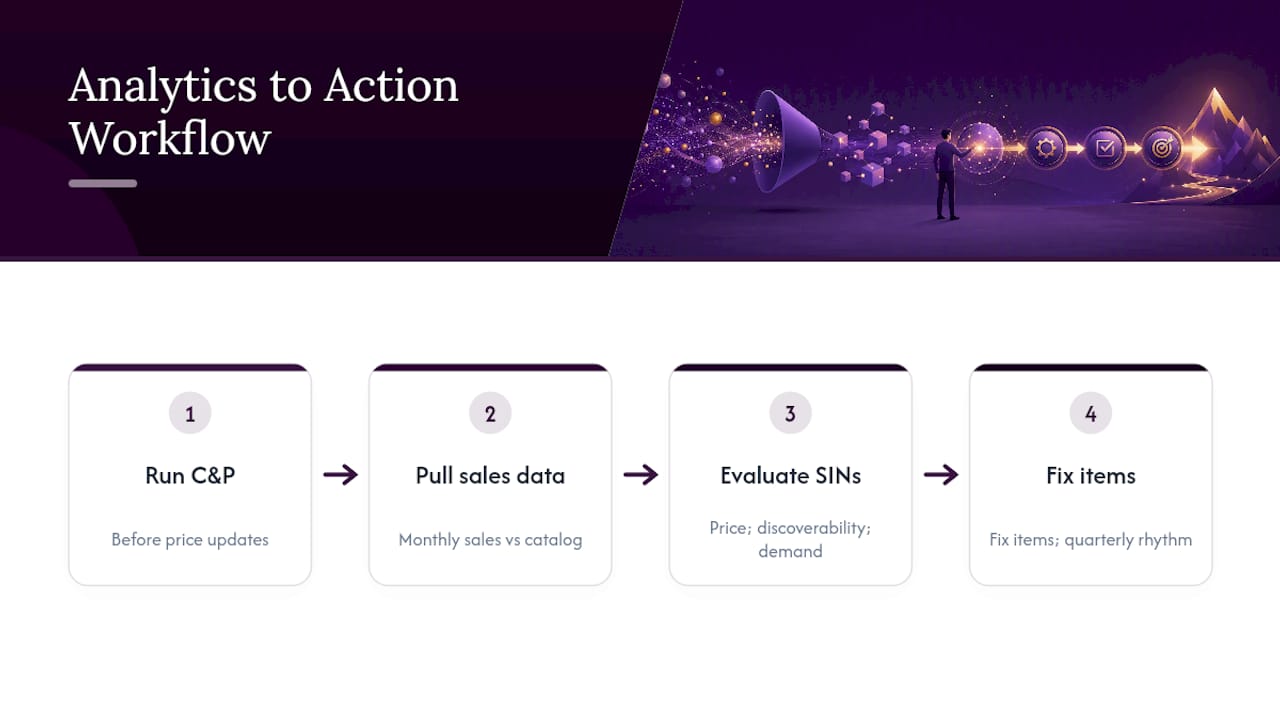
Beyond C&P reports, your monthly sales reporting data is itself a performance signal most vendors ignore until tax season. Track which SINs actually generate orders versus which sit published but dormant. A SIN with zero orders after six months of clean listing data usually points to a pricing problem, a discoverability issue, or genuinely weak demand, and knowing which one it is changes what you fix next.
Cross-reference your order volume against your published catalog size. If you have 200 line items published but only 15 have ever generated a sale, that’s not a marketing problem to solve with more promotion. It’s usually a sign those 185 items need better titles, missing photos, or a SIN remap before any promotional push will help them.
Set a quarterly rhythm: pull your C&P report before any price update, check your sales data against your published catalog, and confirm your IFF reporting matches what actually sold. Vendors who treat this as a quarterly habit rather than an annual scramble catch small problems while they’re still small.
The Real Priority Order Most Advice Gets Backward
Most guidance on this topic leads with pricing tactics and promotional pushes because those feel like the levers you can pull to chase a sale. That’s backward. A Temporary Price Reduction on a listing with a broken SIN mapping or missing photos is money spent promoting something buyers can’t find in the first place.
The uncomfortable truth is that most “optimization” problems on Advantage are actually data synchronization problems. Your eMod, your FCP baseline, and your live Advantage page all need to agree, and when they don’t, no amount of pricing cleverness fixes a listing that’s structurally invisible. Fix the plumbing before you touch the marketing.
I’d also push back on the idea that this is purely a technical checklist exercise. Vendors holding certifications like 8(a), HUBZone, or WOSB status alongside a clean catalog have a real edge on set-aside orders, and too many small businesses treat that certification as a separate box to check rather than something that should shape which SINs and pricing strategies they prioritize first per government marketing guidance.
Start with the baseline. Everything else on this list is wasted effort until that’s solid.
Get Help Fixing Your GSA Advantage Listings
Fixing a broken baseline, untangling a rejected FCP upload, or realigning a T&C file with your Product File is exactly the work Gsascheduleservices handles for Schedule holders who don’t have a full-time compliance person on staff. If your catalog has been stuck in error status, your photos never made it into FCP correctly, or your pricing strategy needs to sync with a Temporary Price Reduction plan, that’s a readiness gap worth closing before it costs you another quarter of buried listings. A short discovery call walks through where your catalog actually stands and what it would take to get it publishing cleanly. Book that assessment now rather than guessing at which error is blocking your next upload.
Sources
- GSA Advantage | Vendor Support Center
- FAS Catalog Platform / VSC guidance
- General Instructions | Vendor Support Center
- Contractor Start-up Kit (VSC)
FAQ
Is GSA Advantage Worth It?
For Schedule holders with a clean, discoverable catalog, yes. Advantage puts your products in front of federal buyers actively searching by SIN, keyword, and photo filters, but the payoff depends entirely on whether your listing data is accurate and complete.
Who Owns GSA Advantage?
The U.S. General Services Administration owns and operates GSA Advantage as the government’s official online catalog and ordering system for Schedule contracts, as outlined by the Vendor Support Center.
Is GSA Advantage the Same as GSA Global Supply?
No. GSA Advantage is the online catalog for Schedule contract holders selling directly to federal buyers, while GSA Global Supply is a separate GSA program focused on supply chain and inventory management for specific product categories.
How Does GSA Advantage Work?
Vendors publish an electronic catalog through the FAS Catalog Platform or legacy SIP/EDI systems, and once a baseline is approved, Product Files and Services Plus Files go live for federal buyers to search, filter, and order directly.
How Do I Know if My Advantage Listing Needs Optimization?
Check whether your published item count matches your actual catalog, whether photos and UPCs are present where required, and whether your validation error rate has stayed flat or climbed over the past few catalog cycles.
Recommended
- GSA Advantage Optimization: Rank Higher, Sell more
- Unlock Massive Cost Savings with GSA Advantage
- Avoid Rough Seas with your GSA Contract
- Maximize Orders with GSA Advantage Usage